
Our Top Picks
 Logitech G923 Racing Wheel and Pedals for Playstation/PS5/PS410.24 x 10.94 x 6.57 inches11.9 PoundsDVD-ROMCheck on Amazon
 Logitech G920 Racing Wheel and Pedals for Xbox10.94 inches10.24 x 10.94 x 10.63 inches4.96 poundsCheck on Amazon
 Logitech G923 Racing Wheel and Pedals Trueforce SimG92310.24 x 10.94 x 6.5 inches16.9 poundsCheck on Amazon
Automobilista 2 is a racing sim released in 2020, built around a broad mix of cars and tracks, dynamic weather and track conditions, and strong VR support. On PC, it is not one of the most demanding racing titles by modern standards: its official minimum GPU is a GTX 680 and its official recommended GPU is a GTX 1080 Ti. That said, high-refresh 1440p, 4K, and especially VR can still ask for more hardware. This guide covers the official specs, realistic GPU choices by resolution, CPU, RAM and storage advice, and build suggestions for smooth racing.
How Demanding Is Automobilista 2?
Automobilista 2 is an older racing sim, so it is not especially demanding at 1080p on today’s hardware. The official minimum calls for a 3.5 GHz Intel Core i5-3450 or AMD FX-8350, 8 GB RAM, and a GTX 680 or equivalent, while the official recommended spec lists an Intel Core i7-8700K or AMD Ryzen 7 2700X, 16 GB RAM, and a GTX 1080 Ti or equivalent. In practice, the minimum is enough for lower settings and lower resolutions, while the recommended spec is a better target for high settings at 1080p and 1440p. VR and 4K are the areas where the game can become more demanding, because they require higher and more consistent frame rates. It is a simulation, so a decent CPU helps when running large AI grids, but you do not need a current flagship processor to enjoy it.
Logitech G923 Racing Wheel and Pedals for Playstation/PS5/PS4 & PC | Trueforce compatible, <1000 Hz force feedback, dual clutch launch control, genuine leather cover, for PS5, PS4, PC, Mac
One of the home product options compared in this guide.
View on AmazonLogitech G920 Racing Wheel and Pedals for Xbox X|S/Xbox One/PC | Real force feedback, stainless steel paddle shifters, leather steering wheel cover, for Xbox Series X|S, PC, Mac
One of the home product options compared in this guide.
View on Amazon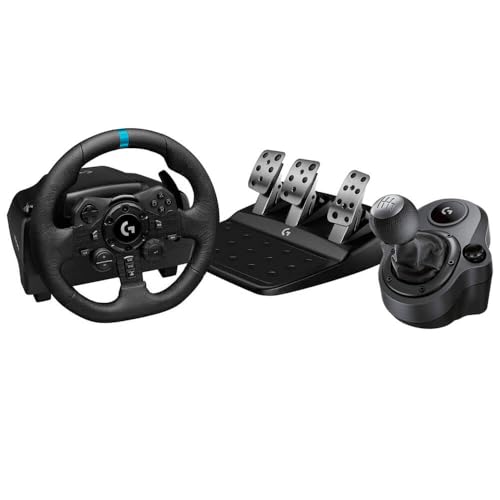
Logitech G Logitech G923 Racing Wheel and Pedals + Driving Force Shifter Bundle - Real Leather, For PS5, PS4, PC, Mac - Black (Renewed)
One of the home product options compared in this guide.
View on AmazonLogitech G923 Racing Wheel and Pedals Trueforce Sim Driving Wheel For PC, PS4, PS5 with Accessories
One of the home product options compared in this guide.
View on AmazonAutomobilista 2 Official PC System Requirements
| Component | Minimum (official) | Recommended (official) |
|---|---|---|
| OS | Windows 10 (+ specific versions of 7) | Windows 10 |
| Processor | 3.5 GHz Intel Core i5 3450 or AMD FX-8350 | Intel Core i7 8700K / AMD Ryzen7 2700X |
| Memory | 8 GB RAM | 16 GB RAM |
| Graphics | GTX680 or equivalent | NVidia GTX 1080Ti or equivalent |
| DirectX | Version 11 | Version 11 |
| Storage | 120 GB available space | 120 GB available space |
Source: the official Automobilista 2 Steam store listing (app 1066890), checked October 2026. Publishers can update these specs after patches.
Best GPU for Automobilista 2 by Resolution
1080p
At 1080p, the official minimum GTX 680 can run Automobilista 2 at reduced settings, but the official recommended GTX 1080 Ti is a more realistic target for high settings. A modern card such as the NVIDIA GeForce RTX 4060 is in the same broad performance tier as that recommended spec, while newer options like the RTX 5060 or RX 9060 XT are a step above. Either class of card gives you plenty of headroom for high-refresh 1080p racing, even with weather and a full grid.
1440p
For 1440p, the official recommended GTX 1080 Ti is the starting point for high settings, but a stronger card is sensible if you want higher frame rates. The NVIDIA GeForce RTX 4070 SUPER is comfortably above the official recommended spec, and current-generation equivalents such as the RTX 5070 or RX 9070 offer similar or better performance. This is the resolution where a mid-range modern GPU makes the most sense for a racing sim with dynamic weather.
4K
4K is the one resolution where Automobilista 2 can still push a GPU, particularly at high settings. The official recommended GTX 1080 Ti is not a 4K ultra card, so you will want something stronger. The NVIDIA GeForce RTX 4070 Ti SUPER is a realistic entry point, and newer cards such as the RTX 5070 Ti or RX 9070 XT are natural current-generation options. Upscaling or a slightly reduced resolution scale can help keep frame rates stable, and VR at high resolution is similarly demanding.
CPU, RAM and Storage for Automobilista 2
For the CPU, the official recommended is an Intel Core i7-8700K or AMD Ryzen 7 2700X, so most modern six-core or eight-core gaming processors are already above the target. The AMD Ryzen 5 7600 is excellent value and comfortably exceeds the recommended spec, while the AMD Ryzen 7 7800X3D is one of the fastest gaming CPUs if you want maximum headroom for large AI grids or VR. Intel fans can opt for the Intel Core i5-14600K. For memory, the official minimum is 8 GB and the official recommended is 16 GB. A 16 GB kit is the baseline for a modern build, and 32 GB such as the Corsair Vengeance DDR5 32GB gives extra headroom for VR and background apps. The game lists 120 GB of available storage, and while an SSD is not strictly required by the official spec, it is strongly recommended for load times; a fast NVMe SSD like the Samsung 990 Pro 2TB NVMe SSD is a good choice.
Recommended PC Builds for Automobilista 2
1080p budget build: NVIDIA GeForce RTX 4060 + AMD Ryzen 5 7600 + 16 GB DDR5 — this is well above the official minimum and recommended specs, and it is more than enough for high-settings 1080p racing in Automobilista 2.
1440p sweet-spot build: NVIDIA GeForce RTX 4070 SUPER + AMD Ryzen 7 7800X3D + Corsair Vengeance DDR5 32GB + Samsung 990 Pro 2TB NVMe SSD — a strong setup for high-refresh 1440p, with headroom for dynamic weather, full grids, and VR if you add a headset.
4K high-end build: NVIDIA GeForce RTX 4070 Ti SUPER + AMD Ryzen 7 7800X3D + 32 GB DDR5 + fast NVMe SSD — for 4K with upscaling, and a sensible foundation if you also want to try high-resolution VR.
Is It Worth Upgrading Your PC for Automobilista 2?
If your current PC meets or exceeds the official recommended spec — an i7-8700K or Ryzen 7 2700X, 16 GB RAM, and a GTX 1080 Ti or equivalent — you can run Automobilista 2 well without a major upgrade. If you are below the official minimum, an upgrade is necessary. For most players, the graphics card has the biggest effect on resolution, visual settings, and VR performance, so upgrade the GPU first if you have to choose. A modern mid-range CPU is usually enough for this sim, though a stronger processor helps with large AI grids. Moving the game to an SSD and having 16 GB of RAM are inexpensive ways to improve load times and overall smoothness. Rather than replacing everything at once, target the weakest part of your build.
Can You Play Automobilista 2 on a Laptop or Handheld?
A gaming laptop with a modern mid-range mobile GPU such as an RTX 4060 or better can handle Automobilista 2 at 1080p with high settings, and it will comfortably exceed the official minimum. The official recommended GTX 1080 Ti is a desktop card, so mobile performance varies, but a mid-range laptop GPU from the last few generations is a good starting point. On handhelds like the Steam Deck or ROG Ally, the game can run at lower settings and resolution, but a racing sim with dynamic weather and track conditions benefits from a stable frame rate, so expect to reduce settings. VR is not practical on current handhelds. If portability matters, choose a device with a capable GPU and enough SSD storage for the 120 GB install.
How to Boost FPS in Automobilista 2
If frame rates are low, the quickest gains usually come from lowering the resolution or using the game’s resolution scale/upscaling option if available. Reduce expensive graphics settings such as shadows, reflections, weather effects, and post-processing before dropping everything else. Keep your GPU drivers up to date, close background apps, and make sure the game is installed on an SSD. For racing, a stable frame rate matters more than maximum visual quality, so aim for settings that stay consistent in rain and with a full grid. If you use VR, lower the headset resolution or in-game resolution scale before turning off essential effects.
Frequently Asked Questions
Can my PC run Automobilista 2?
If your PC meets the official minimum — a 3.5 GHz Intel Core i5-3450 or AMD FX-8350, 8 GB RAM, and a GTX 680 or equivalent — it can run Automobilista 2 at lower settings and resolutions. For a smoother high-settings experience at 1080p or 1440p, aim for the official recommended spec: an Intel Core i7-8700K or AMD Ryzen 7 2700X, 16 GB RAM, and a GTX 1080 Ti or equivalent.
Is Automobilista 2 demanding on PC?
Not especially by modern standards. Its official minimum is a GTX 680 and its recommended GPU is a GTX 1080 Ti, so it is an older, reasonably scalable racing sim. VR, 4K, and very high frame rates are the situations where it becomes more demanding.
What GPU do I need for Automobilista 2 at 1440p?
The official recommended GTX 1080 Ti is the baseline for high settings at 1440p. A NVIDIA GeForce RTX 4070 SUPER-class graphics card or a current RTX 5070 / RX 9070 gives you comfortable headroom, especially if you want higher frame rates or run VR.
How much RAM does Automobilista 2 need?
The official minimum is 8 GB and the official recommended is 16 GB. For a modern gaming PC, 16 GB is the practical target, and 32 GB gives extra headroom if you race in VR or keep other applications open. Faster memory can help in CPU-limited scenes, but capacity matters more.
Do I need an SSD for Automobilista 2?
The official spec lists 120 GB of available storage but does not require an SSD. An SSD is still strongly recommended for faster load times and smoother asset streaming, and an NVMe drive like the Samsung 990 Pro is a good choice for a modern build.









