
Our Top Picks
 Logitech G29 Racing Wheel and Pedals for PS5/PS4/PC10.24 x 10.94 x 10.63 inches10 PoundsDVD-ROMCheck on Amazon
 Logitech G923 Racing Wheel and Pedals Trueforce SimG92310.24 x 10.94 x 6.5 Inches16.9 poundsCheck on Amazon
Thinking about playing RaceRoom Racing Experience on PC and wondering what hardware you actually need? RaceRoom is a free-to-download racing sim that has been running since 2013, built on true-to-life physics and force feedback, with DTM, FIA WTCC and WTCR content plus a huge library of cars and tracks — including the most up-to-date Nordschleife. Because there is nothing to pay up front, the only real barrier to entry is hardware, and the good news is that the published requirements are modest. This guide walks through the official PC system requirements for RaceRoom Racing Experience, the graphics cards that make sense at 1080p, 1440p and 4K, and complete build recommendations for both flat-screen and VR racing.
How Demanding Is RaceRoom Racing Experience?
RaceRoom Racing Experience is not a demanding game by modern standards. It launched in 2013 on DirectX 9.0c, and the official minimum spec asks for nothing more than a dual-core 2.4 GHz processor, 512 MB of VRAM, 4 GB of RAM and Windows 10 — a bar that plenty of older machines with a basic discrete graphics card can clear. The recommended spec steps up to a quad-core 3.0 GHz CPU, 16 GB of RAM, 8 GB of VRAM and Windows 11, which is still well below what any current mid-range gaming PC offers. In practice that means an entry-level modern card is comfortable at 1080p, 1440p and 4K are within reach of mid-range hardware, and the places where extra headroom genuinely helps are VR — the game supports SteamVR, so you are rendering two views at a high refresh rate — and races with large AI grids or a full online lobby, where the physics and opponent calculations lean on the processor. The official numbers are listed in full below, and the main hardware obligation outside the GPU is the 70 GB of storage space the game asks for.

Logitech G923 Racing Wheel and Pedals for Playstation/PS5/PS4 & PC | Trueforce compatible, <1000 Hz force feedback, dual clutch launch control, genuine leather cover, for PS5, PS4, PC, Mac
One of the home product options compared in this guide.
View on AmazonLogitech G29 Racing Wheel and Pedals for PS5/PS4/PC | Stainless steel paddle shifters, leather steering wheel cover, real force feedback, for PS5, PS4, PC, Mac
One of the home product options compared in this guide.
View on Amazon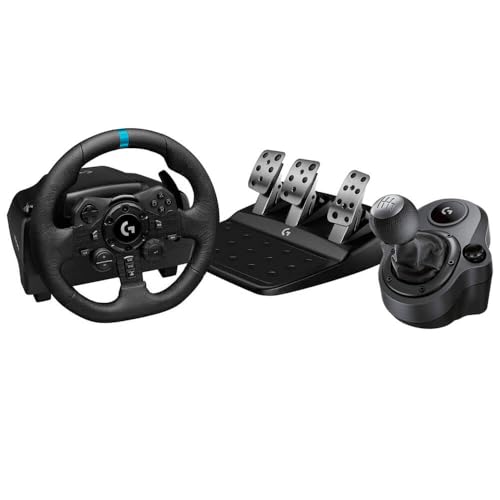
Logitech G Logitech G923 Racing Wheel and Pedals + Driving Force Shifter Bundle - Real Leather, For PS5, PS4, PC, Mac - Black (Renewed)
One of the home product options compared in this guide.
View on AmazonLogitech G923 Racing Wheel and Pedals Trueforce Sim Driving Wheel For PC, PS4, PS5 with Accessories
One of the home product options compared in this guide.
View on AmazonRaceRoom Racing Experience Official PC System Requirements
| Component | Minimum (official) | Recommended (official) |
|---|---|---|
| OS | Windows 10 | Windows 11 |
| Processor | Dual Core 2.4 GHz | Quad Core 3.0 GHz |
| Memory | 4 GB RAM | 16 GB RAM |
| Graphics | VRAM 512MB | VRAM 8GB |
| DirectX | Version 9.0c | Not published |
| Storage | 70 GB available space | 70 GB available space |
Source: the official RaceRoom Racing Experience Steam store listing (app 211500), checked October 2026. Publishers can update these specs after patches.
Best GPU for RaceRoom Racing Experience by Resolution
1080p
For 1080p, the AMD Radeon RX 7600 sits a long way above the official minimum of 512 MB of VRAM and will run RaceRoom at high settings with headroom to spare. Older cards such as the GTX 1060, RX 580 or GTX 1650 also clear the published bar comfortably at 1080p with sensible settings, so there is no need to replace a card from that era just for this game. If you are buying new today, the RTX 5060 and RX 9060 XT are the current-generation options in this class, and either is more than enough for a DirectX 9-era sim.
1440p
Step up to the NVIDIA GeForce RTX 4070 SUPER for high-refresh 1440p. That is far more GPU than RaceRoom strictly needs — the officially recommended 8 GB of VRAM is the figure that actually matters here — but it leaves comfortable room for high refresh rates, VR, and heavier sims later on. Current-generation equivalents such as the RTX 5070 and RX 9070 sit in the same bracket and will handle 1440p without straining.
4K
For 4K, the NVIDIA GeForce RTX 4070 Ti SUPER is a realistic entry point, though this is one case where the resolution does most of the work: an older engine like this scales mainly with pixel count and video memory, so the recommended 8 GB of VRAM is the number worth paying attention to. The RTX 5070 and RX 9070 are the current-generation cards to look at if you want the same tier on newer architecture, and any of them will also drive the game in VR through SteamVR.
CPU, RAM and Storage for RaceRoom Racing Experience
RaceRoom is a simulation, and the physics, tyre model and AI calculations run on the processor, so a chip with strong single-thread performance and a decent cache does more for it than raw core counts. That said, the official recommendation is only a quad-core 3.0 GHz, so almost any modern CPU clears it: the AMD Ryzen 5 7600 is excellent value for gaming, while the AMD Ryzen 7 7800X3D is the fastest mainstream gaming CPU if you want maximum frame rates, and its large cache suits sim titles particularly well. Intel fans can opt for the Intel Core i5-14600K. For memory, 16 GB is the officially recommended amount and the sensible target; a kit like the Corsair Vengeance DDR5 32GB simply gives you extra headroom for VR, overlays and background apps. Storage is the one figure that stands out — the game needs 70 GB of space — and installing it on an SSD such as the Samsung 990 Pro 2TB NVMe SSD keeps load times short when you switch between the Nordschleife and a short club circuit.
Recommended PC Builds for RaceRoom Racing Experience
1080p build: AMD Radeon RX 7600 + AMD Ryzen 5 7600 + 16 GB DDR5 — comfortably above the recommended spec for high-settings 1080p, with room to move up to 1440p later.
1440p sweet-spot build: NVIDIA GeForce RTX 4070 SUPER + AMD Ryzen 7 7800X3D + 32 GB DDR5 + 2TB NVMe SSD — the setup most players should aim for, and plenty for 1440p at high refresh rates.
4K and VR build: NVIDIA GeForce RTX 4070 Ti SUPER + AMD Ryzen 7 7800X3D + 32 GB DDR5 + fast NVMe SSD — for 4K displays and SteamVR headsets, where the extra GPU and CPU headroom is actually put to use.
Is It Worth Upgrading Your PC for RaceRoom Racing Experience?
Because the official requirements are so low, most PCs built in the last several years already run RaceRoom without complaint, so an upgrade is only worth it if you want something specific: a higher resolution, a high-refresh monitor, VR, or larger grids. If you do upgrade, the graphics card delivers the biggest gain at higher resolutions, so that is the part to change first — but a mid-range CPU from the last few years is unlikely to hold you back in this game. Raising your memory to the recommended 16 GB and moving the game onto an SSD are inexpensive changes that help load times and general smoothness. For most people the single biggest improvement is not a component at all: the game’s own notes recommend a steering wheel controller to get the most out of the simulation side, and a wheel transforms the experience far more than another tier of graphics card.
Can You Play RaceRoom Racing Experience on a Laptop or Handheld?
Yes — this is exactly the kind of game that travels well. The published minimum is a dual-core 2.4 GHz CPU and 512 MB of VRAM, so gaming laptops with a modest discrete GPU handle RaceRoom at 1080p without much trouble, though expect shorter battery life and more heat than a desktop. Handheld PCs in the Steam Deck and ROG Ally class also have more than enough GPU for a DirectX 9-era sim, and a gamepad — which the official requirements list as supported — suits them well. Storage is the main practical consideration: the game wants 70 GB, so factor that in before relying on a small drive, and prefer internal storage over a memory card for load times. For VR you will want a desktop-class card, since SteamVR support means rendering two views at once.
How to Boost FPS in RaceRoom Racing Experience
If frame rates are lower than you would like, work through the basics first. Drop the resolution — it is the most reliable lever in a DirectX 9 title, and modern upscalers such as DLSS or FSR are not something you should count on in an engine this old. From there, reduce the settings that cost the most: anti-aliasing, shadows, reflections and track detail. If you race against large AI grids and the frame rate dips in traffic, cut the number of opponents, because that load falls on the CPU rather than the GPU. Cap the frame rate to something your system holds consistently — a steady frame rate feels far better than one that swings. Keep your GPU drivers up to date, close background applications, and make sure the game is installed on an SSD so track loading does not stall you between sessions. Exact option names vary between game versions, so check the in-game graphics menu for the current layout.
Frequently Asked Questions
Can my PC run RaceRoom Racing Experience?
The official minimum is a dual-core 2.4 GHz processor, 512 MB of VRAM, 4 GB of RAM, DirectX 9.0c, Windows 10 and 70 GB of storage — a very low bar, so almost any reasonably modern PC with a discrete GPU will run it. To hit the recommended spec instead, you want a quad-core 3.0 GHz CPU, 16 GB of RAM, 8 GB of VRAM and Windows 11. A keyboard or gamepad is required, and a steering wheel is recommended for the simulation side.
Is RaceRoom Racing Experience demanding on PC?
No. It is a 2013 title running on DirectX 9.0c, and its published requirements sit well below those of current racing sims. Mid-range and even entry-level hardware handles it easily at 1080p, and the main things to plan for are the 70 GB of storage and, for VR, a card with the recommended 8 GB of VRAM.
What GPU do I need for RaceRoom Racing Experience at 1440p 60fps?
A card in the NVIDIA GeForce RTX 4070 SUPER class is more than enough for 1440p at 60fps, and current-generation options such as the RTX 5060 and RX 9060 XT also clear the officially recommended 8 GB of VRAM. Because the engine is old and light, 1440p is not a difficult target; the extra headroom mostly buys you higher refresh rates, VR, and other sims.
How much RAM does RaceRoom Racing Experience need?
The official minimum is 4 GB and the official recommendation is 16 GB. In practice 16 GB is the sensible amount for a modern gaming PC — it matches the recommended spec, leaves room for a browser, overlays or voice chat while you race, and is a small step up in cost from an 8 GB kit.
Do I need an SSD for RaceRoom Racing Experience?
Not strictly — the official requirements only ask for 70 GB of available space — but an SSD is strongly recommended to keep load times short when you switch cars and tracks. An NVMe drive like the Samsung 990 Pro is ideal and leaves plenty of room for the game’s large content library.









