Our Top Picks
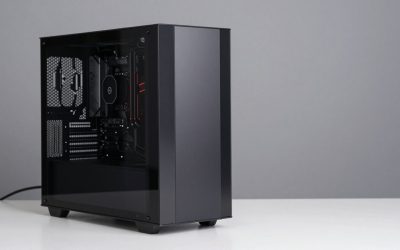
 SAAV CORE Prebuilt Gaming PC Bundle Desktop Tower3050 | Ryzen 5 | 32GB12 x 14 x 14 inchesCheck on Amazon
The best controller for Battlefield 6 on PC is the Xbox Elite Wireless Controller Series 2 if you want adjustable triggers, four rear paddles, strong remapping, and dependable Windows support; for most players, the standard Xbox Wireless Controller is the better-value choice.
Best controllers for Battlefield 6 on PC
| Controller | Best for | PC connection | Stick/trigger design | Typical market range |
|---|---|---|---|---|
| Xbox Elite Wireless Controller Series 2 | Competitive multiplayer and extensive remapping | USB-C, Bluetooth, Xbox Wireless Adapter | Adjustable-tension sticks; hair-trigger locks | Usually $140–$180 |
| Xbox Wireless Controller | Most PC players | USB-C, Bluetooth, Xbox Wireless Adapter | Standard potentiometer sticks and analog triggers | Usually $45–$65 |
| Sony DualSense Edge | Players who prefer PlayStation ergonomics | USB-C and Bluetooth | Replaceable stick modules; adjustable triggers | Usually $180–$220 |
| 8BitDo Ultimate 2 Wireless | Hall-effect hardware and value | USB-C, 2.4 GHz receiver, Bluetooth on supported modes | Hall-effect sticks; remappable controls | Usually $60–$90 |
Why the Xbox Elite Series 2 is the best overall choice
Battlefield 6 multiplayer rewards quick movement, frequent weapon changes, crouch-sliding, and rapid use of gadgets. The Elite Series 2 lets you move actions such as crouch, reload, or melee to rear paddles, so you can keep both thumbs on the sticks during a gunfight.
SAAV CORE Prebuilt Gaming PC Bundle Desktop Tower AMD Ryzen 5 5500 GeForce RTX 3050 6GB GDDR6 Dual Curved 27in Monitors 32GB DDR4 1TB NVMe SSD WiFi 6 Windows 11 Black RGB Computer PC Gaming
Picked as a relevant option in this category.
View on AmazonSAAV CORE Prebuilt Gaming PC Bundle Desktop Tower AMD Ryzen 5 5500 GeForce RTX 3050 6GB GDDR6 Dual Curved 27in Monitors 16GB DDR4 512GB NVMe SSD WiFi 6 Windows 11 Black RGB Computer PC Gaming
Picked as a relevant option in this category.
View on Amazon
SAAV CORE Prebuilt Gaming PC Bundle Desktop Tower AMD Ryzen 7 5800X GeForce RTX 5060 8GB GDDR7 Curved 27in Monitor 32GB DDR4 1TB NVMe WiFi 6 Windows 11 AIO Liquid Cooled Computer PC Gaming Black
Picked as a relevant option in this category.
View on Amazon
Lacolain Wireless Gaming Mouse,Rechargeable Computer Mouse with Type-C Fast Charging, Ergonomic Mouse with 3 Adjustable DPI, 6 Silent Buttons, LED Light, Long Battery Life for Laptop, PC, Mac
Chosen because it specifies Rechargeable Computer Mouse with Type-C Fast Charging and Ergonomic Mouse with 3 Adjustable DPI.
View on AmazonIts adjustable stick tension is useful for separating infantry and vehicle profiles. A lighter setting can make quick infantry turns feel easier, while a heavier setting can help with fine aim in vehicles or at longer range. The adjustable trigger stops are particularly valuable for weapons that do not require a full trigger pull. Set them too aggressively, however, and some games may make analog throttle or gradual trigger input less convenient.
Microsoft accessories software on Windows allows button remapping, stick curves, trigger ranges, and multiple profiles. Save one profile for infantry, one for vehicles, and one for aircraft. The controller can also connect by USB-C, Bluetooth, or Xbox Wireless Adapter, giving you more options when troubleshooting interference or input delay.
The durability qualification
The Elite Series 2 has more moving parts than a basic controller, including paddles, adjustable components, and interchangeable thumbsticks. That versatility is useful, but it also gives you more parts to maintain. Keep the controller dry, avoid forcing the paddle mechanisms, and use the included case when transporting it. No controller is immune to stick wear, so buy the Elite primarily for its controls and profiles—not as a guarantee against drift.
Best value: Xbox Wireless Controller
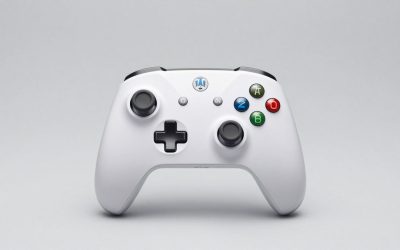
The standard Xbox Wireless Controller is the safest recommendation for most Battlefield 6 players. Windows and Xbox-style controller prompts are usually the least troublesome combination for a PC game, and the layout requires little configuration before entering multiplayer.
It does not provide rear paddles or adjustable trigger stops, but its familiar offset sticks, textured grips, share button, and USB-C port cover the essentials. It uses two AA batteries, with Microsoft listing up to 40 hours of battery life depending on usage and accessories. A rechargeable battery pack adds convenience, while USB-C play avoids battery concerns altogether.
Choose the Xbox Wireless Adapter instead of Bluetooth when you want the most console-like wireless setup. Bluetooth is convenient and often works well, but the adapter avoids some PC Bluetooth issues, including sleep-state reconnection, crowded 2.4 GHz environments, and inconsistent motherboard antenna placement.
Best alternative: DualSense Edge
The DualSense Edge is a strong option if you prefer the symmetrical PlayStation stick layout or already use Sony accessories. It offers replaceable stick modules, back buttons, adjustable trigger stops, and profile-based remapping through compatible PC software.
Its main drawback on PC is less consistent feature support. Basic controls generally work over USB or Bluetooth, but advanced features such as adaptive triggers and haptic effects depend on game and connection support. Battlefield 6’s standard rumble may work without every DualSense feature being available. If you want the least setup work, choose Xbox layout hardware instead.
There is also a practical battery consideration: the DualSense Edge’s battery is smaller than the standard DualSense’s, so heavy wireless sessions may require more frequent charging. Use USB-C for long sessions or keep a charging cable within reach.
Best durability-focused value: 8BitDo Ultimate 2 Wireless
The 8BitDo Ultimate 2 Wireless is worth considering when stick longevity is more important than official Xbox integration. Its Hall-effect sticks use magnetic sensing rather than the conventional contact-based mechanism used in many standard controllers, reducing one common source of stick wear. Hall-effect technology is not a promise of perfect reliability: buttons, triggers, springs, and USB ports can still fail.
Its 2.4 GHz receiver is the preferred wireless connection for fast PC play. Bluetooth is better treated as a convenience mode. Configure remaps and sensitivity in 8BitDo’s software, then check Battlefield 6’s own controller settings afterward so that two layers of remapping do not create confusing inputs.
Wireless latency: what matters in Battlefield 6
Do not choose a controller by a single advertised latency number. Real input delay includes the controller’s scan rate, wireless link, USB or receiver path, game input sampling, display processing, and your network connection. A wired connection removes one variable, but it does not eliminate server latency or monitor delay.
- Lowest-risk setup: connect the controller with a data-capable USB cable directly to the PC.
- Best wireless setup: use the controller’s dedicated 2.4 GHz or Xbox Wireless receiver rather than Bluetooth when available.
- Bluetooth setup: place the PC antenna where it has a clear path to the controller and avoid putting the receiver behind a metal computer case.
- Do not confuse network ping with controller delay: a high-ping warning is not fixed by buying a faster controller.
For Battlefield 6 multiplayer, the practical difference between a stable wired or dedicated wireless connection and a congested Bluetooth connection is more important than a small claimed millisecond advantage that may not apply to your PC.
Recommended Battlefield 6 controller settings
Start with moderate settings rather than copying an extreme competitive configuration. The following baseline is designed to make aiming predictable while preserving enough movement speed for close-range fights:
- Set the right-stick deadzone as low as possible without visible drift. A reasonable starting point is 5%–8%.
- Use a lower left-stick deadzone only if movement does not activate by itself; start around 5%.
- Begin with a 5%–10% trigger deadzone range and increase it if a trigger activates without being touched.
- Use a linear or near-linear aim response first. Change the curve only after you can identify a specific aiming problem.
- Map crouch or slide to a rear paddle on Elite Series 2 or DualSense Edge, leaving jump on a face button or another paddle.
- Keep vibration at roughly 25%–50% for multiplayer if recoil feedback distracts you. Disable it temporarily when diagnosing unwanted controller movement.
The deadzone recommendation has a simple reason: a smaller deadzone gives more usable stick travel for fine aiming, but a value below the hardware’s natural noise level creates unwanted camera movement. Increase it in one-percent steps until the reticle stays still, then stop.
Vibration and trigger control
Vibration can communicate explosions, vehicle damage, and weapon feedback, but excessive rumble makes small corrections harder during sustained firefights. Use Battlefield 6’s controller vibration slider if available; otherwise, adjust vibration in the controller’s Windows or platform software. Test the result in a private practice environment before changing it during a ranked or public match.
Trigger stops deserve separate treatment. They shorten the physical pull, which is helpful for rapid firing, but they can interfere with games or vehicles that use the full analog range. Use short travel for infantry weapons and full travel for driving, flying, or any weapon that benefits from gradual input.
Decision matrix: which controller should you buy?
| Your situation | Best choice | Why |
|---|---|---|
| You want minimum setup on Windows | Xbox Wireless Controller | Native-style layout, USB-C, Bluetooth, and optional Xbox Wireless Adapter |
| You regularly play infantry and vehicles | Xbox Elite Series 2 | Profiles, rear paddles, adjustable stick tension, and trigger stops |
| You are worried about stick wear | 8BitDo Ultimate 2 Wireless | Hall-effect sticks and dedicated 2.4 GHz wireless |
| You prefer symmetrical sticks | DualSense Edge | PlayStation ergonomics, replaceable stick modules, and rear controls |
| You play long sessions and dislike charging | Xbox Wireless Controller with rechargeable pack or USB-C cable | Replaceable AA power or continuous wired use |
| You want the lowest number of variables for competitive play | Any recommended model over USB-C | Stable connection and no wireless interference |
Final verdict
For the best controller for Battlefield 6 on PC, choose the Xbox Elite Wireless Controller Series 2 if rear paddles, profiles, and trigger control will improve how you play. Choose the standard Xbox Wireless Controller if you want reliable compatibility at a much lower price. Pick the 8BitDo Ultimate 2 Wireless for Hall-effect sticks and value, or the DualSense Edge if the PlayStation layout is non-negotiable.
Whichever model you buy, use USB-C or a dedicated wireless receiver, calibrate deadzones instead of blindly lowering them, and set vibration and trigger travel around your preferred role. Those adjustments usually make a larger difference in Battlefield 6 multiplayer than paying extra for a controller with a more impressive specification sheet.