Key takeaways
- Genuine power: Core Ultra chips outperform budget mini PC processors.
- Expandable: Supports up to 96GB RAM and multiple SSDs.
- Modern connectivity: Thunderbolt 4, Wi-Fi 6E, and multi-4K output.
- Compact and quiet: VESA-mountable with tool-less servicing.
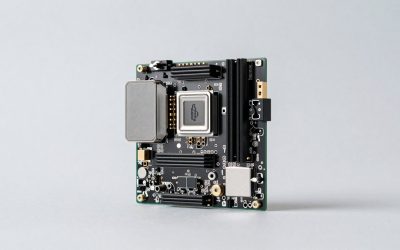
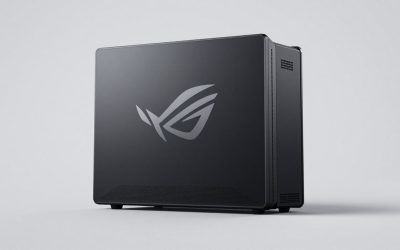
The Intel NUC 14 Pro, now carried forward under the ASUS banner, continues the NUC legacy of packing serious computing into a tiny footprint. Built around Intel’s Core Ultra Meteor Lake processors with integrated Arc graphics, the Revel Canyon platform targets home offices, media centers, and compact workstations that demand more than a basic mini PC.
This review examines the NUC 14 Pro configurations available on Amazon, from barebones kits to fully specced 32GB systems. If you want a powerful, expandable mini PC with modern connectivity, the NUC 14 Pro deserves a close look.
Our top picks
 ASUS NUC 14 Pro
- [AI Capabilities: Powering the Future] The ASUS NUC…
- [Unleashed Performance: Ultra 7 155H Processor and Integrated…
- [Effortless Upgrades: Superior Memory, Versatile Storage, and Tool-Free…
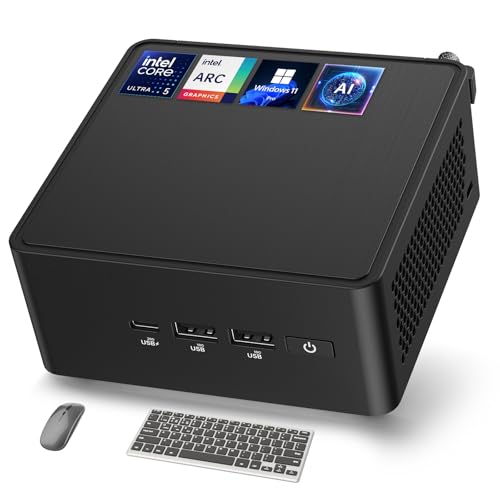 ASUS NUC 14 Pro AI Mini PC
- 🚀 Next-Gen Performance with AI Power
- ❄ Advanced Cooling for 24/7 Stability
- ⚡ High-Speed Memory & Flexible Storage Expansion
 Intel NUC 14 Pro,for ASUS NUC 14
- 【Next-Gen AI Performance】 Powered by the Intel Core…
- 【Unmatched Gaming & Editing】 Equipped with Intel Arc…
- 【Revolutionary Cooling System】 Unleashing Full CPU Potential, Featuring…
| Product | Key specs | |
|---|---|---|
| ASUS NUC 14 Pro | [AI Capabilities: Powering the Future] The ASUS NUC… [Unleashed Performance: Ultra 7 155H Processor and Integrated… [Effortless Upgrades: Superior Memory, Versatile Storage, and Tool-Free… | Check price |
| ASUS NUC 14 Pro AI Mini PC | 🚀 Next-Gen Performance with AI Power ❄ Advanced Cooling for 24/7 Stability ⚡ High-Speed Memory & Flexible Storage Expansion | Check price |
| Intel NUC 14 Pro,for ASUS NUC 14 | 【Next-Gen AI Performance】 Powered by the Intel Core… 【Unmatched Gaming & Editing】 Equipped with Intel Arc… 【Revolutionary Cooling System】 Unleashing Full CPU Potential, Featuring… | Check price |
 ASUS NUC 14 Pro ASUS NUC 14 Pro | [𝗢𝗳𝗳𝗶𝗰𝗶𝗮𝗹 𝗔𝗦𝗨𝗦 𝗡𝗨𝗖 𝗥𝗲𝗯𝗿𝗮𝗻𝗱 & 𝗣𝗼𝘄𝗲𝗿𝗳𝘂𝗹 𝗟𝗼𝗰𝗮𝗹 𝗢𝗳𝗳𝗹𝗶𝗻𝗲… [𝗠𝗲𝘁𝗲𝗼𝗿 𝗟𝗮𝗸𝗲 𝗨𝗹𝘁𝗿𝗮 𝟳 𝟭𝟱𝟱𝗛 𝗖𝗣𝗨 & 𝗛𝗶𝗴𝗵-𝗦𝗽𝗲𝗲𝗱… [𝗧𝗼𝗼𝗹-𝗙𝗿𝗲𝗲 𝗕𝗼𝗱𝘆 𝗗𝗲𝘀𝗶𝗴𝗻 & 𝗘𝘅𝗽𝗮𝗻𝗱𝗮𝗯𝗹𝗲 𝗗𝗗𝗥𝟱 𝗠𝗲𝗺𝗼𝗿𝘆 &… | Check price |
 ASUS NUC 14 Pro Tall Barebone with ASUS NUC 14 Pro Tall Barebone with | Performance: Powered by the latest 14th Gen Intel… AI Ready: Harnesses the prowess of Intel Core… Customizable: Designed for toolless chassis access making upgrades… | Check price |
| ASUS NUC 14 Pro | [AI Capabilities: Powering the Future] The ASUS NUC… [Unleashed Performance: Ultra 7 155H Processor and Integrated… [Effortless Upgrades: Superior Memory, Versatile Storage, and Tool-Free… | Check price |
 NUC 14 Pro AI Mini Pc NUC 14 Pro AI Mini Pc | [Set Out Again] Old NUC is officially renamed… [All “Core” Advent] Equipped with the most powerful… [The AI Future is Here] for ASUS Nuc… | Check price |
 Intel NUC 13 Pro for ASUS NUC Intel NUC 13 Pro for ASUS NUC | 【Advancing Performance Hybrid Architecture】--Newest 13th Gen Intel Core… 【Small Outside, Powerful Inside】--Intel NUC 13 Pro mini… 【Less Size, More Business Performance】--Intel NUC 13 Pro… | Check price |
As an Amazon Associate we earn from qualifying purchases at no extra cost to you.
🎮 Get More From Your Setup — Free
Prime Gaming gives you free PC games every month, in-game loot, and a free Twitch channel sub — plus fast free shipping on all the gear above. New members get a 30-day free trial.
Watch: Intel Nuc 14: Review & Buyer’s Guide — Video Review
Design & Build
The NUC 14 Pro retains the compact, understated chassis the line is known for, small enough to VESA-mount behind a monitor yet built with tool-less access for easy servicing. The Tall barebone variant accepts up to 96GB of DDR5 and multiple storage drives, offering genuine expandability rare in this size class. Build quality is excellent, with a solid metal frame and quiet cooling. Whether you choose a prebuilt 32GB model or a barebone kit to populate yourself, the engineering feels premium.
Performance
The Core Ultra 7 155H and Ultra 5 125H chips bring strong multi-core performance and a capable NPU for AI acceleration, while Intel Arc integrated graphics handle light gaming, media, and multi-display setups. These NUCs drive 8K or quad 4K displays, making them excellent for productivity and digital signage. With Thunderbolt 4, Wi-Fi 6E, and fast DDR5, the NUC 14 Pro feels responsive across office work, virtualization like Proxmox, and content consumption, comfortably outpacing budget mini PCs.
Pros & Cons
- Genuine power: Core Ultra chips outperform budget mini PC processors.
- Expandable: Supports up to 96GB RAM and multiple SSDs.
- Modern connectivity: Thunderbolt 4, Wi-Fi 6E, and multi-4K output.
- Compact and quiet: VESA-mountable with tool-less servicing.
- Premium price: Costs more than basic mini PCs.
- Barebone setup: Some kits require you to add RAM, storage, and an OS.
Alternatives to Consider
If you need only light computing, a budget mini PC with an Intel N-series chip costs far less. For serious gaming, a mini PC with a discrete GPU is a better fit. But for a powerful, expandable, professionally engineered small desktop, the NUC 14 Pro with a Core Ultra 7 155H is the standout choice.
Frequently Asked Questions
Can the NUC 14 Pro handle gaming?
Its Intel Arc integrated graphics handle esports, older titles, and emulation well, but for modern AAA gaming you will want a system with a dedicated GPU.
What is the difference between the barebone and prebuilt versions?
Barebone kits like the Tall variant ship without RAM, storage, or an OS, letting you customize. Prebuilt models arrive ready to use with memory, an SSD, and Windows installed.
How much RAM can it hold?
The NUC 14 Pro supports up to 96GB of DDR5, far more than typical mini PCs, making it suitable for virtualization and demanding multitasking.
Is it good for a Proxmox home lab?
Yes. Its powerful Core Ultra CPU, ample RAM support, and multiple storage options make it a popular and capable choice for Proxmox and home lab setups.
Verdict
The Intel NUC 14 Pro is the mini PC to choose when you need real power and expandability in a tiny package. The Core Ultra 7 155H configurations with 32GB of RAM offer excellent all-around performance for home offices and labs, while the barebone Tall variant appeals to those who want to build their own. Match the configuration to your workload, and you will have a premium, future-ready compact desktop.