Key takeaways
- Buying an M.2 2280 drive because it is cheaper. Standard 2280 SSDs are 80 mm long and do not fit the original Steam Deck OLED mount.
- Confusing 2230 with 22.30 mm. The number means 22 mm wide by 30 mm long, not a single diagonal measurement.
- Choosing M.2 SATA. The physical shape may look right, but the interface is different. Select PCIe NVMe.
- Adding a thick heatsink. Extra metal can prevent the back cover from closing evenly or put pressure on components.
- Assuming Gen4 means unlimited speed. A Gen4 label identifies the SSD generation, not guaranteed performance inside every handheld. Compatibility and capacity are more important here.
- Ignoring single-sided construction. A double-sided drive can have extra components on the rear, reducing clearance even when its length and width are correct.
- Forgetting to back up data. Replacing the internal drive requires reinstalling or restoring the operating system unless you clone the original SSD first.
The Short Answer
The Steam Deck OLED takes a short M.2 2230 NVMe SSD: 22 mm wide by 30 mm long, or approximately 0.87 by 1.18 inches. It uses the M-keyed PCIe NVMe format, not a 2.5-inch SATA drive, microSD card, or standard desktop-length M.2 2280 SSD.
For a straightforward replacement, choose a single-sided M.2 2230 PCIe 3.0 or PCIe 4.0 NVMe drive. A 1TB model is the practical sweet spot for most owners, while 2TB is the largest commonly available upgrade size and offers the most room for a large game library. Steam Deck OLED games do not generally require a Gen4 drive, but a compatible Gen4 SSD will work at the handheld’s supported interface speed.
Our top picks
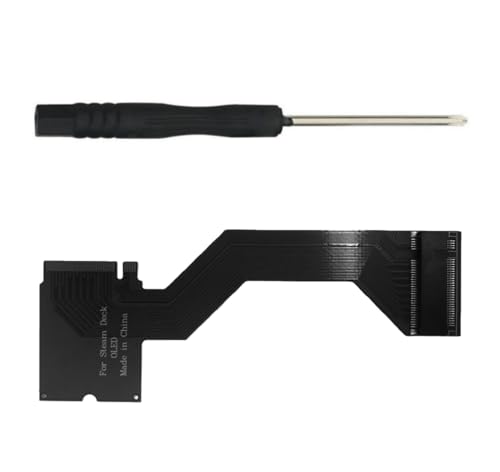 For Steam Deck OLED Handheld Devices M.2
- Brand: Suckoo Patented Product,Compatibility: Specifically designed for the…
- Conversion Function: Converts shorter M.2 NVMe PCIe 4.0…
- Durable Construction: Features premium gold plated circuit board…
 Crucial P310 2TB M.2 2230 SSD
- Broad Compatibility: Works with Valve Steam Deck, ASUS…
- PCIe 4.0 Performance: Delivers up to 7,100MB/s read…
- Spacious NVMe SSD: This 2TB SSD provides space…
 Spigen GlasTR EZ FIT Screen Protector for
- 9H Hardness
- Crystal Clear with 100% Optical Clarity
- Oleophobic Coating for Easy Cleaning
| Product | Key specs | |
|---|---|---|
| For Steam Deck OLED Handheld Devices M.2 | Brand: Suckoo Patented Product,Compatibility: Specifically designed for the… Conversion Function: Converts shorter M.2 NVMe PCIe 4.0… Durable Construction: Features premium gold plated circuit board… | Check price |
| Crucial P310 2TB M.2 2230 SSD | Broad Compatibility: Works with Valve Steam Deck, ASUS… PCIe 4.0 Performance: Delivers up to 7,100MB/s read… Spacious NVMe SSD: This 2TB SSD provides space… | Check price |
| Spigen GlasTR EZ FIT Screen Protector for | 9H Hardness Crystal Clear with 100% Optical Clarity Oleophobic Coating for Easy Cleaning | Check price |
 Heatsink Thermal Pad for Steam Deck SSD Heatsink Thermal Pad for Steam Deck SSD | SSD Heatsink Thermal Pads for Steam Deck: the… Heatsink and full set opening tools: ssd heatsink… Pure Copper Heatsink: Pure Copper has good heat… | Check price |
As an Amazon Associate we earn from qualifying purchases at no extra cost to you.
The physical size matters more than the advertised transfer rate. A full-length 2280 drive is about 80 mm, or 3.15 inches, long—more than twice the length of the correct 2230 module. Do not try to force one into the original SSD position. Some aftermarket 2230-to-2280 adapter boards are designed to relocate or support a longer drive, but they are modification parts rather than a simple drop-in replacement.
Standard Sizes
In an M.2 number such as 2230, the first two digits indicate the width in millimeters and the last two indicate the length. Most M.2 SSDs are 22 mm wide, so the final two digits are the key difference for Steam Deck compatibility.
| SSD size | Actual dimensions | Approximate dimensions | Steam Deck OLED fit | Typical use |
|---|---|---|---|---|
| M.2 2230 | 22 × 30 mm | 0.87 × 1.18 in | Correct size | Steam Deck, compact PCs, tablets |
| M.2 2242 | 22 × 42 mm | 0.87 × 1.65 in | Too long for the standard mount | Some laptops and small computers |
| M.2 2260 | 22 × 60 mm | 0.87 × 2.36 in | Too long | Older laptops and desktops |
| M.2 2280 | 22 × 80 mm | 0.87 × 3.15 in | Does not fit the standard bay | Most desktop and laptop M.2 slots |
The replacement should also be an NVMe PCIe drive with an M-key connector. M.2 is only the physical format; M.2 SATA drives can look similar but are not the intended type for the Steam Deck OLED. Check the product description for “M.2 2230 NVMe,” “PCIe,” and “M-key” before buying.
Capacity is separate from physical size. Common choices include 512GB, 1TB, and 2TB. A 512GB SSD weighs roughly 2 to 4 grams, while many 1TB and 2TB 2230 drives weigh about 3 to 6 grams, depending on the controller, memory chips, and heat spreader. Those weights are far below the Steam Deck OLED’s roughly 640-gram handheld weight, so capacity and compatibility—not weight—should drive the decision.
How to Measure Your Space
- Confirm the device model. The OLED and LCD Steam Deck models both use the short M.2 2230 format, but buy parts specifically listed for the Steam Deck OLED when possible. The internal layout and back cover differ between generations.
- Measure the replacement module, not just the package. The circuit board should measure approximately 22 mm wide and 30 mm long. In inches, that is about 0.87 by 1.18. Packaging dimensions and heatsink dimensions can be much larger.
- Check the connector. Look for a single M-key notch and PCIe NVMe support. Do not rely on “M.2” alone, because that label describes several interfaces and sizes.
- Check the mounting hole position. A 2230 drive has its mounting notch or screw hole 30 mm from the connector edge. It should line up with the Steam Deck’s existing short-drive post without bending the board.
- Measure thickness and accessories. A bare 2230 SSD is usually only a few millimeters thick. Avoid bulky desktop heatsinks or tall covers that could press against the back shell, shielding, or nearby components. A thin thermal pad or low-profile copper heatsink may be suitable only if it leaves the shell sitting flat.
- Check the adapter carefully if choosing 2280. A 2230-to-2280 adapter can change the mounting position and may require opening the back or modifying the internal arrangement. Confirm its total length, screw locations, drive-side clearance, and OLED-specific compatibility. It is not equivalent to buying a native 2230 SSD.
Opening the handheld also creates a practical measurement issue: the drive bay is not an empty universal M.2 enclosure. The battery, shielding, motherboard layout, and rear shell limit where a longer drive can go. Measure the assembled modification—not just the SSD—if you are considering an adapter.
By Room or Use Case
For a direct, low-risk replacement
Choose a bare M.2 2230 NVMe SSD in 512GB, 1TB, or 2TB. This is the cleanest approach because the board uses the original mounting point and avoids extra brackets. A reputable 1TB drive commonly falls in the approximate $70 to $150 range, while 2TB 2230 drives can range from about $180 to $370. Prices vary substantially by brand, NAND type, and availability.
For the biggest practical game library
A 2TB M.2 2230 drive provides four times the capacity of a 512GB model before accounting for the operating system and formatting. It is useful for owners who keep several large modern games installed. The Crucial P310 2TB is an example of a PCIe Gen4 2230 drive marketed for handheld PCs; its listed price can be much higher than typical 1TB options, so compare current pricing rather than assuming every 2TB drive offers the same value.
For a budget-conscious upgrade
A 512GB 2230 SSD may be enough if the Steam Deck OLED is used for indie games, emulation, streaming, or a small rotating library. Expect roughly $45 to $90 for a compatible 512GB replacement. If the price difference between 512GB and 1TB is modest, 1TB usually offers better convenience because reinstalling large games can take time and consume bandwidth.
For an adapter-based modification
A 2230-to-2280 conversion board can make inexpensive, widely available 2280 SSDs usable in some custom installations. Adapter prices commonly range from about $15 to $30, with one example listed at $21.90. However, the adapter adds another part, may alter cable or shell clearance, and can make future servicing more complicated. It is best suited to experienced owners who have verified a particular installation rather than buyers seeking a simple upgrade.
For cooling and repair supplies
Most replacement 2230 SSDs do not need a tall heatsink inside the Steam Deck. If you add cooling material, use a thin, low-profile product intended for handheld electronics. Compact SSD thermal pads or copper heatsink kits often cost approximately $5 to $15; one repair kit example is listed at $7.99. A screen protector, such as an OLED-compatible tempered-glass kit, is unrelated to SSD sizing and should not be confused with an internal clearance accessory.
Common Sizing Mistakes
- Buying an M.2 2280 drive because it is cheaper. Standard 2280 SSDs are 80 mm long and do not fit the original Steam Deck OLED mount.
- Confusing 2230 with 22.30 mm. The number means 22 mm wide by 30 mm long, not a single diagonal measurement.
- Choosing M.2 SATA. The physical shape may look right, but the interface is different. Select PCIe NVMe.
- Adding a thick heatsink. Extra metal can prevent the back cover from closing evenly or put pressure on components.
- Assuming Gen4 means unlimited speed. A Gen4 label identifies the SSD generation, not guaranteed performance inside every handheld. Compatibility and capacity are more important here.
- Ignoring single-sided construction. A double-sided drive can have extra components on the rear, reducing clearance even when its length and width are correct.
- Forgetting to back up data. Replacing the internal drive requires reinstalling or restoring the operating system unless you clone the original SSD first.
FAQ
Can a 2TB SSD fit in the Steam Deck OLED?
Yes. A 2TB M.2 2230 NVMe SSD can fit, provided it has the correct 22 × 30 mm dimensions, M-key connector, and suitable thickness. Capacity does not change the physical length, although higher-capacity models may use different components.
Will a 2280 SSD fit without an adapter?
No. A standard 2280 drive is 80 mm long and is not a direct replacement for the 30-mm SSD in the Steam Deck OLED. An adapter-based modification may be possible, but verify the complete installation and clearance before buying parts.
Does the Steam Deck OLED use PCIe Gen3 or Gen4?
The OLED model supports the internal NVMe interface used by the Steam Deck platform. A PCIe Gen4 2230 SSD is generally chosen for compatibility with newer handheld hardware, but it will not automatically deliver its desktop-rated maximum speed in the Steam Deck. Prioritize the correct size, interface, reliability, and price.
Is a heatsink necessary for a replacement SSD?
Usually not. A bare or lightly covered 2230 SSD is the safer fit for the original enclosure. If using a thermal pad or copper heatsink, keep it low profile and confirm that the back cover closes without pressure. Never use a bulky desktop M.2 cooler inside the handheld.