Key takeaways
- Switch type: Mechanical switches offer tactile feedback and durability, while mechanical-feel membrane boards cut cost but sacrifice some precision and lifespan.
- Layout size: Full-size boards include a number pad, while 80% and 75% layouts save desk space for larger mousepads and swipe room, which matters more for FPS players.
- RGB zones and customization: Per-key lighting offers the most control, but multi-zone lighting still delivers vibrant effects at a lower price point through companion software.
- Build quality and water resistance: Metal top plates and IP32-rated spill resistance extend a keyboard’s lifespan, especially if you eat or drink at your desk.
- Connectivity: Wired keyboards guarantee zero input lag for competitive play, while wireless boards with 2.4GHz and Bluetooth offer flexibility for a cleaner, multi-device setup.
What's inside
Shopping for a new keyboard usually means wading through vague marketing terms like “gaming grade” and “ultra-responsive” without any real sense of how a board will feel under your fingers or look on your desk. Lighting effects, switch types, and layout sizes all affect both performance and price, and it’s easy to overspend on features you won’t use or underspend and end up with mushy keys and washed-out RGB.
This guide breaks down six well-regarded RGB keyboards spanning budget membrane boards to premium hot-swappable mechanicals, so you can match a keyboard to your play style, desk space, and budget. Below you’ll find buying criteria, hands-on style reviews, and answers to common questions to help you land on the right pick.
As an Amazon Associate we earn from qualifying purchases at no extra cost to you.


🎮 Get More From Your Setup — Free
Prime Gaming gives you free PC games every month, in-game loot, and a free Twitch channel sub — plus fast free shipping on all the gear above. New members get a 30-day free trial.
Watch: Best Rgb Keyboard: Top Picks Reviewed — Video Review
How to Choose a Rgb Keyboard
- Switch type: Mechanical switches offer tactile feedback and durability, while mechanical-feel membrane boards cut cost but sacrifice some precision and lifespan.
- Layout size: Full-size boards include a number pad, while 80% and 75% layouts save desk space for larger mousepads and swipe room, which matters more for FPS players.
- RGB zones and customization: Per-key lighting offers the most control, but multi-zone lighting still delivers vibrant effects at a lower price point through companion software.
- Build quality and water resistance: Metal top plates and IP32-rated spill resistance extend a keyboard’s lifespan, especially if you eat or drink at your desk.
- Connectivity: Wired keyboards guarantee zero input lag for competitive play, while wireless boards with 2.4GHz and Bluetooth offer flexibility for a cleaner, multi-device setup.
The Best Rgb Keyboards Reviewed
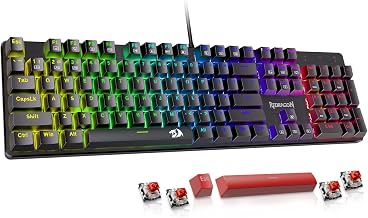
Redragon K521 Upgrade Rainbow LED Gaming Keyboard
The Redragon K521 delivers a satisfying mechanical-feel typing experience with anti-ghosting and one-touch backlit controls at a price that’s hard to beat, and its broad compatibility across PC, Mac, and consoles makes it a versatile pick for mixed-platform households.
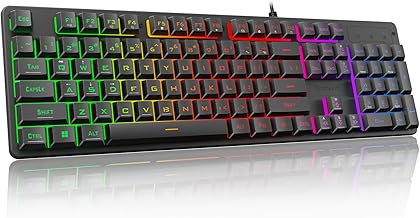
TECKNET Wired Gaming Keyboard
With a metal panel design, 15-zone RGB illumination, and IP32 water resistance, the TECKNET strikes a nice balance between durability and vibrant lighting, while its whisper-quiet keys make it a solid choice for shared spaces or late-night sessions.
MageGee 80% Gaming Keyboard
The MageGee 80% keyboard trims the layout down to a compact footprint without losing the volume knob or multimedia keys, and its 19-key rollover ensures reliable input during fast-paced gaming.
SteelSeries Apex 3 RGB Gaming Keyboard
SteelSeries brings genuine polish with its whisper-quiet switches, 10-zone RGB, and IP32 water resistance, and the included magnetic wrist rest adds real comfort during long sessions.
Logitech G213 Prodigy Wired RGB Gaming Keyboard
The Logitech G213 pairs comfortable Mech-Dome keys with a built-in palm rest and dedicated media controls, and LIGHTSYNC RGB software integration lets it react to games and music for a more immersive setup.
Frequently Asked Questions
Do I need a mechanical keyboard for gaming, or is mechanical-feel good enough?
True mechanical switches, like those in the SteelSeries Apex 3 or AULA F75 Pro, offer more consistent feel and longer lifespans, but mechanical-feel boards like the Redragon K521 and MageGee 80% are a great budget-friendly starting point for casual gamers.
Is a smaller keyboard layout worth the trade-off?
Compact layouts like the MageGee 80% or AULA F75 Pro’s 75% design free up desk space for mouse movement, which competitive and FPS players often prefer, though you’ll lose the dedicated number pad found on full-size boards.
How important is water resistance on a gaming keyboard?
Water resistance ratings like IP32, found on the TECKNET and SteelSeries Apex 3, protect against accidental spills and extend the keyboard’s usable life, which is worthwhile if you keep drinks near your setup.
Should I choose a wired or wireless RGB keyboard?
Wired keyboards eliminate any concern about input lag or battery life, making them the safer choice for competitive gaming, while a hybrid option like the AULA F75 Pro offers 2.4GHz, Bluetooth, and USB-C flexibility for those who want to switch between devices.
Final Thoughts
For most gamers, the SteelSeries Apex 3 offers the best overall mix of comfort, durability, and lighting quality, while the Redragon K521 remains the top pick for budget-conscious buyers who still want strong RGB performance. If you want a premium, hot-swappable experience with wireless freedom, the AULA F75 Pro is well worth the upgrade.