Our Top Picks
HDMI 2.1, VRR, and ALLM are often presented as one gaming package, but they describe different parts of a connection. A product can support one feature without supporting every other feature associated with the specification family. The reliable buying method is to list the video modes you need, verify each device and port, and test the complete chain. A version badge alone is not a compatibility report.
Updated October 2026 — A plain-language guide to HDMI 2.1 VRR and ALLM for PS5, Xbox Series X and S, and gaming PCs.
Quick answer: HDMI 2.1 VRR and ALLM are two separate gaming features. VRR (Variable Refresh Rate) lets the screen follow your game’s frame rate to stop tearing, and ALLM (Auto Low Latency Mode) switches the TV into its low-lag game mode on its own. Neither is guaranteed by the “HDMI 2.1” label, so check each port and device.
- Need 4K at 120 Hz: every link in the chain must handle about 40 Gbps, so use a certified 48 Gbps Ultra High Speed cable and a 4K 120 Hz-capable port.
- PS5: VRR needs a display that supports HDMI VRR over HDMI 2.1 ports.
- Xbox Series X and S: VRR can also work on HDMI 2.0 displays that support it.
- PC: HDMI 2.1 VRR works with recent NVIDIA and AMD graphics cards, and DisplayPort 1.4 is a valid alternative on monitors.
What the HDMI label means
HDMI is an interface ecosystem covering signaling, cables, connectors, content protection, audio return, and optional features. Later specifications introduced capabilities including higher-bandwidth video modes, Variable Refresh Rate, Auto Low Latency Mode, Quick Frame Transport, and enhanced Audio Return Channel.

Highwings 8K 10K 4K HDMI Cable 48Gbps 6.6FT/2M, Certified Ultra High Speed | 2.1 HDMI Cable Braided Cord-4K@120Hz 8K@60Hz, DTS:X, HDCP 2.2 & 2.3, HDR 10 Compatible with DVD Player/PS5/HDTV/Blu-ray
One of the home product options compared in this guide.
View on Amazon
UGREEN 8K HDMI 2.1 Cable 48Gbps 6.6FT, Certified Ultra High Speed HDMI Cord | Aluminum, 4K@240Hz 120Hz 10K 8K@60Hz, HDCP 2.2&2.3, eARC HDR 10 Dolby Compatible with PS5/Blu-ray/Roku TV/Switch 2/Mac mini
One of the home product options compared in this guide.
View on Amazon
Acer HDMI 2.1 Cable 10FT (8K@60Hz,4K@120Hz) 48Gbps High-Speed Braided Cord | Certified HDMI Cable Supports HDR10+/HDCP 2.2 & ARC/eARC, Compatible with PS5, PS4, Xbox, Monitors, Laptops, Roku TV, HDTV
One of the home product options compared in this guide.
View on Amazon
Silkland Certified HDMI 2.1 Cable Ultra High Speed 48Gbps Braided HDR 6.6FT | 4K@240Hz 144Hz 120Hz, 8K@60Hz, 1440P, HDR10+, eARC, HDCP 2.3, Dolby Atmos, DTS:X, Xbox, PS5, PS4, Roku TV, Monitor, PC TV
One of the home product options compared in this guide.
View on Amazon
RyzzRooa HDMI 2.2 Cable 96Gbps 6FT, 16K@60Hz, Gaming Braided Cord
One of the home product options compared in this guide.
View on Amazon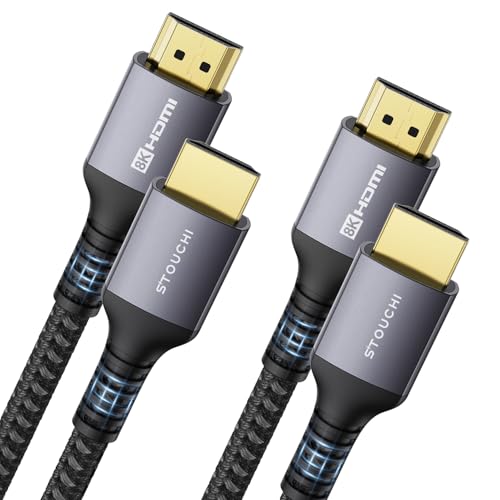
Stouchi 8K HDMI 2.1 Cable 8ft (2-Pack) 48Gbps 4K@120Hz | Ultra High Speed | eARC | Reduce Screen Tearing & Lag | Triple-tin Shielding | 30AWG Copper Wire | Nylon Braided
One of the home product options compared in this guide.
View on Amazon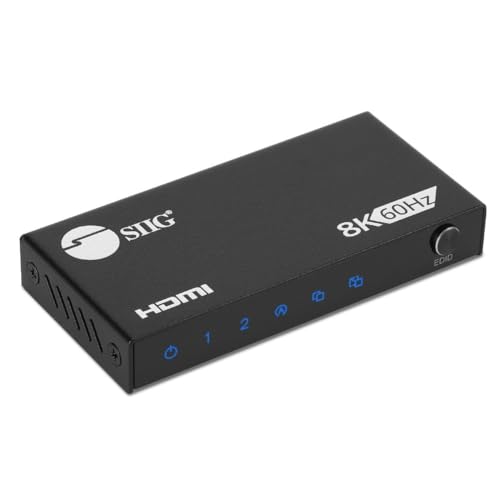
SIIG 1x2 HDMI 2.1 Splitter, 8K60Hz, VRR, ALLM, EDID, CE-H27N11-S1 | Send one HDMI 2.1 source to two 8K60Hz displays; VRR, ALLM and EDID support gaming and high-refresh AV systems.
One of the home product options compared in this guide.
View on AmazonThat does not mean every device advertised with a current HDMI label implements every capability. HDMI Licensing Administrator tells buyers to look for the specific supported features. Its official HDMI 2.1 feature overview describes the available set, while product manuals establish what an individual port implements.
Even ports on the same television may differ. One may support eARC, two may accept 4K 120 Hz, and the others may be limited to lower-bandwidth modes. Screen size and regional suffix can also change hardware within a family.
4K 120 Hz needs an end-to-end path
A 4K 120 Hz signal carries more data than 4K 60 Hz at comparable color settings. The source, cable, every intermediate device, and display input must support the selected combination. If an AV receiver or soundbar cannot pass it, the console may fall back to 60 Hz or remove VRR.
High bandwidth is not the same as high rendered frame rate. A console can output a 120 Hz container while a game renders at a lower or variable rate. Game support, performance mode, CPU/GPU load, and frame pacing determine the actual frames.
Use an Ultra High Speed HDMI cable for demanding modes. HDMI.org’s cable certification information explains the program. Certification reduces uncertainty but cannot repair an unsupported port or intermediary.
HDMI 2.1 VRR and ALLM explained: the feature table
The table below separates the features that marketing pages bundle together. Use it as a checklist when you read a TV or monitor spec sheet.
| Feature | What it does | What must support it | Common failure |
|---|---|---|---|
| 48 Gbps link (FRL) | Carries 4K 120 Hz with 10-bit color | Source, cable, every box in between, display port | Mode missing or falls back to 60 Hz |
| VRR | Display refresh follows game frame delivery | Source, display, and any receiver in the path | VRR switch greyed out after adding an AV receiver |
| ALLM | Source asks the TV for its low-latency mode | Source and display | TV stays in a processed picture mode |
| QFT | Sends each frame across the link faster | Source and display | Not listed on most spec sheets |
| QMS | Removes the blank screen when video frame rate changes | Source and display | Brief black flash when switching content |
| eARC | Sends TV audio back to a receiver or soundbar | One designated TV port plus the receiver | eARC port is also the only 4K 120 Hz port |
HDMI 2.0, 2.1 and 2.2 data rates
The wire speed is the hard limit behind most gaming surprises.
- HDMI 2.0: 18 Gbps. Enough for 4K at 60 Hz, which is why 4K 120 Hz is out of reach on those ports.
- HDMI 2.1: 48 Gbps. 4K at 120 Hz with 10-bit full color needs roughly 40 Gbps of video data, so it fits, with little headroom for a poor cable.
- HDMI 2.2: 96 Gbps with the Ultra96 cable label, announced in 2025. Few consoles and TVs use it yet, and 4K 120 Hz does not need it.
Ports may also use DSC (Display Stream Compression) to squeeze higher modes, such as 8K, into the link. Where a mode relies on DSC, both ends must support it.
Variable Refresh Rate
Without synchronization, a display refresh can occur while the source is partway through a new frame, creating a visible tear. Traditional V-Sync can prevent tearing by waiting, but depending on implementation it can increase queueing or produce judder when frame delivery misses fixed intervals.
VRR allows the display to vary refresh timing within a supported range to follow frame delivery. HDMI.org describes HDMI VRR as a gaming-oriented feature. AMD FreeSync and NVIDIA G-SYNC are related adaptive-sync ecosystems with their own validation, transport, and feature distinctions. A display may support more than one label.
VRR has a minimum and maximum effective range. Below the floor, Low Frame Rate Compensation may repeat frames when supported. The exact threshold and behavior are display-dependent. VRR cannot fix a game that pauses for shader compilation, stalls on storage, or suffers network lag.
Some OLED and LCD televisions show brightness fluctuation or near-black flicker when frame time changes abruptly under VRR. Local dimming may also work differently in Game Mode. Check independent testing for the exact model and firmware.
HDMI VRR vs FreeSync vs G-SYNC Compatible
These labels solve the same problem, tearing and judder when the frame rate fluctuates, but they are validated differently.
- HDMI VRR: the standard feature on HDMI 2.1 televisions and consoles. It is what PS5 and Xbox use with a TV.
- AMD FreeSync: AMD’s adaptive-sync program. Many displays that carry it also advertise HDMI VRR.
- G-SYNC Compatible: NVIDIA’s validation of adaptive-sync displays. Recent GeForce cards can run VRR on many HDMI 2.1 TVs, including some OLED models.
Look for the exact label the TV or monitor lists. A display can carry more than one, and the supported range matters as much as the logo. Many panels sync only above a floor, often around 40 to 48 frames per second. Below it, Low Frame Rate Compensation may repeat frames if the display supports it, and behavior varies by model.
What 48 Gbps buys you, and what it does not
A fast cable cannot add a feature the port lacks. A certified Ultra High Speed cable carries the signal, and the TV’s port decides whether 4K 120 Hz, VRR, and eARC are all available at once. A short, certified cable of 6.6 feet (2 meters) or less is the safest choice for 4K 120 Hz because margin shrinks as length grows.
Chroma subsampling is the usual fallback. If the link cannot carry full color at 4K 120 Hz, a device may drop to 4:2:2 or 4:2:0, or lower the bit depth. That is fine for most game footage but shows as colored fringes around desktop text on a PC.
Auto Low Latency Mode
ALLM lets a source signal that low-latency processing is appropriate. A compatible television can switch into its designated low-latency mode automatically and return to a film-oriented mode for video. HDMI.org’s ALLM description focuses on this automation.
ALLM does not define a maximum input-lag figure. It does not disable every processing option and does not improve pixel response. Confirm which picture mode activates and whether it is retained for HDR and VRR.
Console settings can enable or disable automatic low-latency behavior. CEC and ALLM are not identical: CEC handles control functions such as power and input switching, while ALLM communicates latency preference.
eARC belongs in the same planning exercise
Enhanced Audio Return Channel sends audio from a television to a receiver or soundbar with more bandwidth and capability than traditional ARC, subject to device support. It often occupies one of the television’s premium HDMI ports. HDMI.org documents eARC separately.
If a TV has two high-bandwidth gaming inputs and one is also eARC, connecting a soundbar can leave only one for consoles. Count PS5, Xbox, PC, and audio equipment before purchase. Console-to-TV plus TV-to-soundbar eARC often preserves video modes better than routing through an older soundbar.
PS5 verification
Connect PS5 to the correct enhanced-format input using its supplied or an appropriate certified cable. Enable the port’s enhanced mode if the television requires it. In Screen and Video settings, review resolution, 120 Hz Output, VRR, ALLM-related behavior, and HDR.
Sony’s PS5 4K resolution guide explains current settings and troubleshooting. Use the console’s video information display to see detected capabilities. A checkmark does not force every game into 120 fps; launch a known compatible title and select its performance mode.
Xbox Series X verification
Connect Series X directly to the TV for the baseline, enable enhanced input mode, then open General, TV & display options and “4K TV details.” Microsoft’s 4K gaming at 120 Hz guide documents the checks.
Xbox exposes 4K, HDR, VRR, and low-latency options. Enable only modes the chain supports. If adding a receiver removes a green check, the intermediary, its port configuration, or cable is the likely boundary.
PC verification
On PC, GPU output capability, driver, operating-system setting, display EDID, cable, and game configuration all matter. Select the intended refresh in Windows Advanced display settings and the GPU control panel. Check resolution, color depth, chroma, and HDR rather than reading refresh alone.
DisplayPort may offer a different set of modes on a monitor, while televisions commonly rely on HDMI. Adapters must explicitly support the required conversion; a connector that physically fits does not guarantee VRR or high bandwidth.
Color format and bandwidth fallbacks
When a mode exceeds the available link budget, devices may reduce chroma resolution or color depth, or may refuse the mode. For television video, chroma subsampling can be acceptable; for a PC desktop, reduced chroma can make text fringed. The source’s output-information screen can reveal the active format.
Do not force a high bit depth merely because a menu offers it. The display panel, HDR pipeline, and bandwidth must support the complete setting. If 4K 120 Hz fails, return to automatic output, then test cable, port, intermediary, and enhanced mode systematically.
QFT and QMS
Quick Frame Transport reduces the time required to transport a frame across the link for supported combinations; it does not reduce game render time. Quick Media Switching uses VRR-related transport to reduce blank screens when compatible video sources change frame rate. These are distinct from 120 Hz, VRR gaming, and ALLM, and support is less universal.
Buy them only for a defined use case and verify both source and display support. Marketing lists sometimes group every HDMI acronym even when the device implements only part of the chain.
Which HDMI 2.1 gaming features matter for your setup
Match features to the situation, not to the longest acronym list.
- PS5 or Xbox on a modern TV, no receiver: make sure the console’s port supports 4K 120 Hz, turn on the enhanced input mode, and check that VRR and ALLM are on. This covers nearly everything you will notice.
- Console plus soundbar or AV receiver: eARC and pass-through become the question. Confirm the receiver passes 4K 120 Hz and VRR, or run the console to the TV and send audio back by eARC.
- Gaming PC to a TV: you need a graphics card with an HDMI 2.1 output, a driver that exposes 4K 120 Hz, and a cable that carries 48 Gbps. Check chroma format in the control panel.
- Gaming PC to a monitor: DisplayPort may give the same refresh and VRR options. Use whichever port the monitor lists with the mode you want.
- Mostly 60 fps games or movies: 4K 60 Hz on HDMI 2.0 is fine, and ALLM plus VRR still helps with tearing on consoles that support them.
- Competitive shooters at high frame rates: prioritize a documented low-latency Game Mode and independent input-lag results over the HDMI version badge.
What HDMI 2.1 cannot fix
None of these features raise the frame rate your hardware can render. VRR will not make a 30 fps game feel like 60 fps, and ALLM does not guarantee a specific input-lag number. Treat them as removing avoidable problems, not as performance upgrades.
Troubleshooting order
- Record current settings and firmware versions.
- Connect source directly to the display.
- Use the display’s documented high-bandwidth port.
- Enable enhanced input mode and Game Mode.
- Test with a known appropriate cable.
- Verify 4K 60 Hz, then 4K 120 Hz, then VRR and HDR one at a time.
- Reintroduce receiver, soundbar, switch, or capture card individually.
This sequence identifies the boundary. Cable failures typically show missing modes, dropouts, sparkles, or handshake problems; they do not explain every performance issue.
Buying checklist
Ask precise questions:
- Which ports accept 4K 120 Hz at the desired HDR/color mode?
- What is the documented VRR range?
- Does local dimming retain full behavior with VRR?
- Does ALLM activate the lowest-latency mode?
- Is eARC using a needed gaming input?
- Can the receiver or soundbar pass 4K 120 Hz and VRR?
- Does the exact screen size retain the feature set?
Our gaming TV input-lag guide covers measured response, while the PS5 TV and Xbox Series X TV guides apply the checklist to each console.
Common myths
“HDMI 2.1 means every feature” is false; feature support must be declared. “VRR increases frame rate” is false; it changes display timing. “ALLM means zero lag” is false; it requests a mode. “A more expensive cable improves picture quality” is misleading for a stable digital link; the cable either carries the selected mode reliably or it does not.
Finally, “120 Hz means every game runs at 120 fps” confuses output refresh with rendering. Software support and performance remain the limiting factors.
HDMI 2.1 VRR and ALLM FAQ
Does the PS5 need HDMI 2.1 for VRR?
Yes, for practical purposes. PS5 VRR needs a display that supports HDMI VRR, and these appear on HDMI 2.1 ports. Check that the specific port is enabled for it in the TV’s settings.
Does Xbox Series X support VRR on HDMI 2.0?
Yes, on displays that support it. Xbox Series X and S can use VRR over HDMI 2.0 connections, but 4K at 120 Hz still needs the 48 Gbps path.
What is the difference between ALLM and Game Mode?
Game Mode is a picture setting the TV applies, and ALLM is the signal that turns it on automatically. Without ALLM you would switch modes by hand each time.
Does VRR add input lag?
In normal use, no meaningful lag is added. VRR changes when the screen refreshes, not how the game processes input. Some TVs behave differently in Game Mode, so check model-specific reviews.
Do I need a new cable for HDMI 2.1 gaming?
For 4K 120 Hz, yes if your current cable is not Ultra High Speed. Choose a certified 48 Gbps cable and keep it as short as the room allows. Lower modes such as 4K 60 Hz work with an older certified cable.
Is HDMI 2.1 or DisplayPort better for PC gaming?
It depends on the display. Monitors often list DisplayPort first, while TVs only offer HDMI. Use the port that the display documents with your target refresh rate and VRR.
Is HDMI 2.2 worth waiting for?
For most players, no. HDMI 2.2 offers 96 Gbps, but 4K 120 Hz is fully served by HDMI 2.1, and few consoles or TVs use the newer standard today.
Can eARC work on a TV that has HDMI 2.0 gaming ports?
Yes, eARC can appear on a TV whose other ports lack 4K 120 Hz. That is why a spec sheet should list eARC and gaming ports separately.
Final recommendation
Treat HDMI gaming as an end-to-end feature matrix. Verify 4K 120 Hz bandwidth, VRR, ALLM, HDR, and eARC separately on every required port and intermediary. Start with direct connection, add devices one at a time, and use console information screens as evidence. Specific feature support matters more than the largest version number on the box.
Sources
- HDMI.org: HDMI 2.1 specification features
- HDMI.org: Gaming features
- HDMI.org: Auto Low Latency Mode
- HDMI.org: Ultra High Speed HDMI Cable
- PlayStation: PS5 4K resolution guide
- Xbox Support: 4K gaming at 120 Hz