Key takeaways
- Compare 120Hz and 144Hz gaming TVs by console support, PC frame rates, VRR, HDMI bandwidth, frame time, latency, motion, and value.
For console gaming, a good 120 Hz TV is usually the sensible target because PlayStation 5 and Xbox Series X support game output up to 120 Hz in compatible titles and modes. A 144 Hz TV mainly benefits a gaming PC that can output 144 frames per second at the chosen resolution. The numerical difference is real but modest: each refresh lasts about 8.33 milliseconds at 120 Hz and 6.94 milliseconds at 144 Hz, a difference of roughly 1.39 milliseconds per refresh.
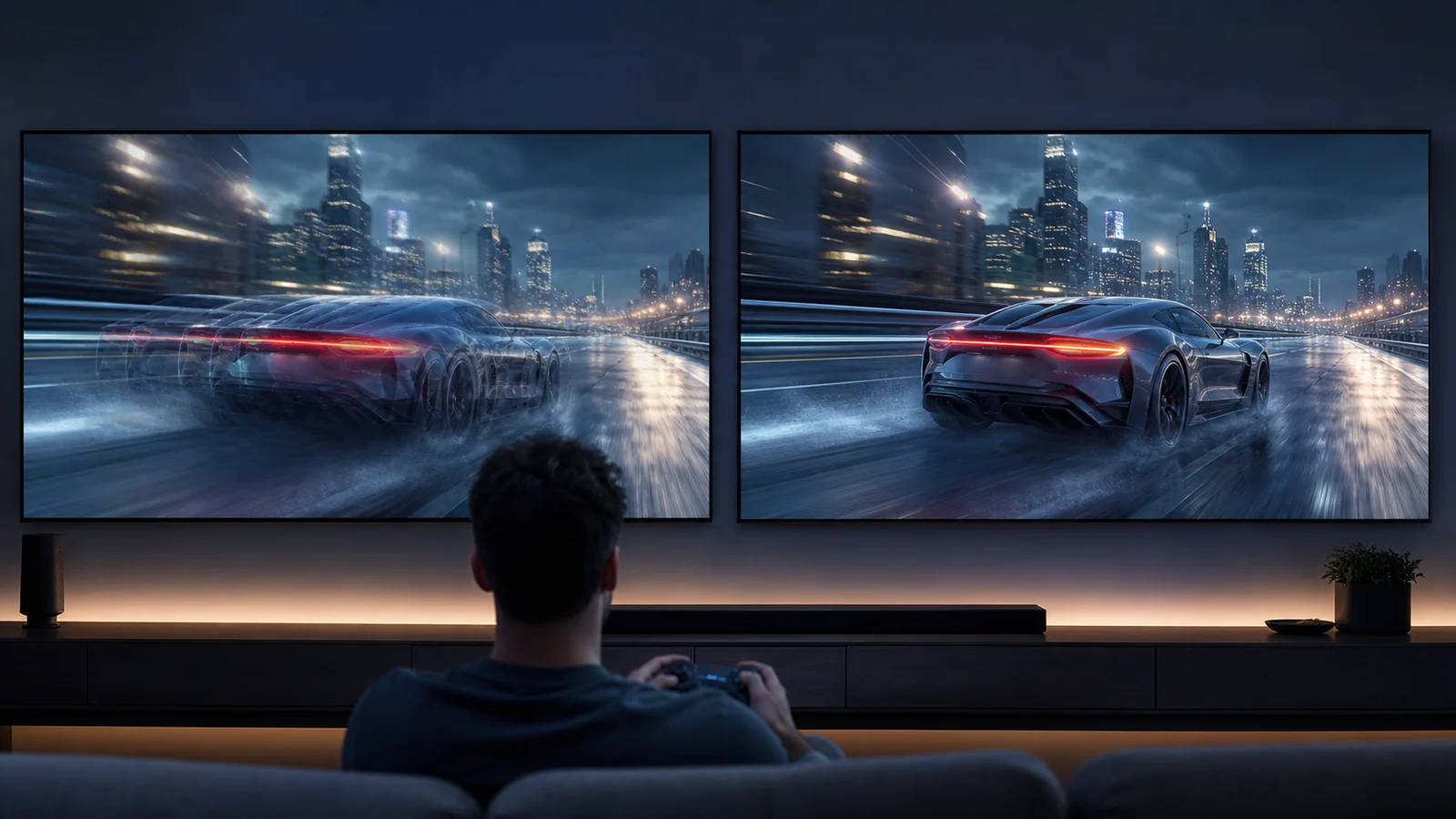
Refresh rate alone does not establish motion quality or total input latency. Pixel response, processing, VRR behavior, frame rate, overshoot, persistence, and game engine latency all affect what you see and feel.
Our top picks
 TCL 55" T7 4K QLED Google TV
- 4K UltraHD Resolution: Experience incredible detail with 4X…
- QLED (Quantum Dot Technology): Rich, vibrant colors covering…
- 120Hz Panel Refresh Rate: Watch action-packed movies, fast-paced…
 TCL 65" T7 4K QLED Google TV
- 4K UltraHD Resolution: Experience incredible detail with 4X…
- QLED (Quantum Dot Technology): Rich, vibrant colors covering…
- 144Hz Panel Refresh Rate: Watch action-packed movies, fast-paced…
 Gawfolk 34" Ultrawide Curved Gaming Monitor
- Seamless Gaming - Experience fluid and responsive gameplay…
- 21:9 Ultrawide Curved Monitor: Expand your view and…
- 34 inch Curved Gaming Monitor - With a…
| Product | Key specs | |
|---|---|---|
| TCL 55" T7 4K QLED Google TV | 4K UltraHD Resolution: Experience incredible detail with 4X… QLED (Quantum Dot Technology): Rich, vibrant colors covering… 120Hz Panel Refresh Rate: Watch action-packed movies, fast-paced… | Check price |
| TCL 65" T7 4K QLED Google TV | 4K UltraHD Resolution: Experience incredible detail with 4X… QLED (Quantum Dot Technology): Rich, vibrant colors covering… 144Hz Panel Refresh Rate: Watch action-packed movies, fast-paced… | Check price |
| Gawfolk 34" Ultrawide Curved Gaming Monitor | Seamless Gaming - Experience fluid and responsive gameplay… 21:9 Ultrawide Curved Monitor: Expand your view and… 34 inch Curved Gaming Monitor - With a… | Check price |
 SANSUI 32 Inch Curved 240Hz Gaming Monitor SANSUI 32 Inch Curved 240Hz Gaming Monitor | 32 Inch curved 1500R gaming monitor, 240Hz high… Performance: 240Hz refresh rate, Full HD 1920*1080P resolution,… Interfaces: HDMI up to 240Hz, DP 1.4 up… | Check price |
 CRUA 34" WQHD 165Hz Ultrawide Curved Gaming CRUA 34" WQHD 165Hz Ultrawide Curved Gaming | UltraWide View for Work and Play: This 34-inch… Smooth 165Hz Gaming Performance: With a fast 165Hz… Vivid Color for Entertainment and Creative Use: Featuring… | Check price |
 Gawfolk 49 inch Ultra-Wide Curved 1500R Gaming Gawfolk 49 inch Ultra-Wide Curved 1500R Gaming | 【5120×1440 Ultra-Wide Resolution + 32:9 Aspect Ratio, Superior… 【165Hz High Refresh Rate + 1MS Response +… 【120%sRGB Wide Color Gamut + 3000:1 Contrast Ratio,… | Check price |
 Hisense 85“ Hi-QLED 4K S7 CanvasTV Series Hisense 85“ Hi-QLED 4K S7 CanvasTV Series | Art Gallery: The CanvasTV transforms any room into… Hi-Matte Display: Every detail the director intended Choose Your Frame | Check price |
 TCL 85" T7 4K QLED Google TV TCL 85" T7 4K QLED Google TV | 4K UltraHD Resolution: Experience incredible detail with 4X… QLED (Quantum Dot Technology): Rich, vibrant colors covering… 144Hz Panel Refresh Rate: Watch action-packed movies, fast-paced… | Check price |
As an Amazon Associate we earn from qualifying purchases at no extra cost to you.
What 120 Hz and 144 Hz mean
A 120 Hz panel can refresh up to 120 times per second; a 144 Hz panel can refresh up to 144 times per second when it receives and displays that signal. The maximum interval between refresh opportunities falls as rate increases:
| Refresh rate | Refresh interval |
|---|---|
| 60 Hz | 16.67 ms |
| 120 Hz | 8.33 ms |
| 144 Hz | 6.94 ms |
These values are not the television’s complete latency. Input sampling, CPU and GPU rendering, frame queues, display processing, pixel transitions, and controller or mouse behavior add time. A poorly configured 144 Hz TV can feel worse than a responsive 120 Hz model in Game Mode.
Higher refresh also requires frames. A game running at 60 fps does not gain 144 unique frames simply because the panel is set to 144 Hz. The display may repeat frames or use variable timing, while optional motion interpolation can invent intermediate images at the cost of artifacts and added latency. Disable interpolation for responsive gaming unless a specific use case justifies it.
Console gaming: 120 Hz is the relevant ceiling
Sony documents 120 Hz output for compatible PS5 displays and games. Microsoft documents 4K gaming at 120 Hz on Xbox Series X when the TV and connection support it. Individual games may offer 120 fps performance modes with reduced resolution or visual settings; others remain at 30 or 60 fps.
A TV advertised at 144 Hz can still be an excellent console display, but the console generally uses its supported 120 Hz mode rather than 144 Hz. Therefore, do not pay a large premium for “144 Hz” alone when buying only for a console. Prioritize reliable 4K 120 Hz input, VRR, HDR performance, responsive Game Mode, and enough suitable HDMI ports.
Check the console’s actual signal screen. On Xbox, “4K TV details” reports supported combinations. On PS5, Video Output Information shows the current connection. These screens describe the negotiated route and can expose a receiver, cable, or port that limits the mode.
PC gaming: 144 Hz can be useful
A PC with a suitable GPU can output 4K 144 Hz to a compatible TV. The extra 24 refreshes per second reduce the refresh interval and can make motion or mouse response slightly smoother when the game sustains high frame rates. The improvement from 120 to 144 is much smaller than the improvement from 60 to 120.
Whether it is visible depends on the game, user, viewing distance, and display behavior. Competitive players using a television as a large monitor may value every reduction. A player using a controller from a sofa in a cinematic 60–100 fps game may not.
Driving 4K at 144 fps is demanding. Upscaling, dynamic resolution, or reduced settings may be necessary. Decide whether those compromises are worthwhile. A stable 120 fps with consistent frame times can feel better than an unstable attempt to reach 144.
VRR matters more than the headline difference
Variable Refresh Rate lets a compatible display adjust refresh timing to match frame delivery within a supported range. It can reduce tearing and the judder caused by mismatch between fixed refresh intervals and variable rendering.
A 144 Hz maximum may slightly extend the upper VRR range, but the lower boundary, low-frame-rate compensation, flicker behavior, and format support matter too. OLED and LCD televisions can show VRR-related brightness or gamma shifts in certain unstable frame-rate situations. Performance is model-specific.
Read the HDMI 2.1, VRR, and ALLM guide before treating a logo as proof. HDMI features are implemented individually, and port bandwidth or firmware can differ by model and input.
HDMI bandwidth and signal compatibility
High-resolution, high-refresh signals consume substantial bandwidth. Color depth, chroma format, HDR, and compression affect the requirement. HDMI Forum VRR, Display Stream Compression, or reduced chroma may appear in some PC configurations. The exact GPU, cable, port, and TV mode must agree.
Use a certified Ultra High Speed HDMI cable for high-bandwidth HDMI 2.1 links where the device instructions require it. Connect directly to the TV during diagnosis. A soundbar or receiver in the video path may limit 4K 144 Hz even if it passes 4K 120 Hz.
Some televisions enable 144 Hz only on certain inputs, only in PC mode, or only through a special overclock setting. Verify whether HDR and VRR remain available at the same time. Product pages sometimes list the panel’s maximum without explaining all combinations.
Motion clarity is not refresh rate alone
Pixel response determines how quickly the image changes after a refresh. OLED pixels generally transition rapidly, producing clear edges but revealing low-frame-rate stutter because frames are held distinctly. LCD response varies with transition and overdrive; slow dark transitions can smear, while aggressive overdrive can create bright inverse trails.
Sample-and-hold blur also depends on eye tracking and frame persistence. Increasing from 120 to 144 Hz reduces persistence modestly when unique frames are supplied, but it cannot correct severe response-time artifacts. Black-frame insertion may improve clarity on some displays while reducing brightness and potentially adding flicker.
Independent measurements of the exact size and model are more useful than refresh rate printed on a box. Different sizes within a series can use different panels.
Input lag and Game Mode
The theoretical 1.39 ms refresh-interval reduction is only part of response. A television’s Game Mode should reduce video processing, but behavior may differ by resolution, HDR, VRR, and refresh rate. Confirm that Game Mode remains active at 144 Hz.
Avoid motion smoothing for interactive content. It requires future-frame analysis and generally adds latency. Features marketed as clarity or judder reduction can re-enable processing even inside a broadly labeled gaming preset.
Use the gaming TV input lag guide to diagnose the entire path. Controller polling, wireless interference, PC frame queues, V-Sync, engine caps, and frame-generation settings can influence response more than the 120-to-144 difference.
When 144 Hz is worth paying for
Prioritize 144 Hz when:
- A gaming PC is the main source.
- The GPU and games commonly sustain over 120 fps at the chosen settings.
- The TV accepts 144 Hz with VRR and HDR in the required mode.
- You play fast, mouse-driven games from relatively close range.
- The premium is small and does not compromise picture quality.
It is a useful bonus on an otherwise strong TV. It should not displace contrast, local dimming, HDR tone mapping, viewing angle, size, port layout, or reliability.
When 120 Hz is the better value
Choose a quality 120 Hz television when:
- PS5 or Xbox is the primary source.
- Most games run at 30, 60, or up to 120 fps.
- You play from a sofa with a controller.
- The 144 Hz alternative costs substantially more.
- The 120 Hz model has better contrast, HDR, processing, or port support.
The best TV for gaming framework can help balance refresh rate against picture and room priorities.
Verify 144 Hz before purchase
Ask five questions:
- Does the exact size accept 4K 144 Hz, or only a lower resolution?
- Which HDMI ports support it?
- Does 144 Hz work with VRR and HDR together?
- Is special PC labeling, enhanced mode, or firmware required?
- Does the GPU provide a compatible HDMI output and driver?
Then check the manual and independent tests. Retailer filters may confuse a 120 Hz native panel with a higher “motion rate,” interpolated value, or PC-only overclock. Native accepted refresh rate is the relevant specification.
Setup sequence
- Connect the PC or console directly to a supported TV port.
- Enable the manufacturer’s enhanced or high-bandwidth input mode.
- Enable Game Mode and disable motion interpolation.
- Select 120 Hz or 144 Hz in the source settings.
- Confirm the current signal in the TV information panel.
- Enable VRR and verify its operating range.
- Test HDR separately, then together with VRR.
- Add a receiver or soundbar only after the direct route is stable.
Change one variable at a time. If the screen goes blank, wait for the source to revert or use its safe-display procedure. Do not repeatedly power-cycle during firmware updates.
FAQ
Can PS5 use a 144 Hz TV?
Yes, if the TV supports compatible PS5 modes, but the console uses supported output rates such as 120 Hz rather than gaining a 144 Hz mode solely from the panel label.
Is 144 Hz noticeably better than 120 Hz?
The difference is smaller than 60-to-120 Hz. Some PC players notice it in fast motion and mouse response; others prefer to spend the budget on picture quality or size.
Does 144 Hz require HDMI 2.1?
Required interface capability depends on resolution, color format, compression, and device implementation. For 4K high-refresh TV use, verify the exact HDMI port bandwidth and supported signal table rather than relying only on the version label.
Should I cap a PC game at 120 fps on a 144 Hz TV?
That can provide stable performance if the system cannot maintain higher rates. With VRR, choose a cap and settings that keep frame delivery consistent and within the display’s useful range. There is no universal cap for every engine.
Bottom line
A 120 Hz TV already delivers the high-refresh mode current consoles are built around. A 144 Hz TV offers a modest additional benefit for a capable gaming PC, not a transformative console upgrade. Compare exact Game Mode latency, response behavior, VRR, HDR, HDMI ports, and picture quality. Buy 144 Hz when it is a low-cost bonus you can actually drive; otherwise, a better 120 Hz television is the stronger purchase.
Primary sources
- Xbox Support: 4K gaming at 120 Hz
- PlayStation Support: PS5 4K resolution guide
- HDMI Licensing Administrator: Gaming features