Key takeaways
- Choose the best gaming TV for your room and platform by comparing 4K 120 Hz inputs, VRR, latency, HDR, OLED, Mini-LED, size, and port layout.
The best TV for gaming in 2026 is not one permanent model. It is the television that supports your console or PC’s useful signal modes, stays responsive in Game Mode, produces convincing contrast in your room, and fits both the viewing distance and HDMI-device count. A dark-room OLED, bright-room Mini-LED, and budget 120 Hz LCD can each be the right answer. Start with requirements, then compare exact models and sizes.
The specification baseline
Recommended products
As an Amazon Associate, we may earn from qualifying purchases.
Our top picks
 Hisense 65" U7 Mini-LED ULED 4K UHD
- Thousands of MiniLED backlights deliver pinpoint control for…
- Advanced motion technology handles gaming, sports and action…
- Bright windows, overhead lights, afternoon sun—your screen handles…
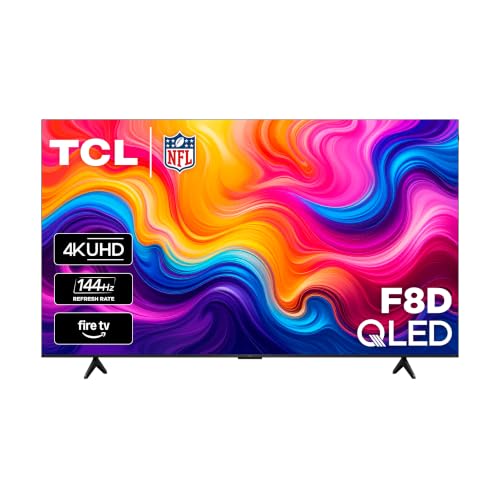 TCL 98-Inch F8D Series 4K QLED Smart
- 4K QLED with Quantum Dot Color: Experience 4x…
- Dolby Vision HDR & HDR10+ for Realistic Contrast:…
- High Brightness Direct LED Backlight: A direct-lit LED…
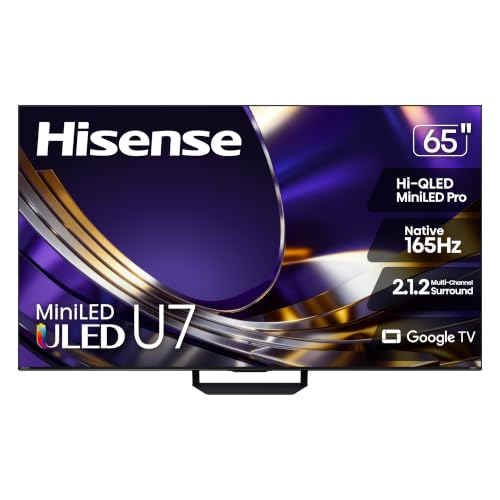 Hisense 65" U7 Mini-LED ULED 4K UHD
- Thousands of MiniLED backlights deliver pinpoint control for…
- Advanced motion technology handles gaming, sports and action…
- Bright windows, overhead lights, afternoon sun—your screen handles…
| Product | Key specs | |
|---|---|---|
| Hisense 65" U7 Mini-LED ULED 4K UHD | Thousands of MiniLED backlights deliver pinpoint control for… Advanced motion technology handles gaming, sports and action… Bright windows, overhead lights, afternoon sun—your screen handles… | Check price |
| TCL 98-Inch F8D Series 4K QLED Smart | 4K QLED with Quantum Dot Color: Experience 4x… Dolby Vision HDR & HDR10+ for Realistic Contrast:… High Brightness Direct LED Backlight: A direct-lit LED… | Check price |
| Hisense 65" U7 Mini-LED ULED 4K UHD | Thousands of MiniLED backlights deliver pinpoint control for… Advanced motion technology handles gaming, sports and action… Bright windows, overhead lights, afternoon sun—your screen handles… | Check price |
 Hisense 100" U6 Pro Series Mini‑LED ULED Hisense 100" U6 Pro Series Mini‑LED ULED | Striking contrast and vivid, lifelike color put every… Fast breaks, high-speed chases, live finales Immersive deep bass from the built-in subwoofer pulls… | Check price |
 INSIGNIA 43" Class F50 Series LED 4K INSIGNIA 43" Class F50 Series LED 4K | 4k Ultra HD (2160p resolution): Enjoy breathtaking HDR10… High Dynamic Range: Provides a wide range of… All-in-one: Get right to your good stuff | Check price |
As an Amazon Associate we earn from qualifying purchases at no extra cost to you.
- Mainstream gaming option: TCL 55-Inch T7 4K QLED Google TV
- Large-screen Mini-LED option: TCL 65-Inch QM6K Mini-LED QLED 4K TV
- Budget 120Hz alternative: VIZIO 50-Inch Quantum Pro 4K 120Hz QLED TV
For a current console or capable gaming PC, a strong general target is a 4K television with a native 120 Hz panel, at least one input supporting 4K at 120 Hz, Variable Refresh Rate, Auto Low Latency Mode, and an HDR Game Mode that preserves low input lag. Buyers using several consoles, a PC, and a soundbar should prioritize port count as strongly as picture quality.
These features are separate. HDMI Licensing Administrator’s gaming feature overview describes VRR and ALLM individually. A broad HDMI version label does not guarantee every feature on every port. Check the manufacturer manual for the exact screen size and regional model number.
Do not confuse accepted refresh with rendered performance. A television may accept 4K 120 Hz, but the game and hardware determine actual frame rate. Performance modes may reduce image detail to reach higher rates. A 120 Hz panel still helps with compatible games and provides even cadence for common film rates, but it cannot create native game frames.
Choose OLED for pixel-level contrast
OLED is self-emissive: each pixel controls its own light. A black pixel can turn off, giving dark games strong contrast without backlight halos. Pixel transitions are fast, and viewing angles are generally broad. These qualities suit cinematic titles, dark-room play, and seating spread across a sofa.
Tradeoffs remain. Many OLED televisions reduce output on large bright scenes compared with their smallest highlights. Glossy screens can reflect windows and lamps. Organic materials can age unevenly under cumulative static use, although modern displays include pixel shifting, logo dimming, compensation cycles, and screen savers. Leave protection systems enabled and avoid using maximum brightness with a fixed desktop interface continuously.
OLED is not automatically the fastest complete television. Low input lag depends on processing mode, and sharp pixel hold can make low-frame-rate stutter more visible. Check measured performance at the refresh modes you use.
Choose Mini-LED for bright-room impact
Mini-LED televisions are LCDs with a backlight divided into many dimming zones. Strong models can sustain high brightness, fight daylight, and create vivid HDR highlights. There is no organic-panel wear mechanism, making them practical for long mixed-use days, news tickers, or PC desktops.
A zone is larger than a pixel, so a bright object on a dark field can illuminate neighboring pixels and create blooming. Local-dimming behavior may be reduced or changed in Game Mode to preserve response. Viewing angle depends on LCD panel type and optical layers.
The best Mini-LED implementation is not identified by zone count alone. Algorithms, native panel contrast, zone geometry, and processing determine the result. Our OLED versus Mini-LED gaming guide provides a room-by-room comparison.
Budget LCD can be the rational choice
A conventional full-array or direct-lit LCD can deliver low input lag and clean 4K output without premium HDR performance. Budget buyers should prioritize genuine native refresh, VRR compatibility, and measured Game Mode response. Marketing terms such as motion rate may describe processing rather than panel refresh.
If the budget set is 60 Hz, it can still be appropriate for turn-based games, a console used mostly at 30 or 60 fps, or a secondary room. A dim panel with no effective local dimming will not provide dramatic HDR even if it accepts HDR10, so evaluate it as an SDR-first value option.
Input lag and response time
Input lag is the delay from signal arrival to visible output. Pixel response time is the transition between shades. Frame time, controller delay, network ping, and audio synchronization are other stages. Combining them into one “1 ms” claim hides the real behavior.
Game Mode usually removes motion interpolation and other frame analysis. ALLM can request the mode automatically, but it does not guarantee a latency threshold. Independent measurements should specify 4K 60 Hz, 4K 120 Hz, HDR, and VRR conditions. The gaming TV input-lag guide explains how to read and reproduce useful comparisons.
LCD overdrive can reduce transitions but cause inverse ghosting when set too aggressively. OLED transitions quickly but may expose low-frame-rate judder. A balanced display behaves consistently throughout its VRR range rather than posting one extreme best-case number.
VRR, ALLM, and 4K 120 Hz
VRR changes display timing to follow frames within a supported range, reducing tearing and some judder. It does not cure shader-compilation pauses, CPU bottlenecks, or unstable network play. Some televisions exhibit near-black flicker when frame time changes abruptly.
ALLM communicates that low-latency processing is appropriate. It is convenience, not performance proof. A television might support ALLM while lacking 120 Hz or VRR. Likewise, a 120 Hz panel may not accept 4K 120 Hz on every input.
Our HDMI 2.1, VRR, and ALLM explainer covers the full chain. Use an appropriate cable, enable enhanced input mode where required, and connect directly before diagnosing a receiver or soundbar.
HDR quality in Game Mode
HDR requires more than a logo. It needs a useful brightness range, dark-level control, color capability, and tone mapping that retains detail. OLED achieves contrast through pixel control. Mini-LED uses brightness and local dimming. Each can look excellent in the right room.
Check whether Game Mode keeps effective local dimming and whether HDR tone mapping clips highlights or lifts blacks. Calibrate the console after selecting the permanent HDR Game Mode. Settings copied from another model, size, or room are not evidence-based.
PS5 supports HDR10 and offers an adjustment process documented in Sony’s PS5 4K and HDR guide. Xbox provides an HDR Game Calibration app and HDR settings guidance. Format availability can change, so use current platform support pages.
PS5 priorities
PS5 buyers should verify 4K 120 Hz, VRR, HDR Game Mode, and enough compatible HDMI inputs. Sony’s video information screen reports detected modes. A television’s Dolby Vision gaming capability is not a PS5 buying requirement; evaluate formats the platform currently outputs.
Direct PS5-to-TV connection is the clean baseline. If a receiver or soundbar removes 120 Hz or VRR, return audio through eARC where supported. The best TV for PS5 guide details setup and port planning.
Xbox Series X priorities
Xbox Series X exposes “4K TV details,” making capability checks straightforward. It supports 4K 120 Hz in compatible games, VRR, ALLM, HDR10, and additional format options under supported conditions. Dolby Vision gaming behavior can vary by television and refresh combination.
Microsoft’s 4K 120 Hz support page explains verification. See the Xbox Series X TV guide for audio routing and VRR considerations.
PC gaming priorities
A TV used as a PC monitor needs clear chroma for text, compatible GPU bandwidth, usable scaling, and protection from static desktop elements where relevant. Confirm 4:4:4 chroma or an appropriate PC mode at the target resolution and refresh. Some televisions process a renamed PC input differently.
For close seating, 42 or 48 inches can already be large. Check whether the chosen size retains 120 Hz and VRR. Use screen savers and auto-hide static interface elements on OLED without disabling manufacturer maintenance cycles.
PC users should verify G-SYNC Compatible or FreeSync behavior independently from generic HDMI VRR. Driver settings, frame caps, and display firmware can affect the result.
Screen size and seating
Mark the proposed screen width on the wall. A larger image improves immersion but can require head movement when viewed too closely, and low-resolution performance modes become easier to see. Place the screen near seated eye level and confirm furniture depth, foot position, VESA pattern, and ventilation.
Do not assume every size within a series shares hardware. Smaller variants sometimes use a 60 Hz panel, fewer dimming zones, or different speakers. Verify the exact suffix on the manufacturer specification page.
Ports, eARC, and the complete system
Count PS5, Xbox, PC, streaming device, and soundbar connections. eARC often uses a premium HDMI input. A television with only two high-bandwidth ports can become constrained once audio is connected.
HDMI.org’s eARC overview explains the return-audio path, but codec passthrough remains device-specific. If external equipment is older, connect sources directly to the TV and use eARC for audio. Test the chain before hiding cables in a wall.
A buying process that ages well
- List platforms, desired resolution/refresh, and audio devices.
- Measure room brightness, seating distance, and physical width.
- Decide OLED, Mini-LED, or value LCD from the environment.
- Verify exact ports and modes in the manufacturer manual.
- Read independent measurements for latency, response, HDR, and VRR.
- Confirm current price, return policy, and warranty.
- After installation, update firmware and test direct connection first.
This process remains valid when specific model names change. It also prevents a retailer’s product ranking from substituting for compatibility.
Common mistakes
Do not buy by “HDMI 2.1” badge alone. Do not assume 144 Hz matters to a console capped at 120 Hz output. Do not leave motion interpolation active for competitive play. Do not select OLED for an uncontrolled sunlit room without evaluating reflections, or Mini-LED for a dark room without checking blooming.
Avoid universal claims that one panel technology is future-proof. Firmware support, port capability, room fit, and repair economics matter alongside the panel.
Final recommendation
For most buyers, the best gaming TV is a native 120 Hz 4K model with VRR, low-latency HDR Game Mode, and enough full-capability HDMI ports. Choose OLED for dark-room blacks and wide seating; choose Mini-LED for bright-room output and long mixed use; choose a value LCD when responsive SDR gaming matters more than premium HDR. Verify the exact size, connect directly, and let platform information screens confirm the result.
Sources
- HDMI.org: Gaming features
- HDMI.org: Enhanced Audio Return Channel
- PlayStation: PS5 4K resolution and HDR
- Xbox Support: 4K gaming at 120 Hz
- Xbox Support: HDR TV settings