Our Top Picks
 iBUYPOWER Element Gaming PC Desktop Computer AMD Ryzen20 x 9.1 x 17.4 inches36 poundsCheck on Amazon
 Turtle Beach Stealth 700 Wireless Gaming Headset forStandard7.87 x 6.81 x 3.7 inches0.9 poundsCheck on Amazon
Cyber Monday is where the online-only bargains land, and for gamers it can match or beat Black Friday on some hardware. Pre-built PCs, headsets, and peripherals see some of their deepest cuts of the year, but the flood of listings makes it easy to grab something that looks discounted yet isn’t actually worth buying. A little planning goes a long way.
We rounded up the gaming products most worth targeting on Cyber Monday, spanning desktops, headsets, and complete setups. Below are our picks and a guide to shopping the sales smartly so you land genuine value, not just a flashy price tag.
iBUYPOWER Element Gaming PC Desktop Computer AMD Ryzen 9 7900X CPU, NVIDIA GeForce RTX 5070 12GB GPU, 32GB DDR5 RAM, 1TB NVMe SSD, Windows 11 Home, Gamer Keyboard and Mouse - EWA9N5702
One of the home product options compared in this guide.
View on AmazonTurtle Beach Stealth 700 Wireless Gaming Headset for Xbox, PS5, PC, Mobile | Xbox Series X|S, Xbox One, PlayStation, Multiplatform, Bluetooth, 60mm Dual Drivers, 80-Hr Battery, Flip-to-Mute Mic, Cobalt
One of the home product options compared in this guide.
View on Amazon
Alienware Aurora Gaming Desktop, RTX 5070, Intel Core Ultra 7 265F | 1TB SSD, 32GB DDR5, Wi‑Fi 7, Bluetooth, Killer 2.5Gb Ethernet, Windows 11 Home, Wired Keyboard, ACT1250
One of the home product options compared in this guide.
View on Amazon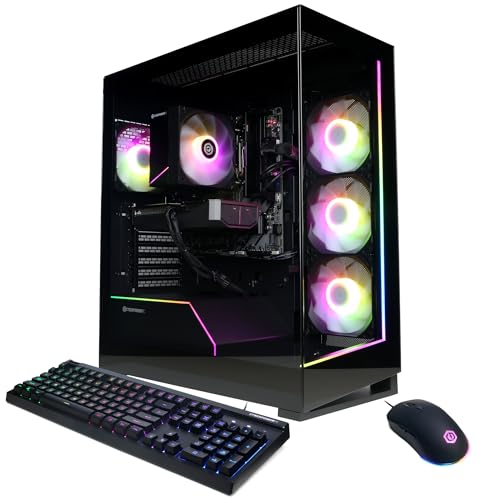
CyberPowerPC Gaming PC, AMD Ryzen 7 8700F, GeForce RTX 5060 Ti 8GB | Gamer Master, 16GB DDR5, 1TB PCIe 4.0 SSD, WiFi Ready & Windows 11 Home (GMA2900A3)
One of the home product options compared in this guide.
View on Amazon
CyberPowerPC Gaming PC, Intel Core i5-14400F, GeForce RTX 5060 8GB | Gamer Xtreme, 16GB DDR5, 1TB PCIe 4.0 SSD, WiFi Ready & Windows 11 Home (GXiVR8060A47)
One of the home product options compared in this guide.
View on Amazon
Skytech Gaming PC Storm, Ryzen 5, RTX 5060 Ti 8GB, 16GB RAM, 1TB SSD | Windows 11, AMD 5500, NVIDIA 5060 Ti 8G, NVMe SSD, DDR4 3200, 650W GOLD PSU, Wi-Fi 5, Desktop
One of the home product options compared in this guide.
View on Amazon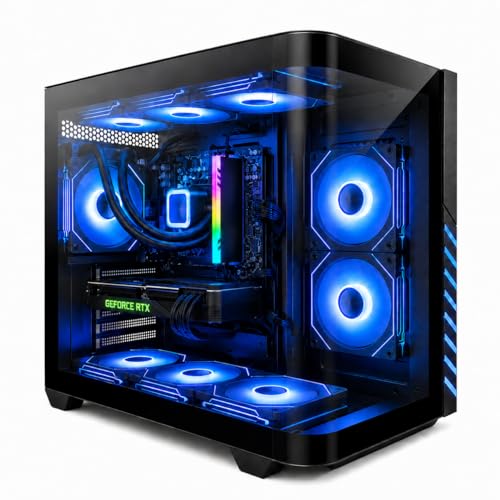
Gaming PC Desktop Liquid Cooled Ryzen 7 8700F RTX 4060 Ti 16GB DDR5 RAM | 1TB NVME WiFi-6 9×ARGB Fans Mechanical Keyboard & Mouse Windows 11
One of the home product options compared in this guide.
View on AmazonUpdated October 2026 – Cyber Monday 2026 falls on Monday, November 30, three days after Black Friday on November 27. This page lists the gaming products to watch before then.
Quick answer: the best Cyber Monday gaming deals are usually on pre-built gaming PCs, 1440p monitors, wireless headsets and mice. Watch the iBUYPOWER Element (RTX 5070) for overall value, the CyberPowerPC Gamer Xtreme (RTX 5060) for a budget entry, and the Turtle Beach Stealth 700 for audio. A real deal is a price at or near that product’s usual low, not just a large percentage off a high list price.
Best Cyber Monday Gaming Deals at a Glance
| Product | Category | Key spec | Typical price tier |
|---|---|---|---|
| iBUYPOWER Element (RTX 5070) | Gaming PC | Ryzen 9 7900X · RTX 5070 · 32GB DDR5 | Varies |
| Alienware Aurora (RTX 5070) | Gaming PC | Core Ultra 7 265F · RTX 5070 · 32GB DDR5 · WiFi 7 | Varies |
| CyberPowerPC Gamer Master (RTX 5060 Ti) | Gaming PC | Ryzen 7 8700F · RTX 5060 Ti · 16GB DDR5 | Check on Amazon |
| CyberPowerPC Gamer Xtreme (RTX 5060) | Budget gaming PC | Core i5-14400F · RTX 5060 · 16GB DDR5 | Check on Amazon |
| Turtle Beach Stealth 700 | Headset | 60mm drivers · 80-hour battery · multiplatform | Check on Amazon |
| Samsung Odyssey G5 27-inch | Monitor | 1440p · 180Hz · 1ms · FreeSync | Check on Amazon |
Tiers are rough ranges, not current prices. Check each listing during the sale.
🎮 Get More From Your Setup — Free
Prime Gaming gives you free PC games every month, in-game loot, and a free Twitch channel sub — plus fast free shipping on all the gear above. New members get a 30-day free trial.
Watch: Best Cyber Monday Gaming Deals — Video Review
How to Choose a Cyber Monday Gaming Deal
- Research before you buy: Know a product’s typical price so you can recognize a real discount. Deal fatigue leads to impulse buys that aren’t bargains.
- Prioritize the GPU in PCs: For pre-built desktops, the graphics card defines the value. Focus on the GPU tier rather than headline RAM or storage numbers.
- Check the full spec sheet: Cheap bundles sometimes cut the power supply or cooling. Read the whole configuration, not just the eye-catching parts.
- Balance your setup: A great PC deserves a decent headset and peripherals, so watch for bundle savings that round out your whole rig.
- Verify warranty and returns: Confirm the deal includes proper warranty coverage and a fair return window before committing.
The Best Cyber Monday Gaming Deals Reviewed
iBUYPOWER Element (RTX 5070)
This Ryzen 9 7900X and RTX 5070 build with 32GB DDR5 is a high-refresh 1440p powerhouse that becomes a standout when discounted. The included keyboard and mouse make it a complete deal.
Alienware Aurora (RTX 5070)
With an RTX 5070, Intel Core Ultra 7, WiFi 7, and 32GB DDR5, the Aurora is a premium pre-built that’s especially tempting on sale. Its refined design and connectivity add lasting appeal.
CyberPowerPC Gamer Master (RTX 5060 Ti)
This Ryzen 7 8700F and RTX 5060 Ti build with 16GB DDR5 and a fast SSD offers strong mid-range value that sales sweeten further. It’s a sensible pick for 1440p gaming.
Turtle Beach Stealth 700 Headset
A wireless multiplatform headset with 60mm dual drivers and an 80-hour battery, the Stealth 700 is the kind of accessory worth grabbing during Cyber Monday. It rounds out a new setup nicely.
CyberPowerPC Gamer Xtreme (RTX 5060)
This Core i5-14400F and RTX 5060 build with 16GB DDR5 is an affordable entry into modern gaming that shines on discount. It’s a great value pick for newcomers.
Every Pick Compared at a Glance
The guide above reviews each product on its own, which makes it hard to see how the picks relate to each other. The table below puts all thirteen products side by side, so you can match a PC to a monitor, a headset to a platform, and a mouse to a grip style before you buy anything.
| Product | Category | Key specs | Best for |
|---|---|---|---|
| iBUYPOWER Element | Gaming PC | Ryzen 9 7900X, RTX 5070, 32GB DDR5, 1TB NVMe | High-refresh 1440p play |
| Alienware Aurora | Gaming PC | Core Ultra 7 265F, RTX 5070, 32GB DDR5, WiFi 7 | Premium build and support |
| CyberPowerPC Gamer Master | Gaming PC | Ryzen 7 8700F, RTX 5060 Ti, 16GB DDR5, 1TB SSD | Mid-range 1440p value |
| CyberPowerPC Gamer Xtreme | Gaming PC | Core i5-14400F, RTX 5060, 16GB DDR5, 1TB SSD | Budget entry |
| Skytech Storm | Gaming PC | Ryzen 5 5500, RTX 5060 Ti, 16GB DDR4, 1TB SSD, 650W Gold PSU | Value with a recent GPU |
| ZOTAC MEK | Gaming PC | Ryzen 5 5500, RTX 5060, 16GB DDR4, 1TB SSD, WiFi 6E | Compact budget build |
| Evounic liquid-cooled PC | Gaming PC | Ryzen 7 8700F, RTX 4060 Ti, 16GB DDR5, 1TB SSD | Flashy showcase build |
| Turtle Beach Stealth 700 | Headset | 60mm drivers, 80-hour battery, multiplatform wireless | Long sessions and chat |
| Samsung Odyssey G5 27-inch | Monitor | 1440p, 180Hz, 1ms, FreeSync, HDR10 | Matching an RTX 5060-class PC |
| ASUS TUF VG27AQ3A | Monitor | 1440p fast IPS, 180Hz, 1ms, G-SYNC, speakers | IPS color on a budget |
| Logitech G305 Lightspeed | Mouse | 12,000 DPI, 6 buttons, about 250-hour battery | Budget wireless mouse |
| Razer Viper V3 HyperSpeed | Mouse | 30K DPI, 82g, up to 280-hour battery | Fast-paced shooters |
| Logitech G413 SE | Keyboard | Full-size mechanical, backlit, anti-ghosting | First mechanical keyboard |
Read the table in pairs. An RTX 5070 PC pairs naturally with a 1440p 180Hz monitor, while an RTX 5060 PC is happiest at 1080p or 1440p with tuned settings. A wireless headset suits a desk where you move around, while a wired headset suits console chat through a controller. A light mouse suits fast shooters, while a mouse with more buttons suits games with many shortcuts. If two picks share the same GPU tier, the deciding factors are memory, storage, power supply quality, and warranty, not the brand name on the case.
Sizing and Compatibility Checklist
Work through this list before you order, because most Cyber Monday returns come from fit problems, not faulty hardware.
- Desk space: measure the width and depth of your desk. A 27-inch monitor needs room for its stand, and a full-size keyboard plus a mouse pad fills a narrow desk fast.
- Monitor distance: sit where you will play and check the viewing distance. A 27-inch 1440p screen suits a normal desk depth; a larger screen at the same distance forces constant head movement.
- Power supply: confirm the PSU wattage and rating on the exact configuration. A 650W Gold unit is a sensible baseline for RTX 5060-class builds, and a stronger card needs more headroom.
- Video outputs: check that the PC has the ports your monitor needs. A 1440p high-refresh monitor wants DisplayPort or HDMI 2.1, and some monitors ship with only one cable in the box.
- Headset platform: confirm the headset works with your platform. Multiplatform wireless covers PC, console and mobile, while a wired headset plugs straight into a controller for party chat.
- Keyboard layout: decide between full-size and compact before you buy. A full-size board keeps the number pad, while a compact board leaves more room for mouse movement.
- Storage slot: for an SSD upgrade, check that your PC or console has a free M.2 2280 slot and, for a PS5, that the drive has a heatsink thin enough to fit.
- Laptop needs: if you buy a laptop instead of a desktop, weigh it against how often you will carry it. A 16-inch gaming laptop is a desk machine more than a backpack machine.
- Wi-Fi and wired network: check whether the PC has Wi-Fi 7, Wi-Fi 6E or only wired Ethernet, and whether your router sits close enough for a cable.
- Return window: confirm the return period and warranty before ordering, and keep the boxes until that window closes.
First-Day Setup and Care
A sale purchase still needs a proper setup. These steps take an evening and prevent most early problems.
- Inspect on arrival. Open the box, check for shipping damage, and confirm the model code, memory, storage and graphics card match the listing. Photograph anything that looks wrong before you plug anything in.
- Update the graphics driver. Download the latest driver from the graphics card maker, not from a random search result. A fresh driver fixes stutter and unlocks features the card shipped without.
- Set the monitor refresh rate. Display settings often default to 60Hz even on a 180Hz panel. Open the display settings, select the native resolution, then set the highest refresh rate the monitor supports, and turn on adaptive sync.
- Update headset firmware. If the headset has companion software, install it, update the firmware, and charge the headset fully before the first long session. A half-charged headset dying mid-game is an avoidable annoyance.
- Install mouse and keyboard software. Set your DPI levels, program the extra buttons, and save the profile to the device memory if the mouse supports it, so the settings travel with the mouse.
- Fit an SSD carefully. On a PS5, check Settings then Storage first to see how much room you actually use. Power the console down fully, fit the drive in the expansion slot, and let the console format it. On a PC, use a free M.2 slot and initialize the drive in disk management.
- Manage cables and airflow. Route cables away from fan intakes, leave space behind the PC for exhaust air, and keep the case off carpet. Dust filters work only if you clean them every few months.
- Test with a game you know. Play something familiar for an hour and listen for fan noise, watch for stutter, and check temperatures. A problem found on day one is far easier to return than one found after the window closes.
Who Should Skip a Cyber Monday Gaming Deal
Not every deal is a deal for you. Skip the sale, or at least skip a specific pick, if any of these apply.
- Your current setup already runs your games well. A new GPU tier means little if your favorite games already run smoothly at your monitor’s refresh rate.
- You have nowhere to put it. A second monitor, a larger case or a full-size keyboard needs desk space. Measure first, buy second.
- You are buying a gift for a platform you do not know. A PC headset, a console headset and a mobile headset are not interchangeable. Ask which console or computer the person uses before you order.
- The listing comes from an unknown third-party seller. A low offer from a seller with no history is a risk, not a bargain. Prefer listings sold by the retailer or the brand’s own store.
- You need the gear before the sale ends. Popular picks sell out and shipping slows during sale week. If you need it by a fixed date, order early or accept a backup pick.
- The configuration is wrong for your games. An 8GB graphics card struggles with maximum textures at 4K, and 16GB of system memory is tight if you stream while you play. A discount does not fix a mismatch.
- You are stretching your budget for a premium tier. A mid-range PC that fits your budget beats a premium PC that strains it. The next sale will come, and your current setup will still work until then.
Common Mistakes That Cost You the Deal
- Buying the wrong configuration variant. The same model name often hides different graphics cards, memory amounts or power supplies. Match the exact GPU, CPU, memory, storage and PSU on the listing, not just the family name.
- Trusting the crossed-out list price. A large markdown from an inflated list price can still cost more than the usual selling price elsewhere. Check a price-history tool to see what the product actually sold for in recent weeks.
- Forgetting the cable. Some monitors ship with a cable that cannot carry 1440p at high refresh. Check what is in the box and order the right DisplayPort or HDMI cable with the monitor if needed.
- Buying a bare SSD for a PS5. The console needs a drive with a heatsink, or a separate heatsink fitted to a bare drive. A bare drive in a PS5 slot overheats under load.
- Ignoring the return window. Sale items sometimes carry shorter return periods. Confirm the window and the warranty before you pay, and test the product inside that window.
- Impulse bundles. A bundle with a keyboard, mouse and headset you do not need is not a saving. Buy the parts you will actually use.
- Waiting until Monday afternoon. The best Cyber Monday gaming picks routinely sell out or revert to full price by early afternoon. Set a reminder for Sunday night or first thing Monday morning.
- Skipping the seller check. Confirm who sells and ships the item, whether the listing is new or renewed, and whether the warranty comes from the maker. A renewed listing is a different product from a new one.
Buyer Questions Answered
Should I buy a gaming laptop or a desktop on Cyber Monday?
Buy a laptop if you travel, study away from home, or play in more than one room. Buy a desktop if you want a longer upgrade path, quieter cooling, and a bigger screen for the same money. The desktop picks in this guide take standard parts you can swap later, while a laptop mostly allows memory and storage upgrades only, so buy the graphics card you will want for years.
What if my first pick sells out?
Keep a shortlist of two alternates with the same graphics tier before the sale starts, so a sold-out pick does not turn into a panic buy. Cyber Monday deals often extend through the following week as Cyber Week, so check back on Tuesday and Wednesday if Monday sells out. If an alternate has a weaker power supply or less memory, treat it as a different product and compare the full spec sheet again.
How do I verify a deal is real?
Check a price-history tool to see what the product sold for in recent weeks, then compare the same configuration across two or three retailers. A real deal sits at or near the product’s usual low. Ignore the crossed-out list price, and be wary of a listing that is always on sale. Also check the seller, the condition, and the return terms before you order.
Is a wired headset better than wireless for console chat?
A wired headset plugs straight into the controller, needs no charging, and never drops its connection, which makes it the simple choice for party chat. A wireless headset suits players who move around the room or hate cables on the desk. If you play mostly on a PS5, a wired headset with a detachable microphone is hard to beat for reliability.
Do I need a new SSD if I already have 1TB?
Check how much room you actually use before you buy. On a PS5, open Settings and then Storage; on a PC, check your drive usage in settings. If deleting a few old games frees enough space, keep your money. If you regularly delete games to make room, a 2TB drive with a heatsink is the right upgrade, and it fits both a PS5 and a PC.
Does Cyber Monday beat Black Friday for gaming gear?
For online-only offers on PCs, monitors and accessories, Cyber Monday often matches or beats Black Friday, and it is easier to compare across retailers in real time. Black Friday can favor in-store bargains on consoles and games. If you see a clear low price on a PC build you want on Black Friday, there is rarely a reason to wait for Monday, because stock can run out.
More Cyber Monday Gaming Deals to Watch
Skytech Storm (RTX 5060 Ti) – Best Value 1080p to 1440p Pre-Built
The Skytech Storm pairs a Ryzen 5 5500 with an RTX 5060 Ti 8GB, 16GB of DDR4 RAM, a 1TB NVMe SSD and a 650W Gold power supply, according to its listing. The older Ryzen 5 and DDR4 platform keeps cost down while the graphics card does most of the work for gaming. It makes sense if you want a recent GPU tier at a lower total price and do not care about the newest CPU platform.
- Ryzen 5 5500 processor
- RTX 5060 Ti 8GB graphics
- 16GB DDR4 RAM and 1TB NVMe SSD
- 650W Gold power supply and Wi-Fi
Pros: strong GPU for the money, Gold power supply. Cons: older DDR4 platform with limited upgrade path. Skip it if you want a long upgrade runway on the same motherboard.
ZOTAC MEK Gaming PC (RTX 5060) – Best Compact Budget Build
The ZOTAC MEK pairs a Ryzen 5 5500 with an RTX 5060 8GB, 16GB DDR4, a 1TB NVMe SSD, a 650W 80+ Gold power supply and WiFi 6E. It is a sensible entry-level 1080p and light 1440p gaming desktop from an established graphics-card maker, and a good Cyber Monday target if the price drops toward the low end of its tier.
- Ryzen 5 5500 and RTX 5060 8GB
- 16GB DDR4 and 1TB NVMe SSD
- 650W 80+ Gold power supply
- WiFi 6E
Pros: brand-name build, Gold PSU, current-generation GPU. Cons: 8GB of video memory limits ultra settings in newer games. Skip it if you play at high resolutions with maximum textures.
Evounic Ryzen 7 8700F Liquid-Cooled PC (RTX 4060 Ti) – Best for Flashy Builds
This Evounic desktop pairs a Ryzen 7 8700F with an RTX 4060 Ti, 16GB DDR5 and a 1TB NVMe SSD, with liquid cooling and nine ARGB fans, WiFi 6 and Bluetooth 5.4. It is an appealing showcase build if the discount is real, though the previous-generation GPU means you should compare it with newer RTX 5060-class machines at a similar price.
- Ryzen 7 8700F and RTX 4060 Ti
- 16GB DDR5 and 1TB NVMe SSD
- Liquid cooling with nine ARGB fans
- WiFi 6 and Bluetooth 5.4
Pros: strong CPU, lots of lighting, fast RAM. Cons: older GPU generation and a lesser-known brand. Skip it if you want a long, well-known support record.
Samsung Odyssey G5 27-Inch – Best Monitor Deal Target

Samsung 27" Odyssey G5 (G51F) Series QHD (1440P) Gaming Monitor | 180Hz, 1ms, AMD FreeSync, HDR10, Height Adj Stand, Black Equalizer, Virtual Aim Point, Auto Source Switch+ (LS27FG512ENXZA)
One of the home product options compared in this guide.
View on AmazonThe Samsung Odyssey G5 (G51F) is a 27-inch QHD 1440p gaming monitor with a 180Hz refresh rate, 1ms response, AMD FreeSync, HDR10 and a height-adjustable stand. It matches an RTX 5060-class PC well, because 1440p is the usual sweet spot for those cards.
- 27-inch QHD (2560 x 1440) panel
- 180Hz refresh rate and 1ms response time
- AMD FreeSync and HDR10
- Height-adjustable stand
Pros: high refresh at 1440p, adjustable stand. Cons: HDR10 on an entry panel is modest. Skip it if you need a premium color-accurate display.
ASUS TUF Gaming VG27AQ3A – Best Fast IPS Monitor

ASUS TUF Gaming VG27AQ3A 27 Inch 1440p 180Hz G-SYNC Gaming Monitor | Fast IPS, ELMB Sync, 1ms, 130% sRGB, Built-In Speakers, FreeSync Premium, HDR10, for PS5 and Xbox, 3yr warranty
Chosen because it lists an explicit depth/thickness.
View on AmazonThe ASUS TUF Gaming VG27AQ3A is a 27-inch 1440p fast IPS monitor with a 180Hz refresh rate, G-SYNC compatibility, ELMB Sync, 1ms response, 130% sRGB coverage and built-in speakers. It suits players who want IPS colors without a high price.
- 27-inch 1440p fast IPS panel
- 180Hz refresh rate and 1ms response
- ELMB Sync motion blur reduction
- Built-in speakers
Pros: IPS color, fast response, speakers. Cons: built-in speakers are basic. Skip it if you want an OLED or 4K monitor.
Logitech G305 Lightspeed – Best Budget Wireless Mouse

Logitech G305 LIGHTSPEED Wireless Gaming Mouse, Hero 12K Sensor - Black | 12,000 DPI, lightweight, 6 programmable buttons, 250h battery life, on-board memory, PC/Mac, lightweight gaming mouse
One of the home product options compared in this guide.
View on AmazonThe Logitech G305 is a lightweight wireless gaming mouse with 12,000 DPI, six programmable buttons and a battery rated for about 250 hours. It is a classic budget pick that rarely needs a deep discount to be good value.
- Lightspeed wireless connection
- 12,000 DPI sensor
- Six programmable buttons
- About 250 hours of battery life
Pros: light, long battery life, low price. Cons: AA battery design is bulkier than rechargeable rivals. Skip it if you want a premium ultra-light esports mouse.
Razer Viper V3 HyperSpeed – Best Esports-Style Mouse

Razer Viper V3 HyperSpeed Wireless PC Gaming Mouse, 82g, Black | 30K DPI Optical Sensor, Up to 280 Hr Battery Life, Mechanical Switches Gen-2, 6 Programmable Buttons, 1 x AA Battery included
One of the home product options compared in this guide.
View on AmazonThe Razer Viper V3 HyperSpeed is a lightweight 82g wireless gaming mouse with a 30K DPI optical sensor and up to 280 hours of battery life. It targets fast-paced shooters where low weight and tracking matter.
- 82g wireless design
- 30K DPI optical sensor
- Up to 280 hours of battery life
- HyperSpeed wireless
Pros: light, accurate sensor, long battery life. Cons: symmetrical shape does not suit every grip. Skip it if you prefer a heavier, more ergonomic mouse.
Logitech G413 SE – Best Budget Mechanical Keyboard

Logitech G413 SE Full-Size Mechanical Gaming Keyboard, Black Aluminum | Backlit keyboard with tactile mechanical switches, anti-ghosting, and compatible with Windows and macOS
One of the home product options compared in this guide.
View on AmazonThe Logitech G413 SE is a full-size mechanical gaming keyboard with backlighting and anti-ghosting, compatible with Windows and macOS. It gives you a real mechanical feel without a big spend.
- Full-size mechanical layout
- Backlit keys
- Anti-ghosting
- Windows and macOS compatible
Pros: sturdy, simple, solid value. Cons: basic backlighting. Skip it if you want hot-swappable switches or a compact layout.
Best Gaming Laptop Deals for Cyber Monday 2026
The best gaming laptop deals for Cyber Monday 2026 are usually RTX 5060-class models with 16 GB of memory. Top picks to watch: the ASUS ROG Strix G16 (2025) with RTX 5060 for a 165 Hz screen, and the Acer Nitro V 16S AI with RTX 5060 for a Ryzen-based option.
| Laptop | GPU | Screen | Best for |
|---|---|---|---|
| ASUS ROG Strix G16 (2025) | RTX 5060 | 16-inch FHD+ 16:10, 165 Hz | Fast, sharp 1080p-class play |
| Acer Nitro V 16S AI | RTX 5060 Laptop GPU | 16-inch | Ryzen-based all-rounder |
ASUS ROG Strix G16 (2025) — Best for a Fast 16-Inch Screen

ASUS ROG Strix G16 (2025) Gaming Laptop, 16” FHD+ 16:10 165Hz/3ms, NVIDIA® GeForce RTX™ 5060, Intel® Core™ i7 Processor 14650HX, 16GB DDR5, 1TB Gen 4 SSD, Wi-Fi 7, Windows 11 Home, G615JMR-AS74
One of the home product options compared in this guide.
View on Amazon- GPU: NVIDIA GeForce RTX 5060
- CPU: Intel Core i7 processor
- Display: 16-inch FHD+ 16:10, 165 Hz, 3 ms
- Series: ROG Strix gaming line
Pros: Smooth 165 Hz panel; taller 16:10 screen; strong mid-range GPU.
Cons: Gaming laptops run warm and loud under load; battery life is short while gaming.
Skip it if you need a thin laptop for travel or mostly play on battery.
Acer Nitro V 16S AI — Best Ryzen Option for the Money

Acer Nitro V 16S AI Gaming Laptop | AMD Ryzen 7 260 Processor | NVIDIA GeForce RTX 5060 Laptop GPU (572 AI Tops) | 16" WUXGA IPS 180Hz Display | 32GB DDR5 | 1TB Gen 4 SSD | Wi-Fi 6 | ANV16S-41-R2AJ
One of the home product options compared in this guide.
View on Amazon- CPU: AMD Ryzen 7 260 processor
- GPU: NVIDIA GeForce RTX 5060 Laptop GPU (572 AI TOPS)
- Display: 16-inch
- Design: 16S slim-profile Nitro V line
Pros: AI-ready RTX 5060 hardware; modern Ryzen 7 chip; 16-inch screen suits work and play.
Cons: Entry-tier cooling and build compared with premium lines.
Skip it if you want a premium metal chassis or a very bright screen.
What to expect at this tier:
- RTX 5060 laptops handle most current games at 1080p with high settings.
- 16 GB of memory is the floor; 32 GB is better for streaming.
- Check the SSD size; 512 GB fills quickly with modern games.
- A 144 Hz or higher screen is a common feature to look for.
- Match the exact configuration: the same model name often ships in several versions.
Cyber Monday 2026 Gaming Console Deals
Cyber Monday 2026 gaming console deals most often come as bundles and accessory discounts rather than deep cuts on the console itself. The Nintendo Switch 2 is the hardware to watch, with the Mario Kart World game and an extra controller as natural add-ons. PlayStation 5 and Xbox listings change often, so compare bundle contents before you pay.
Nintendo Switch 2 System — Best Console to Watch

- Type: Nintendo Switch 2 console
- Screen: 7.9-inch handheld display
- Play modes: handheld, tabletop, or docked to a TV
- Storage: 256 GB built in
Pros: Plays in handheld or on a TV; strong first-party game lineup.
Cons: Console deals tend to be small; extra storage and accessories add cost.
Skip it if you only play on PC.
Mario Kart World (Nintendo Switch 2) — Best Game to Pair With the Console

Mario Kart™ World (Nintendo Switch 2)
One of the home product options compared in this guide.
View on Amazon- Platform: Nintendo Switch 2
- Genre: kart racing
- Play: single-player and local or online multiplayer
Pros: Easy to pick up for any age; strong for group play.
Cons: First-party games rarely see deep discounts.
Skip it if you do not own a Switch 2.
Xbox Wireless Controller — Best Controller for PC and Console
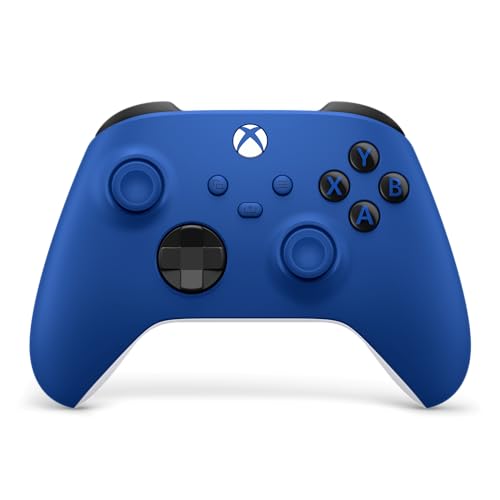
XBOX Wireless Gaming Controller | Shock Blue | Textured triggers and bumpers, Hybrid D-pad, XBOX Wireless, Bluetooth, USB-C, Play across Console & PC & Cloud Devices
Chosen because it is a hybrid/pocket-spring build.
View on Amazon- Features: textured triggers and bumpers, hybrid D-pad
- Connectivity: Xbox Wireless, Bluetooth, and USB
- Works with: Xbox consoles and Windows PCs
Pros: Easy plug-and-play on PC; comfortable grip; widely supported.
Cons: Needs batteries or a rechargeable pack.
Skip it if you want back paddles or Hall effect sticks.
Cyber Monday 2026 GPU Deals
For Cyber Monday 2026 GPU deals, the two cards worth watching are the ASUS Prime GeForce RTX 5060 Ti 16GB for 1440p value and the MSI Gaming RTX 5070 12G Ventus 2X OC for higher frame rates. Graphics cards usually see smaller discounts than monitors, so compare against the card’s recent normal price.
ASUS Prime GeForce RTX 5060 Ti 16GB — Best Value 1440p GPU to Watch

ASUS PRIME GeForce RTX 5060 Ti 16GB GDDR7 Gaming Graphics Card | PCIe 5.0, HDMI/DP 2.1, 2.5-slot, Axial-tech Fans, Dual BIOS
One of the home product options compared in this guide.
View on Amazon- Memory: 16 GB GDDR7
- Interface: PCIe 5.0
- Ports: HDMI and DisplayPort 2.1
- Cooler: 2.5-slot, Axial-tech fans
Pros: 16 GB of memory helps in texture-heavy games; compact enough for many cases.
Cons: 128-bit memory bus; a step below the RTX 5070 for raw speed.
Skip it if you play at 4K.
MSI Gaming RTX 5070 12G Ventus 2X OC — Best Step-Up GPU to Watch

msi Gaming RTX 5070 12G Ventus 2X OC Graphics Card (12GB GDDR7, 192-bit, Extreme Performance: 2557 MHz, DisplayPort x3 2.1a, HDMI 2.1b, NVIDIA Blackwell Architecture)
One of the home product options compared in this guide.
View on Amazon- Memory: 12 GB GDDR7, 192-bit
- Boost: up to 2557 MHz in the listed mode
- Cooling: dual-fan Ventus 2X design
- Outputs: three DisplayPort connectors
Pros: Strong 1440p performance; dual-fan design fits many cases.
Cons: 12 GB can be tight for some 4K texture settings.
Skip it if your power supply or case cannot fit a dual-fan card.
Cyber Monday Video Game and Storage Deals
Video games and storage are the easiest Cyber Monday wins: digital game sales are broad, and 2 TB SSDs often drop in price.
Samsung 990 PRO 2TB NVMe SSD — Best SSD to Watch

Samsung SSD 990 PRO 2TB, PCIe 4.0 M.2 2280, Up to 7,450 MB/s | NVMe Internal Solid State Hard Drive for High End Computing, Gaming, and Heavy Duty Workstations, (MZ-V9P2T0B/AM)
One of the home product options compared in this guide.
View on Amazon- Capacity: 2 TB
- Interface: PCIe 4.0 x4, M.2 2280
- Read speed: up to 7,450 MB/s
- Use: PC and compatible consoles
Pros: Fast, reliable Gen 4 drive; big enough for a large game library.
Cons: Gen 5 drives are faster on paper, though most games load much the same.
Skip it if you already have a 2 TB drive.
Cyber Monday 2026 Gaming Deals by Category: What to Expect
- Gaming laptops: bundle upgrades and price drops on RTX 5060 and RTX 5070 models.
- Consoles: bundles and accessory savings; small cuts on the hardware.
- GPUs: modest drops; compare model versions closely.
- Games: wide digital sales on older titles.
- Storage: frequent discounts on 1 TB and 2 TB SSDs.
When Is Cyber Monday 2026 and What Gaming Gear Goes on Sale?
Cyber Monday 2026 is on Monday, November 30, following Black Friday on November 27. Many retailers start gaming deals earlier in the week, and some run early sales in mid-November. Pre-built gaming PCs, monitors, headsets, mice and keyboards are the categories most likely to see real drops, because they have many competing brands. Consoles and the newest graphics cards see smaller cuts.
How We Pick Cyber Monday Gaming Deals
This list is based on research, not on handling the products. We compare maker specifications, listing details and recurring buyer feedback, and we favor products with proven specs and well-known brands. We do not list sale prices here because they change by the hour, so always confirm the current price on the listing.
How to Tell a Real Cyber Monday Gaming Deal From a Fake One
- Check the usual price: a product that is always “on sale” at a high list price has no real discount. Compare to its recent normal price range.
- Ignore the percentage: a 40% discount from an inflated price can still cost more than a normal price elsewhere.
- Compare the same configuration: pre-builts often come in several versions with different RAM, storage or power supplies. Match the exact GPU, CPU and PSU.
- Look at the power supply and cooling: a low price sometimes means a basic PSU or a small cooler. Gold-rated 650W units are a good baseline for RTX 5060-class builds.
- Confirm the warranty and return window: a longer return period protects you from defects and from deals that arrive late.
- Beware of unknown brands: an unfamiliar brand with an old CPU and a new GPU name may hide weak parts. Stick with known builders for pre-built PCs.
Best Cyber Monday Gaming PC Deals: What to Look For
For a pre-built, graphics card tier decides the experience. An RTX 5060 or RTX 5060 Ti suits 1080p and 1440p gaming, an RTX 5070 suits high-refresh 1440p, and larger cards handle 4K. Look for at least 16GB of RAM, a 1TB NVMe SSD and a 650W Gold power supply for midrange cards. DDR5 platforms such as the Ryzen 7 8700F and Core i5-14400F systems here offer faster RAM, while DDR4 builds can be cheaper.
Cyber Monday Gaming Deals by Budget
If you only need three, chase the iBUYPOWER Element for the best overall PC, the CyberPowerPC Gamer Xtreme for a budget start, and the Samsung Odyssey G5 for a monitor to match.
Cyber Monday vs Black Friday for Gaming Gear
Black Friday often brings more doorbuster deals on consoles and games, while Cyber Monday focuses on online-only offers for PCs, monitors and accessories. Prices can match between the two days, and some retailers sell the same sale for the entire weekend. If you see a clear low price on a PC build you want on Black Friday, there is rarely a reason to wait for Monday, because stock can run out.
What are the best gaming laptop deals for Cyber Monday 2026?
RTX 5060-class laptops such as the ASUS ROG Strix G16 (2025) and Acer Nitro V 16S AI are the best value to watch. Look for 16 GB of memory and a 144 Hz or faster screen.
Which gaming consoles go on sale for Cyber Monday 2026?
Nintendo Switch 2, PlayStation 5, and Xbox listings all appear, mostly as bundles. Compare what is in the box, because the console price itself often changes little.
Are there Cyber Monday 2026 GPU deals worth waiting for?
Yes, but expect modest drops. Compare the current price to the card’s recent normal price, and focus on RTX 5060 Ti and RTX 5070 models.
Are there Wargaming Cyber Monday deals?
Usually as in-game bundles, not hardware discounts. Wargaming titles are free to play, so the sales are for premium items and starter packs on the game’s own store.
Frequently Asked Questions
Is Cyber Monday better than Black Friday for gaming?
Cyber Monday often has deeper online-only deals on PCs and peripherals, while Black Friday can favor in-store bargains. Both are worth watching.
How do I spot a genuine Cyber Monday deal?
Research typical prices ahead of time and compare against historical lows. A real deal shows a meaningful, verifiable drop.
Should I buy a pre-built PC on Cyber Monday?
Yes, if the GPU and overall configuration match your needs at a discounted price. Focus on the graphics card and full spec sheet.
Are headset deals worth it during the sales?
Definitely. Premium headsets like the Stealth 700 often see strong discounts, making Cyber Monday a great time to complete your setup.
When Is Cyber Monday 2026?
Cyber Monday 2026 is on Monday, November 30, the Monday after Thanksgiving weekend. Black Friday is on November 27.
What Gaming Products Have the Best Cyber Monday Deals?
Pre-built gaming PCs, 1440p monitors, wireless mice and headsets usually see the biggest real discounts. Consoles and brand-new graphics cards see smaller cuts.
Is a Gaming PC Worth Buying on Cyber Monday?
Yes, if the GPU, RAM, SSD and power supply match what you need at a price near its usual low. Compare configurations carefully, because the same model name can hide different parts.
How Much RAM and Storage Should a Cyber Monday Gaming PC Have?
Aim for 16GB of RAM and a 1TB NVMe SSD at minimum. Pick 32GB if you stream or multitask heavily.
Should I Wait for Cyber Monday or Buy Early?
If an early sale shows a clear low price on a product you want, buying early is fine, because popular PCs and monitors can sell out. Otherwise Cyber Monday itself is a safe target.
Final Thoughts
The iBUYPOWER Element RTX 5070 is the best overall deal to chase, the Alienware Aurora is the premium pick worth grabbing on sale, and the CyberPowerPC Gamer Xtreme is the smart budget entry into modern gaming.
FAQ
Should I buy a gaming laptop or a desktop on Cyber Monday?
What if my first pick sells out?
How do I verify a deal is real?
Is a wired headset better than wireless for console chat?
Do I need a new SSD if I already have 1TB?
Does Cyber Monday beat Black Friday for gaming gear?
When Is Cyber Monday 2026 and What Gaming Gear Goes on Sale?
What are the best gaming laptop deals for Cyber Monday 2026?
More from Amazon
Programs that pair well with the guide above. Offers and eligibility are set by Amazon and may change.
Send a Prime gift membership to someone who would use free shipping and Prime Video.
Gift Amazon PrimeGive audiobooks to someone who loves to listen. Plans and prices are set by Amazon.
Gift AudibleFree shipping on eligible items, Prime Video and more. Eligible new members can start with a free trial.
Start a Prime free trialAd-free music streaming. Eligible new subscribers can start with a free trial.
Try Music Unlimited freeAs an Amazon Associate we earn from qualifying purchases.