
Key takeaways
- Comparing mAh without checking voltage. Watt-hours provide the clearer energy comparison. A battery advertised as 6,880mAh may use a different voltage than a 6,500mAh pack.
- Buying by “OLED/LCD” wording alone. Verify the exact model designation, connector, and installation fit. Compatibility labels can be broad or confusing.
- Measuring only the console body. A docked, cabled Steam Deck needs far more depth than its 1.93-inch body depth suggests.
- Forgetting protective-case bulk. Thick grips and hard shells can prevent a Deck from fitting a dock, drawer, or molded travel case.
- Using a tight enclosed cubby while playing. The Deck needs airflow. A storage compartment is not automatically a safe gaming compartment.
- Assuming a replacement battery adds capacity beyond the OLED. Many third-party packs are simply near-50Wh replacements, not meaningful upgrades over the standard OLED battery.
What's inside
The Short Answer
The Steam Deck OLED has a larger built-in battery than the original Steam Deck LCD: 50Wh versus 40Wh. That is a 10Wh increase, or 25% more battery capacity on paper. The two handhelds have essentially the same exterior footprint, so an OLED does not require more shelf, drawer, dock, or travel-case space than an original model.
For buyers comparing battery replacements, capacity is more useful than milliamp-hours alone. The original Steam Deck battery is rated at approximately 40Wh, while the Steam Deck OLED battery is rated at 50Wh. Because replacement packs may use slightly different nominal voltages, a listing showing 6,500mAh is not automatically larger than one showing 6,880mAh. Check the watt-hour rating, voltage, connector arrangement, and exact Steam Deck compatibility before ordering.
As an Amazon Associate we earn from qualifying purchases at no extra cost to you. Product prices and availability are accurate as of the date shown and are subject to change.


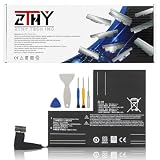
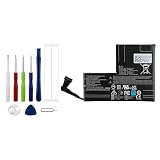
Both versions measure about 11.73 inches wide, 4.61 inches tall, and 1.93 inches deep. The OLED weighs less at roughly 1.41 pounds, compared with about 1.47 pounds for the original LCD model. In a media cabinet, bedside setup, office drawer, or gaming station, the practical space difference is zero; the decision is about battery capacity, screen technology, condition, and price.
As of 2026, replacement batteries commonly cost about $46 to $60 before tools, shipping, or installation. Examples in the market include 50Wh-class replacement packs around $49.99 and higher-capacity-marketed packs around $59.99. Treat third-party capacity claims carefully, particularly when a product is advertised for both LCD and OLED systems.
Standard Sizes
| Measurement | Original Steam Deck LCD | Steam Deck OLED | What It Means for Your Space |
|---|---|---|---|
| Console width | 11.73 in / 29.8 cm | 11.73 in / 29.8 cm | Use a shelf or drawer opening at least 12.5 inches wide for easy access. |
| Console height | 4.61 in / 11.7 cm | 4.61 in / 11.7 cm | A 5.5-inch-tall compartment gives reasonable finger clearance. |
| Console depth | 1.93 in / 4.9 cm | 1.93 in / 4.9 cm | Allow 3 inches without a case, or more when cables remain attached. |
| Weight | 1.47 lb / 669 g | 1.41 lb / 640 g | The OLED is about 1 ounce lighter, but both need a stable stand or tray. |
| Built-in battery capacity | 40Wh | 50Wh | The OLED has 10Wh more capacity, a 25% increase. |
| Approximate battery specification | 5,313mAh at 7.7V | 6,500mAh at 7.7V | Use watt-hours as the primary comparison figure for replacement packs. |
| Practical dock-and-cable depth | 6 to 8 in / 15.2 to 20.3 cm | 6 to 8 in / 15.2 to 20.3 cm | Extra room prevents strain on the USB-C cable and leaves ventilation space. |
Neither console is furniture-sized, but both are wide for a handheld. A narrow side-table cubby, small charging drawer, or wall-mounted media shelf can feel cramped if it is sized only for a phone or Nintendo Switch. Plan around the full 11.73-inch width, then add clearance for a case, charging cable, stand, and airflow.
Do not assume a 50Wh replacement battery is physically identical simply because it has the same watt-hour figure as the OLED battery. Battery housing shape, screw locations, cable length, connector position, protective foam, and battery-management electronics all matter. A 53Wh F7A/F7G replacement pack listed near $49.99 may be appropriate only for the specific models named by its manufacturer. Likewise, a 50.08Wh, 7.74V battery with a toolkit, often around $49.99, should be matched by model and part number rather than capacity alone.
How to Measure Your Space
- Measure the clear interior width. Use a tape measure inside the drawer, cubby, shelf, or basket—not the exterior furniture width. Aim for at least 12.5 inches (31.8 cm) of clear width for a bare Steam Deck and 13.5 inches (34.3 cm) if it will stay in a protective case.
- Measure usable depth with the door closed. A bare Steam Deck needs only about 2 inches (4.9 cm) of depth, but a charging setup needs more. Allow 6 to 8 inches (15.2 to 20.3 cm) for a dock, the USB-C connector, and a gently curved cable.
- Check vertical clearance. The console is 4.61 inches (11.7 cm) tall. For a drawer or cubby, 5.5 inches (14 cm) is a comfortable minimum. A vertical stand may require 7 inches (17.8 cm) or more, depending on the stand angle.
- Account for the case. Measure the actual protective case rather than assuming all cases add the same amount. Rugged shells, grips, and travel cases can add substantial bulk around the handles and triggers.
- Leave room for heat and hands. Avoid a sealed compartment while gaming or charging. Leave at least 1 inch (2.5 cm) around the vents where possible, and make sure you can grip the console without scraping it against furniture edges.
- Plan the cable route. The USB-C port is at the top edge. Measure enough cable slack to reach that edge without a sharp bend. If the Deck sits in a dock, confirm the dock supports its full width and does not interfere with a case.
By Room or Use Case
Living Room TV Setup
For a living room console table or media cabinet, reserve a shelf area at least 13 inches wide by 8 inches deep (33 by 20 cm). That accommodates either Steam Deck, a compact dock, and cable clearance. The OLED’s 50Wh battery is useful for handheld sessions away from the television, but once docked, the key concern is ventilation. Do not place the Deck directly against a cabinet wall or bury it under remotes, blankets, or game cases.
Bedroom Nightstand or Charging Drawer
A 13-by-8-inch area also works well on a nightstand. If storing it in a drawer, choose one at least 5.5 inches tall and avoid charging under loose clothing or papers. A shallow tray prevents the Steam Deck from sliding into the back of a deep drawer. For overnight charging, use a quality USB-C charger and cable rated for the job; the Deck can draw up to 45W through USB-C Power Delivery.
Desk, Office, or Small Apartment Setup
On a compact desk, a vertical stand can reduce the footprint, but measure height rather than depth. Leave enough top clearance for the USB-C port and enough rear clearance for ventilation. A 7-inch-tall open section is a sensible starting point for a standing setup. The 1.41-pound OLED is slightly easier to move between desk and sofa, although both models are substantial enough to benefit from a stable stand.
Travel, Commuting, and Hotel Use
For travel, the carrying case—not the bare console—is the measurement that matters. Select a bag compartment wider than 13.5 inches and deeper than 6 inches if carrying the Deck with a charger and power bank. The OLED’s 50Wh internal battery provides more capacity than the original 40Wh model without increasing the handheld’s exterior size. Still, real runtime changes with game settings, refresh rate, wireless use, and screen brightness, so do not buy based on a single claimed hours-of-play figure.
Common Sizing Mistakes
- Comparing mAh without checking voltage. Watt-hours provide the clearer energy comparison. A battery advertised as 6,880mAh may use a different voltage than a 6,500mAh pack.
- Buying by “OLED/LCD” wording alone. Verify the exact model designation, connector, and installation fit. Compatibility labels can be broad or confusing.
- Measuring only the console body. A docked, cabled Steam Deck needs far more depth than its 1.93-inch body depth suggests.
- Forgetting protective-case bulk. Thick grips and hard shells can prevent a Deck from fitting a dock, drawer, or molded travel case.
- Using a tight enclosed cubby while playing. The Deck needs airflow. A storage compartment is not automatically a safe gaming compartment.
- Assuming a replacement battery adds capacity beyond the OLED. Many third-party packs are simply near-50Wh replacements, not meaningful upgrades over the standard OLED battery.
FAQ
Is the Steam Deck OLED physically bigger than the original Steam Deck?
No. Both are approximately 11.73 inches wide, 4.61 inches tall, and 1.93 inches deep. The OLED is slightly lighter, at about 1.41 pounds versus 1.47 pounds for the original LCD model.
How much larger is the Steam Deck OLED battery?
The OLED battery is rated at 50Wh, compared with 40Wh in the original Steam Deck. That is a 10Wh increase, equal to 25% more battery capacity.
Will a 50Wh replacement battery fit both Steam Deck versions?
Not necessarily. Even when listings mention both LCD and OLED compatibility, confirm the exact model, battery part number, connector, cable routing, and installation instructions. Capacity alone does not confirm physical fit.
How much space should I allow for a Steam Deck charging station?
For a simple horizontal setup, allow at least 13 inches wide by 8 inches deep by 5.5 inches high. Increase that space if you use a bulky case, a vertical stand, external storage, or a dock with multiple cables.





