Our Top Picks
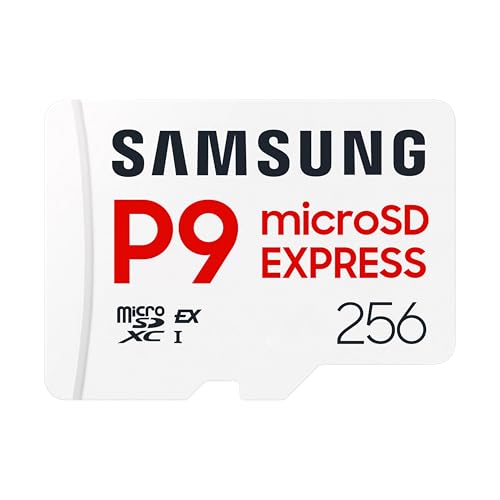 Samsung P9 Express microSDXC 256GB for Nintendo-Switch™ 2256GB0.59 x 0.43 x 0.1 inches0 poundsCheck on Amazon
For a Steam Deck or an original Nintendo Switch, the SanDisk Extreme 1TB microSD card is the strongest pick on stated specs: UHS-I, U3, V30 and A2 ratings with read speeds listed up to 190MB/s and write speeds up to 130MB/s, plus the roomiest capacity in the group. The key facet to understand is that a microSD card must match the console’s slot standard. The Steam Deck and original Switch use ordinary UHS-I microSD cards, while the Nintendo Switch 2 accepts only the newer microSD Express type, which is why the last two cards in this list are for Switch 2 owners and not for the other handhelds.
Quick List
- Silicon Power 1TB Superior Gaming – best for a large-capacity card made with Steam Deck, ROG Ally and Switch in mind
- Samsung PRO Plus Sonic the Hedgehog 1TB – best for buyers who want a long warranty and Samsung’s durability claims
- SanDisk Extreme 1TB – best overall for Steam Deck and original Switch libraries
- SanDisk Extreme 256GB – best for a smaller, faster-rated card on a tighter plan
- Samsung P9 Express 256GB – best for Nintendo Switch 2 owners who need a compatible Express card
- Samsung microSD Express 256GB – best as a second Switch 2 Express option
Which One Is Right for You?
| If you… | Choose |
|---|---|
| own a Steam Deck or original Switch and want the biggest, fastest-rated card | SanDisk Extreme 1TB |
| want a long manufacturer warranty and water and temperature protection claims | Samsung PRO Plus Sonic the Hedgehog 1TB |
| want a gaming-labeled 1TB card with error correction | Silicon Power 1TB Superior Gaming |
| only need a few installed games and want a high stated read speed | SanDisk Extreme 256GB |
| own a Nintendo Switch 2 | Samsung P9 Express 256GB |
| own a Switch 2 and want a second compatible option | Samsung microSD Express 256GB |
Do not mix the groups. A standard UHS-I card will not work as game storage in a Switch 2, and a microSD Express card is overkill for a Steam Deck or original Switch because their slots cannot use the extra speed. Decide which console you own first, then choose the capacity.

Silicon Power 1TB Superior Gaming Micro SDXC UHS-I (U3), V30 4K A2,High Speed MicroSD Card with Adapter, Design for Steam Deck, ROG Ally and Nintendo-Switch
Chosen because it specifies V30 4K A2 and High Speed MicroSD Card with Adapter.
View on Amazon
Samsung PRO Plus Sonic The Hedgehog 1TB microSDXC + Adapter, Up to 180MB/s | Full HD & 4K UHD, UHS-I, C10, U3, V30, A2 microSD for Nintendo Switch, Steam Deck, GoPRO, DJI Drone, Tablets (MB-MD1T0SA/LC1)
Chosen because it specifies Up to 180MB/s and Full HD & 4K UHD.
View on Amazon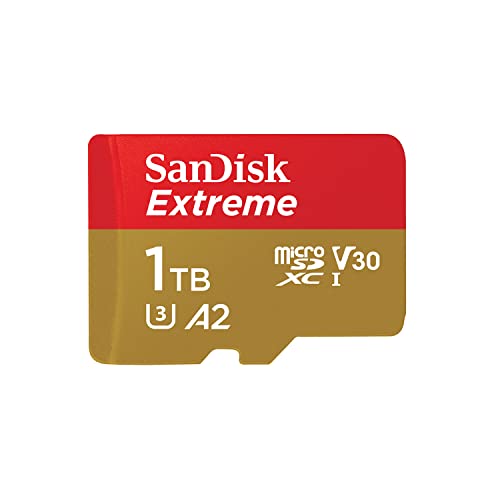
SANDISK 1TB Extreme microSD Card + Adapter, Up to 190MB/s Read Speeds | UHS-I, V30, 5K & 4K UHD, U3, C10, A2, Up to 130MB/s Write Speeds, Ideal for Action Cam, Drone, Smartphone- SDSQXAV-1T00-GN6MA
Chosen because it specifies Up to 190MB/s Read Speeds and UHS-I.
View on Amazon
SANDISK 256B Extreme microSD Card + Adapter, Up to 245MB/s Read Speeds | UHS-I, V30, 5K & 4K UHD, U3, C10, A2, Up to 170MB/s Write Speeds, Ideal for Action Cams+Drones, Android- SDSQXH9-256G-GZ6MA
Chosen because it specifies Up to 245MB/s Read Speeds and UHS-I.
View on AmazonSamsung P9 Express microSDXC 256GB for Nintendo-Switch™ 2 | Express microSD Card for Nintendo-Switch™ 2 (MB MK256T/AM)
Chosen because it specifies Express microSD Card for Nintendo-Switch™ 2 (MB MK256T/AM).
View on Amazon
Samsung microSD Express Card – 256GB for Nintendo Switch™ 2
Chosen because it specifies 256GB for Nintendo Switch™ 2.
View on AmazonAll 6 Picks in Detail
1. Silicon Power 1TB Superior Gaming – Best for a Large Card Aimed at Handheld Gamers
As an Amazon Associate we earn from qualifying purchases at no extra cost to you.

The Silicon Power Superior Gaming is a 1TB microSDXC card whose listing says it is designed for handheld gaming devices including the Steam Deck, ROG Ally and Nintendo Switch. It carries UHS Speed Class 3 (U3), Video Speed Class 30 (V30) and Application Performance Class A2 ratings, the three labels that matter most for running games from a card. The listing also mentions automatic error correction and a five-year limited warranty. A full-size adapter comes with it, though a handheld only needs the microSD itself.
Practical note: a gaming-labeled card from a mid-tier brand can be a sensible way to reach 1TB without relying on the biggest names, but the quality of the support and warranty process varies by brand, so keep your proof of purchase and read the warranty terms before filling the card with a library you cannot easily replace.
Who it suits: players with a large library who want a one-card solution and are comfortable choosing a brand outside the two biggest names. The listing does not give a read or write speed in megabytes per second in the text we can see, so expect UHS-I-class performance and check the product page if you want an exact figure.
- Capacity: 1TB microSDXC
- Ratings: UHS-I, U3, V30, A2
- Includes an adapter
- Error correction and a five-year limited warranty per the listing
- Read and write speeds in MB/s: confirm on listing
Pros
- Explicitly aimed at Steam Deck, ROG Ally and Switch
- Full set of gaming-relevant ratings
Cons
- No speed figure in the visible listing text
- Shorter warranty than the Samsung card
Compared with the Samsung PRO Plus, it offers a shorter warranty but explicitly names more handheld devices in its listing.
2. Samsung PRO Plus Sonic the Hedgehog 1TB – Best for a Long Warranty

This Samsung PRO Plus is a themed edition of the 1TB microSDXC card, and the listing states read speeds up to 180MB/s and write speeds up to 130MB/s, with UHS-I, Class 10, U3, V30 and A2 ratings. Samsung describes the card as having “6-proof” protection, covering conditions such as water and extreme temperatures, and backs it with a 10-year limited warranty. A full-size adapter is included, and Samsung’s Magician software can verify authenticity and monitor card health. The Sonic artwork is cosmetic and does not change the electronics.
Who it suits: buyers who plan to keep a card for years or move it between a handheld, a camera and a drone, and who value the longest warranty in this group. The 180MB/s read figure is slightly lower than the SanDisk’s 190MB/s, but both are theoretical peaks that a UHS-I slot cannot fully exploit.
- Capacity: 1TB microSDXC with adapter
- Up to 180MB/s read and 130MB/s write per the listing
- UHS-I, C10, U3, V30, A2
- 6-proof protection claims and a 10-year limited warranty
- Samsung Magician software support
Pros
- Longest warranty in the group
- Authenticity verification software
Cons
- Slightly lower stated read speed than the SanDisk 1TB
- Themed art may not appeal to everyone
Next to the SanDisk Extreme 1TB, the Samsung trades a few megabytes per second of stated read speed for a much longer warranty term.
3. SanDisk Extreme 1TB – Best Overall for Steam Deck and Original Switch

The SanDisk Extreme 1TB lists read speeds up to 190MB/s and write speeds up to 130MB/s, along with UHS-I, V30, U3, C10 and A2 ratings, and 5K and 4K video recording support. It includes an adapter. On paper it combines the highest read figure among the 1TB cards here with the full set of application and video ratings, which is why it leads the group for a handheld that installs large games. A 1TB card gives room for dozens of modern titles on a Steam Deck, where individual games commonly run from tens to well over a hundred gigabytes.
Practical note: on a Steam Deck, SteamOS formats the card for its own use, so a large card is best treated as dedicated game storage rather than a shared drive. Keep saves backed up through the platform’s cloud features, because any microSD card can fail or be lost.
Who it suits: Steam Deck, ROG Ally and original Switch owners who want to stop managing storage. Remember that the console, not the card, sets the ceiling: both the Steam Deck and original Switch use UHS-I-class interfaces, which cap real sequential speeds near 100MB/s, so the listed 190MB/s will not be reached in those slots.
- Capacity: 1TB microSDXC with adapter
- Up to 190MB/s read and 130MB/s write per the listing
- UHS-I, U3, V30, C10, A2
- 5K and 4K video support per the listing
- Warranty length: confirm on listing
Pros
- Highest stated read speed among the 1TB cards
- Complete gaming and video ratings
Cons
- Headline speed exceeds what UHS-I slots can use
- Large capacity means a bigger commitment to one card
Compared with the 256GB SanDisk, this is the same family with four times the room, so it is the better fit unless you are deliberately keeping capacity low.
4. SanDisk Extreme 256GB – Best for a Smaller, Faster-Rated Card

This SanDisk Extreme listing states read speeds up to 245MB/s and write speeds up to 170MB/s, with the same UHS-I, V30, U3, C10 and A2 ratings and an adapter. The title writes the capacity as “256B”, which is almost certainly a typo for 256GB, so confirm the capacity on the product page before buying. The higher stated speeds compared with the 1TB version reflect how manufacturers rate different capacities, and again they are lab peaks that a UHS-I handheld slot will not reach.
Practical note: if you buy this one for a Steam Deck, plan to move a few games on and off as you play. Many owners use a smaller card for the current rotation and keep a larger card for archived titles.
Who it suits: players who keep only a handful of games installed, use the card mainly for a Switch library of cartridges and downloads, or want a second card to swap. At 256GB it fills quickly on a Steam Deck, so it is a better match for the Switch than for a large PC library.
- Capacity: listed as 256B, presumably 256GB – confirm on listing
- Up to 245MB/s read and 170MB/s write per the listing
- UHS-I, U3, V30, C10, A2
- Adapter included
- Warranty length: confirm on listing
Pros
- Highest stated speeds in the standard-card group
- Same ratings as the 1TB version
Cons
- Capacity typo in the title needs checking
- Small for a modern Steam Deck library
Where the 1TB model is for storage, this one is for players who value a lighter card and are comfortable swapping games.
5. Samsung P9 Express 256GB – Best for Nintendo Switch 2 Owners

This is a different kind of card. The Samsung P9 Express is a microSD Express card with a 256GB capacity, listed for the Nintendo Switch 2 under model code MB-MK256T/AM. Nintendo states that the Switch 2 works only with microSD Express cards, so the standard UHS-I cards earlier in this guide cannot serve as its game storage. Express cards use a faster PCIe-based interface, with published speeds in the hundreds of megabytes per second, far above UHS-I.
Practical note: Express cards are newer, and capacity options and compatibility details are still settling. Before buying, check the console maker’s current list of supported cards and look for the Express marking so you do not end up with a look-alike standard card.
Who it suits: only Switch 2 owners. It is not the right pick for a Steam Deck or original Switch, whose slots are UHS-I class and cannot take advantage of Express speeds, so we treat it here as a runner-up outside the main Steam Deck and original Switch decision.
- Capacity: 256GB microSD Express
- Listed for Nintendo Switch 2
- Model code MB-MK256T/AM per the listing
- Read and write speeds: confirm on listing
- Compatibility with non-Express devices: confirm on listing
Pros
- Meets the Switch 2’s microSD Express requirement
- Far higher interface ceiling than UHS-I cards
Cons
- Not intended for Steam Deck or original Switch use
- 256GB fills quickly with large Switch 2 titles
It is nearly identical in purpose to the other Samsung Express card in this list, so choose between them on the exact product pages.
6. Samsung microSD Express 256GB – Best as a Second Switch 2 Option

The final listing is a Samsung microSD Express card of 256GB, again listed for the Nintendo Switch 2. As with the P9 Express, its role is Switch 2 storage, and it sits outside the Steam Deck and original Switch picks. The visible listing text is brief and does not state speeds or a model code, so use the product page to confirm the exact model, the stated read speed and whether the card is the same product as the P9 Express under a different listing.
Who it suits: Switch 2 owners who want a Samsung Express card and are comparing listings. If you accidentally buy the wrong card type, the console will not use it for games, so look for the Express marking on the card or packaging.
- Capacity: 256GB microSD Express
- Listed for Nintendo Switch 2
- Read and write speeds: confirm on listing
- Model code: confirm on listing
- Relation to the P9 Express listing: confirm on listing
Pros
- Compatible card type for Switch 2 per the listing
- Well-known brand for a new standard
Cons
- Sparse listing details
- Not a Steam Deck or original Switch pick
If you cannot tell it apart from the P9 Express, the practical advice is to pick whichever product page gives clearer speed and model information.
Specs Compared
| Card | Capacity | Type | Stated read / write | Ratings | Best console |
|---|---|---|---|---|---|
| Silicon Power Superior Gaming | 1TB | microSDXC UHS-I | Confirm on listing | U3, V30, A2 | Steam Deck, ROG Ally, Switch |
| Samsung PRO Plus Sonic | 1TB | microSDXC UHS-I | 180 / 130 MB/s | C10, U3, V30, A2 | Steam Deck, Switch |
| SanDisk Extreme 1TB | 1TB | microSDXC UHS-I | 190 / 130 MB/s | C10, U3, V30, A2 | Steam Deck, Switch |
| SanDisk Extreme 256GB | 256GB (listed 256B) | microSDXC UHS-I | 245 / 170 MB/s | C10, U3, V30, A2 | Steam Deck, Switch |
| Samsung P9 Express | 256GB | microSD Express | Confirm on listing | Express | Switch 2 |
| Samsung microSD Express | 256GB | microSD Express | Confirm on listing | Express | Switch 2 |
How We Chose These
This guide is based on research of the listed cards, not on handling them. For each card we read the listing’s title and specification fields, noting capacity, card type, stated speeds and class ratings. We then checked console requirements in published documentation: Nintendo’s microSD Express guidance for the Switch 2 and published Steam Deck specification comparisons. Cards were ordered by how well their stated specifications fit the handheld use case, with the two Express cards separated as Switch 2 specific. Speed figures are manufacturer claims, and anything the listing did not state is marked “confirm on listing”.
What to Look For
Match the card type to the console
The first decision is the slot standard. The Steam Deck and original Switch (including the Lite and OLED) take standard microSDXC UHS-I cards. Nintendo says the Switch 2 is compatible only with microSD Express cards, and that cards from the original Switch cannot be used with it for games; its guidance also says the only exception is importing screenshots and videos. Express cards are usually marked “EX”, and searching for Express can bring up look-alike Extreme or Extreme Plus cards that are not Express, so read the packaging carefully.
Capacity: how much is enough
Capacity is the most practical spec. Modern Steam Deck titles often take from 30GB to over 100GB, so a 256GB card holds only a few large games, while 1TB holds a broad library. Original Switch downloads are smaller, with many games between 1GB and 20GB. A rule of thumb: add up the size of the games you want installed now, add 30 to 40 percent for updates, patches and new purchases, and round up to the next standard capacity of 256GB, 512GB or 1TB. The Switch family supports cards up to 2TB, though availability of very large cards is limited.
Speed classes: what the labels mean
U3 guarantees at least 30MB/s sustained writes, V30 guarantees 30MB/s for video recording, and A2 sets minimum random-access performance (4,000 read and 2,000 write input/output operations per second) that matters when a game loads many small files. For game storage, A2 is the label to prioritize because random performance affects load times more than sequential speed. UHS-I tops out near 104MB/s on the bus, so the 180MB/s to 245MB/s numbers in the listings describe the card in ideal conditions, not what a handheld will show. Do not pay extra for a higher headline number if the ratings are the same.
Authenticity, formatting and care
Counterfeit cards that report fake capacity are a known problem for large microSD cards. Buy from a seller you trust, check that the listing is for the exact brand and model, and test a new card by filling it with data and verifying the files, using the manufacturer’s software where offered. Format the card in the console itself; on the Steam Deck this is done in the settings menu. Avoid removing the card during writes and eject it properly when switching devices.
Setting up a card in each handheld
On the Steam Deck, insert the card with the console powered off or on, then open the storage settings and choose to format the card from the Deck itself; this erases everything, so back up first. Games can then be installed to the card from the library by choosing the install location. On the original Switch, power down, open the kickstand, slide the card into the slot behind it and let the console format it when prompted. On the Switch 2, the microSD Express card goes in the slot on the console and is formatted in system settings. In all cases, eject through the menu before removing the card, and keep spare cards in a small case, because a bare microSD is easy to lose.
Planning capacity for your own library
A worked example: suppose you own a Steam Deck with ten games averaging 25GB, three large titles at 80GB each and a few indie games that total 30GB. That is about 520GB, so adding the 30 to 40 percent margin points to a 1TB card rather than a 512GB one. For an original Switch with a mix of digital games averaging 8GB, a 256GB card covers around thirty games before updates. Use these numbers as a quick method, and check the size of each game on its store page before buying.
Questions
Will a standard microSD card work in a Nintendo Switch 2?
No. Nintendo says the Switch 2 works only with microSD Express cards for game storage, so standard UHS-I cards are not suitable. The one exception is importing screenshots and videos from an original Switch card.
Can I use a microSD Express card in a Steam Deck?
Express cards are meant for hosts that support the faster interface, and the Steam Deck’s slot is UHS-I class. Even if a card falls back to older speeds, you would be paying for performance you cannot use, so confirm compatibility on the product page before trying it.
Is 1TB too much for a Switch?
The original Switch supports cards up to 2TB, so 1TB works. It is mostly a convenience choice that lets you keep a large digital library installed without deleting games.
What does A2 mean on a microSD card?
A2 is an Application Performance Class that sets minimum random read and write speeds for running apps from the card. It is the most useful rating for game loading.
Do faster listed speeds mean faster loading?
Not always. UHS-I slots cap real transfers near 104MB/s, so a card listed at 245MB/s and one listed at 180MB/s can behave similarly in a handheld. Random-access performance and the console’s own limits matter more.
How do I avoid fake cards?
Buy from reputable sellers, check the exact model, and verify capacity by filling the card with data and confirming the files read back correctly. Use the manufacturer’s tools if available.
Update History
- October 20, 2026 – Initial publication; product set drawn from current catalog listings.
- Check the product page for current specifications and availability before buying.
Sources
- Retailer listing titles and specification fields for each listed card
- Nintendo support documentation on microSD Express cards and the Switch 2
- Published Steam Deck LCD and OLED specification comparisons