Key takeaways
- For competitive esports players: pick the ASUS TUF VG279QM5A for its 0.3ms response time and G-SYNC compatibility.
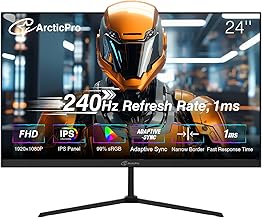
- For tight budgets: pick the Sceptre C255B-FWT240 or ArcticPro 24-inch, both of which deliver 240Hz without the premium price tag.
- For immersive, cinematic gaming: pick the SANSUI 32-inch curved monitor for its 1500R curve and larger screen size.
- For a balance of screen size and color accuracy: pick the Dell SE2726HG for its 27-inch IPS panel.
- For compact desk setups: pick the Dell SE2426HG or ArcticPro, both 24-inch options with frameless designs.
What's inside
Refresh rate is one of the few monitor specs that actually changes how a game feels the moment you sit down, and the jump from 144Hz to 240Hz is the most talked-about upgrade in competitive gaming right now. More frames per second means less motion blur, tighter tracking on fast-moving targets, and a smoother overall picture — but it also demands more from your GPU and, in some cases, your wallet.
In this comparison we’re focusing on 240Hz monitors, since every model below is capable of hitting that ceiling, and breaking down which ones are worth it depending on your budget, screen size preference, and whether you’re chasing competitive precision or just want a smoother everyday experience. Panel type, size, and curvature all affect how that extra speed actually feels in practice, so the “best” 240Hz monitor really depends on what you’re optimizing for.
As an Amazon Associate we earn from qualifying purchases at no extra cost to you.




🎮 Get More From Your Setup — Free
Prime Gaming gives you free PC games every month, in-game loot, and a free Twitch channel sub — plus fast free shipping on all the gear above. New members get a 30-day free trial.
Watch: 144Hz vs 240Hz Gaming Monitor: Is the Upgrade Worth It? — Video Review
Quick Verdict
If you want the best all-around competitive experience, the ASUS TUF Gaming VG279QM5A is the one to beat thanks to its 0.3ms response time and G-SYNC compatibility. Budget-conscious shoppers should look at the Sceptre C255B-FWT240 or ArcticPro 24-inch, while anyone wanting more screen real estate without sacrificing speed should consider the Dell SE2726HG or the immersive SANSUI 32-inch curved display.
Dell SE2426HG / SE2726HG (24″ & 27″ 240Hz)
Dell’s SE series pairs IPS panels with 240Hz refresh rates, which is a strong combination since IPS technology typically delivers better color accuracy and viewing angles than the VA panels found in many budget gaming monitors. The 24-inch SE2426HG is great for tight desk setups, while the 27-inch SE2726HG gives you more visual real estate for the same FHD resolution, which some players prefer for immersion.
Both models support AMD FreeSync Premium to reduce screen tearing, and the TÜV 3-Star certification means reduced flicker and blue light for longer sessions. The tradeoff is a tilt-only stand with no height or swivel adjustment, so you may need a separate monitor arm if ergonomics matter to you.
ASUS TUF Gaming VG279QM5A (27″ 240Hz)
The ASUS TUF VG279QM5A is built for players who take competitive gaming seriously. Its Fast IPS panel delivers a 0.3ms response time — noticeably quicker on paper than most competitors here — and Extreme Low Motion Blur Sync technology sharpens fast-moving objects that would otherwise smear on a standard panel.
G-SYNC compatibility makes it a natural fit if you’re running an NVIDIA GPU, ensuring frame rates and refresh rate stay in sync for a tear-free image. With 99% sRGB coverage, it also holds its own for color-sensitive work outside of gaming. The main consideration is price: this is the most premium option in the lineup, so it’s best suited for players who want top-tier performance and are willing to pay for it.
Head-to-Head: Which Should You Buy?
- For competitive esports players: pick the ASUS TUF VG279QM5A for its 0.3ms response time and G-SYNC compatibility.
- For tight budgets: pick the Sceptre C255B-FWT240 or ArcticPro 24-inch, both of which deliver 240Hz without the premium price tag.
- For immersive, cinematic gaming: pick the SANSUI 32-inch curved monitor for its 1500R curve and larger screen size.
- For a balance of screen size and color accuracy: pick the Dell SE2726HG for its 27-inch IPS panel.
- For compact desk setups: pick the Dell SE2426HG or ArcticPro, both 24-inch options with frameless designs.
Frequently Asked Questions
Is 240Hz actually better than 144Hz for gaming?
Yes, if your GPU can consistently push frame rates above 144fps. 240Hz reduces motion blur and input-to-display lag further, which competitive shooter and racing game players notice most. Casual gamers may find 144Hz already looks smooth enough to be a diminishing return.
Do I need a powerful PC to use a 240Hz monitor?
You’ll need a GPU capable of rendering games at high frame rates to take full advantage of 240Hz. Otherwise the monitor will simply display whatever frame rate your PC can produce, and the extra headroom goes unused.
Does panel type (IPS vs VA) matter at 240Hz?
Yes. IPS panels, like those on the Dell and ASUS models here, generally offer better color accuracy and viewing angles, while curved VA panels like the SANSUI can offer deeper contrast and a more immersive feel, sometimes at the cost of slightly slower pixel response.
Is FreeSync or G-SYNC compatibility necessary?
It’s not strictly necessary, but it significantly reduces screen tearing and stuttering by syncing your monitor’s refresh rate with your GPU’s output. If you have an AMD card, look for FreeSync support; NVIDIA users should prioritize G-SYNC compatibility.
Final Verdict
There’s no single “best” 240Hz monitor — the right pick depends on your priorities. Competitive players chasing every millisecond of advantage should invest in the ASUS TUF VG279QM5A, budget-focused buyers will get excellent value from the Sceptre or ArcticPro, and those wanting a bigger, more immersive canvas should look to the Dell SE2726HG or SANSUI 32-inch curved. Whichever you choose, pairing a 240Hz panel with a GPU that can actually hit those frame rates is what makes the upgrade worthwhile.