Key takeaways
- One-cable desk: connect displays, drives, and power through a single port.
- Strong charging: 85W to 140W passthrough keeps the MacBook topped up.
- Scalable options: from pocket hubs to a 14-in-1 Thunderbolt 5 station.
- Reliable brand: Anker’s docks have a solid track record for stability.
What's inside
Apple’s move to a minimalist port layout was great for thinness and terrible for anyone who plugs in more than one accessory. A good USB-C dock fixes that, turning a single Thunderbolt or USB-C port into a full workstation with external displays, wired networking, card readers, and enough power delivery to charge the laptop itself. For MacBook owners, the right dock is the difference between constant cable-swapping and a clean one-cable desk.
This review focuses on Anker’s well-regarded lineup, from compact 5-in-1 hubs to the monster 14-in-1 Thunderbolt 5 Prime dock. Whether you want something to toss in a bag or a permanent desk anchor, here is how the options stack up.
As an Amazon Associate we earn from qualifying purchases at no extra cost to you.


🎮 Get More From Your Setup — Free
Prime Gaming gives you free PC games every month, in-game loot, and a free Twitch channel sub — plus fast free shipping on all the gear above. New members get a 30-day free trial.
Watch: Mac Usb C Dock: Review & Buyer’s Guide — Video Review
Design & Build
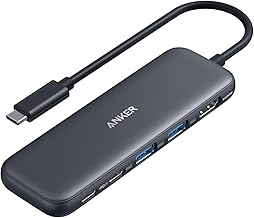
Anker’s docks span a wide range of form factors. The 5-in-1 and 7-in-1 hubs are pocket-sized dongles that clip onto the side of a MacBook for travel, adding HDMI, USB-A, and card slots without a wall adapter in some cases. Step up to the 8-in-1 dual-monitor hub or the Nano 13-in-1 with its detachable 6-in-1 sub-hub, and you get a more substantial device built to live on a desk. At the top sits the Prime TB5 docking station, a 14-in-1 unit with an active cooling system and a metal chassis designed for heavy multi-display, high-bandwidth work.
Performance
The gap between these docks is mostly about bandwidth and displays. The compact hubs handle a single 4K@60Hz output over HDMI, which is plenty for a laptop plus one external screen, and offer up to 85W passthrough charging. The dual-monitor 8-in-1 and Nano 13-in-1 add multiple display outputs and gigabit Ethernet for a proper desktop setup. The Prime TB5 is in another league, with 120Gbps transfer, support for up to 8K or dual displays, 140W charging, and the cooling to sustain it. Note Anker’s compatibility warnings, as a few models are optimized for specific MacBook generations.
Pros & Cons
- One-cable desk: connect displays, drives, and power through a single port.
- Strong charging: 85W to 140W passthrough keeps the MacBook topped up.
- Scalable options: from pocket hubs to a 14-in-1 Thunderbolt 5 station.
- Reliable brand: Anker’s docks have a solid track record for stability.
- Model-specific quirks: some hubs note limited compatibility with certain MacBooks.
- Charger not always included: a few models require your own USB-C adapter.
Alternatives to Consider
If you only need to add a display and a couple of ports on the go, the Anker 5-in-1 or 7-in-1 hub is all most travelers require and slips into any bag. For a dual-monitor home office without Thunderbolt 5’s premium, the 8-in-1 dual-HDMI dock or the Nano 13-in-1 with its detachable hub hits a strong balance of ports and price. Only creative professionals moving huge files or running 8K and dual high-res displays truly need the Prime TB5. Always confirm your MacBook model against Anker’s compatibility notes before buying, especially for the newest M-series machines.
Frequently Asked Questions
Can a USB-C dock charge my MacBook?
Yes, most of these support power delivery passthrough from 85W up to 140W on the Prime TB5, enough to charge a MacBook Pro while it drives displays and peripherals.
Will it run dual external monitors?
The 8-in-1 dual-HDMI dock, Nano 13-in-1, and Prime TB5 support multiple displays. The compact 5-in-1 and 7-in-1 hubs are designed for a single external screen.
Do I need Thunderbolt 5?
Only if you transfer very large files or run 8K and multi-display setups. For a typical laptop-plus-monitor arrangement, a standard USB-C hub is more than sufficient.
Are these compatible with the latest MacBooks?
Most are, but Anker flags specific compatibility notes on a few models, so check that your MacBook Air or Pro generation is listed before ordering.
Verdict
The best Mac USB-C dock is the one that matches your desk, not the one with the most ports. Grab the Anker 5-in-1 or 7-in-1 for travel, the 8-in-1 dual-monitor or Nano 13-in-1 for a capable home office, and the Prime TB5 only if you genuinely need Thunderbolt 5’s bandwidth and dual-8K support. Confirm MacBook compatibility, and one cable will run your whole setup.