Our Short List of 3

- Best for: High-refresh 4K capture from a console.
- Brand: Elgato
- Model: Game Capture 4K X
- Capture resolutions: Up to 4K144, 1440p144, 1080p240
- Passthrough resolutions: Up to 4K144, 1440p240, 1080p240, HDR10

- Best for: 4K60 capture on a compact USB-C card.
- Brand: Elgato
- Model: 4K S
- Capture resolutions: 2160p60, 1440p60, 1080p120
- Passthrough resolutions: Up to 2160p60, 1440p120, 1080p240

- Best for: 4K144 passthrough on a high-refresh display.
- Brand: AVerMedia
- Model: Live Gamer Ultra 2.1 (GC553G2)
- Capture: Up to 2160p144 on Windows, 4K60 on macOS
- Passthrough resolutions: 2160p144 HDR and VRR, 3440x1440p120 HDR and VRR, 1440p240 HDR and VRR, 1080p360 HDR and VRR
All 5 Picks at a Glance
| Product | Specs | Action |
|---|---|---|
| 1. Elgato 4K X |
| Check price on Amazon |
| 2. Elgato 4K S |
| Check price on Amazon |
| 3. AVerMedia Live Gamer Ultra 2.1 GC553G2 |
| Check price on Amazon |
 4. AVerMedia Live Gamer Ultra S GC553Pro |
| Check price on Amazon |
 5. Elgato Cam Link 4K |
| Check price on Amazon |
Our Top Picks
- AVerMedia Live Gamer Ultra 2.1 4K144 HDMI 2.1HDMI 2.1 - GC553G2 (Black)2.7 x 7.3 x 6.3 inches0.3 poundsCheck on Amazon
Buying a 4K capture card is less about the number 4K itself than about whether the rest of your setup can carry it. A console, a display, a USB port, and a computer all have to agree before a 4K recording exists. The 4K X and the Live Gamer Ultra 2.1 use HDMI 2.1 for high frame rates, while the 4K S and the Ultra S trade that speed for a simpler USB link, and the Cam Link 4K serves a camera instead of a console.
This guide is for console streamers who want 4K recordings, PC players with high-refresh displays, and creators who bring a camera into a stream. It also covers anyone who has wondered why a 4K card sometimes records below its headline figure. The five cards below are chosen from their Amazon titles and listing details alone, with capture, passthrough, HDMI version, and connection stated where the listing states them.
Quick Picks
As an Amazon Associate we earn from qualifying purchases.
| Product | Best for | Key spec from title |
|---|---|---|
| Elgato 4K X | High-refresh 4K capture from a console | Up to 4K144 capture, HDMI 2.1, USB 3.2 Gen 2 |
| Elgato 4K S | 4K60 capture on a compact USB-C card | 4K60 capture, 1440p120 or 1080p240 passthrough |
| AVerMedia Live Gamer Ultra 2.1 GC553G2 | 4K144 passthrough on a high-refresh display | HDMI 2.1, 4K144 passthrough, 4K60 capture |
| AVerMedia Live Gamer Ultra S GC553Pro | 4K60 capture without an HDMI 2.1 link | 4K60 capture, 4K60 HDR/VRR passthrough, USB 3.2 Gen 1 |
| Elgato Cam Link 4K | Turning a camera into a 4K webcam | 1080p60 or 4K30/4K60, HDMI to USB 3.0 |
How to Choose
Let the HDMI version set the ceiling
HDMI 2.1 and HDMI 2.0 draw very different lines around a 4K setup. The Elgato 4K X and the AVerMedia Live Gamer Ultra 2.1 both name HDMI 2.1, which allows their 4K144 passthrough and high frame-rate capture modes. The 4K S and the Ultra S name HDMI 2.0, which still carries 4K60 cleanly but stops short of the 144Hz modes. The Cam Link 4K takes HDMI from a camera rather than a console, so its HDMI version matters less than the camera’s output. Match the card’s HDMI version to your display first, then to your console.
Check the USB link before the capture number
A 4K capture figure is only as good as the USB port that carries it to the computer. The 4K X and the Live Gamer Ultra 2.1 both need a USB 3.2 Gen 2 link, described as a 10Gbps connection, for full performance, and the 4K X listing states that a slower Gen 1 port works with reduced capture resolution. The 4K S and the Ultra S use a 5Gbps Gen 1 link, which is easier to find on a laptop but caps the top modes. The Cam Link 4K uses USB 3.0. Look at the USB ports on your computer before you look at the capture table.
Separate HDR capture from HDR passthrough
HDR appears in two places on a capture card, and the two do not always match. The 4K S passes HDR10 through at up to 2160p60, yet its HDR10 capture reaches only 1080p60 and only on Windows. The Ultra S captures HDR at 1440p30 or 1080p60, while passing HDR and VRR through at up to 2160p60. The 4K X and the Ultra 2.1 both name HDR10 support, with the Ultra 2.1 listing HDR capture on Windows and 4K60 capture on macOS. Read the HDR line for capture and for passthrough separately, and note which operating system each one applies to.
Decide whether the source is a console or a camera
Console cards and camera cards solve different problems, even when both name 4K. The four Elgato and AVerMedia cards here are built around consoles and PCs, with passthrough to a display, VRR support, and streaming software in mind. The Cam Link 4K is built around a DSLR, camcorder, or action camera, turning its HDMI output into a webcam feed for OBS, Zoom, or Discord, with no passthrough named in its title. A camera owner who buys a console card will pay for passthrough that is never used, while a console owner who buys a Cam Link will have nowhere to plug a television in.
The 5 Best Options
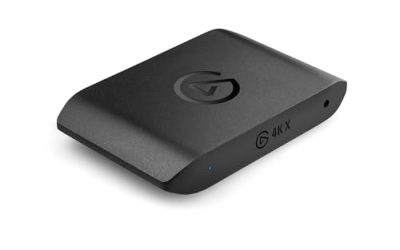
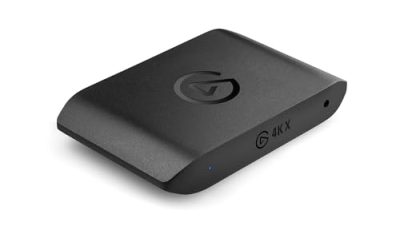
1. Elgato 4K X
- Best for: High-refresh 4K capture from a console.
- Brand: Elgato
- Model: Game Capture 4K X
- Capture resolutions: Up to 4K144, 1440p144, 1080p240
- Passthrough resolutions: Up to 4K144, 1440p240, 1080p240, HDR10
High-refresh 4K capture from a console.
Full performance needs a USB 3.2 Gen 2 port, and the listing states that a Gen 1 port works with reduced capture resolution, so confirm the port on your computer before buying.
Among the five cards here, the 4K X carries the widest envelope, because its title joins 4K144 capture, HDMI 2.1, VRR, HDR10, and a USB 3.2 Gen 2 link in one device. It suits a console streamer who plays at high frame rates and wants the recording to keep up, and a creator who records for later editing. Its naming of PS5, Xbox, Switch 2, OBS, PC, Mac, and iPad shows a broad host range, while its included 8K HDMI cable supplies the high-bandwidth link in the box.
Watch out for: Full performance needs a USB 3.2 Gen 2 port, and the listing states that a Gen 1 port works with reduced capture resolution, so confirm the port on your computer before buying.
2. Elgato 4K S
- Best for: 4K60 capture on a compact USB-C card.
- Brand: Elgato
- Model: 4K S
- Capture resolutions: 2160p60, 1440p60, 1080p120
- Passthrough resolutions: Up to 2160p60, 1440p120, 1080p240
4K60 capture on a compact USB-C card.
HDR10 capture reaches only 1080p60 and only on Windows, so Mac and iPad users should confirm that passthrough-only HDR fits their plans before buying.
The 4K S fits a streamer who wants genuine 4K60 capture without HDMI 2.1, because its title states 4K60 capture alongside 1440p120 and 1080p240 passthrough in a compact USB-C device. It suits a living-room setup where the card hides behind a television, and a laptop setup where a single USB-C cable is easier to manage. Its 3.5mm analog audio input gives a party-chat feed a hardware route into the stream, which the 4K X does not name in its title.
Watch out for: HDR10 capture reaches only 1080p60 and only on Windows, so Mac and iPad users should confirm that passthrough-only HDR fits their plans before buying.
3. AVerMedia Live Gamer Ultra 2.1 GC553G2
- Best for: 4K144 passthrough on a high-refresh display.
- Brand: AVerMedia
- Model: Live Gamer Ultra 2.1 (GC553G2)
- Capture: Up to 2160p144 on Windows, 4K60 on macOS
- Passthrough resolutions: 2160p144 HDR and VRR, 3440x1440p120 HDR and VRR, 1440p240 HDR and VRR, 1080p360 HDR and VRR
4K144 passthrough on a high-refresh display.
The top capture mode reaches 2160p144 on Windows, while macOS capture is stated at 4K60, so confirm the operating system and USB 3.2 Gen 2 port on your computer before buying.
The Live Gamer Ultra 2.1 fits a high-refresh player who refuses to give up display quality while recording, because its HDMI 2.1 passthrough reaches 4K144 with HDR and VRR while it captures at 4K60. It suits a PS5 Pro or Xbox owner with a fast display, and a PC player whose monitor runs at 144Hz or above, since the card keeps that refresh rate on screen. Its USB 3.2 Gen 2 Type-C link, its 4-pole 3.5mm audio connection, and its RGB lighting give it a different character from the Elgato cards.
Watch out for: The top capture mode reaches 2160p144 on Windows, while macOS capture is stated at 4K60, so confirm the operating system and USB 3.2 Gen 2 port on your computer before buying.
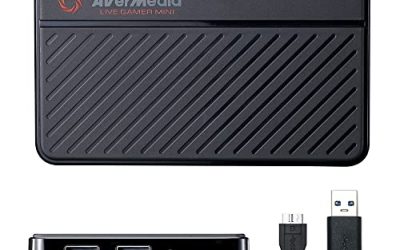
4. AVerMedia Live Gamer Ultra S GC553Pro
- Best for: 4K60 capture without an HDMI 2.1 link.
- Brand: AVerMedia
- Model: Live Gamer Ultra S (GC553Pro)
- Capture resolutions: 2160p60, 1440p144, 1080p240, HDR at 1440p30 or 1080p60
- Passthrough resolutions: 2160p60 HDR and VRR, 1440p144 HDR and VRR, 1080p240 HDR and VRR
4K60 capture without an HDMI 2.1 link.
HDR capture is stated at 1440p30 or 1080p60, not at 4K, and macOS capture carries extra conditions in the listing, so confirm both before buying.
The Live Gamer Ultra S fits a streamer who wants 4K60 capture at a simpler level than the Ultra 2.1, because its HDMI 2.0 design still records at 2160p60 while passing HDR and VRR through at the same resolution. It suits a console owner with a 4K60 television rather than a high-refresh monitor, and a creator who values ultrawide input support. Its USB 3.2 Gen 1 link is easier to find on a laptop than a Gen 2 port.
Watch out for: HDR capture is stated at 1440p30 or 1080p60, not at 4K, and macOS capture carries extra conditions in the listing, so confirm both before buying.
5. Elgato Cam Link 4K
- Best for: Turning a camera into a 4K webcam.
- Brand: Elgato
- Model: Cam Link 4K
- Supported resolutions: 4K60 in MJPG only, 4K30, 1080p60, 1080p30, 720p60
- Input: HDMI, unencrypted
Turning a camera into a 4K webcam.
4K60 needs a compatible camera and the latest Cam Link 4K model, and no passthrough is stated in the title, so confirm camera compatibility before buying.
The Cam Link 4K fits a creator who already owns a good camera and wants that camera to become the webcam, because its purpose is to carry a camera’s HDMI output into a computer over USB 3.0. It suits a streamer who wants a face camera in 4K, and a presenter who wants a mirrorless camera for calls. Its title states 1080p60 or 4K30 and 4K60, with 4K60 available only in MJPG and only with a compatible camera and the latest Cam Link 4K model, so the camera in your hands matters as much as the card itself.
Watch out for: 4K60 needs a compatible camera and the latest Cam Link 4K model, and no passthrough is stated in the title, so confirm camera compatibility before buying.
Which One Fits Your Situation
You play at high frame rates and want the recording to keep up
Choose the Elgato 4K X, because its title states capture up to 4K144, 1440p144, and 1080p240 over HDMI 2.1, with VRR passthrough to stop tearing. It suits a PS5 Pro or Xbox owner with a fast monitor, and a creator who edits high frame-rate footage afterwards. Confirm that your computer has a USB 3.2 Gen 2 port first, since a slower port reduces capture resolution.
You want 4K60 capture in the smallest, simplest package
Choose the Elgato 4K S, because it records at 2160p60 and passes 1440p120 or 1080p240 through, all over a single USB-C link in a compact body. It suits a living-room streamer who wants the card hidden behind a television, and a laptop owner who values one cable over a larger box. Its 3.5mm analog audio input also gives party chat a hardware route.
You own a high-refresh 4K display and will not lower its refresh rate
Choose the AVerMedia Live Gamer Ultra 2.1 GC553G2, because its HDMI 2.1 passthrough reaches 2160p144 with HDR and VRR, plus 1440p240 and 1080p360 modes for faster displays. It suits a player whose monitor is the centre of the setup. Confirm the USB 3.2 Gen 2 port and the operating system limits before buying.
You want a 4K camera feed rather than a console feed
Choose the Elgato Cam Link 4K, because it is the only card here built to turn a DSLR, camcorder, or action camera into a webcam for OBS, Zoom, or Discord. It suits a streamer who wants a face camera in 4K, or a presenter who wants a mirrorless camera for calls. Check that your camera outputs clean HDMI, since 4K60 needs a compatible camera and the latest model.
Common Mistakes
- Buying an HDMI 2.1 card for a display and console that never send more than 4K60.
- Plugging a USB 3.2 Gen 2 card into a slower port, then wondering why the top capture mode is missing.
- Reading HDR passthrough as HDR capture, when the two figures differ on the 4K S and the Ultra S.
- Choosing the Cam Link 4K for a console, when its title names no passthrough.
- Forgetting to check whether HDR capture is limited to Windows.
Frequently Asked Questions
Does 4K capture need an HDMI 2.1 card?
No, 4K60 capture does not need HDMI 2.1, and both the 4K S and the Live Gamer Ultra S record at 2160p60 over HDMI 2.0. HDMI 2.1 matters when you want 4K at 120Hz or 144Hz, or modes such as 1080p240, which the 4K X and the Ultra 2.1 provide. Match the HDMI version to your display and frame-rate goals.
Why does my 4K card record at a lower resolution than its passthrough?
Capture and passthrough are separate figures, and many cards pass a higher signal to the display than they record. The 4K S passes 2160p60 while capturing HDR only at 1080p60 on Windows. A slower USB port can also reduce capture resolution, as the 4K X listing states for Gen 1 ports. Read both numbers on the listing before buying.
Can the Cam Link 4K capture a console in 4K?
It is not the right card for that job, even though its title names 4K30 and 4K60 from a camera. The Cam Link 4K is built to turn a camera into a webcam, and its title names no passthrough to a television, so a console player would have nowhere to watch the game.
Is HDR capture available on a Mac with these cards?
It depends on the card. The Elgato 4K S states HDR10 capture up to 1080p60 on Windows only, while the Live Gamer Ultra 2.1 states 4K60 capture on macOS with higher capture on Windows. The Ultra S also carries macOS conditions for 4K60 capture. Check the operating system line on the listing before buying.
FAQ
Does 4K capture need an HDMI 2.1 card?
Why does my 4K card record at a lower resolution than its passthrough?
Can the Cam Link 4K capture a console in 4K?
Is HDR capture available on a Mac with these cards?
More from Amazon
Programs that pair well with the guide above. Offers and eligibility are set by Amazon and may change.
Free shipping on eligible items, Prime Video and more. Eligible new members can start with a free trial.
Start a Prime free trialAd-free music streaming. Eligible new subscribers can start with a free trial.
Try Music Unlimited freeA Prime membership for ages 18-24 with a trial period. Eligibility is set by Amazon.
See Prime for Young AdultsAudiobooks and podcasts to listen to on the go. Eligible new members can start with a free trial.
Try Audible freeAs an Amazon Associate we earn from qualifying purchases.