Our Top Picks
 AVerMedia Live Gamer Ultra 2.1 4K144 HDMI 2.1HDMI 2.1 - GC553G2 (Black)2.7 x 7.3 x 6.3 inches0.3 poundsCheck on Amazon


The ROG Ally X is a handheld, so capturing its gameplay takes one extra step compared with a home console. The handheld sends video out over USB-C, so a capture card with an HDMI input needs a USB-C to HDMI adapter or a dock in between. From there the chain is standard: the handheld feeds the card, the card passes the signal to a display, and a streaming PC records or broadcasts it.
The five cards below cover that setup end to end, from straightforward 1080p60 capture to 4K60 recording with high-refresh passthrough, plus one dock that records straight to a memory card with no PC at all. Pick by the resolution you want to capture, the resolution your monitor needs to keep showing, and whether you stream from a desk or record on the move.
As an Amazon Associate, we earn from qualifying purchases.
Quick Answer
The Elgato 4K S is the pick: it captures 4K60, passes through 4K60 with VRR, and connects over USB-C. If you want HDMI 2.1 and 4K144 passthrough, choose the AVerMedia Live Gamer Ultra 2.1. For recording without a second PC, the AVerMedia X’TRA GO dock is the one built for handhelds. Note: three of these five cards also appear in techpulsegaming.com’s Best Capture Card for Legion Go roundup.
1. Elgato 4K S

The Elgato 4K S is the most balanced card here for an ROG Ally X owner who wants clean 4K footage. It captures up to 4K60, along with 1440p120 and 1080p240 for high-frame-rate recording, and its passthrough matches at 4K60, 1440p120, or 1080p240, so the display never drops below what the card records. HDR10 passthrough reaches 4K60, VRR is supported, and a 3.5 mm analog audio input lets a separate audio source join the feed.
Connection is a single USB-C cable to the streaming PC, and the card works with Windows 11, macOS 13 or later, and iPadOS with USB-C. Elgato lists near-zero latency, and the compact housing measures 112 x 72 x 18 mm and weighs 90 grams. The box includes the 4K S, a USB C-to-C cable, and an HDMI 2.0 cable; the USB-C to HDMI link from the handheld is the only extra piece needed. One point to watch: HDR capture is Windows-only, while Mac and iPad users get HDR passthrough only.
Specs
- Capture resolution: 4K60, 1440p120, 1080p240
- Passthrough: 4K60 HDR10, 1440p120, 1080p240, VRR
- Interface: HDMI 2.0 in and out, USB 3.0 Type-C
- Audio input: 3.5 mm analog audio in
- Dimensions: 112 x 72 x 18 mm
- Weight: 90 g
- Operating systems: Windows 11, macOS 13 or later, iPadOS with USB-C
- Tier: premium
2. AVerMedia Live Gamer Ultra 2.1 GC553G2
The AVerMedia Live Gamer Ultra 2.1, model GC553G2, is the strongest external option here for high-refresh play. Its HDMI 2.1 input and output carry passthrough up to 4K144 with HDR and VRR, plus 1440p240 and 1080p360 for competitive games, so a fast monitor keeps its full refresh rate while the recording runs. Capture reaches 4K144 on Windows through AVerMedia Streaming Center and 4K60 on macOS, with HDR capture on Windows.
It connects over USB 3.2 Gen 2 Type-C, which supplies the bandwidth that 4K144 capture demands, and it needs a USB 3.2 Gen 2 port on the streaming PC to reach its top speeds. Two 3.5 mm TRRS jacks cover headset audio and gamepad audio, including party chat, and a customizable RGB lightbar runs along the front. The box includes an HDMI 2.1 cable, a USB-C cable, and a 3.5 mm audio cable.
Specs
- Capture resolution: up to 4K144 on Windows, 4K60 on macOS
- Passthrough: 4K144 HDR and VRR, 1440p240, 1080p360
- Interface: HDMI 2.1 in and out, USB 3.2 Gen 2 Type-C
- Audio: 3.5 mm TRRS headset and gamepad jacks
- Dimensions: 120 x 70 x 27.6 mm
- Weight: 115 g
- Operating systems: Windows 10 x64 and 11 x64 or later, macOS 13 and 14 or later
- Tier: premium
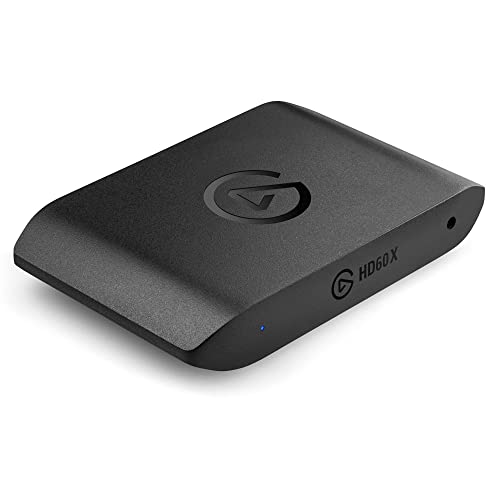
3. Elgato HD60 X
The Elgato HD60 X is the sensible mid-range choice when the stream itself runs at 1080p. It captures 1080p60 with HDR10, or 4K30 for recorded footage, while passthrough is far more generous: 4K60 HDR10, 1440p120, and 1080p240, all with VRR, reach the monitor untouched. That split suits most streamers: the audience sees 1080p60 while the player keeps a high-refresh picture.
It is a driverless UVC device, so OBS and similar apps see it as a video source with no extra software to install, and it connects over USB-C. The card measures 112 x 72 x 18 mm, weighs 91 grams, and runs on Windows 10 and macOS 10.13 or later, though HDR capture is Windows-only. Availability on Amazon has varied, so confirm the listing before ordering.
Specs
- Capture resolution: 1080p60 HDR10, 1440p60, 4K30
- Passthrough: 4K60 HDR10, 1440p120, 1080p240, VRR
- Interface: HDMI in and out, USB 3.0 Type-C, driverless UVC
- Dimensions: 112 x 72 x 18 mm
- Weight: 91 g
- Operating systems: Windows 10, macOS 10.13 or later
- Tier: mid-range
4. AVerMedia X’TRA GO GC515
The AVerMedia X’TRA GO GC515 is the only pick here built specifically around handhelds, and it solves the Ally X connection problem in a different way: it takes video straight from the handheld over USB-C with DisplayPort Alt Mode, so no separate HDMI adapter is needed. It also charges the handheld while it plays, and records with one button press and no PC at all.
Recording goes to a microSD card, up to 1 TB in exFAT format, with 4K30, 1440p60, or 1080p120 capture. The HDMI 2.0 output passes up to 4K60 or 1080p120 to a display. The dock carries two USB-A ports, three USB-C ports, and one HDMI port, and the box includes an HDMI 2.0 cable, a Type-C to Type-A cable, and a Type-C to Type-C PD cable. Note that it needs a suitable USB PD power source, and the microSD card is not included.
Specs
- Capture resolution: 4K30, 1440p60, 1080p120 to microSD
- Passthrough: HDMI 2.0 up to 4K60, 1080p120
- Interface: USB-C DP Alt Mode input, HDMI 2.0 output, USB-A x 2, USB-C x 3
- Recording: one-click, PC-free, microSD up to 1 TB exFAT
- Dimensions: 141 x 99.4 x 37.7 mm
- Weight: 176 g
- Operating systems: Windows 10 x64 and 11 x64 or later, macOS 13 and 14 or later
- Tier: mid-range
5. AVerMedia Live Gamer Mini GC311
The AVerMedia Live Gamer Mini, model GC311, is the budget pick for anyone whose whole setup is 1080p. It captures and passes through 1080p60, which covers a Full HD monitor and a 1080p60 stream with nothing wasted on headroom the setup cannot use. A built-in H.264 hardware encoder lightens the load on the streaming PC.
It is a compact UVC plug-and-play device, so OBS picks it up without a driver install, and it connects to the streaming PC over micro USB. The housing measures 3.93 x 2.24 x 0.74 inches and weighs 2.63 ounces, and it runs on Windows 10 and 11 and macOS 12. The trade-offs are clear: there is no 4K, HDR, or high-refresh support, and HDCP-protected signals cannot be captured.
Specs
- Capture resolution: 1080p60
- Passthrough: 1080p60
- Interface: HDMI in and pass-through, micro USB, UVC plug-and-play
- Encoder: built-in H.264 hardware encoder
- Dimensions: 3.93 x 2.24 x 0.74 inches
- Weight: 2.63 ounces
- Operating systems: Windows 10 and 11, macOS 12
- Tier: budget
How to Choose
Start with the resolution you actually stream or record at. A 1080p60 stream needs nothing more than the GC311, while 4K60 recording points to the 4K S or the GC553G2. Then check passthrough: the monitor should keep the resolution and refresh rate you play at. Every card here passes through at least as much as it captures, except the GC311, which is 1080p on both sides.
Next, settle the connection. The Ally X outputs video over USB-C, so HDMI-input cards need a USB-C to HDMI adapter or dock between the handheld and the card, while the GC515 takes the USB-C signal directly and doubles as a charging dock. If you record away from the desk, only the GC515 records with no PC at all. Finally, confirm the streaming PC has the right USB port: the GC553G2 needs USB 3.2 Gen 2 for its top modes, and HDR capture is Windows-only on the Elgato cards.
Who Should Skip
Skip a capture card entirely if you never stream or record gameplay and only play on the handheld screen, since it adds cables and a second PC for no benefit. Skip the premium HDMI 2.1 cards if your monitor and your stream are both 1080p, because the extra passthrough headroom will sit unused. Skip the GC515 if you always record at a desk with a streaming PC running, since its PC-free recording is the feature that sets it apart.
Frequently Asked Questions
Do I need an adapter to connect the ROG Ally X to a capture card?
Yes, for most capture cards. The ROG Ally X outputs video over USB-C, while the Elgato and standard AVerMedia cards take HDMI input, so a USB-C to HDMI adapter or a dock sits between the handheld and the card. The AVerMedia X’TRA GO GC515 is the exception: it takes the USB-C signal directly and charges the handheld.
Can I capture ROG Ally X gameplay without a second PC?
Yes, with the AVerMedia X’TRA GO GC515. It records to a microSD card with one button press and no PC, capturing up to 4K30 or 1080p120. The other four cards in this guide all send their signal to a streaming PC or laptop running software such as OBS.
What is the difference between capture resolution and passthrough?
Capture resolution is what gets recorded or streamed, while passthrough is what the monitor shows while you play. A card can pass through a higher signal than it captures: the Elgato HD60 X, for example, captures at 1080p60 but passes 4K60 to the display, so gameplay stays sharp even when the stream runs at 1080p.
Will a capture card slow down my ROG Ally X?
No. A capture card sits outside the handheld and only receives the video signal the Ally X already outputs, so it does not use the handheld’s processor or graphics. The streaming PC handles encoding, which is the whole point of the split: the handheld keeps playing while the second machine records.
Final Verdict
For most ROG Ally X owners, the Elgato 4K S is the right capture card: 4K60 capture, 4K60 passthrough with VRR, and a simple USB-C connection cover the common cases. The AVerMedia Live Gamer Ultra 2.1 is the step up for high-refresh monitors, with HDMI 2.1 and 4K144 passthrough. The Elgato HD60 X is the value choice for 1080p60 streams, the AVerMedia X’TRA GO GC515 is the pick for PC-free recording, and the AVerMedia Live Gamer Mini GC311 is the budget entry to 1080p capture. Three of these five cards also appear in techpulsegaming.com’s Best Capture Card for Legion Go roundup.
Product and ASIN Reference
| Product | ASIN |
|---|---|
| Elgato 4K S | B0FFTFYGLV |
| AVerMedia Live Gamer Ultra 2.1 GC553G2 | B0CGD86HNB |
| Elgato HD60 X | B09V1KJ3J4 |
| AVerMedia X’TRA GO GC515 | B0DBSND34P |
| AVerMedia Live Gamer Mini GC311 | B07R6P2JJR |
FAQ
Do I need an adapter to connect the ROG Ally X to a capture card?
Can I capture ROG Ally X gameplay without a second PC?
What is the difference between capture resolution and passthrough?
Will a capture card slow down my ROG Ally X?
More from Amazon
Programs that pair well with the guide above. Offers and eligibility are set by Amazon and may change.
Free shipping on eligible items, Prime Video and more. Eligible new members can start with a free trial.
Start a Prime free trialAd-free music streaming. Eligible new subscribers can start with a free trial.
Try Music Unlimited freeA Prime membership for ages 18-24 with a trial period. Eligibility is set by Amazon.
See Prime for Young AdultsAudiobooks and podcasts to listen to on the go. Eligible new members can start with a free trial.
Try Audible freeAs an Amazon Associate we earn from qualifying purchases.