Choosing a laptop that can handle both AAA gaming and a full course load is trickier than it sounds. You need enough GPU horsepower to run modern titles at solid frame rates, but also the battery life, portability, and keyboard comfort to survive a day of lectures and late-night essays. Spend too little and you’ll be stuck with stutters and thermal throttling; overspend and you’re lugging around a bulky machine that dies before your last class ends.
This guide breaks down six laptops that balance gaming performance with everyday school usability, from ultra-portable options built for note-taking and light gaming to dedicated gaming rigs with discrete RTX graphics. Below, you’ll find what to look for before you buy, honest reviews of each pick, and answers to the questions we hear most from students shopping for their next laptop.
Our top picks
 LG gram 14-inch Thin and Lightweight Laptop
- Incredibly Light
- Remarkably Light
- Power That Last with Smart Efficiency - LG…
 LG gram Pro 17-inch Lightweight Laptop Computer
- Pro AI Anywhere - LG gram Pro pairs…
- Welcome to Copilot on Windows 11 Home -…
- On-Device Intelligence Meets Cloud Power with gram AI…
 ASUS ROG Strix G16
- Unleash power with Windows 11 Home, an Intel…
- Multitask seamlessly with 16GB of DDR5-5600MHz memory and…
- Immerse yourself in stunning visuals with the smooth…
| Product | Key specs | |
|---|---|---|
| LG gram 14-inch Thin and Lightweight Laptop | Incredibly Light Remarkably Light Power That Last with Smart Efficiency - LG… | Check price |
| LG gram Pro 17-inch Lightweight Laptop Computer | Pro AI Anywhere - LG gram Pro pairs… Welcome to Copilot on Windows 11 Home -… On-Device Intelligence Meets Cloud Power with gram AI… | Check price |
| ASUS ROG Strix G16 | Unleash power with Windows 11 Home, an Intel… Multitask seamlessly with 16GB of DDR5-5600MHz memory and… Immerse yourself in stunning visuals with the smooth… | Check price |
 NIMO Light-Gaming-Laptop NIMO Light-Gaming-Laptop | 【AMD Ryzen 7 RDNA 3 Graphics Smooth AI… 【Radeon 780M USB4 Port Upgradeable for Gaming and… 【32GB RAM 1TB SSD Expandable Storage for Heavy… | Check price |
 NIMO 17.3" Light Gaming Laptop NIMO 17.3" Light Gaming Laptop | 【Desktop-Class AI Performance: AMD Ryzen 7 8745HS】Powered by… 【Radeon 780M RDNA 3 Graphics for Gaming &… 【64GB DDR5 RAM & 2TB PCIe 4.0 SSD】With… | Check price |
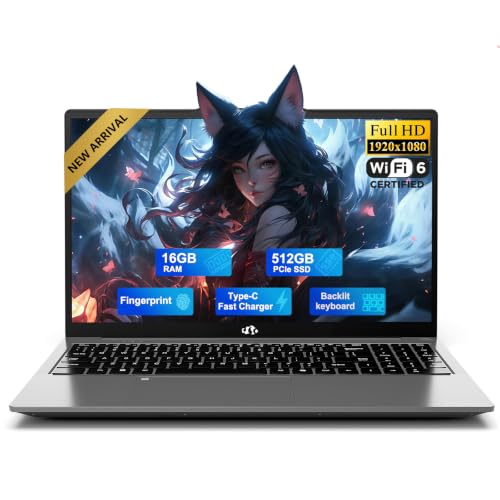 NIMO 15.6" AMD Gaming Laptop NIMO 15.6" AMD Gaming Laptop | 【WHY NIMO】Experience absolute confidence with this premium A-metal… 【SILENT N150 POWER, UP TO 3.6GHZ】Powered by the… 【Massive Memory & Storage】Enjoy rapid boot times with… | Check price |
 NIMO 15.6" IPS FHD-Light Gaming-Laptop NIMO 15.6" IPS FHD-Light Gaming-Laptop | [High-Performance Processing] Powered by the AMD Ryzen 5… [Future-Proof Expandability] Designed for longevity, the N153 allows… [Enhanced Privacy & Security] Protect your sensitive data… | Check price |
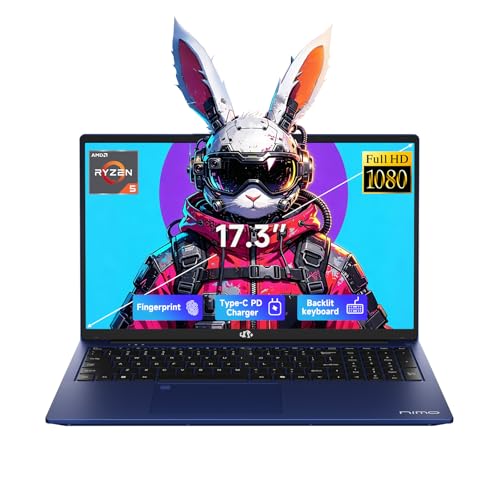 NIMO 17.3" FHD Gaming Laptop NIMO 17.3" FHD Gaming Laptop | 【2-Year Warranty & Local US Support】Buy with confidence 【AMD Ryzen 5 6600H for Work, Study &… 【32GB DDR5 RAM + 1TB PCIe SSD】Stay productive… | Check price |
As an Amazon Associate we earn from qualifying purchases at no extra cost to you.
🎮 Get More From Your Setup — Free
Prime Gaming gives you free PC games every month, in-game loot, and a free Twitch channel sub — plus fast free shipping on all the gear above. New members get a 30-day free trial.
Watch: Best Laptop For Gaming And School — Video Review
How to Choose a Laptop For Gaming And School (2026)
- GPU Performance: A discrete GPU like the RTX 5050 or RTX 5060 handles modern games far better than integrated graphics; if gaming is a priority, don’t settle for integrated-only unless your titles are lightweight or esports-focused.
- Portability and Weight: If you’re carrying your laptop between classes daily, prioritize models under 4 pounds with a slim chassis; heavier gaming rigs are better suited to dorm-room setups.
- Battery Life: Gaming laptops with high-wattage GPUs often sacrifice battery life; look for efficient processors and fast-charging support if you need all-day use away from an outlet.
- RAM and Storage: 16GB RAM is the practical minimum for multitasking between games and coursework; 1TB of SSD storage gives you room for both game libraries and school files without constant cleanup.
- Display Quality: A high refresh rate (144Hz+) improves competitive gaming, while accurate color and adequate brightness matter just as much for reading, writing, and design work.
The Best Laptop For Gaming And School (2026)s Reviewed
LG gram Pro 17-inch
This is the standout pick for students who don’t want to compromise on either side of the equation. The Intel Core Ultra 9 285H and RTX 5050 combo delivers genuine gaming performance in a chassis that’s still light enough to carry to class, and 32GB of RAM plus a 2TB SSD means you won’t run out of room for games or coursework.
ASUS ROG Strix G16
If gaming performance is your top priority, the Strix G16’s RTX 5060 and 165Hz display make it the fastest option here for competitive titles. It runs warmer and heavier than the LG models, so it’s better suited to students who mostly game and study from a dorm room or desk rather than commuting with it daily.
NIMO 17.3″ Light Gaming Laptop
The Ryzen 7 7735HS and 1TB SSD give this 17-inch model strong value for the price, and the 180-degree hinge and fingerprint reader add practical touches for shared study spaces. Graphics rely on the integrated Radeon 680M, so expect solid performance in esports titles but more modest results in demanding AAA games.
LG gram 14-inch
Built around portability, this is the lightest laptop in the lineup and a great fit for students who prioritize battery life and easy transport over heavy gaming. The AMD Ryzen AI 7 450 processor and 1TB SSD handle schoolwork and casual or cloud gaming well, though it’s not the choice for demanding local gameplay.
NIMO Light-Gaming-Laptop (15.6″)
A budget-friendly all-rounder, this 15.6-inch model pairs a Ryzen 7 7735HS with 16GB of DDR5 RAM and fast 100W charging, making it easy to top up between classes. Its Radeon 680M graphics are best suited to lighter games and schoolwork rather than the latest AAA releases at high settings.
Frequently Asked Questions
Do I need a discrete GPU for gaming and school?
Not always. If you mainly play esports titles or older games, integrated graphics like the Radeon 680M can manage. For newer AAA titles at higher settings, a discrete GPU like the RTX 5050 or RTX 5060 makes a noticeable difference.
How much RAM is enough for gaming and coursework?
16GB is a comfortable baseline for running a game alongside browser tabs, documents, and background apps. If you multitask heavily or plan to keep the laptop for several years, 32GB offers more long-term headroom.
Are 17-inch laptops too bulky for daily class use?
They’re heavier and less pocketable in a backpack sleeve, but many students find the larger screen worth it for both gaming immersion and reading long documents. If daily portability matters most, a 14- or 15.6-inch model is the safer choice.
Is a gaming laptop overkill for school-only tasks?
For pure schoolwork, yes—thinner laptops with integrated graphics will run cooler, last longer on battery, and cost less. A gaming laptop only makes sense if you genuinely plan to use the GPU for gaming or GPU-intensive coursework like video editing or 3D modeling.
Final Thoughts
For most students who need real gaming power without giving up portability, the LG gram Pro 17-inch is the strongest all-around choice. Those chasing maximum frame rates should look at the ASUS ROG Strix G16, while budget-conscious students will get solid value from the NIMO 17.3″ Light Gaming Laptop.