Our Short List of 3

- Best for: Sharp calls with desk view.
- Resolution: 4K Ultra HD at 30 fps, 1080p at 60 fps
- Sensor: 8.5MP Sony CMOS sensor
- Show Mode: Tilts down to show the desk
- Focus: Auto Focus

- Best for: Windows Hello sign-in and calls.
- Resolution: 4K at 30 fps
- Focus: Autofocus, 5x digital zoom
- Field of view: 65, 78, or 90 degrees diagonal
- Microphone: Noise-cancelling microphone

- Best for: Smooth 4K60 streaming.
- Resolution: 2160p60, 2160p30, 1080p60, 1080p30, 720p60, 720p30
- Sensor: Sony CMOS sensor, 8.3MP
- Lens: f/2.0 aperture, 21mm focal length
- Field of view: Up to 90 degrees
All 4 Picks at a Glance
| Product | Specs | Action |
|---|---|---|
| 1. Logitech MX Brio Ultra HD 4K Webcam |
| Check price on Amazon |
| 2. Logitech Brio 4K Webcam |
| Check price on Amazon |
| 4. Elgato Facecam Pro |
| Check price on Amazon |
 5. Razer Kiyo Pro Ultra 4K Webcam |
| Check price on Amazon |
Our Top Picks
Buying a 4K webcam is a decision about how much detail a camera keeps when the light is poor and the room is busy, not about the biggest number on the box. A 4K sensor helps when the lens, the sensor size, and the frame rate can use that detail, so 4K at 30 frames each second suits a calm call, while 4K with a large sensor suits a dim room. The wrong choice is a camera whose 4K mode drops to a slow frame rate, or whose narrow view cuts out a second person at the desk.
This guide is for home workers who want video calls, streamers who record in 4K, presenters who move around while they talk, and gamers who want a face camera beside their gameplay. The five cameras below are chosen from their Amazon product titles and pages, with resolution, sensor, frame rate, field of view, and microphone details stated where the listing states them, and with gaps flagged where the listing stays silent.
Quick Picks
As an Amazon Associate we earn from qualifying purchases.
| Product | Best for | Key spec from title |
|---|---|---|
| Logitech MX Brio Ultra HD 4K Webcam | Sharp calls with desk view | 4K at 30 fps, 1080p at 60 fps, Show Mode |
| Logitech Brio 4K Webcam | Windows Hello sign-in and calls | 4K at 30 fps, 5x digital zoom, Windows Hello |
| OBSBOT Tiny 2 Lite 4K Webcam | Moving around on camera | 4K PTZ, AI tracking, 1/2-inch sensor |
| Elgato Facecam Pro | Smooth 4K60 streaming | True 4K60, Sony sensor, wide angle |
| Razer Kiyo Pro Ultra 4K Webcam | Low-light 4K with a large sensor | 1/1.2-inch Sony sensor, f/1.7 lens, HDR |
How to Choose
Read the frame rate beside the 4K label
A 4K label on its own says little, because the frame rate beside it decides how motion looks. The Logitech MX Brio and Brio 4K both list 4K at 30 frames each second, with 1080p at 60 frames each second as the smoother option, while the Elgato Facecam Pro lists true 4K at 60 frames each second. The OBSBOT Tiny 2 Lite lists the same two modes, and the Razer Kiyo Pro Ultra lists 4K at 30 frames each second. If you move, gesture, or play games on camera, favour the higher frame rate at the resolution you will actually use, and check the listing for the exact modes before you buy.
Judge the sensor before the megapixel count
Sensor size shapes low-light video far more than a megapixel figure does. The Razer Kiyo Pro Ultra names a 1/1.2-inch Sony sensor, the largest in this group, and pairs it with an f/1.7 lens, which suits a dim gaming room. The OBSBOT Tiny 2 Lite names a 1/2-inch sensor with an f/1.8 lens, and the Logitech MX Brio names an 8.5MP Sony sensor with larger pixels. The Elgato Facecam Pro names a Sony sensor with an f/2.0 lens. When two cameras both claim 4K, the one with the larger sensor and the wider aperture will usually hold detail better in a dark room, so compare those two figures first.
Match the field of view to the room
Field of view decides how much of the room the camera shows, and the right width depends on who sits in frame. The Logitech Brio 4K gives three diagonal presets, 65 degrees, 78 degrees, and 90 degrees, so a solo caller can stay tight while a pair can widen the shot. The Elgato Facecam Pro lists a wide angle up to 90 degrees, and the Razer Kiyo Pro Ultra lists 80, 70, and 60 degree options. A wide view suits a group call or a desk with two people, while a narrow view suits a solo streamer who wants the background kept out of frame. Check the presets on the listing before you buy.
Check focus, microphones, and the USB connection
Focus and audio decide whether a sharp picture is usable in a real call. The OBSBOT Tiny 2 Lite uses phase-detection autofocus, the Logitech cameras use autofocus, and the Elgato Facecam Pro uses manual focus with DSLR-style control, so a moving presenter needs autofocus while a fixed streamer can live with manual focus. Microphones differ too: the Logitech MX Brio has dual noise-reducing microphones, the Brio 4K has a noise-cancelling microphone, and the Razer Kiyo Pro Ultra has a built-in microphone. Confirm the USB connection as well, because 4K at 60 frames each second needs a USB 3.0 port on the Facecam Pro.
The 5 Best Options
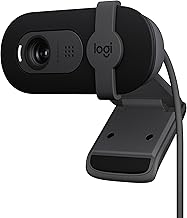
1. Logitech MX Brio Ultra HD 4K Webcam
- Best for: Sharp calls with desk view.
- Resolution: 4K Ultra HD at 30 fps, 1080p at 60 fps
- Sensor: 8.5MP Sony CMOS sensor
- Show Mode: Tilts down to show the desk
- Focus: Auto Focus
Sharp calls with desk view.
The 4K mode runs at 30 frames each second, so use the 1080p mode at 60 frames each second for fast movement, and confirm Windows Hello support on the listing if you need it.
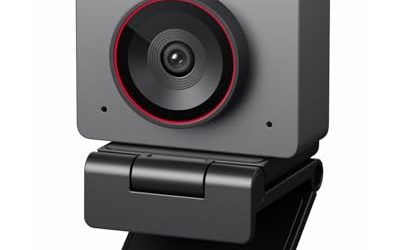
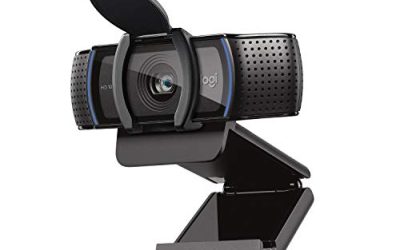
Logitech MX Brio is the complete call camera in this group, because its title joins 4K video, a 60 frames each second mode at 1080p, and a Show Mode for desk shots. It suits a home worker who takes calls all day and wants to tilt the camera down to show notes, sketches, or hardware on the desk, since Show Mode flips the image for that overhead view. The model lists USB-C, autofocus, and dual noise-reducing microphones, and it works with Microsoft Teams, Zoom, and Google Meet. A buyer who wants Windows Hello sign-in should note that this model does not list that feature.
Watch out for: The 4K mode runs at 30 frames each second, so use the 1080p mode at 60 frames each second for fast movement, and confirm Windows Hello support on the listing if you need it.
2. Logitech Brio 4K Webcam
- Best for: Windows Hello sign-in and calls.
- Resolution: 4K at 30 fps
- Focus: Autofocus, 5x digital zoom
- Field of view: 65, 78, or 90 degrees diagonal
- Microphone: Noise-cancelling microphone
Windows Hello sign-in and calls.
The 4K mode runs at 30 frames each second, so check the listing for the 1080p frame rate and confirm the mount fits your monitor before buying.
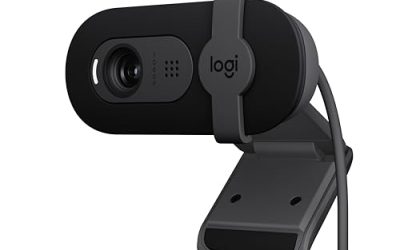
Logitech Brio 4K is the long-running 4K call camera in this group, and its title makes its strengths plain: 4K video, a noise-cancelling microphone, and Windows Hello face sign-in. It suits a home worker who signs into Windows with a glance and wants a camera that stays put on a monitor for calls all day. The listing states autofocus, 5x digital zoom, and three field-of-view presets at 65, 78, and 90 degrees diagonal, so a solo caller and a pair at one desk can both frame themselves well. It connects over USB-A and USB-C, and it works with Windows, Mac, and ChromeOS.
Watch out for: The 4K mode runs at 30 frames each second, so check the listing for the 1080p frame rate and confirm the mount fits your monitor before buying.
3. OBSBOT Tiny 2 Lite 4K Webcam
OBSBOT Tiny 2 Lite is the camera for people who cannot sit still on camera, because its title names AI tracking and a PTZ design built around a 1/2-inch sensor. It suits a presenter who stands, paces, or moves between a desk and a whiteboard, since the motorised gimbal follows the subject and keeps the framing centred. The listing states 4K at 30 frames each second, 1080p at 60 frames each second, phase-detection autofocus, gesture control, and dual microphones. Its compact body sits on a monitor or a small tripod, which helps on a crowded desk where a wide bar camera would not fit.
Specs
- Resolution: 4K at 30 fps, 1080p at 60 fps
- Sensor: 1/2-inch CMOS sensor
- Lens: f/1.8 aperture
- Focus: Phase-detection autofocus
- Tracking: AI tracking, 2-axis gimbal
- Microphones: Dual microphones
- Connection: USB-C, with USB-C to USB-A adapter
- Operating systems: Windows 10 or later, macOS 11 or later
Best for: Moving around on camera.
Watch out for: The title places 4K and 60 FPS side by side, while the maker specification lists 4K at 30 frames each second and 60 frames each second only at 1080p, so confirm the mode you need.
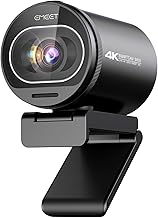
4. Elgato Facecam Pro
- Best for: Smooth 4K60 streaming.
- Resolution: 2160p60, 2160p30, 1080p60, 1080p30, 720p60, 720p30
- Sensor: Sony CMOS sensor, 8.3MP
- Lens: f/2.0 aperture, 21mm focal length
- Field of view: Up to 90 degrees
Smooth 4K60 streaming.
Full 4K at 60 frames each second needs a USB 3.0 port, and the title does not state a built-in microphone, so confirm audio and the USB port on your computer before buying.
Elgato Facecam Pro is the smooth-motion camera in this group, because its title promises 4K at 60 frames each second rather than 4K at a slower rate. It suits a streamer who wants 4K video with motion, and a creator who records in 4K and crops the footage without losing sharpness. The listing states a Sony sensor, an f/2.0 lens at 21mm, a field of view up to 90 degrees, and resolutions from 2160p60 down to 720p60. It connects over USB-C and works with OBS and Teams on PC and Mac, and its DSLR-style control suits a creator who wants manual control over focus.
Watch out for: Full 4K at 60 frames each second needs a USB 3.0 port, and the title does not state a built-in microphone, so confirm audio and the USB port on your computer before buying.
5. Razer Kiyo Pro Ultra 4K Webcam
- Best for: Low-light 4K with a large sensor.
- Resolution: 4K at 30 fps, 1080p at 60 fps, uncompressed 4K at 24 fps
- Sensor: 1/1.2-inch Sony sensor
- Lens: Custom f/1.7 aperture lens
- Focus: Autofocus, AI-powered face tracking
Low-light 4K with a large sensor.
The camera is a large, heavy unit for a monitor mount, and the listing states Windows support with plug-and-play use on macOS, so confirm the mount and your operating system before buying.
Razer Kiyo Pro Ultra is the camera in this group for dim rooms, because its title leads with a large sensor and an f/1.7 lens. It suits a streamer who broadcasts from a dim room, a creator who wants a background blur without software effects, and a gamer whose light is a monitor and a desk lamp. The listing states a 1/1.2-inch Sony sensor, HDR at 30 frames each second, face tracking, autofocus, and auto exposure, plus a built-in microphone and a shutter. It records 4K at 30 frames each second and 1080p at 60 frames each second, and it works with OBS and XSplit.
Watch out for: The camera is a large, heavy unit for a monitor mount, and the listing states Windows support with plug-and-play use on macOS, so confirm the mount and your operating system before buying.
Which One Fits Your Situation
You take calls all day from one desk
Choose the Logitech MX Brio, because its title joins 4K video, 1080p at 60 frames each second, and Show Mode for desk shots. It suits a home worker who wants sharp calls and a quick overhead view of notes or hardware. The dual noise-reducing microphones handle solo calls without a headset, and the USB-C connection keeps the desk tidy.
You sign into Windows with your face
Choose the Logitech Brio 4K, because its title names Windows Hello facial recognition alongside 4K video and a noise-cancelling microphone. It suits a Windows user who wants one camera for sign-in and calls. The three field-of-view presets help when a second person joins the desk, and the autofocus keeps a solo caller sharp.
You present while you move around
Choose the OBSBOT Tiny 2 Lite, because its AI tracking and 2-axis gimbal follow you as you move, while its 1/2-inch sensor keeps the 4K picture clean. It suits a teacher, a presenter, or a streamer who stands and paces. Confirm that 4K runs at 30 frames each second on this model, and use 1080p at 60 frames each second for faster movement.
You stream or record in 4K and want smooth motion
Choose the Elgato Facecam Pro, because it is the only camera here that lists true 4K at 60 frames each second. It suits a streamer whose face camera sits beside fast gameplay, and a creator who crops 4K footage in editing. Check that your computer has a USB 3.0 port, and plan separate audio, since the title does not state a built-in microphone.
Common Mistakes
- Buying a 4K camera without checking the frame rate at 4K, then finding motion looks slow.
- Choosing a camera with a small sensor for a dim room, where a larger sensor would hold detail better.
- Picking a wide field of view for a solo call, so the background fills the frame.
- Assuming every 4K camera has a built-in microphone, when some titles do not state one.
- Plugging a 4K60 camera into an older USB port, so the camera falls back to a slower mode.
Frequently Asked Questions
Is 4K at 30 frames each second enough for video calls?
Yes, for a calm call where you sit still, 4K at 30 frames each second looks sharp and steady. Movement looks smoother at 60 frames each second, so a presenter who gestures or a streamer beside fast gameplay should use the 1080p mode at 60 frames each second, or a camera such as the Elgato Facecam Pro that lists 4K at 60 frames each second.
Which 4K webcam is best for a dim room?
The Razer Kiyo Pro Ultra suits a dim room, because its title names a 1/1.2-inch Sony sensor and an f/1.7 lens, the largest sensor and widest aperture here. The OBSBOT Tiny 2 Lite is the next choice, with a 1/2-inch sensor and an f/1.8 lens. Add a lamp in front of your face, since no webcam can replace light.
Do I need a 4K webcam for streaming?
No, most live streams are watched at 1080p, so a 1080p camera at 60 frames each second can look smoother than a 4K camera at 30 frames each second. Choose 4K when you record and crop footage, or when your audience watches on a large screen. For a simple live face camera, frame rate and sensor size matter more than the 4K label.
Can a 4K webcam follow me if I move around?
Yes, but only the cameras with tracking can do it well. The OBSBOT Tiny 2 Lite uses AI tracking and a motorised gimbal to follow you, while the other cameras here stay fixed and rely on a wide field of view. If you pace while you present, choose the Tiny 2 Lite, and check that its gesture controls suit the way you move.
FAQ
Is 4K at 30 frames each second enough for video calls?
Which 4K webcam is best for a dim room?
Do I need a 4K webcam for streaming?
Can a 4K webcam follow me if I move around?
More from Amazon
Programs that pair well with the guide above. Offers and eligibility are set by Amazon and may change.
Free shipping on eligible items, Prime Video and more. Eligible new members can start with a free trial.
Start a Prime free trialAd-free music streaming. Eligible new subscribers can start with a free trial.
Try Music Unlimited freeA Prime membership for ages 18-24 with a trial period. Eligibility is set by Amazon.
See Prime for Young AdultsAudiobooks and podcasts to listen to on the go. Eligible new members can start with a free trial.
Try Audible freeAs an Amazon Associate we earn from qualifying purchases.