Our Short List of 3

- Best for: A spin-shutter camera for a shared desk.
- Resolution: 1080p
- Privacy: Privacy shutter, spin to cover the lens
- Microphone: Noise reduction mic
- Connection: USB-C

- Best for: A wide-angle call camera with a cover.
- Resolution: Full HD 1080p, 1920 x 1080
- Microphones: 2 noise reduction mics
- Field of view: 90 degrees
- Privacy: Privacy cover

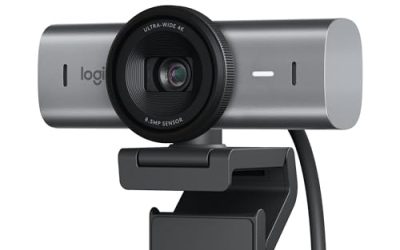
- Best for: A 4K camera with a built-in shutter.
- Resolution: 4K
- Sensor: 1/1.2-inch Sony sensor
- Lens: Custom F/1.7 aperture lens
- Light: Auto light correction, HDR at 30FPS
All 5 Picks at a Glance
| Product | Specs | Action |
|---|---|---|
| 1. Logitech Brio 300 HD Webcam with Privacy Shutter, Noise Reduction Mic, USB-C, Certified for Zoom, Microsoft Teams, Google Meet, Automatic Light Correction – White |
| Check price on Amazon |
| 2. EMEET C960 1080P Webcam with Microphone, C960 Web Cam, 2 Mics, 90-Degree FOV, USB Type-A and A-to-C Adapter, Plug and Play Computer Camera for Online Calling, Zoom/Teams/Facetime, Switch 2 Camera Support, 2025 Version |
| Check price on Amazon |
| 3. Razer Kiyo Pro Ultra 4K Webcam: Large Sensor – Auto Light Correction – Built-in Mic and Shutter – Pro Grade Content Creation, Streaming, Gaming, Video Calls – Works with OBS, Xsplit, PC, Zoom, Teams |
| Check price on Amazon |
 4. NexiGo N60 Pro 4K Webcam for PC, 4K UHD Sony Sensor, Autofocus, 1080p 60 fps, Noise-Canceling Mics, Privacy Cover, Distortion-Free Lens, 4X Digital Zoom, Works with Switch 2/Zoom/Teams/Google Meet |
| Check price on Amazon |
 5. NexiGo N660P (Gen 2) 1080P 60FPS Webcam with Software Control, Dual Microphone and Cover, Autofocus, HD USB Computer Web Camera, for OBS/Gaming/Zoom/Skype/FaceTime/Teams/Twitch |
| Check price on Amazon |
Our Top Picks
Covering a webcam lens with a physical shutter changes a daily worry into a single movement of a finger. Software can mute a camera, yet a cover lets you see at a glance that the lens is blocked, which matters in a shared home, a bedroom office, or a desk that faces a bed. The buying decision is therefore about the cover itself and the camera behind it: how the cover moves, whether it stays attached, and whether the resolution, focus, and microphone still fit the calls you make.
People who work from a bedroom, parents who share a desk with children, and anyone who leaves a camera mounted on a monitor will find the most use for these five models. The webcams below are chosen from their Amazon product titles and listing details alone, with the cover type, resolution, frame rate, field of view, and microphone stated where the listing states them.
Quick Picks
As an Amazon Associate we earn from qualifying purchases.
| Product | Best for | Key spec from title |
|---|---|---|
| Logitech Brio 300 | A spin-shutter camera for a shared desk | 1080p, privacy shutter, USB-C, certified for Zoom |
| EMEET C960 | A wide-angle call camera with a cover | 1080p, 2 mics, 90-degree view, privacy cover |
| Razer Kiyo Pro Ultra | A 4K camera with a built-in shutter | 4K, large sensor, built-in mic and shutter |
| NexiGo N60 Pro | A 4K camera with a sliding cover | 4K UHD Sony sensor, privacy cover, 4X digital zoom |
| NexiGo N660P Gen 2 | Smooth 1080p motion with a sliding cover | 1080p 60FPS, dual microphone, cover, autofocus |
How to Choose
Look first at how the cover moves
Covers move in different ways, and the movement decides whether you will actually use it every day. The Logitech Brio 300 names a privacy shutter that spins around the lens, so a twist covers or reveals the camera in one motion. The NexiGo N60 Pro and NexiGo N660P name a sliding cover, so a finger slides the panel across the lens. The Razer Kiyo Pro Ultra names a built-in shutter, while the EMEET C960 names a cover that can be removed. Try the motion in your head against your desk: a spin shutter suits a camera you leave mounted, while a removable cover suits a camera you pack away.
Do not let the cover hide a weak camera
A privacy cover is a single feature, and it should never be the only reason to buy a webcam. Resolution, focus, and sound still decide how you look and sound on a call, so read those details alongside the cover wording. A 1080p camera with autofocus, such as the NexiGo N660P, can suit a presenter who leans in and back, while a 4K camera, such as the Razer Kiyo Pro Ultra or the NexiGo N60 Pro, adds detail for close-up work. If the cover is excellent and the picture is not, the camera will still disappoint on every call.
Match the connection and the mount to your desk
Connection and mounting decide whether a webcam fits the computer you already own. The Logitech Brio 300 uses USB-C, so it fits a newer laptop with a free USB-C port, while the EMEET C960 offers USB Type-A with an A-to-C adapter in the box, which helps an older desktop. A clip mount suits a monitor, and a tripod thread suits a desk stand; the NexiGo N660P names a tripod thread on its listing. Check the port, the cable, and the mount on the listing before you choose, because an adapter bought later is easy to forget.
Check frame rate and focus for the way you move
Frame rate and focus decide how smooth and sharp you look when you move, gesture, or share a document on camera. A camera at 30 frames per second suits a still caller at a desk, while a camera at 60 frames per second, such as the NexiGo N60 Pro at 1080p or the NexiGo N660P, keeps hand movements and head turns smoother. Autofocus helps when you lean toward the camera to show a page, while fixed focus suits a caller who stays at one distance. Match those two details to your own movement, not to a number on the box.
The 5 Best Options
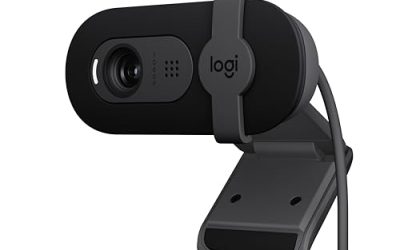
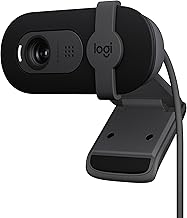
1. Logitech Brio 300 HD Webcam with Privacy Shutter, Noise Reduction Mic, USB-C, Certified for Zoom, Microsoft Teams, Google Meet, Automatic Light Correction – White
- Best for: A spin-shutter camera for a shared desk.
- Resolution: 1080p
- Privacy: Privacy shutter, spin to cover the lens
- Microphone: Noise reduction mic
- Connection: USB-C
A spin-shutter camera for a shared desk.
The listing names fixed focus, so confirm that a fixed-focus camera suits the distance you sit from your desk before buying.
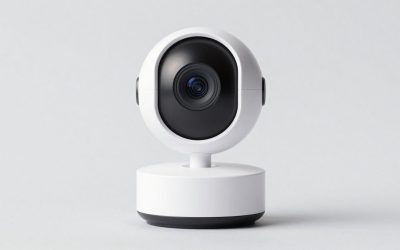
A spin shutter makes the Logitech Brio 300 a natural fit for a desk where the camera stays mounted all week. Twisting the shutter covers the lens between calls and reveals it again for the next meeting, without a separate cap to lose. Its title also names 1080p video, a noise reduction microphone, USB-C, certification for Zoom, Microsoft Teams, and Google Meet, and automatic light correction. That set suits a home worker in a shared room, a student in a bedroom office, or anyone who wants a visible sign that the camera is off.
Watch out for: The listing names fixed focus, so confirm that a fixed-focus camera suits the distance you sit from your desk before buying.
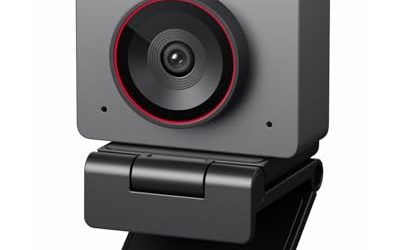
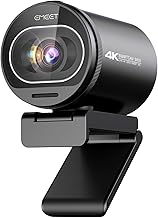
2. EMEET C960 1080P Webcam with Microphone, C960 Web Cam, 2 Mics, 90-Degree FOV, USB Type-A and A-to-C Adapter, Plug and Play Computer Camera for Online Calling, Zoom/Teams/Facetime, Switch 2 Camera Support, 2025 Version
- Best for: A wide-angle call camera with a cover.
- Resolution: Full HD 1080p, 1920 x 1080
- Microphones: 2 noise reduction mics
- Field of view: 90 degrees
- Privacy: Privacy cover
A wide-angle call camera with a cover.
The focus is fixed, so confirm that your usual sitting distance falls inside the stated focal range on the listing before buying.
The EMEET C960 suits a caller who wants a wide view and two microphones behind a simple cover. Its title names 1080p video, two microphones, a 90-degree field of view, USB Type-A with an A-to-C adapter, plug-and-play use, and support for Zoom, Teams, and FaceTime, and its listing names a privacy cover. That wide view fits a small group around one computer, a classroom corner, or a desk where two people share a call. Two microphones help when the speaker sits a little further from the camera than usual.
Watch out for: The focus is fixed, so confirm that your usual sitting distance falls inside the stated focal range on the listing before buying.
3. Razer Kiyo Pro Ultra 4K Webcam: Large Sensor – Auto Light Correction – Built-in Mic and Shutter – Pro Grade Content Creation, Streaming, Gaming, Video Calls – Works with OBS, Xsplit, PC, Zoom, Teams
- Best for: A 4K camera with a built-in shutter.
- Resolution: 4K
- Sensor: 1/1.2-inch Sony sensor
- Lens: Custom F/1.7 aperture lens
- Light: Auto light correction, HDR at 30FPS
A 4K camera with a built-in shutter.
This is a wide, creator-focused camera, so confirm the size, mount, and USB connection on the listing before buying for a small monitor.
The Razer Kiyo Pro Ultra suits a creator who wants 4K detail and a built-in shutter in the same camera. Its title names a large sensor, auto light correction, a built-in microphone and shutter, and use for content creation, streaming, gaming, and video calls with OBS, Xsplit, PC, Zoom, and Teams. Its listing names a 1/1.2-inch Sony sensor, a custom F/1.7 aperture lens, HDR at 30 frames per second, and uncompressed 4K at 24 frames per second or 1080p at 60 frames per second. That set fits a streamer or presenter who records as well as calls.
Watch out for: This is a wide, creator-focused camera, so confirm the size, mount, and USB connection on the listing before buying for a small monitor.
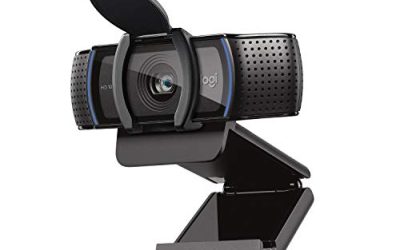
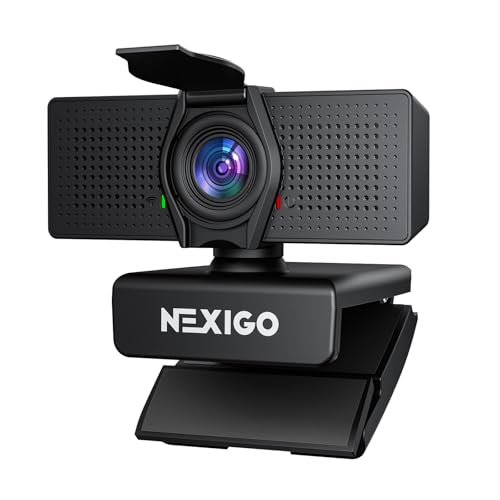
4. NexiGo N60 Pro 4K Webcam for PC, 4K UHD Sony Sensor, Autofocus, 1080p 60 fps, Noise-Canceling Mics, Privacy Cover, Distortion-Free Lens, 4X Digital Zoom, Works with Switch 2/Zoom/Teams/Google Meet
- Best for: A 4K camera with a sliding cover.
- Resolution: 4K UHD Sony sensor
- Video: 1080p at 60fps
- Focus: Autofocus
- Microphones: Noise-canceling mics
A 4K camera with a sliding cover.
The title names a 4X digital zoom, so confirm how digital zoom affects picture sharpness on the listing before buying.
The NexiGo N60 Pro suits a caller who wants 4K detail, a sliding privacy cover, and autofocus in one desk camera. Its title names a 4K UHD Sony sensor, autofocus, 1080p at 60 frames per second, noise-canceling microphones, a privacy cover, a distortion-free lens, and 4X digital zoom, and it names Switch 2, Zoom, Teams, and Google Meet. That combination fits a presenter who shows documents close to the camera, a gamer who streams from a desk, or a home worker who wants a sharper picture for client calls. The cover slides across the lens when the call ends.
Watch out for: The title names a 4X digital zoom, so confirm how digital zoom affects picture sharpness on the listing before buying.
5. NexiGo N660P (Gen 2) 1080P 60FPS Webcam with Software Control, Dual Microphone and Cover, Autofocus, HD USB Computer Web Camera, for OBS/Gaming/Zoom/Skype/FaceTime/Teams/Twitch
- Best for: Smooth 1080p motion with a sliding cover.
- Resolution: 1080p at 60FPS
- Focus: Autofocus
- Microphones: Dual microphone, noise reduction
- Privacy: Privacy cover, sliding shutter
Smooth 1080p motion with a sliding cover.
This webcam is limited to 1080p, so confirm that 1080p at 60 frames per second meets your needs before buying a 4K model.
The NexiGo N660P (Gen 2) suits a caller who moves, gestures, and streams from the same desk. Its title names 1080p video at 60 frames per second, software control, a dual microphone and cover, autofocus, and use for OBS, gaming, Zoom, Skype, FaceTime, Teams, and Twitch. That set fits a streamer who leans in to talk and back to play, a teacher who gestures while explaining, or a presenter who wants smooth motion without moving to 4K. A sliding privacy shutter covers the lens when the session ends, and a tripod thread on the listing gives a second mounting choice.
Watch out for: This webcam is limited to 1080p, so confirm that 1080p at 60 frames per second meets your needs before buying a 4K model.
Which One Fits Your Situation
You share a desk or a room with other people
Choose the Logitech Brio 300, because its spin shutter gives a visible sign that the lens is covered between calls. Certification for Zoom, Microsoft Teams, and Google Meet, automatic light correction, and USB-C fit a shared desk where the camera stays mounted. Confirm that fixed focus suits your sitting distance before buying.
You call with two people in frame
Choose the EMEET C960, because its title names a 90-degree field of view and two microphones. That width keeps two people in frame without crowding, and the privacy cover closes the lens when the call ends. The USB Type-A connection with an A-to-C adapter helps an older desktop, so check the adapter in the box on the listing.
You record and stream as well as call
Choose the Razer Kiyo Pro Ultra, because its title names 4K video, a large sensor, a built-in shutter, and use with OBS and Xsplit as well as Zoom and Teams. Auto light correction and HDR help with uneven light, and the built-in shutter covers the lens between sessions. Confirm the size and mount for your desk before buying.
You want smooth motion and a simple sliding cover
Choose the NexiGo N660P (Gen 2), because its title names 1080p at 60 frames per second, autofocus, a dual microphone, and a cover. Smooth motion suits gestures and leaning in, while software control adjusts the framing without moving the camera. If you want 4K instead, move to the NexiGo N60 Pro in this guide.
Common Mistakes
- Buying a webcam for its cover alone, without checking resolution, focus, and microphone first.
- Choosing a spin shutter when you pack the camera away daily, and losing the habit of closing it.
- Assuming a removable cover stays attached, when the EMEET C960 cover can be removed.
- Picking a USB-C camera for a computer with no free USB-C port.
- Choosing a fixed-focus camera for a desk where you lean in and back during every call.
Frequently Asked Questions
Does a privacy cover block the microphone as well?
No, a privacy cover blocks the lens, not the microphone, so sound can still travel when the cover is closed. Mute the microphone in your calling app when you want silence as well as a covered lens. The webcams in this guide name a shutter or cover for the lens only, so check the microphone controls in Zoom, Teams, or FaceTime.
Is a sliding cover better than a spin shutter?
Neither type is better for every desk, because the choice depends on how the camera is mounted. A sliding cover suits a camera that sits flat on a monitor, while a spin shutter suits a round camera such as the Logitech Brio 300. A removable cover suits a camera you pack away, because it can be taken off and stored with the camera.
Can I use a 4K webcam for ordinary Zoom calls?
Yes, a 4K webcam works for ordinary Zoom calls, and the Razer Kiyo Pro Ultra and NexiGo N60 Pro both name 4K in their titles. Zoom may show the call at a lower resolution, so the extra detail helps for close-up shots and recordings. A 1080p camera at 60 frames per second, such as the NexiGo N660P, can suit a presenter better than 4K at a lower frame rate.
Do all webcams with a privacy cover work on a Mac?
No, not every model names Mac support, so check the listing for your own computer before buying. The EMEET C960 names Windows 10 and 11 and macOS 10.14 or later on its listing, while other models in this guide name different platforms. Confirm the operating system, the USB port type, and the calling app on the listing first.
FAQ
Does a privacy cover block the microphone as well?
Is a sliding cover better than a spin shutter?
Can I use a 4K webcam for ordinary Zoom calls?
Do all webcams with a privacy cover work on a Mac?
More from Amazon
Programs that pair well with the guide above. Offers and eligibility are set by Amazon and may change.
Free shipping on eligible items, Prime Video and more. Eligible new members can start with a free trial.
Start a Prime free trialAd-free music streaming. Eligible new subscribers can start with a free trial.
Try Music Unlimited freeA Prime membership for ages 18-24 with a trial period. Eligibility is set by Amazon.
See Prime for Young AdultsAudiobooks and podcasts to listen to on the go. Eligible new members can start with a free trial.
Try Audible freeAs an Amazon Associate we earn from qualifying purchases.