Our Short List of 3

- Best for: A tiny 4K camera for a small desk.
- Resolution: 4K at 30 fps, 1080p at 60 fps
- Sensor: 1/2-inch sensor, 48MP
- Focus: PDAF autofocus
- Framing: AI framing

- Best for: Following you around the room.
- Resolution: 4K Ultra HD
- Frame rate: Not stated in the product title
- Sensor: 1/2-inch sensor
- Tracking: PTZ, AI tracking

- Best for: Vertical and landscape streaming.
- Resolution: Full HD 1080p at 60 fps
- Lens: Premium glass lens
- Focus: Smart auto-focus
- Field of view: 78 degrees
All 4 Picks at a Glance
| Product | Specs | Action |
|---|---|---|
| 2. OBSBOT Meet 2 |
| Check price on Amazon |
| 3. Insta360 Link 2 |
| Check price on Amazon |
| 4. Logitech StreamCam |
| Check price on Amazon |
 5. Elgato Facecam 4K |
| Check price on Amazon |
Our Top Picks
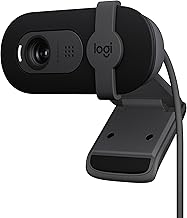
- Logitech StreamCam Premium Webcam for Streaming and ContentFull HD 1080p 60 fps1.89 x 2.28 x 3.35 inches0.6 poundsCheck on Amazon
A gaming webcam has one job: it must keep your face clear and in sync while the game beside it moves fast, the room stays dim, and the stream runs for hours. Resolution alone will not do that. A 1080p camera at 60 frames each second can look smoother than a 4K camera at 30 frames each second, and a large sensor can matter more than either figure when the only light comes from a monitor. Pick the camera that matches your stream, your light, and the way you sit, and the face camera will stop being the weak link.
This guide covers five kinds of gamer: a streamer beginning with a first face camera, a creator who records in 4K, a presenter who moves around the room, a vertical-video creator, and a gamer who wants a clean 1080p60 feed for OBS. The five cameras below are chosen from their Amazon product titles and pages, with resolution, frame rate, sensor, and focus stated where the listing states them.
Quick Picks
As an Amazon Associate we earn from qualifying purchases.
| Product | Best for | Key spec from title |
|---|---|---|
| Elgato Facecam MK.2 | Clean 1080p60 streaming in OBS | Uncompressed 1080p60, Sony sensor, HDR |
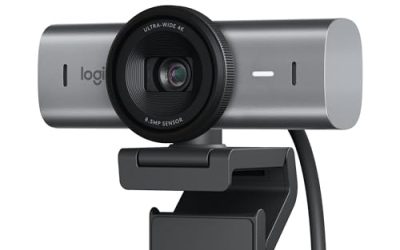
| OBSBOT Meet 2 | A tiny 4K camera for a small desk | 4K, AI framing, 1/2-inch sensor, 40.5 g |
| Insta360 Link 2 | Following you around the room | PTZ 4K, AI tracking, 1/2-inch sensor |
| Logitech StreamCam | Vertical and landscape streaming | Full HD 1080p 60 fps, glass lens, auto-focus |
| Elgato Facecam 4K | Recording in 4K60 with lens filters | 4K60, Sony sensor, 49mm lens filters, HDR |
How to Choose
Put frame rate ahead of resolution for live play
Live gaming runs at 60 frames each second, so a face camera that matches that rate looks natural beside it. The Elgato Facecam MK.2 sends uncompressed 1080p at 60 frames each second, and the Logitech StreamCam records Full HD 1080p at 60 frames each second, which both suit a live stream. The OBSBOT Meet 2 lists 1080p at 60 frames each second as well, with 4K at 30 frames each second for recording. The Elgato Facecam 4K is the only camera here that lists 4K at 60 frames each second. If your stream is live, choose 60 frames each second first, and treat 4K as a bonus for recording.
Look at the sensor when the room is dark
Gaming rooms are often lit by a monitor and a strip of coloured light, which is a hard scene for a small sensor. The Elgato Facecam 4K names a Sony sensor at 1/1.8 inch, the Insta360 Link 2 and the OBSBOT Meet 2 both name a 1/2-inch sensor, and the Elgato Facecam MK.2 names a Sony sensor at 1/2.5 inch. A larger sensor gathers more light, so the picture stays cleaner when the room is dim. Check the sensor size and the lens aperture together, then add a lamp in front of your face, because even the best sensor in this group needs some light to work with.
Decide how much of the room should be in frame
A gaming face camera usually shows one person in a corner box, so a narrow view keeps the focus on you, while a wide view suits a duo stream or a desk with two players. The Elgato Facecam MK.2 lists an 84-degree field of view, the Logitech StreamCam lists a 78-degree angle, and the OBSBOT Meet 2 lists a 79.4-degree diagonal view. The Insta360 Link 2 pans and tilts, so it can reframe you without a wider lens. Think about who sits in frame, how close the camera sits, and whether the background behind you helps or hurts the shot.
Sort out audio, focus, and the USB port early
Audio and focus cause more stream problems than resolution does. The Elgato Facecam MK.2 has no built-in microphone, so it suits a gamer who already uses a headset or a USB microphone, while the OBSBOT Meet 2, the Insta360 Link 2, and the Logitech StreamCam all list built-in microphones. Focus differs too: the Facecam MK.2 and the Facecam 4K use fixed focus, the StreamCam uses smart auto-focus, and the Link 2 uses AI tracking with a moving head. Finally, uncompressed 1080p60 and 4K60 both need a USB 3.0 port, so check the ports on your computer before you buy.
The 5 Best Options
1. Elgato Facecam MK.2
Elgato Facecam MK.2 is the default face camera for a streamer who wants a clean 1080p60 feed in OBS, because its title leads with uncompressed Full HD video, HDR, and a Sony sensor. It suits a gamer whose face camera sits in a corner box beside fast gameplay, where smooth motion and low delay matter more than a 4K label. The listing states a Sony CMOS sensor, a 24mm Prime Lens at f/2.4, fixed focus from 30 to 120 cm, an 84-degree field of view, and a built-in privacy shutter. It connects over USB-C and works with OBS, Zoom, and Teams on PC and Mac.
Specs
- Resolution: 1080p60, 1080p30, 720p120, uncompressed
- Sensor: Sony CMOS sensor, 1/2.5-inch
- Lens: Elgato Prime Lens, 24mm, f/2.4 aperture
- Focus: Fixed focus, 30 to 120 cm
- Field of view: 84 degrees
- HDR: HDR enabled
- Privacy: Built-in privacy shutter
- Microphone: None built in
- Connection: USB-C, USB 3.0 for uncompressed video
- Works with: OBS, Zoom, Teams, PC/Mac
Best for: Clean 1080p60 streaming in OBS.
Watch out for: This camera has no built-in microphone and no 4K mode, so plan separate audio and confirm you have a USB 3.0 port for uncompressed 1080p60.
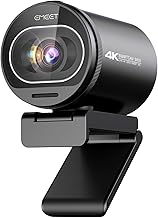
2. OBSBOT Meet 2
- Best for: A tiny 4K camera for a small desk.
- Resolution: 4K at 30 fps, 1080p at 60 fps
- Sensor: 1/2-inch sensor, 48MP
- Focus: PDAF autofocus
- Framing: AI framing
A tiny 4K camera for a small desk.
The 4K mode runs at 30 frames each second, so use 1080p at 60 frames each second for live play, and confirm the magnetic mount fits your monitor before buying.
OBSBOT Meet 2 is the camera in this group for a small desk, because its title joins 4K video, AI framing, and a body that weighs 40.5 grams. It suits a gamer with a crowded desk, a laptop streamer, or anyone who wants a 4K camera that clips to a monitor. The listing states a 1/2-inch sensor, AI framing and autofocus, gesture control, HDR, and a dual microphone, with 4K at 30 frames each second and 1080p at 60 frames each second. Its magnetic mount and privacy cover help on a desk where the camera is moved or shared between a desktop and a laptop.
Watch out for: The 4K mode runs at 30 frames each second, so use 1080p at 60 frames each second for live play, and confirm the magnetic mount fits your monitor before buying.
3. Insta360 Link 2
- Best for: Following you around the room.
- Resolution: 4K Ultra HD
- Frame rate: Not stated in the product title
- Sensor: 1/2-inch sensor
- Tracking: PTZ, AI tracking
Following you around the room.
The title does not state a frame rate, so confirm the 4K and 1080p frame rates on the listing, and check that the moving head has room to pan on your desk.
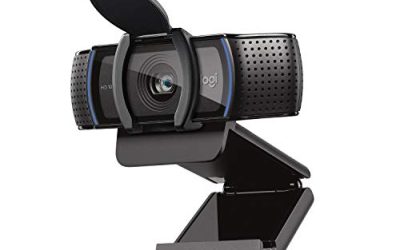
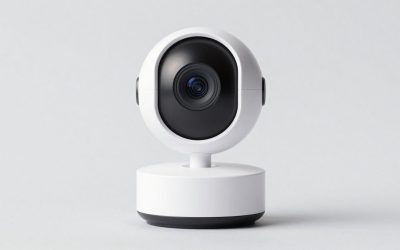
Insta360 Link 2 is the camera for a gamer who moves, because its title names PTZ movement and AI tracking alongside 4K video. It suits a streamer who stands up between matches, a presenter who walks to a whiteboard, or a creator who records from different spots in the room, since the camera head pans and tilts to follow the subject. The listing states a 1/2-inch sensor, HDR, an AI noise-canceling microphone, and gesture control, and it works with Zoom, Teams, and Twitch on PC and Mac. Its whiteboard mode and group tracking suit a creator who shares a room with other people on camera.
Watch out for: The title does not state a frame rate, so confirm the 4K and 1080p frame rates on the listing, and check that the moving head has room to pan on your desk.
4. Logitech StreamCam
- Best for: Vertical and landscape streaming.
- Resolution: Full HD 1080p at 60 fps
- Lens: Premium glass lens
- Focus: Smart auto-focus
- Field of view: 78 degrees
Vertical and landscape streaming.
This camera has no 4K mode, so it suits live streaming rather than 4K recording, and it needs a USB-C port or an adapter on an older computer.
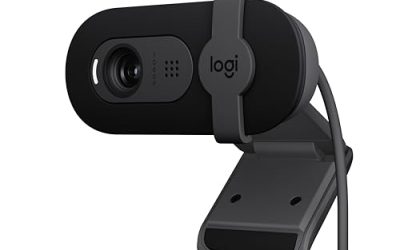
Logitech StreamCam is the vertical-video camera in this group, because its title names Full HD 1080p at 60 frames each second and a mount that turns the camera on its side. It suits a gamer who streams to a landscape platform and also posts vertical clips, since one camera can cover both shapes without a second mount. The listing states a premium glass lens, smart auto-focus, dual front-facing microphones, and a USB-C connection, with support for Windows 10 or later and macOS 10.14 or later. Its 78-degree angle keeps a solo streamer in frame without showing too much of the room behind.
Watch out for: This camera has no 4K mode, so it suits live streaming rather than 4K recording, and it needs a USB-C port or an adapter on an older computer.
5. Elgato Facecam 4K
- Best for: Recording in 4K60 with lens filters.
- Resolution: 4K at 60 fps, 1080p at 60 fps
- Sensor: Sony CMOS sensor, 1/1.8-inch
- Lens: Elgato Prime Lens, 21mm, f/4.0 aperture
- Focus: Fixed focus, 30 to 120 cm at 4K
Recording in 4K60 with lens filters.
The title does not state a built-in microphone, so plan separate audio, and confirm you have a USB 3.0 port for 4K at 60 frames each second.
Elgato Facecam 4K is the recording camera in this group, because its title joins 4K at 60 frames each second, a Sony sensor, and support for 49mm lens filters. It suits a creator who records commentary in 4K, edits the footage, and wants effects from filters on the lens. The listing states a Sony CMOS sensor at 1/1.8 inch, an Elgato Prime Lens at f/4.0 and 21mm, fixed focus from 30 to 120 cm at 4K, HDR, and uncompressed video over USB-C. Its fixed focus keeps a seated streamer sharp without hunting, while the filter thread lets a creator add diffusion or colour effects.
Watch out for: The title does not state a built-in microphone, so plan separate audio, and confirm you have a USB 3.0 port for 4K at 60 frames each second.
Which One Fits Your Situation
You are opening your first stream
Choose the Elgato Facecam MK.2, because its uncompressed 1080p60 feed suits OBS and looks clean beside fast gameplay, without the extra demands of 4K. It suits a new streamer who already has a headset or a USB microphone. The fixed focus keeps a seated gamer sharp, and the privacy shutter covers the lens when the stream ends.
Your desk is small and crowded
Choose the OBSBOT Meet 2, because it weighs only 40.5 grams and clips to a monitor without taking up desk space, while still listing 4K video and AI framing. It suits a laptop streamer or a gamer with a crowded desk. Use 1080p at 60 frames each second for live play, and keep 4K at 30 frames each second for recording.
You move around while you stream
Choose the Insta360 Link 2, because its PTZ head and AI tracking follow you as you stand, pace, or walk to another part of the room. It suits a presenter, a teacher, or a streamer who does not sit still. Confirm the frame rates on the listing first, since the title does not state them, and give the moving head room to pan.
You post vertical clips as well as streams
Choose the Logitech StreamCam, because its mount turns the camera on its side for vertical video, while its 1080p at 60 frames each second suits a live stream. It suits a creator who posts to short-form platforms and streams on a landscape platform with one camera. The dual front-facing microphones handle solo commentary without extra gear.
Common Mistakes
- Buying a 4K camera at 30 frames each second for a live stream, where 1080p at 60 frames each second would look smoother.
- Choosing a camera with no built-in microphone and forgetting to plan separate audio.
- Sitting in a dark room and expecting a small sensor to stay clean without a lamp.
- Plugging a 4K60 or uncompressed 1080p60 camera into an older USB port, so it falls back to a slower mode.
- Picking a wide field of view for a solo face camera, so the background fills the corner box.
Frequently Asked Questions
Is 1080p at 60 frames each second better than 4K at 30 for gaming?
Yes, for a live stream, because the face camera moves at the same rate as the gameplay beside it, so motion looks natural. A 4K camera at 30 frames each second suits recording, where you can crop the footage later. Choose 1080p60 for live play, and choose a camera such as the Elgato Facecam 4K when you want 4K at 60 frames each second as well.
Do I need a separate microphone with these webcams?
It depends on the camera. The OBSBOT Meet 2, the Insta360 Link 2, and the Logitech StreamCam all list built-in microphones, so they suit a solo streamer without extra gear. The Elgato Facecam MK.2 has no built-in microphone, and the Facecam 4K title does not state one, so plan a headset or a USB microphone with those two.
Can a webcam follow me if I stand up during a stream?
Yes, but only the cameras with a moving head can do it well. The Insta360 Link 2 pans and tilts to follow you, and the OBSBOT Meet 2 uses AI framing to keep you centred without moving parts. The other cameras here stay fixed, so a wide field of view is the only way they can cover movement.
Which webcam here is best for a small desk?
The OBSBOT Meet 2 suits a small desk best, because it weighs only 40.5 grams and clips to a monitor, while still listing 4K video, AI framing, and a dual microphone. The Elgato Facecam MK.2 is the next choice for a small desk, since its low-profile mount sits neatly on a monitor without blocking the screen.
FAQ
Is 1080p at 60 frames each second better than 4K at 30 for gaming?
Do I need a separate microphone with these webcams?
Can a webcam follow me if I stand up during a stream?
Which webcam here is best for a small desk?
More from Amazon
Programs that pair well with the guide above. Offers and eligibility are set by Amazon and may change.
Free shipping on eligible items, Prime Video and more. Eligible new members can start with a free trial.
Start a Prime free trialAd-free music streaming. Eligible new subscribers can start with a free trial.
Try Music Unlimited freeA Prime membership for ages 18-24 with a trial period. Eligibility is set by Amazon.
See Prime for Young AdultsAudiobooks and podcasts to listen to on the go. Eligible new members can start with a free trial.
Try Audible freeAs an Amazon Associate we earn from qualifying purchases.