Our Short List of 3

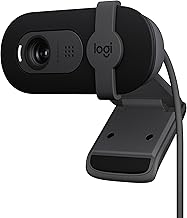
- Best for: Simple daily Zoom calls from a desk.
- Resolution: Full HD 1080p
- Light: Auto-light balance
- Microphone: Built-in mic
- Privacy: Privacy shutter

- Best for: Dependable 1080p calls on PC or Mac.
- Resolution: Full HD 1080p/30fps
- Audio: Clear stereo audio
- Light: Light correction
- Privacy: Privacy shutter

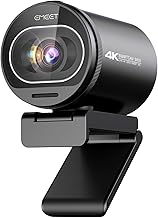
- Best for: Sharper 2K calls in a dim room.
- Resolution: 2K
- Microphones: AI-noise canceling mics, stereo mics
- Field of view: Adjustable, 65, 78, and 95 degrees
- Light: Low-light correction
All 5 Picks at a Glance
| Product | Specs | Action |
|---|---|---|
| 1. Logitech Brio 101 Full HD 1080p Webcam for PC, Built-in Mic, Black |
| Check price on Amazon |
| 2. Logitech C920S HD Pro Webcam, Full HD 1080p/30fps Video Calling, Clear Stereo Audio, Light Correction, Privacy Shutter |
| Check price on Amazon |
| 3. Anker PowerConf C200 2K Webcam for PC/Laptop/Mac, Computer Camera, Low-Light Correction, AI-Noise Canceling Mics, Adjustable Field of View, Built-in Privacy Cover, Stereo Mics |
| Check price on Amazon |
 4. NexiGo N60 1080P Webcam with Microphone, Software Control and Privacy Cover, USB HD Computer Web Camera, Plug and Play, for Zoom/Skype/Teams |
| Check price on Amazon |
 5. OBSBOT Meet SE 1080P 100FPS Webcam for PC, AI Framing Streaming Camera with 1/2.8-Inch Sensor, Beauty Mode, Gesture Control, Staggered HDR |
| Check price on Amazon |
Our Top Picks

A Zoom call puts your face, your voice, and your room on screen at the same time, so the real decision is about being seen clearly in the room you actually call from. A dim corner, a window behind you, a noisy household, and a laptop lid that sits too low all shape the picture more than a single resolution number does. The webcam that fits is the one whose lens, light correction, field of view, and microphone match that room, and whose connection fits the computer in front of you.
This guide is for home workers on daily Zoom calls, students joining classes from a bedroom desk, and presenters who move, gesture, and share a screen while they talk. The five webcams below are chosen from their Amazon product titles and listing details alone, with resolution, frame rate, field of view, microphone, and privacy cover stated where the listing states them.
Quick Picks
As an Amazon Associate we earn from qualifying purchases.
| Product | Best for | Key spec from title |
|---|---|---|
| Logitech Brio 101 | Simple daily Zoom calls from a desk | Full HD 1080p, auto-light balance, privacy shutter |
| Logitech C920S HD Pro | Dependable 1080p calls on PC or Mac | Full HD 1080p/30fps, stereo audio, privacy shutter |
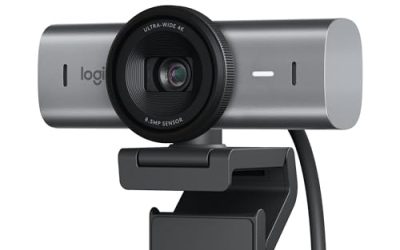
| Anker PowerConf C200 | Sharper 2K calls in a dim room | 2K, AI-noise canceling mics, adjustable field of view |
| NexiGo N60 | Wide-angle Zoom calls with a group in frame | 1080p, software control, privacy cover, 110-degree view |
| OBSBOT Meet SE | Moving presenters who need AI framing | 1080p 100FPS, AI framing, 1/2.8-inch sensor |
How to Choose
Match resolution to the call, not to the box
Resolution sets the ceiling for how sharp your face can look, and Zoom calls rarely need the highest number on the shelf. A 1080p webcam gives a clear picture for one person at a desk, while a 2K webcam such as the Anker PowerConf C200 adds detail for close-up face shots and shared documents. A 1080p camera that runs at 100 frames per second, like the OBSBOT Meet SE, keeps motion smooth when you gesture or lean in. Choose the resolution that fits your distance from the camera, then look at light correction and focus before chasing a larger number.
Judge light correction by your own room
Most Zoom calls happen in rooms that were never built as studios, with a window on one side and a lamp on the other. Light correction matters because it lifts shadows on your face and holds back bright patches from a window behind you. The Logitech Brio 101 names auto-light balance, the Logitech C920S names light correction, and the Anker PowerConf C200 names low-light correction, so each listing gives a clue about dim rooms. Sit where you normally call from, notice which side the light comes from, and pick a camera whose listing names the kind of correction that room needs.
Pick a field of view that fits who is in frame
Field of view decides how much of the room appears beside you, and the wrong width can crowd a call or leave you too small in the frame. A narrow view suits one person at a desk, because it keeps the focus on your face and hides a messy shelf. A wide view suits a small group around one computer, because everyone stays in frame without leaning in. The NexiGo N60 names a 110-degree view, and the Anker PowerConf C200 offers adjustable views of 65, 78, and 95 degrees, so you can match the width to the people in the room.
Check the microphone and the connection before you buy
A webcam microphone decides whether colleagues hear you or hear the room around you, and a single built-in microphone is often enough for a quiet desk. The Logitech C920S names clear stereo audio, the Anker PowerConf C200 names AI-noise canceling microphones, and the NexiGo N60 names a microphone in its title, so the listing tells you what to expect. Connection matters just as much: the OBSBOT Meet SE uses USB-C, while other models in this guide use USB-A, so check which port your computer has free before you choose.
The 5 Best Options
1. Logitech Brio 101 Full HD 1080p Webcam for PC, Built-in Mic, Black
- Best for: Simple daily Zoom calls from a desk.
- Resolution: Full HD 1080p
- Light: Auto-light balance
- Microphone: Built-in mic
- Privacy: Privacy shutter
Simple daily Zoom calls from a desk.
The title does not state a frame rate, so confirm the frame rate and the USB port type on the listing before buying.
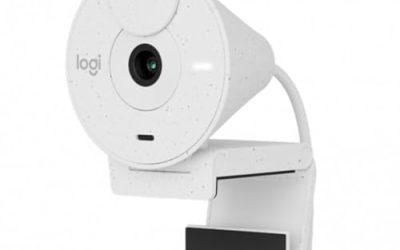
The Logitech Brio 101 suits a caller who wants a simple desk camera that works without extra software or fiddling. Its title names Full HD 1080p video, auto-light balance, a built-in microphone, and a privacy shutter, which covers the four things a daily Zoom call needs most: a clear picture, steadier light, sound, and a way to cover the lens when the call ends. It fits a home worker, a student, or a family member who joins calls from the same desk each day and wants the camera to sit on a monitor and stay there.
Watch out for: The title does not state a frame rate, so confirm the frame rate and the USB port type on the listing before buying.
2. Logitech C920S HD Pro Webcam, Full HD 1080p/30fps Video Calling, Clear Stereo Audio, Light Correction, Privacy Shutter
- Best for: Dependable 1080p calls on PC or Mac.
- Resolution: Full HD 1080p/30fps
- Audio: Clear stereo audio
- Light: Light correction
- Privacy: Privacy shutter
Dependable 1080p calls on PC or Mac.
This webcam is limited to 1080p, so confirm that 1080p meets your needs before buying a higher-resolution model.
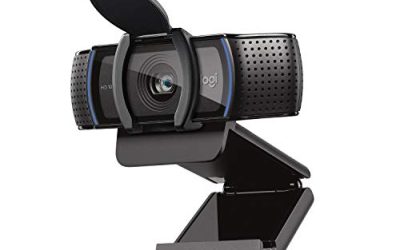
The Logitech C920S HD Pro suits a caller who wants a long-running 1080p webcam with stereo sound and a privacy shutter in one familiar package. Its title names Full HD 1080p video at 30 frames per second, clear stereo audio, light correction, and a privacy shutter, and it names Skype, Zoom, FaceTime, and Hangouts alongside PC, Mac, laptop, and tablet use. That breadth makes it a fit for a household with more than one computer, or a worker who moves the same camera between a desktop and a laptop for different calls.
Watch out for: This webcam is limited to 1080p, so confirm that 1080p meets your needs before buying a higher-resolution model.
3. Anker PowerConf C200 2K Webcam for PC/Laptop/Mac, Computer Camera, Low-Light Correction, AI-Noise Canceling Mics, Adjustable Field of View, Built-in Privacy Cover, Stereo Mics
- Best for: Sharper 2K calls in a dim room.
- Resolution: 2K
- Microphones: AI-noise canceling mics, stereo mics
- Field of view: Adjustable, 65, 78, and 95 degrees
- Light: Low-light correction
Sharper 2K calls in a dim room.
The adjustable field of view is set through software, so confirm the software and operating system support on the listing before buying.
The Anker PowerConf C200 suits a caller who works in a dim room and wants a sharper picture than 1080p without moving to a 4K camera. Its title names 2K video, low-light correction, AI-noise canceling microphones, stereo microphones, an adjustable field of view, and a built-in privacy cover. That combination fits a home worker whose desk faces away from a window, or a presenter who wants to widen the frame for a whiteboard and narrow it again for a one-to-one call. The adjustable view is the feature that sets it apart in this group.
Watch out for: The adjustable field of view is set through software, so confirm the software and operating system support on the listing before buying.
4. NexiGo N60 1080P Webcam with Microphone, Software Control and Privacy Cover, USB HD Computer Web Camera, Plug and Play, for Zoom/Skype/Teams
- Best for: Wide-angle Zoom calls with a group in frame.
- Resolution: 1080p
- Microphone: Built-in microphone
- Privacy: Privacy cover
- Control: Software control
Wide-angle Zoom calls with a group in frame.
The wide 110-degree view can include more of the room than a narrow camera would, so check the framing on the listing before buying.
The NexiGo N60 suits a caller who needs a wide view and a simple plug-and-play setup for group calls. Its title names 1080p video, a microphone, software control, a privacy cover, and plug-and-play USB use for Zoom, Skype, and Teams, and its listing names a 110-degree view. That wide view fits a small table with two or three people in frame, a classroom corner, or a desk where the camera sits further back than usual. Software control lets the user adjust the framing without moving the camera itself.
Watch out for: The wide 110-degree view can include more of the room than a narrow camera would, so check the framing on the listing before buying.
5. OBSBOT Meet SE 1080P 100FPS Webcam for PC, AI Framing Streaming Camera with 1/2.8-Inch Sensor, Beauty Mode, Gesture Control, Staggered HDR
- Best for: Moving presenters who need AI framing.
- Resolution: 1080p at 100FPS
- Sensor: 1/2.8-inch sensor
- Framing: AI framing
- Control: Gesture control
Moving presenters who need AI framing.
The title does not state a privacy cover, so confirm how the lens is covered between calls on the listing before buying.
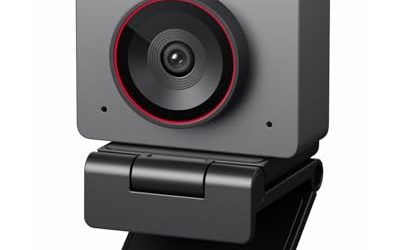
The OBSBOT Meet SE suits a presenter who moves during a call and wants the camera to keep them in frame. Its title names 1080p video at 100 frames per second, AI framing, a 1/2.8-inch sensor, beauty mode, gesture control, and staggered HDR. That set fits a teacher who walks beside a whiteboard, a host who leans in and back while talking, or a creator who records as well as calls. The high frame rate keeps gestures smooth, while AI framing adjusts the shot as the presenter moves.
Watch out for: The title does not state a privacy cover, so confirm how the lens is covered between calls on the listing before buying.
Which One Fits Your Situation
You call from the same desk every day
Choose the Logitech Brio 101, because its title covers the daily essentials in one simple package: Full HD 1080p video, auto-light balance, a built-in microphone, and a privacy shutter. It sits on a monitor and needs no extra software for a basic call. Confirm the USB port on your computer first, then leave the camera in place for every call.
You move between computers for different calls
Choose the Logitech C920S HD Pro, because its title names PC, Mac, laptop, and tablet use alongside Skype, Zoom, FaceTime, and Hangouts. Clear stereo audio and light correction travel with the camera, and the privacy shutter covers the lens when you pack it away. It suits a worker who carries one camera between a desktop and a laptop.
Your room is dim and your face needs more detail
Choose the Anker PowerConf C200, because its title names 2K video and low-light correction together. AI-noise canceling microphones help when the room is not quiet, and the adjustable field of view lets you widen the frame for a group or narrow it for a one-to-one call. Check the software support for your operating system before buying.
You present while you move around the room
Choose the OBSBOT Meet SE, because its title names AI framing and 1080p video at 100 frames per second. AI framing keeps a moving presenter in shot, gesture control changes the framing without a keyboard, and staggered HDR helps with uneven light. It suits a teacher, a host, or a creator who does not sit still during a call.
Common Mistakes
- Choosing the highest resolution available without checking light correction for the room you call from.
- Picking a wide-angle webcam for a solo desk call, then showing far more of the room than intended.
- Assuming every webcam has a privacy cover, when the OBSBOT Meet SE title does not state one.
- Forgetting to check whether the camera uses USB-A or USB-C before buying.
- Relying on a built-in microphone in a noisy room without checking the noise-canceling wording on the listing.
Frequently Asked Questions
Is 1080p enough for Zoom calls?
Yes, 1080p is enough for most Zoom calls, because one person at a desk fills the frame well at that resolution. Light correction, focus, and a clear microphone matter more than a larger number on the box. A 2K camera such as the Anker PowerConf C200 adds detail for close-up shots, but it is not required for a clear daily call.
Do I need a privacy shutter on a Zoom webcam?
A privacy shutter is useful when the camera stays on your monitor between calls, because it physically covers the lens. The Logitech Brio 101, Logitech C920S, Anker PowerConf C200, and NexiGo N60 all name a privacy shutter or cover in their titles. The OBSBOT Meet SE title does not state one, so check the listing first.
Can one webcam work on both a PC and a Mac?
Yes, when the listing names both platforms. The Logitech C920S names PC and Mac in its title, and the Anker PowerConf C200 names Windows 7 or later and macOS 10.11 or later on its listing. Always confirm the operating system and the USB port type on the listing for your own computer before buying.
Why does my Zoom picture look dark even with a good webcam?
Dark pictures usually come from the room, not from the camera alone, because a window behind you or a single lamp leaves your face in shadow. Light correction helps, and the webcams in this guide name auto-light balance, light correction, low-light correction, or staggered HDR. Move the light in front of you, then check the listing wording for your room.
FAQ
Is 1080p enough for Zoom calls?
Do I need a privacy shutter on a Zoom webcam?
Can one webcam work on both a PC and a Mac?
Why does my Zoom picture look dark even with a good webcam?
More from Amazon
Programs that pair well with the guide above. Offers and eligibility are set by Amazon and may change.
Free shipping on eligible items, Prime Video and more. Eligible new members can start with a free trial.
Start a Prime free trialAd-free music streaming. Eligible new subscribers can start with a free trial.
Try Music Unlimited freeA Prime membership for ages 18-24 with a trial period. Eligibility is set by Amazon.
See Prime for Young AdultsAudiobooks and podcasts to listen to on the go. Eligible new members can start with a free trial.
Try Audible freeAs an Amazon Associate we earn from qualifying purchases.