Our Short List of 3

- Best for: High frame rate console capture over USB.
- Capture: Up to 4K144, 1080p240, 1440p144
- Passthrough: Up to 4K144
- HDMI: HDMI 2.1 in and out
- VRR: VRR passthrough

- Best for: 4K60 console capture with VRR passthrough.
- Capture: 2160p60, 1440p144, 1080p240, 1440p30 HDR, 1080p60 HDR
- Passthrough: 2160p60 HDR and VRR, 1440p144 HDR and VRR, 1080p240 HDR and VRR
- Input and output: HDMI 2.0
- Connection: USB 3.2 Gen 1

- Best for: Turning a camera into a webcam.
- Capture: 1080p60, 4K30, 4K60 in MJPG only
- Input: HDMI, unencrypted
- Connection: HDMI to USB 3.0
- Source: DSLR, camcorder, ActionCam as webcam
All 4 Picks at a Glance
| Product | Specs | Action |
|---|---|---|
| 1. Elgato 4K X Capture Card |
| Check price on Amazon |
| 3. AVerMedia Live Gamer Ultra S GC553Pro Capture Card |
| Check price on Amazon |
| 4. Elgato Cam Link 4K External Capture Card |
| Check price on Amazon |
 5. Elgato 4K Pro Internal Capture Card |
| Check price on Amazon |
Our Top Picks
A capture card is bought for two numbers that are easy to confuse: the resolution it records, and the resolution it passes through to your screen. A card that records 1080p60 while passing 4K60 to the display lets you play in 4K and stream in Full HD, while a card that records 4K144 needs a fast USB port and a computer that can keep up. The five cards below were chosen from their Amazon titles alone, because each one states its capture number, its passthrough number, and its connection in the name.
This guide is for console players who want to record PS5, Xbox, or Switch play on a PC, streamers who need a clean feed for OBS, camera owners who want to turn a DSLR into a webcam, and desktop owners who want an internal card for a dual PC setup. Every card below is described from its Amazon product title and listing details alone, with capture, passthrough, HDMI version, and connection stated where the listing states them.
Quick Picks
As an Amazon Associate we earn from qualifying purchases.
| Product | Best for | Key spec from title |
|---|---|---|
| Elgato 4K X | High frame rate console capture over USB | Capture up to 4K144, HDMI 2.1, USB 3.2 Gen 2 |
| Elgato Game Capture Neo | Simple console capture on a laptop | 1080p60 capture, 4K60 HDR passthrough, portable USB |
| AVerMedia Live Gamer Ultra S GC553Pro | 4K60 console capture with VRR passthrough | Capture 2160p60, passthrough 2160p60 HDR/VRR |
| Elgato Cam Link 4K | Turning a camera into a webcam | 1080p60 or 4K30/4K60, HDMI to USB 3.0 |
| Elgato 4K Pro | Internal capture for a desktop or dual PC setup | 4K60 HDR10 capture, 8K60 passthrough, PCIe |
How to Choose
Separate capture from passthrough before you compare
Capture and passthrough are different jobs, and a card can be strong at one and modest at the other. The Elgato Game Capture Neo records 1080p60 while passing 4K60 HDR to the display, so the game looks better on the screen than in the recording. The Elgato 4K X records up to 4K144 and passes the same signal through, while the Elgato 4K Pro records 4K60 and passes up to 8K60. Read both numbers on every listing, then decide which one matters more.
Match the connection to the computer you own
A USB card and an internal card suit different desks. USB cards, such as the Elgato 4K X, the Game Capture Neo, and the AVerMedia Live Gamer Ultra S, plug into a laptop or a desktop and move between machines, but they need the right USB version for full speed. The Elgato 4K X lists USB 3.2 Gen 2, and the AVerMedia lists USB 3.2 Gen 1, so a slower port will limit what they can record. The Elgato 4K Pro is an internal PCIe card, so it needs a free PCIe x4, x8, or x16 slot inside a desktop.
Check the console, the HDMI version, and the software
HDMI version decides which console signals a card can carry. HDMI 2.1, listed for the Elgato 4K X and the Elgato 4K Pro, carries high frame rate 4K signals and VRR, while HDMI 2.0, listed for the AVerMedia Live Gamer Ultra S, carries 4K60 with HDR and VRR passthrough. The Elgato Cam Link 4K takes an HDMI signal from a camera, not from a console, so it suits a different job entirely. Check the console named in the title, the operating system named in the listing, and whether the card works with OBS, Zoom, or Discord.
Know where simple cards leave things out
Simple capture cards often leave out the same details: a microphone input, a headphone output, an HDMI output to a second screen, or HDR at every resolution. The Elgato Cam Link 4K has no HDMI output to a monitor stated in its title, so it turns a camera into a webcam and nothing else. The AVerMedia Live Gamer Ultra GC553, the older model in the same family, limits high frame rate and HDR recording to NVIDIA graphics cards, according to its listing. Read the full listing for audio ports, loop-out, and HDR limits before you buy.
The 5 Best Options
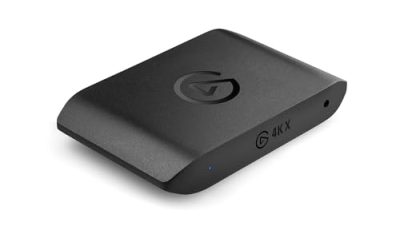
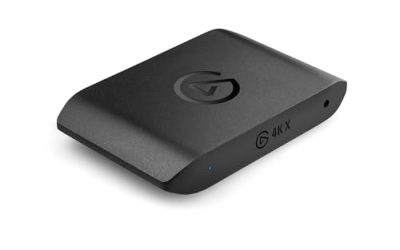
1. Elgato 4K X Capture Card
- Best for: High frame rate console capture over USB.
- Capture: Up to 4K144, 1080p240, 1440p144
- Passthrough: Up to 4K144
- HDMI: HDMI 2.1 in and out
- VRR: VRR passthrough
High frame rate console capture over USB.
Full capture needs a USB 3.2 Gen 2 port, so confirm your computer has one before buying, or the capture resolution will be lower.
Elgato 4K X is the most capable USB card in this group, because its title names capture up to 4K144, HDMI 2.1, VRR, HDR10, and USB 3.2 Gen 2 in one line. It suits a console player who plays PS5, Xbox Series X and S, or Nintendo Switch 2 at a high frame rate and wants to record that play without giving up the smooth picture on the display. Its listed size is 112 x 72 x 18 mm and its weight is 91 g, so it sits on a desk without taking much room. A USB 3.2 Gen 2 port is needed for full speed.
Watch out for: Full capture needs a USB 3.2 Gen 2 port, so confirm your computer has one before buying, or the capture resolution will be lower.
2. Elgato Game Capture Neo Portable USB Capture Card
Elgato Game Capture Neo is the simplest console card here, and that simplicity is why it suits a first streaming setup. Its listing names 1080p60 capture with 4K60 HDR passthrough, so a player can keep a 4K picture on the screen while recording in Full HD. It is a portable USB card, smaller than a smartphone, with two HDMI connections and one USB-C connection, so it moves between a console, a laptop, and a desktop without opening a case. It suits a PS5, Xbox, or Switch player who wants to record or stream from a laptop.
Specs
- Capture: 1080p60
- Passthrough: 4K60 HDR
- Connection: USB-C, 2 HDMI connections
- Type: Portable USB capture card, smaller than a smartphone
- Latency: Ultra-low latency
- Consoles: PS5, Xbox, Switch
- Platforms: PC, Mac, iPad
- Microphone input: Not stated in the product title
- HDMI version: Not stated in the product title
Best for: Simple console capture on a laptop.
Watch out for: Capture tops out at 1080p60, so confirm that resolution suits your stream before buying, and check the listing for a microphone input.
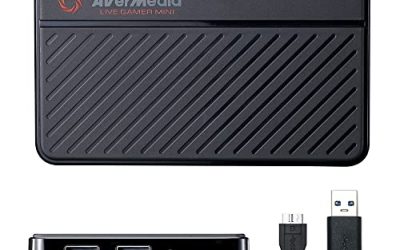
3. AVerMedia Live Gamer Ultra S GC553Pro Capture Card
- Best for: 4K60 console capture with VRR passthrough.
- Capture: 2160p60, 1440p144, 1080p240, 1440p30 HDR, 1080p60 HDR
- Passthrough: 2160p60 HDR and VRR, 1440p144 HDR and VRR, 1080p240 HDR and VRR
- Input and output: HDMI 2.0
- Connection: USB 3.2 Gen 1
4K60 console capture with VRR passthrough.
The listing names HDMI 2.0, not HDMI 2.1, so confirm the passthrough modes for your console and display before buying.
AVerMedia Live Gamer Ultra S GC553Pro is the 4K60 card in this group, and its title names a USB game capture card for streaming and recording with low latency on PS5 and PS5 Pro, Xbox, Switch 2, and PC. Its listing names capture at 2160p60, 1440p144, and 1080p240, with passthrough at 2160p60 HDR and VRR, so a console player can keep HDR and variable refresh rate on the display while recording in 4K. It connects over USB 3.2 Gen 1 and works with Windows 10 and 11, macOS 13 and 14, and iPadOS 17 or later.
Watch out for: The listing names HDMI 2.0, not HDMI 2.1, so confirm the passthrough modes for your console and display before buying.
4. Elgato Cam Link 4K External Capture Card
- Best for: Turning a camera into a webcam.
- Capture: 1080p60, 4K30, 4K60 in MJPG only
- Input: HDMI, unencrypted
- Connection: HDMI to USB 3.0
- Source: DSLR, camcorder, ActionCam as webcam
Turning a camera into a webcam.
4K60 needs a compatible camera and the current Cam Link 4K model, and no HDMI output to a monitor is stated, so confirm both on the listing.
Elgato Cam Link 4K does a different job from every other card here: it turns a DSLR, a camcorder, or an ActionCam into a webcam. Its title names meet, stream, and record in 1080p60 or 4K30 and 4K60, with an HDMI to USB 3.0 connection for PC, Mac, and iPad, and easy connection for OBS, Zoom, and Discord. It suits a creator who already owns a good camera and wants a cleaner picture for calls and streams, without buying a new webcam. Its listed size is 8.1 x 1.2 x 3.1 cm and its weight is 20 g.
Watch out for: 4K60 needs a compatible camera and the current Cam Link 4K model, and no HDMI output to a monitor is stated, so confirm both on the listing.
5. Elgato 4K Pro Internal Capture Card
- Best for: Internal capture for a desktop or dual PC setup.
- Capture: Up to 4K60, 1440p144, 1080p240
- Passthrough: Up to 8K60, 4K240, 1440p240
- HDMI: HDMI 2.1 in and out
- HDR: HDR10 passthrough and recording
Internal capture for a desktop or dual PC setup.
This is an internal PCIe card for Windows only, so confirm a free slot and the operating system before buying, and check that your case has room for it.
Elgato 4K Pro is the internal card in this group, and its title names 8K60 passthrough with 4K60 HDR10 capture for a PC or a dual PC setup. It suits a desktop owner who wants the highest passthrough number here, or a streamer who runs a gaming PC and a separate streaming PC. Its listing names capture up to 4K60, 1440p144, and 1080p240, with passthrough up to 8K60, 4K240, and 1440p240, plus HDMI 2.1 in and out and VRR support. It needs a free PCIe x4, x8, or x16 slot and Windows 10 64-bit or higher.
Watch out for: This is an internal PCIe card for Windows only, so confirm a free slot and the operating system before buying, and check that your case has room for it.
Which One Fits Your Situation
You play on a console and record from a laptop
Choose the Elgato Game Capture Neo, because it records 1080p60 while passing 4K60 HDR to the display, and it plugs into a laptop over USB without opening a case. It suits a PS5, Xbox, or Switch player who wants a simple first card for recording and streaming, with the game picture staying sharp on the display.
You want the highest frame rate over USB
Choose the Elgato 4K X, because its title names capture up to 4K144, HDMI 2.1, VRR, and HDR10 over USB 3.2 Gen 2. It suits a console player who plays at a high frame rate and wants to record that play without losing the smooth picture on the display. Confirm your computer has a USB 3.2 Gen 2 port first.
You want 4K60 capture without opening your PC
Choose the AVerMedia Live Gamer Ultra S GC553Pro, because its listing names 2160p60 capture with 2160p60 HDR and VRR passthrough over USB 3.2 Gen 1. It suits a PS5, Xbox, or Switch 2 player who wants 4K60 recording from a laptop or a desktop. Confirm the HDMI 2.0 passthrough modes for your console and display, since the card does not list HDMI 2.1.
You own a good camera and want it as a webcam
Choose the Elgato Cam Link 4K, because its title names a DSLR, camcorder, or ActionCam as a webcam in 1080p60 or 4K30 and 4K60, over HDMI to USB 3.0. It suits a creator who wants a cleaner picture for calls and streams from a camera already owned. Confirm your camera sends a clean HDMI signal before buying.
Common Mistakes
- Confusing capture resolution with passthrough resolution, and expecting a 1080p60 recording to look like a 4K60 display.
- Buying a USB 3.2 Gen 2 card for a computer with only a slower USB port.
- Choosing an internal PCIe card for a laptop, when it needs a free slot inside a desktop.
- Using the Cam Link 4K for console capture, when its title names a camera as its source.
- Forgetting to check HDR and VRR limits, and finding that a mode works on the display but not in the recording.
Frequently Asked Questions
Can a capture card record 4K while I play in 4K?
Yes, when the card lists both numbers at 4K. The Elgato 4K X lists capture and passthrough up to 4K144, and the AVerMedia Live Gamer Ultra S lists 2160p60 capture with 2160p60 HDR passthrough. The Elgato Game Capture Neo is different: it records 1080p60 while passing 4K60 HDR.
Do I need a desktop PC for a capture card?
No, most cards here are USB cards for a laptop or a desktop, including the Elgato 4K X, the Game Capture Neo, the AVerMedia Live Gamer Ultra S, and the Cam Link 4K. Only the Elgato 4K Pro is an internal PCIe card, so it needs a free PCIe slot inside a desktop.
What is the difference between the Elgato 4K X and the Elgato 4K Pro?
The 4K X is an external USB card that captures up to 4K144 and passes the same signal through, while the 4K Pro is an internal PCIe card that captures up to 4K60 and passes up to 8K60. Choose the 4K X for a laptop, and the 4K Pro for a desktop or a dual PC setup.
Can I use a capture card with a camera instead of a console?
Yes, with the Elgato Cam Link 4K, because its title names a DSLR, camcorder, or ActionCam as a webcam in 1080p60 or 4K30 and 4K60. It connects over HDMI to USB 3.0 and works with OBS, Zoom, and Discord. Confirm your camera sends a clean HDMI signal before buying.
FAQ
Can a capture card record 4K while I play in 4K?
Do I need a desktop PC for a capture card?
What is the difference between the Elgato 4K X and the Elgato 4K Pro?
Can I use a capture card with a camera instead of a console?
More from Amazon
Programs that pair well with the guide above. Offers and eligibility are set by Amazon and may change.
Free shipping on eligible items, Prime Video and more. Eligible new members can start with a free trial.
Start a Prime free trialAd-free music streaming. Eligible new subscribers can start with a free trial.
Try Music Unlimited freeA Prime membership for ages 18-24 with a trial period. Eligibility is set by Amazon.
See Prime for Young AdultsAudiobooks and podcasts to listen to on the go. Eligible new members can start with a free trial.
Try Audible freeAs an Amazon Associate we earn from qualifying purchases.