Our Short List of 3

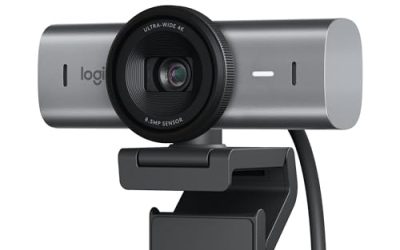
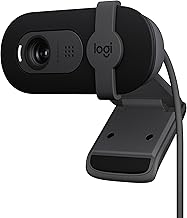
- Best for: Everyday calls on a narrow monitor.
- Video: Full HD 1080p at 30fps
- Audio: Clear stereo audio
- Privacy: Privacy shutter
- Light: Light correction

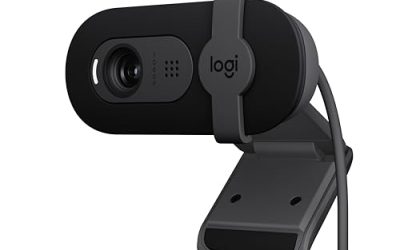
- Best for: A small, light camera for a laptop or small screen.
- Video: Full HD 1080p
- Light: RightLight auto-light correction
- Microphone: Built-in mic
- Privacy: Privacy shutter

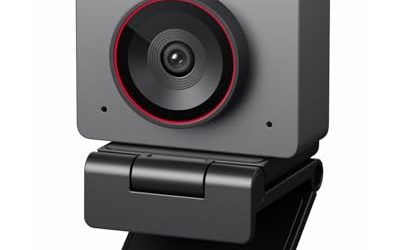
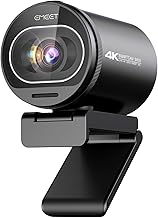
- Best for: Sharper 2K calls in a very small body.
- Video: 2K, 2K at 30fps
- Microphones: AI-noise canceling microphones, stereo mics
- Field of view: Adjustable, 65, 78, and 95 degrees
- Light: Low-light correction
All 5 Picks at a Glance
| Product | Specs | Action |
|---|---|---|
| 1. Logitech C920S HD Pro Webcam |
| Check price on Amazon |
| 2. Logitech Brio 100 Full HD 1080p Webcam |
| Check price on Amazon |
| 3. Anker PowerConf C200 2K Webcam |
| Check price on Amazon |
 4. NexiGo N60 1080P Webcam |
| Check price on Amazon |
 5. Razer Kiyo Pro Streaming Webcam |
| Check price on Amazon |
Our Top Picks

A webcam for a small monitor is a decision about fit before picture quality. A camera that is too wide covers the top edge of a narrow screen, a clip that is too deep pushes the lens forward at an odd angle, and a wide lens shows a whole room when the desk is a metre across. The five cameras below were chosen because their Amazon titles state a compact body, a monitor clip, or a size that suits a small screen, and each one handles the same small-desk problem in a different way.
This guide is for workers on a 24-inch or smaller screen, laptop users who dock to a compact monitor, students in a shared room, and streamers who want a camera that does not dominate a small desk. Each camera below is described from its Amazon product title and listing details alone, with resolution, field of view, privacy cover, and connection stated where the listing states them, and gaps flagged where the title stays silent.
Quick Picks
As an Amazon Associate we earn from qualifying purchases.
| Product | Best for | Key spec from title |
|---|---|---|
| Logitech C920S HD Pro | Everyday calls on a narrow monitor | Full HD 1080p at 30fps, privacy shutter, USB |
| Logitech Brio 100 | A small, light camera for a laptop or small screen | Full HD 1080p, RightLight, privacy shutter, USB-A |
| Anker PowerConf C200 | Sharper 2K calls in a very small body | 2K video, adjustable field of view, privacy cover |
| NexiGo N60 | Simple plug-and-play calls on a tight desk | 1080p at 30fps, privacy cover, USB, plug and play |
| Razer Kiyo Pro | Smooth 1080p60 video for streaming from a small desk | Full HD 1080p at 60fps, HDR, adjustable field of view |
How to Choose
Begin with the clip and the body width
Measure the top bezel of your monitor before you look at resolution. A small monitor often has a thin bezel and a shallow back, so a deep clip can sit at an angle and point the lens down, while a wide body can hang over the screen edge and block a menu bar. The Logitech C920S lists dimensions of 1 x 3.7 x 1.2 inches, and the Anker PowerConf C200 lists 50 x 40 x 55 mm, so both give a buyer a concrete size to compare with a monitor edge. If a listing gives no dimensions, check the mount style and clip depth on the Amazon page before you buy.
Choose resolution and frame rate for your calls
Resolution only helps when the call software and the connection can show it. Full HD 1080p at 30fps, as listed for the Logitech C920S and the NexiGo N60, is enough for most meetings, because faces fill a small window and movement is limited. The Razer Kiyo Pro lists Full HD 1080p at 60fps, which smooths hand movement for streaming, while the Anker PowerConf C200 lists 2K video, which keeps detail clearer on a larger call window. Pick 60fps for movement, 2K for detail, and plain 1080p when calls are the only job.
Match the field of view to the room behind you
Field of view decides how much of your room appears behind you, and that matters more on a small desk than on a wide one. A narrow view keeps the frame on your face and hides a messy shelf, while a wide view shows a whiteboard, a second person, or a desk of notes. The Anker PowerConf C200 lists an adjustable field of view, with 65, 78, and 95 degree options, and the NexiGo N60 lists a 110 degree view, so those two sit at opposite ends of the range. If your desk faces a wall, a narrow view is calmer; if you present objects on a desk, a wider view earns its place.
Look at privacy, sound, and light together
Small cameras often cut the same three things: a privacy cover, a usable microphone, and light correction. Every camera in this guide lists a privacy shutter or cover in its title, which is a good sign for a shared room, but the microphone and light handling still differ. The Logitech C920S lists clear stereo audio and light correction, the Logitech Brio 100 lists a built-in mic and RightLight, and the Anker PowerConf C200 lists AI-noise canceling microphones and low-light correction. If you call from a dim corner, light correction matters as much as resolution.
The 5 Best Options
1. Logitech C920S HD Pro Webcam
- Best for: Everyday calls on a narrow monitor.
- Video: Full HD 1080p at 30fps
- Audio: Clear stereo audio
- Privacy: Privacy shutter
- Light: Light correction
Everyday calls on a narrow monitor.
The listing gives no focus type in the title, so confirm autofocus behaviour on the Amazon page if you move in and out of frame during calls.
The Logitech C920S HD Pro is the steady meeting camera in this group, and its size is the reason it suits a small monitor. Its Amazon listing gives dimensions of 1 x 3.7 x 1.2 inches, so a buyer can picture a camera that sits across a narrow top bezel without hanging far over the screen. Full HD 1080p at 30fps covers everyday calls, clear stereo audio and light correction handle a normal home office, and the privacy shutter closes the lens between meetings. It fits a home worker who wants a camera that clips on, connects over USB, and works with Skype, Zoom, FaceTime, and Hangouts.
Watch out for: The listing gives no focus type in the title, so confirm autofocus behaviour on the Amazon page if you move in and out of frame during calls.
2. Logitech Brio 100 Full HD 1080p Webcam
- Best for: A small, light camera for a laptop or small screen.
- Video: Full HD 1080p
- Light: RightLight auto-light correction
- Microphone: Built-in mic
- Privacy: Privacy shutter
A small, light camera for a laptop or small screen.
Fixed focus suits a steady desk distance, so confirm the focus range on the listing if you lean in close to show documents.
The Logitech Brio 100 is the smallest-feeling Logitech camera here, and that compact shape is its main advantage on a small monitor. Its title names Full HD 1080p video, RightLight auto-light correction, a built-in mic, a privacy shutter, and a USB-A connection, so a buyer gets the full picture from the name alone. It suits a laptop user who docks to a small screen, a student in a shared room, or a worker who wants a camera that disappears on top of a monitor. Fixed focus holds a steady frame at a normal desk distance, and the shutter slides closed when the call ends.
Watch out for: Fixed focus suits a steady desk distance, so confirm the focus range on the listing if you lean in close to show documents.
3. Anker PowerConf C200 2K Webcam
- Best for: Sharper 2K calls in a very small body.
- Video: 2K, 2K at 30fps
- Microphones: AI-noise canceling microphones, stereo mics
- Field of view: Adjustable, 65, 78, and 95 degrees
- Light: Low-light correction
Sharper 2K calls in a very small body.
The adjustable field of view is changed in AnkerWork software, so confirm that software runs on your operating system before buying.
The Anker PowerConf C200 is the sharpest camera in this group, and it still fits a small monitor because its listed size is only 50 x 40 x 55 mm. That small body carries 2K video, AI-noise canceling microphones, stereo mics, an adjustable field of view, low-light correction, and a built-in privacy cover. It suits a worker who wants clearer detail on calls without a large camera on the screen, and a buyer who wants to choose between 65, 78, and 95 degree views for a tight room. The USB-C cable named in the listing keeps the desk tidy, and the privacy cover closes the lens between meetings.
Watch out for: The adjustable field of view is changed in AnkerWork software, so confirm that software runs on your operating system before buying.
4. NexiGo N60 1080P Webcam
- Best for: Simple plug-and-play calls on a tight desk.
- Video: 1080p, 1920 x 1080 Full HD at 30fps
- Sensor: 2MP CMOS sensor
- Microphone: Built-in microphone
- Privacy: Privacy cover
Simple plug-and-play calls on a tight desk.
The 110 degree field of view is wide, so confirm the framing on the listing if your desk faces a shared room.
The NexiGo N60 is the simplest camera in this group, and simplicity is the point for a small desk. Its title names 1080p video, a microphone, software control, a privacy cover, a USB connection, and plug-and-play setup for Zoom, Skype, and Teams, so a buyer knows no driver or hub is needed. It suits a student, a worker on a second monitor, or anyone who wants a camera that plugs in for a call. The 110 degree field of view is wide for a small room, so it shows more of the desk and the wall behind you, and the fixed focus holds a steady frame at a normal distance.
Watch out for: The 110 degree field of view is wide, so confirm the framing on the listing if your desk faces a shared room.
5. Razer Kiyo Pro Streaming Webcam
- Best for: Smooth 1080p60 video for streaming from a small desk.
- Video: Full HD 1080p at 60fps, uncompressed 1080p
- Light sensor: Adaptive light sensor
- HDR: HDR-enabled
- Lens: Wide-angle lens with adjustable field of view
Smooth 1080p60 video for streaming from a small desk.
The title names no microphone or size, so confirm both on the Amazon page, and check the clip depth against your monitor bezel.
The Razer Kiyo Pro is the streaming camera in this group, and its 1080p60 video is the reason it earns a place on a small monitor. Its title names Full HD 1080p at 60fps, an adaptive light sensor, HDR, a wide-angle lens with adjustable field of view, and support for Zoom, Teams, and Skype. That suits a streamer or presenter who moves, gestures, and shows objects on camera, because the higher frame rate keeps motion smooth and the adaptive light sensor handles a room that changes through the day. It is larger than the Brio 100, so a buyer should confirm the clip fits a thin monitor bezel before buying.
Watch out for: The title names no microphone or size, so confirm both on the Amazon page, and check the clip depth against your monitor bezel.
Which One Fits Your Situation
You call all day from a small home office
Choose the Logitech C920S HD Pro, because its 1080p at 30fps video, clear stereo audio, light correction, and privacy shutter cover the whole working day without extra software. Its listed width of 3.7 inches sits neatly on a narrow monitor, and it works with Skype, Zoom, FaceTime, and Hangouts.
You want the smallest camera on the monitor
Choose the Logitech Brio 100, because its title names a compact Full HD camera with RightLight, a built-in mic, and a privacy shutter in one small body. It suits a laptop that docks to a small screen, or a desk where every centimetre counts. Fixed focus holds a steady frame at a normal desk distance.
You want sharper video without a large camera
Choose the Anker PowerConf C200, because it lists 2K video in a body of only 50 x 40 x 55 mm, with an adjustable field of view and a built-in privacy cover. It suits a worker who wants clearer detail on calls and a choice of 65, 78, or 95 degree framing for a tight room. Confirm that AnkerWork software runs on your operating system before you count on the framing controls.
You stream or present from a small desk
Choose the Razer Kiyo Pro, because its title names Full HD 1080p at 60fps, an adaptive light sensor, HDR, and an adjustable field of view. That combination keeps hand movement smooth and handles changing light during a stream. Confirm the clip depth against your monitor bezel first, and confirm the microphone situation on the listing, since the title names no microphone.
Common Mistakes
- Buying a wide camera for a narrow monitor without checking the body width or clip depth first.
- Choosing a 110 degree field of view for a small room, then showing a whole shared space behind you.
- Expecting 2K or 60fps video when the call software is set to a lower resolution.
- Forgetting the privacy cover, and leaving the lens open between meetings in a shared room.
- Assuming every camera has a usable microphone, when some titles name no microphone at all.
Frequently Asked Questions
Will a webcam block the top of a small monitor?
It can, when the body is wide or the clip is deep. Check the listed dimensions, such as 1 x 3.7 x 1.2 inches for the Logitech C920S, against your monitor bezel before buying. A compact camera, such as the Logitech Brio 100, sits more neatly on a narrow top edge.
Is 1080p enough for calls on a small monitor?
Yes, for most meetings it is enough, because faces fill a small window and movement is limited. The Logitech C920S and the NexiGo N60 both list 1080p at 30fps for that job. Choose 2K from the Anker PowerConf C200 when you want sharper detail, or 1080p60 from the Razer Kiyo Pro when you move a lot on camera.
What field of view suits a small desk?
A narrow view, such as 65 degrees on the Anker PowerConf C200, keeps the frame on your face and hides the room behind you. A wide view, such as 110 degrees on the NexiGo N60, shows a desk or a second person. Choose narrow for a shared room and wide only when you need to show more than one person in frame.
Do these webcams need extra software to work?
No, the titles describe plug-and-play USB cameras that join Zoom, Teams, Skype, and similar apps without extra hardware. The Anker PowerConf C200 is the exception for framing, because its adjustable field of view is changed in AnkerWork software, so confirm that software runs on your operating system before buying.
FAQ
Will a webcam block the top of a small monitor?
Is 1080p enough for calls on a small monitor?
What field of view suits a small desk?
Do these webcams need extra software to work?
More from Amazon
Programs that pair well with the guide above. Offers and eligibility are set by Amazon and may change.
Free shipping on eligible items, Prime Video and more. Eligible new members can start with a free trial.
Start a Prime free trialAd-free music streaming. Eligible new subscribers can start with a free trial.
Try Music Unlimited freeA Prime membership for ages 18-24 with a trial period. Eligibility is set by Amazon.
See Prime for Young AdultsAudiobooks and podcasts to listen to on the go. Eligible new members can start with a free trial.
Try Audible freeAs an Amazon Associate we earn from qualifying purchases.