Key takeaways
- Airflow vs static pressure: High-airflow fans suit open case positions; static-pressure fans excel on radiators and restrictive filters.
- Noise level: Look for low-noise designs and quality bearings for quiet operation under load.
- PWM control: 4-pin PWM fans let your motherboard adjust speed automatically for a balance of cooling and quiet.
- RGB or plain: Decide whether you want ARGB lighting or prefer understated, function-first fans.
- Packs and connectivity: Multi-packs and daisy-chain designs simplify cabling in fan-heavy builds.
What's inside
Case fans may not be the flashiest part of a PC build, but they have an outsized impact on temperatures, noise, and even the lifespan of your components. A well-chosen set of fans keeps your CPU and GPU cool under load while staying quiet at idle, and the best models balance strong airflow, static pressure, and refined acoustics.
This roundup gathers some of the best PC case fans available, from premium quiet performers to value-packed multi-packs and RGB options. Below you will find how to choose the right fans, followed by a closer look at each recommended model to fit your case and cooling goals.
As an Amazon Associate we earn from qualifying purchases.




🎮 Get More From Your Setup — Free
Prime Gaming gives you free PC games every month, in-game loot, and a free Twitch channel sub — plus fast free shipping on all the gear above. New members get a 30-day free trial.
Watch: Best Pc Fans 2026 — Video Review
How to Choose PC Case Fans
- Airflow vs static pressure: High-airflow fans suit open case positions; static-pressure fans excel on radiators and restrictive filters.
- Noise level: Look for low-noise designs and quality bearings for quiet operation under load.
- PWM control: 4-pin PWM fans let your motherboard adjust speed automatically for a balance of cooling and quiet.
- RGB or plain: Decide whether you want ARGB lighting or prefer understated, function-first fans.
- Packs and connectivity: Multi-packs and daisy-chain designs simplify cabling in fan-heavy builds.
The Best PC Fans Reviewed
CORSAIR RS120 ARGB Triple Pack
The Corsair RS120 ARGB triple pack offers daisy-chain connectivity, low-noise operation, and a magnetic dome bearing. With three 120mm PWM fans and vibrant ARGB, it is a convenient, good-looking way to fill out a case with coordinated lighting and solid airflow.
ARCTIC P12 Pro A-RGB 3-Pack
The ARCTIC P12 Pro A-RGB 3-pack is a powerful value option with a wide 600-3000 RPM range, a zero-RPM mode below 5% PWM, and fluid dynamic bearings. A Y-cable splitter simplifies wiring, making it a strong choice for high-performance cooling on a budget.
Noctua NF-A12x25 G2 chromax.Black
The Noctua NF-A12x25 G2 is a premium 120mm fan renowned for its exceptional balance of airflow, static pressure, and low noise. Ideal for coolers, radiators, and cases, its refined performance and rich accessory kit justify its position as an enthusiast favorite.
Lian Li UNI Fan SL-Infinity & DARKROCK 3-Pack
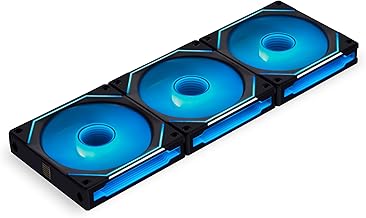
The Lian Li UNI Fan SL-Infinity offers a striking infinity-mirror RGB effect with an included controller for clean, modular installs. For budget-conscious builders, the DARKROCK 3-pack delivers reliable 1200 RPM cooling with hydraulic bearings and a long lifespan at a low price.
Noctua NF-P12 redux-1700 PWM
The Noctua NF-P12 redux-1700 rounds out the list as a value-oriented take on Noctua quality, offering high airflow and low noise in a streamlined package. It is a dependable, no-frills PWM fan for those who want proven performance without RGB or premium pricing.
Frequently Asked Questions
How many case fans do I need?
Most builds do well with at least two intake and one exhaust fan. Larger cases and higher-end components benefit from additional fans for better airflow.
What is the difference between airflow and static pressure fans?
Airflow fans move more air in open spaces, while static pressure fans push through restrictions like radiators and filters. Many modern fans balance both.
Are RGB fans worth it?
RGB is purely aesthetic. If you value a colorful build, they are a great touch, but plain fans like the Noctua models cool just as effectively.
Do I need PWM fans?
PWM fans let your motherboard adjust speed automatically, balancing cooling and noise. They are recommended for a quieter, smarter cooling setup.
Final Thoughts
The best PC fans balance airflow, noise, and features for your build. The Noctua NF-A12x25 G2 leads on premium performance, the ARCTIC P12 Pro offers superb value, and the Corsair RS120 and Lian Li UNI Fan bring style with ARGB. Match the fan type to its position and your priorities, and your system will run cool and quiet.