Key takeaways
- Right GPU for the job: An RTX 5060 Ti handles entry 1440p, a 5070 nails high-refresh 1440p, and a 5080 gives maxed-out headroom; pick based on your target frame rate.
- Balanced CPU: A Ryzen 7 or better keeps fast GPUs fed at 1440p; avoid pairing a strong card with an underpowered budget chip.
- Memory: 16GB DDR5 is the practical floor, but 32GB is the smarter buy for streaming, multitasking, and future titles at this resolution.
- Refresh-rate match: Choose a machine that can consistently exceed your monitor’s refresh rate, whether that is a 144Hz or 240Hz 1440p panel.
- Cooling and power: Look for a quality AIO or strong air cooling plus an 80+ Gold PSU so performance stays stable through long gaming marathons.
What's inside
1440p has become the default resolution for serious gamers in 2026, and for good reason: it delivers a sharp, immersive picture and high refresh rates without the punishing hardware cost of native 4K. The catch is matching the right prebuilt to that goal, because a machine tuned for 1440p needs a carefully balanced GPU, CPU, and memory rather than raw spec-sheet bragging rights. Get that balance right and you unlock buttery-smooth high-settings play across every genre.
We gathered the best 1440p-focused prebuilt gaming PCs and evaluated them on what actually delivers a great experience at this resolution: GPU class, CPU pairing, memory headroom, storage speed, and cooling that sustains performance during long sessions. Below are our top picks spanning several price points, a practical buying guide, honest reviews, and answers to the questions 1440p shoppers ask most.
As an Amazon Associate we earn from qualifying purchases.


🎮 Get More From Your Setup — Free
Prime Gaming gives you free PC games every month, in-game loot, and a free Twitch sub — plus fast free shipping on the rigs above. New members get a 30-day free trial.
Watch: Best 1440p Prebuilt Gaming PC — Video Review
How to Choose a 1440p Prebuilt Gaming PC
- Right GPU for the job: An RTX 5060 Ti handles entry 1440p, a 5070 nails high-refresh 1440p, and a 5080 gives maxed-out headroom; pick based on your target frame rate.
- Balanced CPU: A Ryzen 7 or better keeps fast GPUs fed at 1440p; avoid pairing a strong card with an underpowered budget chip.
- Memory: 16GB DDR5 is the practical floor, but 32GB is the smarter buy for streaming, multitasking, and future titles at this resolution.
- Refresh-rate match: Choose a machine that can consistently exceed your monitor’s refresh rate, whether that is a 144Hz or 240Hz 1440p panel.
- Cooling and power: Look for a quality AIO or strong air cooling plus an 80+ Gold PSU so performance stays stable through long gaming marathons.
The Best 1440p Prebuilt Gaming PCs Reviewed
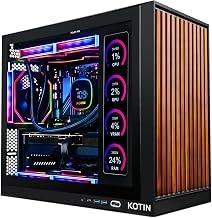
KOTIN Ryzen 7 9700X RTX 5070
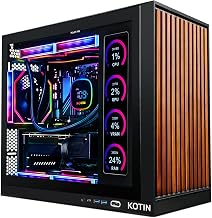
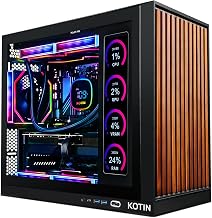
This KOTIN build is our all-around 1440p favorite, pairing the RTX 5070 12GB with a Ryzen 7 9700X, 32GB DDR5, and a 1TB SSD under a 360mm liquid cooler with an 11.3-inch smart display and 850W Gold PSU. It delivers high-refresh 1440p with room to spare and even reaches into 4K, all with Wi-Fi 7 connectivity.
MSI Codex Z2 RTX 5070
MSI’s Codex Z2 offers brand-name confidence with an AMD R7-8700F, the RTX 5070, 32GB DDR5, and a generous 2TB NVMe SSD, plus front USB-C and VR readiness. The large drive and trusted support make it a great high-refresh 1440p pick for players who want ample storage and easy servicing.
CyberPowerPC Gamer Xtreme RTX 5060 Ti
For value-minded 1440p buyers, this CyberPowerPC teams the RTX 5060 Ti with an Intel i7-14700F, 16GB DDR5, and a 1TB PCIe 4.0 SSD. The strong multithreaded CPU and capable 1440p GPU make it a smart entry point that games well today and leaves budget for a nicer monitor.
STORMCRAFT Falcon Ryzen 7 7800X3D
The STORMCRAFT Falcon is the frame-rate specialist, combining the RTX 5070 with the cache-rich Ryzen 7 7800X3D, 32GB of 6000MHz DDR5, an 850W PSU, and a 360mm AIO. Tuned for esports, streaming, and VR, it pushes 1440p frame rates as high as anything in its price class.
Skytech King 95 RTX 5080
When you want maxed-out 1440p with zero compromise, the Skytech King 95 delivers, pairing the RTX 5080 16GB with a Ryzen 7 9850X3D, 32GB DDR5-6000, a 2TB NVMe SSD, and a 360mm ARGB AIO. It obliterates 1440p at ultra settings and doubles as a capable 4K machine for the future.
Frequently Asked Questions
What GPU do I need for smooth 1440p gaming?
An RTX 5060 Ti covers entry-level 1440p, while an RTX 5070 is the sweet spot for high-refresh 1440p at high settings. Step up to a 5080 only if you want maxed-out frames or plan to move to 4K later.
Is 16GB of RAM enough for 1440p?
It is workable, and several capable 1440p builds ship with 16GB. That said, 32GB is the wiser investment if you stream, keep many apps open, or want the system to stay comfortable as games grow more demanding.
How many frames per second should I expect at 1440p?
With these systems you can expect well over 100 FPS in most modern titles and far higher in esports games, especially with DLSS 4 enabled. The exact number depends on the specific GPU and how demanding the title is.
Should I buy a stronger CPU or a stronger GPU for 1440p?
At 1440p the GPU usually matters most, so prioritize it, but keep the CPU balanced. A cache-heavy chip like the 7800X3D in the STORMCRAFT Falcon squeezes out extra frames if pure gaming performance is your goal.
Final Thoughts
1440p is the resolution that rewards smart balance, and this lineup has a match for every budget and priority. The KOTIN Ryzen 7 9700X build is the best all-around pick, the CyberPowerPC Gamer Xtreme is the value entry point, and the Skytech King 95 with its RTX 5080 offers maxed-out, future-ready performance. Choose the GPU tier that fits your monitor and frame-rate goals, and you will enjoy sharp, smooth 1440p gaming for years to come.