Key takeaways
- Bandwidth: DDR5 starts at 4800MHz and commonly runs 6000–6400MHz, roughly doubling the theoretical throughput of a typical DDR4-3200 kit.
- Latency: DDR4 still wins on raw timings. A DDR4-3600 CL16 kit has lower absolute latency than DDR5-6000 CL36, but DDR5’s bandwidth advantage more than compensates in modern workloads.
- Architecture: Each DDR5 module carries two independent 32-bit subchannels, so a single stick behaves more like a dual-channel pair, improving efficiency under heavy multi-threaded load.
- Voltage and power delivery: DDR5 runs at 1.1V by default and moves voltage regulation onto the module itself via an on-board PMIC, rather than relying on the motherboard.
- Capacity ceiling: DDR5 supports far denser modules, making 64GB and 96GB kits straightforward. DDR4 realistically tops out at 32GB per stick on consumer boards.
- Availability: DDR5 production is scaling up while DDR4 winds down, which has eroded the price gap that once made DDR4 the obvious budget answer.
The DDR5 versus DDR4 debate has changed shape completely over the last three years. When DDR5 launched it was scarce, expensive, and barely faster than a good DDR4 kit in real games. In 2026 the situation has inverted: DDR5 is the default for every current-generation platform, kits running 6000MHz and beyond are ordinary rather than exotic, and DDR4 has quietly shifted from “the value pick” to “the legacy option” as manufacturers wind down production lines in favour of DDR5 and DDR5-based server memory.
That matters because RAM is one of the few components you generally cannot carry across an upgrade. Your motherboard socket dictates which standard you can run, and the memory you buy today will likely outlive two GPUs. Choosing correctly means understanding what actually separates the two standards, where the performance difference shows up in games, and whether a DDR4 system is still worth feeding in 2026.
Our top picks


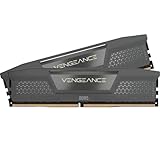
 CORSAIR Vengeance RGB RS DDR5 32GB
- Product Group: Personal Computer
- Binding: Personal Computers

As an Amazon Associate we earn from qualifying purchases at no extra cost to you. Ratings are shown as listed on Amazon.
⚡ Save on Your Next PC — Amazon Prime
Prime members get fast free shipping on the systems above, plus early access to Prime Day & Black Friday PC deals. New members get a 30-day free trial.
Watch: DDR5 vs DDR4 RAM: Does It Matter in 2026? — Video Review
Quick Verdict
DDR5 is the right choice for anyone building new or upgrading a modern platform. If you are on AMD AM5, Intel LGA1851, or any recent gaming laptop, DDR5 is your only option anyway, and 32GB at 6000MHz has become the sensible baseline. DDR4 remains a reasonable choice in exactly one scenario: you already own an AM4 or LGA1700 DDR4 motherboard, the system runs well, and you simply want more capacity without replacing the board and CPU. Buying into a fresh DDR4 platform in 2026 is no longer good value.
Key Differences
- Bandwidth: DDR5 starts at 4800MHz and commonly runs 6000–6400MHz, roughly doubling the theoretical throughput of a typical DDR4-3200 kit.
- Latency: DDR4 still wins on raw timings. A DDR4-3600 CL16 kit has lower absolute latency than DDR5-6000 CL36, but DDR5’s bandwidth advantage more than compensates in modern workloads.
- Architecture: Each DDR5 module carries two independent 32-bit subchannels, so a single stick behaves more like a dual-channel pair, improving efficiency under heavy multi-threaded load.
- Voltage and power delivery: DDR5 runs at 1.1V by default and moves voltage regulation onto the module itself via an on-board PMIC, rather than relying on the motherboard.
- Capacity ceiling: DDR5 supports far denser modules, making 64GB and 96GB kits straightforward. DDR4 realistically tops out at 32GB per stick on consumer boards.
- Availability: DDR5 production is scaling up while DDR4 winds down, which has eroded the price gap that once made DDR4 the obvious budget answer.
DDR5: The Current Standard
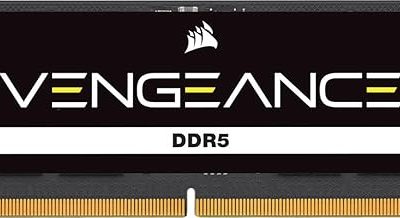
For gaming, the meaningful gains from DDR5 appear in CPU-limited situations: high-refresh 1080p and 1440p play, simulation-heavy titles, large open worlds streaming assets, and anything with dense NPC counts. Frame-time consistency improves noticeably, and 1% lows tend to benefit more than average framerates. The sweet spot has settled around 6000MHz with CL36 to CL38 timings, which is where kits like the CORSAIR Vengeance DDR5 32GB 6000MHz CL38 and the Lexar Thor Z RGB DDR5 32GB 6000MHz CL38 sit. On AMD’s AM5 platform in particular, DDR5-6000 keeps the memory controller running in its most efficient 1:1 mode.
Intel builders with headroom can push further; the CORSAIR Vengeance DDR5 32GB 6400MHz CL36 kit takes advantage of Intel’s more tolerant memory controllers via XMP 3.0. If aesthetics matter, the Vengeance RGB DDR5 32GB 6000MHz CL36 in white is the same class of memory in a build-friendly finish. Laptop and mini-ITX users are covered too: the Crucial 32GB DDR5 SODIMM kit and the TEAMGROUP Elite SODIMM DDR5 32GB 5600MHz kit are the standard 262-pin upgrades for modern Intel Core and Ryzen 7000-series notebooks.
DDR4: Still Viable, No Longer Ideal
DDR4 is far from useless. A well-tuned DDR4-3600 CL16 kit paired with a Ryzen 5000 or 12th/13th-gen Intel CPU still delivers excellent gaming performance, and in many GPU-limited scenarios at 1440p or 4K the difference against DDR5 shrinks to a handful of frames. If you own that hardware, there is no urgency to replace it, and moving from 16GB to 32GB of DDR4 remains one of the cheapest meaningful upgrades available to you.
The problem is forward momentum. No new consumer platform supports DDR4, so any money spent on it is money that will not transfer to your next build. Capacity is capped lower, supply is shrinking, and the price advantage that justified DDR4 in 2023 has largely evaporated. It is a maintenance purchase, not an investment.
Which Should You Buy?
- For a new gaming PC: DDR5, without hesitation — 32GB at 6000MHz CL36-38 is the target.
- For AMD AM5 builds: Pick an EXPO-certified 6000MHz kit such as the Vengeance DDR5 6000MHz CL38 for optimal 1:1 memory controller timing.
- For Intel enthusiasts chasing headroom: The Vengeance DDR5 6400MHz CL36 kit offers more bandwidth for XMP 3.0 tuning.
- For laptops and small form factor: A 262-pin SODIMM kit like the Crucial 5600MHz or TEAMGROUP Elite 5600MHz is the direct drop-in upgrade.
- For an existing DDR4 rig: Add capacity rather than switching standards, and save the platform upgrade for your next full rebuild.
Frequently Asked Questions
Can I put DDR5 in a DDR4 motherboard?
No. The modules are physically keyed differently and electrically incompatible. Your motherboard supports one standard or the other, never both, so check your board’s specification before buying.
Is 32GB enough for gaming in 2026?
Yes. 32GB is the comfortable standard for gaming, streaming, and general multitasking. 64GB is worth considering only for heavy content creation, virtual machines, or local AI workloads.
Does higher MHz always mean better gaming performance?
Not linearly. Beyond roughly 6000–6400MHz, gains taper off sharply and stability becomes harder to maintain. Balanced frequency and timings beat chasing the highest number on the box.
Do I need to enable XMP or EXPO?
Yes. Kits default to base JEDEC speeds until you enable XMP 3.0 (Intel) or EXPO (AMD) in BIOS. Skipping this step leaves most of your rated performance unused.
Final Verdict
DDR5 has won on every axis that matters for a 2026 build: bandwidth, capacity, platform support, and long-term availability. Unless you are topping up an existing DDR4 machine, buy a 32GB DDR5 kit at 6000MHz or above, enable XMP or EXPO, and you will have memory that comfortably outlasts your next graphics card upgrade.