Our Top Picks

A digital camera is only as reliable as the card inside it, and the wrong one shows up at the worst moment: a buffer that fills during a burst, a video clip that stops mid-take, or a card that cannot keep pace with a mirrorless body. Capacity matters, but the speed class and bus type decide whether the card disappears into the background or constantly reminds you it is there. Buying well means matching the card to the camera you own and the files you record, rather than chasing the largest number on the box.

The three cards below cover the situations most camera owners face. One is a dependable everyday UHS-I card for stills and Full HD, one is a faster UHS-I card built around burst shooting and 4K, and one is a UHS-II card for cameras that can use the extra bus speed. Each is a full-size SDXC card in a 128GB capacity, a size that holds a day of RAW files and video without forcing constant swaps.
Quick Picks
As an Amazon Associate we earn from qualifying purchases
| Product | Best for | Key spec from title |
|---|---|---|
| SanDisk Extreme SDXC UHS-I 128GB | Everyday shooting and 4K on a budget | 150MB/s read, C10, U3, V30, 4K UHD |
| SanDisk Extreme PRO SDXC UHS-I 128GB | Burst RAW and fast offloads | Up to 200MB/s read, C10, U3, V30, 4K UHD |
| Lexar Professional Silver PRO SDXC UHS-II 128GB | UHS-II cameras and demanding video | Up to 280MB/s read, UHS-II, C10, U3, V60, 4K |
How to Choose
Match the speed class to your video mode
Video speed classes exist because a card that handles stills can still fail during long video takes. V30 guarantees a minimum sustained write speed of 30MB/s, which suits 4K recording on most mirrorless and DSLR cameras, while V60 doubles that floor to 60MB/s for higher-bitrate 4K and some 6K modes. Check your camera manual for the bitrate of the mode you use most, then pick a class with headroom above it. A card rated below the recording bitrate can stop a take without warning, and no amount of capacity fixes a class mismatch.
Understand UHS-I versus UHS-II before paying more
UHS-II cards carry a second row of contacts and reach far higher transfer speeds, but only when the camera slot and the card reader both support UHS-II. In a UHS-I camera, a UHS-II card still works, yet it runs at UHS-I speeds, so the extra cost buys nothing on the day. Before choosing, look up whether your camera has a UHS-II slot. Owners of older DSLRs and entry-level mirrorless bodies usually gain more from a strong UHS-I card, while newer flagship bodies with UHS-II slots can clear their buffers noticeably faster with the right card.
Pick a capacity that fits a full day of shooting
A 128GB card is the practical middle ground for most photographers: roomy enough for a wedding, a holiday, or a long wildlife session in RAW plus JPEG, without putting an entire trip on a single card. Smaller cards force frequent swaps and increase the chance of losing one in the field, while very large cards concentrate risk, since a lost or failed card takes more work with it. Many experienced shooters carry two mid-size cards instead of one huge one, rotating them so a single failure never wipes out everything.
Check camera compatibility and the card format
Most cameras sold in the last decade accept SDXC cards, but older bodies may only support SDHC, which tops out at 32GB, and some compact cameras still use microSD with an adapter. Confirm the maximum capacity and the supported card type in your camera manual before ordering, and format the card in the camera rather than on a computer so the file system matches what the camera expects. A card that works in a laptop reader can still behave oddly in a camera that was never designed for its capacity or format.
The 3 Best Options
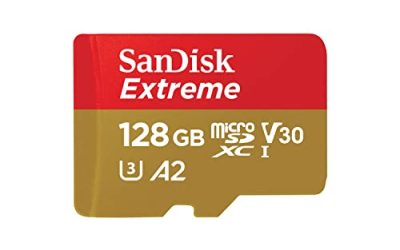
SanDisk Extreme SDXC UHS-I 128GB
The SanDisk Extreme sits in the comfortable middle of the SD card market, fast enough for 4K video and long bursts of stills without asking for flagship money. Its 150MB/s transfer speed keeps import times short, and the 70MB/s shot speed is enough to keep most enthusiast cameras moving through a burst without an early stall. The card is built to resist temperature swings, water, shock, and X-rays, which matters for anyone who shoots outdoors, and the included RescuePRO Deluxe software adds a safety net for accidentally deleted files.
Specs
- Capacity: 128GB
- Format: SDXC
- Interface: UHS-I
- Read speed: up to 150MB/s
- Shot speed: up to 70MB/s
- Speed classes: Class 10, U3, V30
- Video support: 4K UHD
- Durability: temperature-proof, waterproof, shock-proof, and X-ray-proof
- Warranty: lifetime limited manufacturer warranty
- Model number: SDSDXV5-128G-GNCIN
Best for: Enthusiast photographers who want reliable 4K and burst performance from a UHS-I camera without paying for speed their camera cannot use.
Watch out for: The 70MB/s shot speed can fall behind during very long RAW bursts on fast cameras, and the top transfer speed needs a compatible reader to show up in practice.
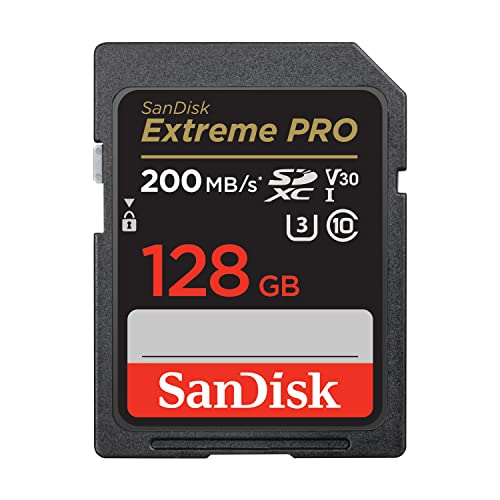
SanDisk Extreme PRO SDXC UHS-I 128GB
The Extreme PRO is SanDisk’s strongest UHS-I card, and the difference over the standard Extreme shows up most clearly after the shoot, when large batches of files move to a computer. QuickFlow Technology pushes offload speeds up to 200MB/s when paired with a compatible reader, so a full card empties noticeably faster than with a mid-range card. In the camera, shot speeds up to 90MB/s keep sequential bursts flowing, and the U3 and V30 ratings cover 4K UHD recording without the dropouts that cheaper cards can produce. It shares the rugged build of the Extreme line, resisting temperature, water, shock, humidity, wear, drops, X-rays, and magnets.
Specs
- Capacity: 128GB
- Format: SDXC
- Interface: UHS-I
- Read speed: up to 200MB/s with QuickFlow Technology
- Shot speed: up to 90MB/s
- Speed classes: Class 10, U3, V30
- Video support: 4K UHD and sequential burst mode photography
- Durability: temperature, water, shock, humidity, wear out, drop, X-ray, and magnet proof
- Recovery software: RescuePRO Deluxe included (2 years)
- Model number: SDSDXXD-128G-GN4IN
Best for: Photographers who shoot long RAW bursts and 4K video on a UHS-I camera and want the fastest offloads that bus can deliver.
Watch out for: Reaching the full 200MB/s offload speed requires a compatible reader, and the card costs more than the standard Extreme for gains that only show in heavy burst and transfer workloads.
Lexar Professional Silver PRO SDXC UHS-II 128GB
The Lexar Silver PRO is the card to reach for when the camera itself has a UHS-II slot and the work involves sustained high-bitrate recording or rapid-fire RAW. Its V60 rating guarantees a higher minimum sustained write speed than the V30 cards in this guide, and the UHS-II bus lifts read speeds up to 280MB/s with write speeds up to 120MB/s, so buffers clear faster and files move to a computer in less time. Lexar designs the card for professional photographers and videographers, with water, shock, vibration, and X-ray resistance built in, and it carries a limited lifetime product support promise from the manufacturer.
Specs
- Capacity: 128GB
- Format: SDXC
- Interface: UHS-II
- Read speed: up to 280MB/s
- Write speed: up to 120MB/s
- Speed classes: Class 10, U3, V60
- Video support: Full HD and 4K
- Durability: water, shock, vibration, and X-ray proof
- Model number: LSDSIPR128G-BNNNU
Best for: Owners of UHS-II mirrorless and DSLR cameras who record demanding video or shoot long RAW bursts and need the buffer to clear quickly.
Watch out for: In a UHS-I camera the card falls back to UHS-I speeds, so buyers without a UHS-II slot pay for performance they cannot reach, and a UHS-II reader is needed for the fastest transfers.
Which One Fits Your Situation
You shoot stills and occasional video on an older DSLR
The SanDisk Extreme is the natural fit here, since an older UHS-I body cannot use UHS-II speeds and the card’s V30 rating already covers the 4K and Full HD modes those cameras support. Its rugged build suits cameras that travel in a bag rather than a studio, and the 128GB capacity holds a full day of RAW files without a swap. Spending more on a faster card would not change what the camera can record.
You shoot bursts of action, sports, or wildlife
The SanDisk Extreme PRO earns its place when the buffer is the bottleneck, because its higher shot speed keeps sequential RAW bursts flowing longer before the camera pauses to catch up. Faster offloads also matter when a shoot produces hundreds of large files that need sorting the same evening. Pair it with a compatible reader to get the full transfer benefit, and keep a spare card in the bag for long sessions.
You record high-bitrate 4K video on a newer mirrorless camera
The Lexar Silver PRO is built for this workload, with a V60 rating that supports higher sustained write speeds and a UHS-II bus that clears the buffer between takes. Video files are large and unforgiving, so the higher minimum write speed is worth more than a headline read speed. Confirm the camera has a UHS-II slot first, and format the card in the camera before the first take.
You want one card for travel, family, and everyday use
The SanDisk Extreme covers this ground best, balancing capacity, durability, and speed at a level that suits a camera used for holidays, birthdays, and weekends away. A single 128GB card holds weeks of family photos and video, and the rugged build tolerates being carried in a pocket or a day bag. For most everyday shooters, it is the card that simply works and stays out of the way.
Common Mistakes
- Buying a UHS-II card for a camera that only has a UHS-I slot, then wondering why transfers feel no faster than before.
- Choosing a card by capacity alone and ignoring the video speed class, which is what actually decides whether long 4K takes record without stopping.
- Putting an entire trip on one very large card instead of splitting the work across two cards, so a single loss or failure takes everything.
- Using a microSD card in an adapter for a camera with a full-size slot, which adds a failure point and can limit speed compared with a native full-size SD card.
- Formatting the card on a computer instead of in the camera, which can leave the file system in a state the camera handles poorly.
Frequently Asked Questions
What size SD card do I need for a digital camera?
A 128GB card suits most photographers, holding a full day of RAW photos plus video without frequent swaps, and it is the capacity used by all three cards in this guide. Casual shooters who mainly record JPEGs can manage with less, while heavy video work may call for a second card rather than one enormous one. Splitting storage across two cards also limits what a single failure can take.
Is UHS-II worth it for a digital camera?
UHS-II is worth it only when the camera has a UHS-II slot, because that second row of contacts is what unlocks the higher speeds. In a UHS-I camera, a UHS-II card works but runs at UHS-I speeds, so the extra cost buys nothing. Check the camera manual for the slot type before deciding, and remember that a UHS-II reader is needed for the fastest file transfers.
Can I use a microSD card in my digital camera?
Most digital cameras take full-size SD cards, and a microSD card only fits with an adapter, which adds a connection that can loosen or fail. Adapters can also limit the speed the camera sees, so a native full-size SD card is the safer choice for stills and video. If a camera was designed for microSD, use a microSD card directly rather than adapting a larger one.
How do I know if an SD card is fast enough for 4K video?
Look for the video speed class printed on the card, not just the headline read speed. V30 suits most 4K recording, while V60 fits higher-bitrate 4K and some heavier video modes. Check the bitrate of the mode you record in your camera manual, then choose a class rated above it, since a card that cannot sustain the write speed can stop a take mid-recording.
FAQ
What size SD card do I need for a digital camera?
Is UHS-II worth it for a digital camera?
Can I use a microSD card in my digital camera?
How do I know if an SD card is fast enough for 4K video?
More from Amazon
Programs that pair well with the guide above. Offers and eligibility are set by Amazon and may change.
Free shipping on eligible items, Prime Video and more. Eligible new members can start with a free trial.
Start a Prime free trialAd-free music streaming. Eligible new subscribers can start with a free trial.
Try Music Unlimited freeA Prime membership for ages 18-24 with a trial period. Eligibility is set by Amazon.
See Prime for Young AdultsAudiobooks and podcasts to listen to on the go. Eligible new members can start with a free trial.
Try Audible freeAs an Amazon Associate we earn from qualifying purchases.