Key takeaways
- Learn how to pick the best micro sd cards for lg g5: the right capacity, speed class and format for photos, 4K video and apps on the 2016 handset today.
As an Amazon Associate we earn from qualifying purchases.
The LG G5 is a phone from 2016, and its microSDXC slot is rated for cards up to 2TB, so the real decision is not whether a modern card will fit — almost any current card fits the tray — but which capacity and speed class match the way you still use the handset. A card bought for bursts of photos and occasional 4K clips is a different purchase from one meant to hold a whole music library or hours of offline video, and the G5’s older UHS-I bus caps the speed worth paying for.
This guide is written for people keeping a G5 alive as a daily driver, a backup phone, a spare camera, or a pocket media player, and it is based on what to look for in a card — capacity, speed class, file system, and seller trust — rather than claims about specific products. The sections below walk through each choice so you can buy once and stop thinking about storage.
How to Choose
Four things decide whether a card feels fast and reliable in a G5 or becomes a source of error messages: how much room you genuinely need, which speed class your use demands, how the card is formatted, and whether the card you receive is really the card you paid for. Get these four right and the card disappears into the background, which is exactly what storage should do.
Capacity: Match the Card to the Library, Not the Spec Sheet
The G5’s headline figure of 2TB is a specification limit, not a shopping suggestion. A 32GB card covers a modest photo roll, 64GB suits a regular shooter keeping a few thousand photos on the phone, and 128GB is the sweet spot for someone who also stores music, podcasts, and offline maps. Cards of 256GB and above work in theory, yet they cost more per gigabyte and make little sense on a phone with a 16-megapixel camera and a 5.3-inch screen. Check the storage screen, add up photos, video, and music, allow roughly a third extra for growth, and buy that size rather than the largest card the slot can technically accept.
Speed Class: UHS-I, U1, U3, and Video Classes Explained
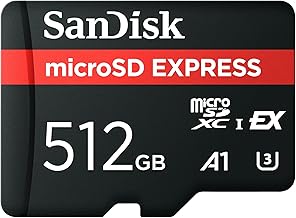
Speed markings crowd every card box, and only some of them change anything on a G5. The phone uses a UHS-I bus, so the extra row of pins on a UHS-II card buys nothing here; any UHS-II card simply runs at UHS-I speeds, and the premium is wasted. Within UHS-I, look for Class 10 as a minimum, U1 for general photos and Full HD video, and U3 or Video Speed Class V30 if you record 4K, since 4K needs a sustained write speed that a basic U1 card may not hold through a long clip. Headline transfer numbers above the UHS-I ceiling mean nothing here, since the phone itself caps the speed.
App Performance and File System: A1 Ratings, exFAT, and Formatting
Speed classes cover video recording; the A1 and A2 classes cover the small random reads and writes that apps produce. The G5 predates the A2 standard, so an A1 rating is the meaningful marker here: it signals a card that copes better when caches and thumbnails live on external storage. Cards of 64GB and above ship formatted as exFAT, which the G5 reads without fuss, while 32GB and smaller cards usually arrive as FAT32. If a new card misbehaves, format it in the phone itself rather than on a computer, so the phone applies the file system and allocation size it expects. Never pull a card out mid-write; use the eject option in settings first.
Genuine Cards and Endurance: Avoiding Fakes and Worn-Out Stock
Counterfeit microSD cards are common, and they are the usual cause of a card that reports its full capacity yet loses files once it is half full. Buy from a traceable seller rather than the cheapest listing, and be wary of capacities that look far too cheap for their size. After a card arrives, fill it completely and verify the data with a free test utility, which exposes a fake within an hour, before trusting it with photos you care about. A card that spent years in a drawer is fine, but a heavily used card from a dash camera may already be near the end of its write endurance, so a fresh card is safer for irreplaceable pictures.
Which One Fits Your Situation
The right card depends less on the phone than on the job you are asking the phone to do, and the four situations below cover most G5 owners still using the handset, from daily drivers to phones rescued from a drawer after years in storage.
Before choosing, check the card tray and slot for dust or wear, since a 2016 phone may have a tray that no longer sits flush, and back up whatever is already on the old card before swapping, because a card change is the moment most owners discover their photos were never copied anywhere else.
Keeping the G5 as a Daily Driver
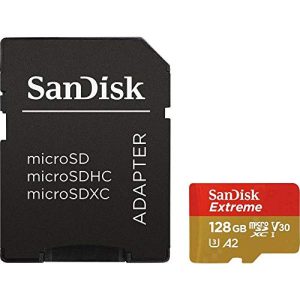
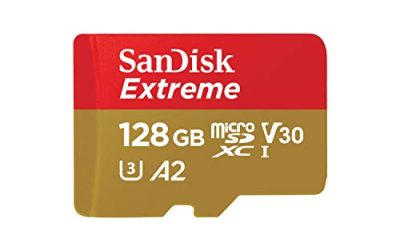
If the G5 is still your everyday phone, a 128GB Class 10 UHS-I card with an A1 rating covers the bases: room for photos, messaging attachments, offline maps, and a music cache, with enough random-read performance that apps stored externally do not feel sluggish. Format the card in the phone, move the camera roll and larger media onto it, and leave the internal storage for the system and your most-used apps.
Using the G5 Mainly as a Camera
A G5 kept as a spare camera lives or dies by write speed, so a U3 or V30 card is worth having despite costing a little more. Burst shooting and 4K video both punish slow cards with dropped frames and long waits between shots, and 64GB usually covers a day of shooting if you back up afterwards. Carry a second card rather than one enormous one, so one failure cannot take a whole trip’s photos.
Turning the G5 Into a Media Player
For a G5 retired to music, podcasts, audiobooks, and offline video, capacity matters more than speed, because playback reads sequentially and never stresses a card the way recording does. A 128GB or 256GB U1 card holds a large library, and the money saved by skipping U3 or V30 ratings can go toward the bigger size. Load the library over a cable rather than a slow wireless transfer, and keep a backup of anything you cannot download again.
Reviving a G5 Found in a Drawer
If you have dug a G5 out of storage, start small and cheap: a 32GB or 64GB Class 10 card is enough to test whether the slot, battery, and software still behave, and it costs little if the phone turns out to have other problems. Update the phone, format the card in the handset, and only buy a larger card once you know the revived G5 earns a place in your routine.
Common Mistakes
Most G5 storage problems are not bad luck; they come from a handful of avoidable choices made at the checkout or in the first hour with a new card.
- Buying a UHS-II card for the extra speed: the G5 has a UHS-I bus, so a UHS-II card runs at UHS-I speeds and the extra money buys nothing you can feel, while the same money would have bought a larger UHS-I card with room to spare.
- Choosing the largest capacity on the shelf: a 512GB or 1TB card costs far more than the 128GB card that covers most G5 use, and a single huge card also puts every photo in one basket, while a card that large is slower and more tedious to back up in full.
- Ignoring the speed class and then blaming the camera: stuttering 4K video and slow burst shooting usually trace back to a U1 card being asked to do U3 work, not to the phone itself, so match the card to the video you actually shoot before blaming the handset.
- Formatting the card on a computer first: a computer may apply a file system or allocation size the phone dislikes, so format new cards in the G5 and let the phone set the layout, since a card formatted elsewhere can throw errors that look like hardware failure.
- Trusting an untested bargain card with irreplaceable photos: fill any new card completely and verify the data before you rely on it, because a counterfeit card reports its full size while silently discarding files, and a fake passes every quick check until it is nearly full.
Frequently Asked Questions
Four questions come up again and again from G5 owners, and the answers all trace back to the same facts: the phone’s UHS-I bus, its 2TB specification ceiling, and the way it treats a card as portable storage.
What is the largest microSD card the LG G5 supports?
LG rates the G5’s microSDXC slot for cards up to 2TB, a specification ceiling rather than a practical recommendation. In practice, 32GB to 256GB covers every job on this phone, from a photo roll to a large music library, and most owners will find 128GB the most sensible size. Larger cards cost more per gigabyte and offer nothing the phone’s camera and screen can use.
Does the LG G5 benefit from UHS-II cards?
No, because the G5’s card slot uses the UHS-I bus, and a UHS-II card simply falls back to UHS-I speeds in it. The second row of contacts on a UHS-II card is never used by this phone, so the premium is wasted. Spend instead on the right capacity and a U3 or V30 rating if you record 4K video, which are the upgrades the G5 can actually use.
Can I use a microSD card as internal storage on the LG G5?
The G5 treats a microSD card as portable storage, so photos, video, music, and some app data can live on it, but the card never merges with internal storage the way adoptable storage does on some handsets. That means apps themselves mostly stay on internal storage, while media moves to the card. Keep the system and your most-used apps internal, and use the card for the bulky files.
Why does my LG G5 say the card is corrupted or keep unmounting it?
Repeated corruption or unmounting usually points to a failing card, a counterfeit card, or a card formatted with settings the phone dislikes. Back up anything readable, format the card in the phone itself, and see whether the errors stop; if they continue, test the card on a computer with a verification utility. A card that fails verification should be replaced, since its flash is likely worn out or fake.
FAQ
What is the largest microSD card the LG G5 supports?
Does the LG G5 benefit from UHS-II cards?
Can I use a microSD card as internal storage on the LG G5?
Why does my LG G5 say the card is corrupted or keep unmounting it?
More from Amazon
Programs that pair well with the guide above. Offers and eligibility are set by Amazon and may change.
Free shipping on eligible items, Prime Video and more. Eligible new members can start with a free trial.
Start a Prime free trialAd-free music streaming. Eligible new subscribers can start with a free trial.
Try Music Unlimited freeA Prime membership for ages 18-24 with a trial period. Eligibility is set by Amazon.
See Prime for Young AdultsAudiobooks and podcasts to listen to on the go. Eligible new members can start with a free trial.
Try Audible freeAs an Amazon Associate we earn from qualifying purchases.