Key takeaways
- Pro: 512GB capacity offers a meaningful step up for a compact-device upgrade.
- Pro: Uses a PCIe Gen4 x4 NVMe interface.
- Con: No stated sequential read or write speed is provided.
Handheld PCs solve the “one more game” problem in a small living room, on a nightstand, or during travel—but their compact storage can fill quickly. Once a few large games, updates, screenshots, and emulation files land on the internal drive, storage management becomes an annoying part of picking up the device. A short M.2 2230 NVMe drive is the usual upgrade route for compatible handhelds, mini PCs, tablets, and compact laptops.
This guide to the best 2230 NVMe SSD for handheld PC upgrade focuses on the listed 2230-format options, capacity choices, interface details, stated compatibility, and price. For 2026 shoppers, the biggest decision is rarely just speed: it is whether a drive fits the device, provides enough usable space for a growing library, and makes financial sense beside the price of the handheld itself. One entry is an adapter rather than an SSD, included because it changes the storage-upgrade path for ROG Ally owners.
Our top picks
 Micron 2500 512GB M.2 2230 NVMe SSD
- SPEED PCIe GEN4 PERFORMANCE
- The space-saving 22 x 30mm design fits compatible…
- Provides practical storage space for the operating system,…
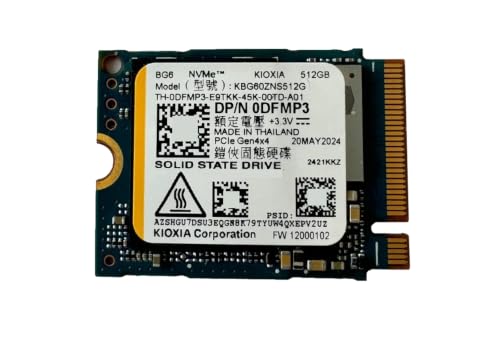 ist computers BG6 512GB M.2 2230 PCIe
- High-Speed PCIe Gen4x4 NVMe Performance: 512GB SSD delivers…
- Compact M.2 2230 SSD for Small Devices: The…
- Ideal Upgrade for Gamers, Students & Professionals: Great…
 Kingston 2TB M.2 2230 PCIe Gen 4.0x4
- Optimized for handheld gaming consoles, small form factor…
- Storage Capacity: 2TB / Interface: M.2 2230 PCIe…
- Rapid load times with read speeds reaching up…
| Product | Key specs | |
|---|---|---|
| Micron 2500 512GB M.2 2230 NVMe SSD | SPEED PCIe GEN4 PERFORMANCE The space-saving 22 x 30mm design fits compatible… Provides practical storage space for the operating system,… | Check price |
| ist computers BG6 512GB M.2 2230 PCIe | High-Speed PCIe Gen4x4 NVMe Performance: 512GB SSD delivers… Compact M.2 2230 SSD for Small Devices: The… Ideal Upgrade for Gamers, Students & Professionals: Great… | Check price |
| Kingston 2TB M.2 2230 PCIe Gen 4.0x4 | Optimized for handheld gaming consoles, small form factor… Storage Capacity: 2TB / Interface: M.2 2230 PCIe… Rapid load times with read speeds reaching up… | Check price |
 Kingston 1TB M.2 2230 PCIe Gen 4.0x4 Kingston 1TB M.2 2230 PCIe Gen 4.0x4 | Model Number - OM3PGP41024P-A0 Capacity - 1TB Form Factor & Connection Type - M.2 2230… | Check price |
 LinksTek ASC-3080 NVME SSD Convertor for ROG LinksTek ASC-3080 NVME SSD Convertor for ROG | 1.This LinksTek ASC-3080 is a 90-degree M2 M-Key… 2 3 | Check price |
 Oemgenuine Kioxi 256GB M.2 PCI-e NVME GEN4X4 Oemgenuine Kioxi 256GB M.2 PCI-e NVME GEN4X4 | Capacity: 256GB / Interface: M.2 2230 PCIe NVME… Dimension: 22mm x 30mm x 2.38mm / Key… Size: Fits 2230 as is / Compatibility: Laptop… | Check price |
 ist computers_SKHYNIX PVC10 512GB NVMe SSD M.2 ist computers_SKHYNIX PVC10 512GB NVMe SSD M.2 | High-Speed PCIe Gen4 NVMe Performance: The 512GB SSD… Compact M.2 2230 Form Factor: Measuring approximately 22… Reliable 512GB Internal Storage: Provides practical capacity for… | Check price |
 SSSTC Internal SSD SSSTC Internal SSD | 【SSD】Upgrade your laptop/desktop computer with the SSSTC SSD… 【Storage Capacity】128GB 【Hardware Interface】PCIe Gen3 x 4 128GB NVMe M.2… | Check price |
As an Amazon Associate we earn from qualifying purchases at no extra cost to you.
Quick Picks
| Product | Best for | Price |
|---|---|---|
| Micron 2500 512GB M.2 2230 NVMe SSD PCIe Gen4 x4 | Shoppers wanting a straightforward 512GB Gen4 x4 upgrade | $124.98 |
| ist computers BG6 512GB M.2 2230 PCIe Gen4x4 NVMe SSD | Compatible laptop, mini PC, tablet, and handheld upgrades | $129.98 |
| Kingston 2TB M.2 2230 PCIe Gen 4.0×4 NVMe SSD OM3SGP4 | Maximum stated capacity for large game libraries | $429.95 |
| Kingston 1TB M.2 2230 PCIe Gen 4.0×4 NVMe SSD TLC NAND | Buyers who want stated speed details and 1TB capacity | $228.99 |
| LinksTek ASC-3080 NVME SSD Convertor for ROG Ally | ROG Ally owners considering an M.2 2280 SSD route | $12.99 |
| Oemgenuine Kioxi 256GB M.2 PCI-e NVME GEN4X4 SSD | A smaller-capacity 2230 replacement or modest expansion | $59.75 |
| ist computers_SKHYNIX PVC10 512GB NVMe SSD M.2 2230 PCIe Gen4 x4 | A 512GB OEM-new upgrade for compatible compact devices | $129.99 |
| SSSTC Internal SSD 128GB PCIe Gen 3 x 4 NVMe | Basic storage replacement where 128GB is enough | $39.95 |
How We Picked
We prioritized products explicitly identified as M.2 2230 NVMe drives, then compared the capacity, PCIe generation, lane configuration, listed device compatibility, stated NAND information, and asking price. Because portable systems can be selective about physical fit and firmware behavior, compatibility language matters as much as a headline performance claim. Products with clear handheld, mini PC, tablet, laptop, Steam Deck, Surface, or Ally references earned particular attention.
We also separated a true storage drive from an upgrade accessory. The LinksTek ASC-3080 is not an SSD and does not add capacity by itself; it is a conversion accessory intended to expand an M.2 2230-type SSD setup to an M.2 2280-type SSD arrangement for the ROG Ally. Finally, we did not invent benchmark results, endurance ratings, temperatures, dimensions, weights, or power figures where they were not provided.
The 8 Best Picks
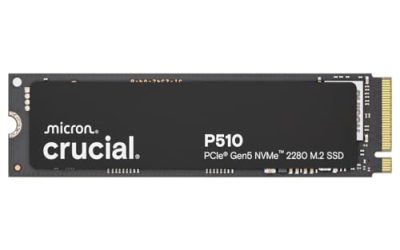
1. Micron 2500 512GB M.2 2230 NVMe SSD PCIe Gen4 x4
The Micron 2500 is a sensible starting point for a buyer who wants a named 512GB M.2 2230 NVMe upgrade with a PCIe Gen4 x4 interface. It is best suited to a compatible handheld or compact computer whose existing storage feels restrictive but does not require the cost of a larger-capacity drive. The listing’s straightforward specification makes it easier to compare against other 512GB options. Its main limitation is capacity: 512GB can still require library management for users who keep many large games installed at once.
- Pro: 512GB capacity offers a meaningful step up for a compact-device upgrade.
- Pro: Uses a PCIe Gen4 x4 NVMe interface.
- Con: No stated sequential read or write speed is provided.
Skip it if: your priority is 1TB or 2TB capacity, or you need a listing with stated performance figures.
2. ist computers BG6 512GB M.2 2230 PCIe Gen4x4 NVMe SSD
The ist computers BG6 is aimed at shoppers who want one 512GB M.2 2230 drive for a variety of compatible small-form-factor systems. Its listing specifically calls out laptops, mini PCs, select tablets, and handheld gaming devices, which makes it a practical candidate when your device falls into one of those categories. It is sold as OEM new, a detail worth noting for buyers who prefer to understand the packaging and sales channel before ordering. The price sits close to the Micron option, so compatibility confidence should guide the choice.
- Pro: The listing identifies compatible laptop, mini PC, tablet, and handheld-use categories.
- Pro: 512GB M.2 2230 PCIe Gen4x4 configuration.
- Con: It is listed as OEM new rather than as a conventional retail-packaged drive.
Skip it if: you need more than 512GB or specifically want retail packaging.
3. Kingston 2TB M.2 2230 PCIe Gen 4.0×4 NVMe SSD OM3SGP4
For the buyer whose handheld PC is also a primary game library, the Kingston 2TB M.2 2230 PCIe Gen 4.0×4 model is the capacity-first pick. The listing identifies compatibility with Steam Deck, Surface, Ally, and mini PC use, while also stating speeds up to 7000 MB/s. That combination is compelling for someone trying to avoid repeated uninstall-and-download cycles. However, this is a premium choice at $429.95, so its value depends on whether 2TB genuinely changes how you use the device rather than simply sounding reassuring.
- Pro: 2TB is the largest capacity in this roundup.
- Pro: The listing states speeds up to 7000 MB/s.
- Con: At $429.95, it is the most expensive SSD listed here.
Skip it if: a 512GB or 1TB library fits your routine and you want to control upgrade spending.
4. Kingston 1TB M.2 2230 PCIe Gen 4.0×4 NVMe SSD TLC NAND
The Kingston 1TB OM3PGP41024P-A0 is the most balanced option for buyers who want more room than 512GB without moving all the way to the 2TB model. It uses TLC NAND and a PCIe Gen 4.0×4 connection, and its listing gives clear stated sequential performance: up to 4,540 MB/s read and 4,230 MB/s write. It is also described as compatible with Steam Deck, Surface, Ally, and mini PCs. The drawback is pricing: $228.99 is substantial for a 1TB upgrade, especially for a device used casually.
- Pro: 1TB offers a roomy middle ground for game storage.
- Pro: TLC NAND and stated read/write speeds provide useful shopping detail.
- Con: The $228.99 price is high for buyers on a tight upgrade budget.
Skip it if: you only need a basic 512GB expansion or want the lowest initial cost.
5. LinksTek ASC-3080 NVME SSD Convertor for ROG Ally
The LinksTek ASC-3080 belongs on this list for a specific reason: it changes the type of SSD upgrade an ROG Ally owner may consider. This is a converter, not storage. It is designed for the ROG Ally gaming handheld and is described as expanding an M.2 2230-type SSD setup to an M.2 2280-type SSD setup through a 90-degree conversion. At $12.99, it is far less expensive than any SSD here, but it should be treated as a fitment accessory rather than a capacity purchase. Careful installation planning is essential.
- Pro: Specifically intended for the ROG Ally gaming handheld.
- Pro: Offers a 90-degree conversion from M.2 2230 type to M.2 2280 type.
- Con: It does not include SSD storage capacity.
Skip it if: you want a direct 2230 SSD replacement or do not own a compatible ROG Ally.
6. Oemgenuine Kioxi 256GB M.2 PCI-e NVME GEN4X4 SSD
The Oemgenuine Kioxi 256GB is a compact, modest-capacity option for a Steam Deck-oriented upgrade or replacement. It is listed as an M.2 PCI-e NVME GEN4X4 SSD in the 30mm 2230 form factor with an M key. At $59.75, it is less costly than the 512GB and larger drives in this roundup, making it relevant when restoring function or adding a limited amount of space is more important than building a large installed library. Its limitation is simple: 256GB can fill quickly with modern games and updates.
- Pro: Listed in the 30mm 2230 form factor with M key.
- Pro: Lower price than the 512GB, 1TB, and 2TB SSD options here.
- Con: 256GB is limited for a larger handheld game collection.
Skip it if: you want to keep numerous large games installed simultaneously.
7. ist computers_SKHYNIX PVC10 512GB NVMe SSD M.2 2230 PCIe Gen4 x4
The ist computers_SKHYNIX PVC10 is another 512GB M.2 2230 PCIe Gen4 x4 candidate for compatible laptops, tablets, and mini PCs. Its OEM-new designation is important: it may appeal to buyers comfortable with OEM components, while others may prefer a more traditional retail presentation. The $129.99 price is nearly identical to the other 512GB OEM-style option in this guide, so a buyer should focus on exact compatibility and seller confidence rather than assume meaningful value separation. It is a practical capacity tier for a focused library, not an unlimited-storage solution.
- Pro: 512GB capacity suits many focused handheld or mini PC libraries.
- Pro: PCIe Gen4 x4 NVMe interface in M.2 2230 format.
- Con: No read or write speed figures are stated in the listing.
Skip it if: you want stated speed specifications or a capacity above 512GB.
8. SSSTC Internal SSD 128GB PCIe Gen 3 x 4 NVMe
The SSSTC CL1-3D128-Q11 is the basic replacement choice. It provides 128GB in an M.2 2230 M-key format with a PCIe Gen 3 x 4 NVMe interface, and it is sold in OEM packaging. At $39.95, it has the lowest SSD price in this roundup. That can make sense for a light-use device, a repair project, or a system where a small internal drive is sufficient. For handheld gaming, though, 128GB is a narrow target and leaves limited headroom after system files, updates, and installed games.
- Pro: Lowest-priced SSD in the roundup at $39.95.
- Pro: M.2 2230 M-key NVMe design for compatible devices.
- Con: 128GB is the smallest capacity listed.
Skip it if: you are upgrading primarily to maintain a substantial installed game library.
Buying Guide
Confirm the 2230 Form Factor Before Ordering
“M.2” alone is not enough. Your handheld or compact PC must support the M.2 2230 format and the appropriate keying before you buy. Check the manufacturer’s documentation for your exact model, not just the product family. Some listings mention Steam Deck, Surface, Ally, mini PC, tablet, or laptop compatibility, but that is still not a substitute for confirming your particular device.
Choose Capacity Based on Your Real Library
The practical capacity ladder here is 128GB, 256GB, 512GB, 1TB, and 2TB. A 128GB drive suits replacement duties and light storage needs. A 256GB drive can work for a modest collection. For many handheld owners, 512GB is a more comfortable starting point. Choose 1TB or 2TB when the goal is to leave multiple large games installed and reduce storage housekeeping.
Do Not Shop by Interface Generation Alone
Several drives use PCIe Gen4 x4, while the SSSTC uses PCIe Gen 3 x 4. Interface labels are useful, but they do not override device compatibility or capacity needs. Only the Kingston 2TB and Kingston 1TB listings provide explicit speed claims in this group. If stated performance matters to you, compare the up-to-7000 MB/s claim on the 2TB Kingston with the up-to-4,540/4,230 MB/s read/write claim on the 1TB Kingston, while recognizing that device conditions affect real-world results.
Our Verdict
The best all-around pick is the Kingston 1TB M.2 2230 PCIe Gen 4.0×4 SSD with TLC NAND for shoppers who want a substantial capacity upgrade plus clearly stated read and write speeds. The Micron 2500 is the cleaner 512GB choice for buyers who want a straightforward Gen4 x4 2230 SSD at a lower price than the Kingston 1TB. For maximum capacity, the Kingston 2TB is the standout, but its $429.95 price makes it a specialized purchase. ROG Ally owners exploring a different physical upgrade route should consider the LinksTek converter only after verifying that an M.2 2280 conversion is appropriate for their device and installation plan.
FAQ
What does 2230 mean on an NVMe SSD?
In this guide, 2230 identifies the M.2 2230 form factor used by the listed SSDs. It is a key fit requirement for compatible handheld PCs, compact laptops, tablets, and mini PCs. Always verify your device’s supported SSD format before purchase.
Is the LinksTek ASC-3080 an SSD?
No. The LinksTek ASC-3080 is an NVME SSD converter for the ROG Ally. It is intended to convert an M.2 2230-type SSD arrangement to an M.2 2280-type SSD arrangement with a 90-degree conversion. It does not provide storage capacity itself.
Is 512GB enough for a handheld PC upgrade?
For many buyers, 512GB is a useful middle ground between cost and convenience. It is a better fit for a focused selection of installed games than for a very large permanent library. If you prefer to keep many games downloaded, 1TB or 2TB may be the better match.
Which drive has the highest stated capacity here?
The Kingston 2TB M.2 2230 PCIe Gen 4.0×4 NVMe SSD OM3SGP4 has the highest stated capacity in this roundup. It is listed at $429.95 and is described as compatible with Steam Deck, Surface, Ally, and mini PC use.