Our Top Picks
 SANDISK 128GB High Endurance Video microSDXC Card with128 GB0.4 x 0.6 x 0.1 inches0 poundsCheck on Amazon


For a Raspberry Pi 4 desktop, buy a 128 GB A2 card — the SanDisk Extreme is the best all-round pick, and the Samsung EVO Select is the value pick. If the Pi records video or logs data around the clock, buy the SanDisk High Endurance instead, because a standard performance card wears out under constant writing. Whatever you buy, get it from the brand’s own Amazon listing and test the real capacity before trusting it with your OS.
This guide is for desktop users, retro gamers, media-centre builders, and anyone running a Pi as a small server or camera recorder. We picked five 128 GB microSDXC UHS-I cards from Amazon titles and specs, and we compare them on random performance, speed-class floor, endurance, and genuine-listing checks — the four things that actually decide how a Pi 4 feels day to day.
Quick Picks
As an Amazon Associate we earn from qualifying purchases
| Product | Best for | Key spec from title |
|---|---|---|
| SanDisk Extreme 128 GB | Best all-rounder Pi 4 desktop | A2, up to 190 MB/s read, U3 V30 |
| Samsung PRO Plus 128 GB | Premium daily-driver Pi | A2, up to 160 MB/s read, 120 MB/s write |
| Samsung EVO Select 128 GB | Best value Pi build | A2, up to 130 MB/s read, U3 V30 |
| Kingston Canvas Go! Plus 128 GB | Retro gaming and emulation Pi | A2, up to 170 MB/s read, U3 V30 |
| SanDisk High Endurance 128 GB | 24/7 recording or logging Pi | Up to 100 MB/s read, up to 10,000 hours rated recording |
How to Choose
Random Performance Comes First
A running operating system does small random reads and writes all day, so the A-rating matters far more than the headline sequential speed. An A2 card guarantees at least 4000 read IOPS and 2000 write IOPS, while an A1 card guarantees 1500 read and 500 write IOPS. That gap shows up every time the Pi opens an app, loads a library, or writes a log file. Remember that the Pi 4 slot caps near 50 MB/s, so a card rated at 190 MB/s never reaches that figure on the Pi itself. On this board, random performance is the number that decides whether the desktop feels snappy or sluggish.
Check the Speed-Class Floor, Not the Headline
The big speed number on the front of the pack is a peak sequential figure measured on a fast PC reader, and it says nothing about sustained writing. The U3 and V30 marks are the real guarantee: they promise a minimum sustained write of 30 MB/s, which is what keeps 4K video recording from dropping frames. Every card in this guide carries U3 and V30, so none of them falls below that floor. When you compare two cards, look past the headline and check the class marks first. A card with a modest peak but a solid floor behaves far better in a Pi than a card with a flashy peak and no floor at all.
Match Capacity and Endurance to the Job
Capacity is about headroom, not speed, and a bigger card is not automatically a faster one. Raspberry Pi OS Lite runs on 16 GB, 32 GB is a comfortable sweet spot for a basic build, and 64 to 128 GB suits a full desktop, a media centre, or a retro-gaming collection with room to grow. Bigger cards also tend to offer slightly better write endurance, which helps a Pi that writes logs or caches data. The other half of the decision is endurance: a card that records video or logs sensor data around the clock wears out far sooner than one in a desktop, so a high-endurance card is the right call there and a waste everywhere else.
Buy Genuine and Verify Before You Install
Fake-capacity cards are common, and a card that reports more storage than it really has will corrupt an operating system install without warning. Buy only from the brand’s own Amazon listing, and treat suspiciously cheap high-capacity deals as a warning sign rather than a bargain. Before you install anything, test the card with F3 on Linux or Mac, or h2testw on Windows, and confirm the real capacity matches the label. This check takes a while on a 128 GB card, but it is far cheaper than rebuilding a Pi that ate its own filesystem. A genuine card from a real listing plus one verification pass is the whole defence.
The 5 Best Options
SanDisk Extreme 128 GB

The SanDisk Extreme is the card to buy when you want one pick that does everything well on a Pi 4 desktop. Its A2 rating keeps random reads and writes quick, so menus open fast, apps launch without a long pause, and the desktop stays responsive under normal multitasking. The 90 MB/s write rating also leaves plenty of headroom for saving files, updating packages, and recording video at the speed classes this card carries. It is the safest default in this guide because it balances random performance, sustained writing, and a proven model number that is easy to verify on the listing before you order.
- Specs:
- 128 GB microSDXC UHS-I, model SDSQXAA-128G-GN6MA
- Up to 190 MB/s read, up to 90 MB/s write
- A2 app performance, 4000 read IOPS and 2000 write IOPS
- Class 10, U3, V30 speed classes
- 4K and 5K UHD video support
- SD adapter included in the listing
- Best for: A Pi 4 desktop that you use every day for browsing, coding, and media.
- Watch out for: The Pi 4 slot caps near 50 MB/s, so the headline 190 MB/s read speed never appears on the Pi itself.
Samsung PRO Plus 128 GB
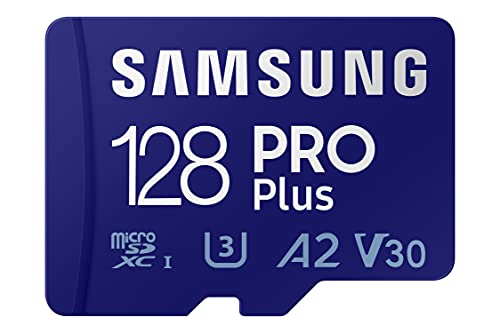
The Samsung PRO Plus is the premium alternative for a Pi that runs all day and gets written to often. Its A2 rating delivers the same strong random performance as the Extreme, and its 120 MB/s write rating is the highest in this guide, which helps when the Pi saves large files or updates a big package set. The 10-year limited warranty and the five-proof rugged design — water, temperature, X-ray, magnet, and wear-out resistance — suit a Pi that lives in a workshop, a garage, or a case that travels. This is the card for a daily-driver Pi where reliability matters as much as speed.
- Specs:
- 128 GB microSDXC UHS-I, model MB-MD128KA/AM
- Up to 160 MB/s read, up to 120 MB/s write
- A2 app performance
- Class 10, U3, V30 speed classes
- Full HD and 4K UHD video support
- 10-year limited warranty
- Five-proof rugged design: water, temperature, X-ray, magnet, and wear-out resistant
- SD adapter included in the listing
- Best for: A daily-driver Pi that runs all day and writes data often.
- Watch out for: A 2023 refresh of this card carries faster 180 and 130 MB/s figures under a different model number, so confirm the listing shows MB-MD128KA/AM before ordering.
Samsung EVO Select 128 GB
The Samsung EVO Select is the value pick, and it proves that a Pi 4 does not need the fastest card to feel quick. Its A2 rating covers the random performance that matters on this board, and its U3 and V30 marks guarantee the same 30 MB/s sustained write floor as the premium cards. The headline read speed is lower than the Extreme or the PRO Plus, but the Pi 4 slot caps near 50 MB/s anyway, so that gap barely shows up in use. For a first Pi build, a second Pi, or a tight-budget project, this is the sensible place to spend.
- Specs:
- 128 GB microSDXC UHS-I, model MB-ME128KA/AM
- Up to 130 MB/s read
- A2 app performance
- Class 10, U3, V30 speed classes
- Full HD and 4K UHD video support
- SD adapter included in the listing
- Best for: A first Pi build or a second Pi where value matters most.
- Watch out for: The Amazon listing states a read speed only, so do not expect a published write-speed figure, and ignore older packaging photos that show different speeds.
Kingston Canvas Go! Plus 128 GB
The Kingston Canvas Go! Plus is the pick for a retro-gaming or emulation Pi, where the workload is thousands of small files rather than one big stream. Its A2 rating keeps front-ends responsive and ROM loading quick, and its 170 MB/s headline read speed is the second highest in this guide. The lifetime warranty from Kingston adds confidence for a card that will sit in a Pi for years, and the U3 and V30 marks cover 4K video recording if the same Pi doubles as a media recorder. It is a strong all-rounder too, but its random-read strength is what earns it the emulation slot.
- Specs:
- 128 GB microSDXC UHS-I, model SDCG3/128GB
- Up to 170 MB/s read
- A2 app performance
- Class 10, U3, V30 speed classes
- 4K video support
- Lifetime warranty from Kingston
- Card and SD adapter included in the listing
- Best for: A retro-gaming or emulation Pi with large ROM collections and front-ends.
- Watch out for: The Amazon listing states a read speed only, and the same card appears in different retail packaging under another ASIN, so confirm the listing shows SDCG3/128GB.
SanDisk High Endurance 128 GB
The SanDisk High Endurance is the only card in this guide built for a Pi that never stops writing. A standard card wears out under constant video recording, CCTV capture, or sensor logging, and this card is rated for up to 10,000 hours of Full HD and 4K video recording at 128 GB. Its sequential speeds are modest, and it carries no A-rating, so it is not a fast desktop card and should never be bought for that job. But for a camera Pi, a dashcam, or a data logger that writes around the clock, endurance is the spec that matters, and this card is built for that workload.
- Specs:
- 128 GB microSDXC UHS-I, model SDSQQNR-128G-GN6IA
- Up to 100 MB/s read, up to 40 MB/s write
- Class 10, U3, V30 speed classes
- 4K UHD video support
- Rated up to 10,000 hours of Full HD and 4K video recording at 128 GB
- 2-year limited warranty
- SD adapter included in the listing
- Best for: A Pi that records video or logs data around the clock.
- Watch out for: It carries no A-rating and is not a fast desktop card, so do not buy it for a general-purpose Pi, and do not use the 40,000-hour figure, which belongs to the 256 GB card.
Which One Fits Your Situation
A Desktop Pi You Use Every Day
Pick the SanDisk Extreme. Its A2 random performance keeps the desktop responsive, its write speed handles updates and file saves comfortably, and it is the easiest default to verify on the listing. The Samsung PRO Plus is the step up if the Pi runs all day and you want the longer warranty and tougher build, but for most daily desktop use the Extreme covers everything the Pi 4 can actually use.
A Retro-Gaming or Media-Centre Pi
Pick the Kingston Canvas Go! Plus. A retro-gaming build loads thousands of small ROM files and front-end artwork, so the A2 random reads matter more than any sequential number, and this card pairs that with the second-highest headline read speed in the guide. The Samsung EVO Select is the budget alternative for the same job if the collection is smaller and the build cost needs to stay low.
A Pi That Records Video or Logs Data Nonstop
Pick the SanDisk High Endurance and nothing else in this guide. A standard performance card wears out under constant writing, while this card is rated for up to 10,000 hours of video recording at 128 GB. Accept its slower speeds as the trade for endurance, and do not judge it against the desktop cards, because it is solving a different problem entirely.
A First Pi Build on a Tight Budget
Pick the Samsung EVO Select. It carries the same A2 rating and the same U3 and V30 floor as the premium cards, so the Pi feels quick in normal use, and the lower headline speed barely matters because the Pi 4 slot caps near 50 MB/s. Spend the saving on a decent case or power supply, which will do more for reliability than a faster card ever could.
Common Mistakes
- Buying by headline speed alone: the Pi 4 slot caps near 50 MB/s, so a 190 MB/s card and a 130 MB/s card feel almost identical on the Pi itself.
- Ignoring the A-rating: sequential speed tells you nothing about the small random reads and writes an operating system does all day.
- Using a standard performance card for 24/7 recording: constant writing wears it out far sooner than a high-endurance card built for that workload.
- Trusting a cheap high-capacity deal without checking: fake-capacity cards report more storage than they really have and corrupt the OS install.
- Mixing up capacities and revisions: a 256 GB card’s endurance hours or a newer revision’s speeds are not the 128 GB card’s figures, so always confirm the exact model number on the listing.
Frequently Asked Questions
What size microSD card does a Raspberry Pi 4 need?
A 16 GB card is the bare minimum for Raspberry Pi OS Lite, and 32 GB is the comfortable sweet spot for a basic build. A full desktop, media centre, or retro-gaming build benefits from 64 to 128 GB, which leaves room for apps, media, and updates. The Pi 4 supports microSDXC, so 128 GB and larger cards work once formatted, and Raspberry Pi Imager handles the formatting for you.
Is an A2 card worth it on a Raspberry Pi 4?
Yes for a desktop OS, but the gain is modest. The Pi 4 cannot use A2 command queueing, which needs Pi 5 host support, so you get the card’s stronger non-command-queueing random performance over the DDR50 bus rather than the full A2 benefit. A good A1 card is fine for a headless Lite build, while an A2 card is the better choice when the Pi runs a desktop every day.
Can I use a 256 GB or 512 GB card in a Pi 4?
Yes, the Pi 4 accepts microSDXC cards of any capacity once they are formatted correctly, and Raspberry Pi Imager takes care of that step. Capacity does not make the card faster, though, and a bigger card is not automatically a better one for the job. Choose capacity for the storage your projects need, and choose the A-rating and speed class for how the Pi will actually perform.
Why does my Pi feel slow even with a fast card?
The Pi 4 slot caps near 50 MB/s, so headline speeds never appear on the Pi, and independent Pi 4 testing shows all cards landing close together. Random input and output is the real bottleneck, and that is what the A1 and A2 ratings measure rather than the sequential number. For a heavily used server or database, booting from a USB SSD outlasts and outperforms any microSD card.
FAQ
What size microSD card does a Raspberry Pi 4 need?
Is an A2 card worth it on a Raspberry Pi 4?
Can I use a 256 GB or 512 GB card in a Pi 4?
Why does my Pi feel slow even with a fast card?
More from Amazon
Programs that pair well with the guide above. Offers and eligibility are set by Amazon and may change.
Free shipping on eligible items, Prime Video and more. Eligible new members can start with a free trial.
Start a Prime free trialAd-free music streaming. Eligible new subscribers can start with a free trial.
Try Music Unlimited freeA Prime membership for ages 18-24 with a trial period. Eligibility is set by Amazon.
See Prime for Young AdultsAudiobooks and podcasts to listen to on the go. Eligible new members can start with a free trial.
Try Audible freeAs an Amazon Associate we earn from qualifying purchases.