Our Top Picks
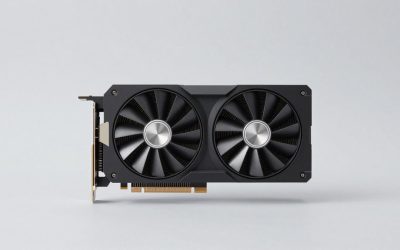
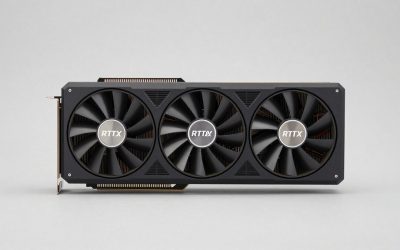
 ASUS Dual GeForce RTX 5060 Ti 16GB GDDR7RTX5060Ti|OC|16GB9 x 4.7 x 2 inches1.4 PoundsCheck on Amazon
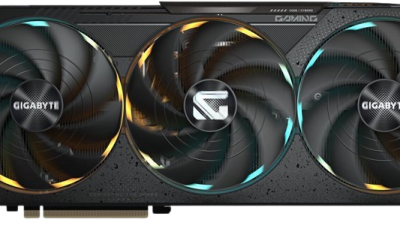
 GIGABYTE Radeon RX 9070 XT Gaming OC 16GRADEON9070XT11.34 x 5.2 x 2.2 inches3.9 PoundsCheck on Amazon
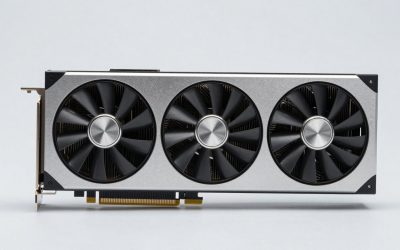
 ASUS Prime Radeon™ RX 9070 GRE EVO OCRX9070GRE|OC|12GB|EVO12 x 5 x 0.1 inches2.4 PoundsCheck on Amazon
The best graphics card for VR in 2026 is the GIGABYTE Radeon RX 9070 XT Gaming OC 16G. It pairs 16 GB of GDDR6 on a 256-bit bus with roughly 640 GB/s of memory bandwidth, DisplayPort 2.1 outputs, PCIe 5.0 and a mid-range price tier — and that combination is exactly what PCVR rewards, because virtual reality punishes memory capacity and frame-time consistency far more than it punishes average frame rate. The short version: buy the RX 9070 XT for a Quest 3, Bigscreen Beyond or Valve Index–class headset; buy the ASUS Dual RTX 5060 Ti 16 GB if you want NVIDIA’s encoder, driver stack and a lower power bill; buy the msi RTX 5080 SUPRIM Liquid SOC if you are driving a Pimax Crystal Super–class panel at high refresh; and buy the ASUS Prime RX 9070 GRE EVO OC if your budget stops at the entry tier. Avoid 8 GB cards for anything beyond a first-generation standalone-streaming setup — in VR the frame buffer usually runs out before the GPU does.
Top 3 Picks
Best overall: GIGABYTE Radeon RX 9070 XT Gaming OC 16G
This is the sweet spot for VR in 2026 because it clears the two hard requirements — 16 GB of VRAM and enough memory bandwidth to feed stereo rendering at high refresh — without climbing into the premium tier. DisplayPort 2.1 means it will not bottleneck a high-resolution headset cable, and PCIe 5.0 keeps it relevant through a platform upgrade. For most Quest 3, Beyond and Crystal Light owners, nothing above this delivers a proportional VR improvement.
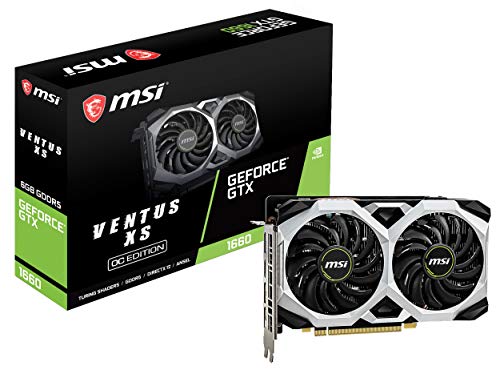
MSI GeForce GTX 1660 VENTUS XS 6G OC Gaming Graphics Card 192-Bit HDMI/DP 6GB GDRR5 HDCP Support DirectX 12 Dual Fan VR Ready OC, NVIDIA GPU Video Card for PC Gaming, Computer Graphics Cards (Renewed)
Chosen because it specifies NVIDIA GPU Video Card for PC Gaming and Computer Graphics Cards (Renewed).
View on Amazon
XFX Radeon RX 580 GTS XXX Edition 1386MHz OC+, 8GB GDDR5, VR Ready, Dual BIOS, 3xDP HDMI DVI, AMD Graphics Card (RX-580P8DFD6)
Chosen because it specifies 8GB GDDR5 and VR Ready.
View on Amazon
XFX Radeon RX 580 GTS XXX Edition 1386MHz OC+, 8GB GDDR5, VR Ready, Dual BIOS, 3xDP HDMI DVI, AMD Graphics Card (RX-580P8DFD6) (Renewed)
Chosen because it specifies 8GB GDDR5 and VR Ready.
View on Amazon
PNY NVIDIA Quadro P5000 16 GB VR Ready Graphics Card - Black
Chosen because it specifies Black.
View on AmazonBest budget: ASUS Prime Radeon RX 9070 GRE EVO OC Edition
A 12 GB, 192-bit card in the budget tier is the most sensible floor for real PCVR in 2026. It handles Quest 3–class rendering at 90 Hz with sane settings and still leaves headroom for a second headset later. If you must go cheaper, you are trading away VRAM you will miss in modded titles.
Best premium: msi Gaming RTX 5080 16G SUPRIM Liquid SOC
For Pimax Crystal Super, Varjo and other 2880×2880-per-eye-and-up headsets, the 5080’s combination of 16 GB of GDDR7, very high bandwidth, DisplayPort 2.1b and the strongest consumer video encoder is the premium answer. The factory liquid cooler also matters in VR: long sessions at sustained load are where air-cooled flagship cards get loud.
Quick Comparison
Every card below is a real, currently listed product. Price tiers are bands, not quotes — GPU pricing moves weekly, so treat the tier as the shopping signal and check the live number before you buy.
| Product | Best for | Key specs | Price tier |
|---|---|---|---|
| ASUS Dual GeForce RTX 5060 Ti 16GB GDDR7 OC Edition | All-round mid-range VR with NVIDIA features | 16 GB GDDR7, 128-bit, 28 Gbps, PCIe 5.0, ~180 W class, DLSS 4, AV1 encode, DP 2.1 | Mid-range |
| GIGABYTE Radeon RX 9070 XT Gaming OC 16G | High-refresh PCVR, best overall value | 16 GB GDDR6, 256-bit, 20 Gbps (~640 GB/s), PCIe 5.0, ~304 W class reference TBP, DP 2.1 | Mid-range |
| ASUS Prime Radeon RX 9070 GRE EVO OC Edition | Budget builds that still need 12 GB | 12 GB GDDR6, 192-bit, ~480 GB/s, PCIe 5.0, ~220 W class, 2.5-slot axial-tech design, HDMI/DP 2.1 | Budget |
| XFX Speedster SWFT210 Radeon RX 7600 8GB | Entry-level streaming-first VR on a tight budget | 8 GB GDDR6, 128-bit, 18 Gbps (~288 GB/s), PCIe 4.0 ×8, ~165 W class, 1× HDMI + 3× DP | Budget |
| ZOTAC Gaming GeForce RTX 5060 Ti 8GB Twin Edge OC | Compact 1080p-class VR rigs | 8 GB GDDR7, 128-bit, 28 Gbps, PCIe 5.0, ~180 W class, DLSS 4, dual-fan short PCB | Budget |
| ZOTAC Gaming GeForce RTX 3090 Ti AMP Extreme Holo 24GB | VRAM-hungry modded sims on a used-card budget | 24 GB GDDR6X, 384-bit, 21 Gbps (~1008 GB/s), PCIe 4.0, 450 W TBP, DP 1.4a, no AV1 encode | Premium |
| msi Gaming RTX 5080 16G SUPRIM Liquid SOC | Premium high-resolution VR, quiet sustained sessions | 16 GB GDDR7, 256-bit, 30 Gbps (~960 GB/s), PCIe 5.0, ~360 W TGP, 2760 MHz boost, factory liquid cooling, DP 2.1b | Premium |
How We Chose
This roundup is built from published specifications, vendor documentation, VR runtime requirements and the accumulated reporting of the VR and hardware review community — not from lab time with the cards. The selection criteria were deliberately VR-specific, because a card that wins flat-screen benchmarks does not automatically win in a headset.
First, VRAM capacity: 8 GB is the practical floor for standalone-streaming setups, 12 GB is the realistic minimum for a Quest 3–class headset with mods, and 16 GB is where a card stops being the limiting factor. Second, memory bandwidth, because stereo rendering doubles pixel work and VR headsets push more pixels per second than most flat displays. Third, frame-time consistency rather than peak frame rate — VR falls back to reprojection when a single frame misses its budget, so 1% lows matter more than averages. Fourth, port and cable support, since DisplayPort 2.1 is now the difference between running a high-resolution headset at full refresh and running it at half. Fifth, encoder support for wireless PCVR streaming, where AV1 encoding materially reduces bandwidth pressure. Sixth, power and thermal behaviour over long sessions, and finally upgrade path — whether the card still makes sense if you move to a higher-resolution headset in two years. Price tier was applied last, as a category label rather than a ranking.
1. ASUS Dual GeForce RTX 5060 Ti 16GB OC Edition – Best for All-Round Mid-Range VR
ASUS Dual GeForce RTX 5060 Ti 16GB GDDR7 OC Edition Gaming Graphics Card | PCIe 5.0, HDMI 2.1b, DisplayPort 2.1b, 2.5-slot, Axial-tech Fans, 0dB Technology, Dual BIOS
Chosen because it specifies PCIe 5.0 and HDMI 2.1b.
View on AmazonThis is the card to buy when you want one GPU that behaves predictably in VR, streams wirelessly without drama, and does not force a power supply upgrade. It suits Quest 3 and Quest 3S owners who play over Link, Steam Link or Virtual Desktop, Reverb G2 holdouts, and anyone with a 1080p-to-1440p-per-eye headset who would rather put the savings into games. The 16 GB frame buffer is the whole point: it is the most affordable way into a card that will not run out of VRAM in a texture-heavy VR title, and it keeps the door open for a higher-resolution headset later.
| Spec | Detail |
|---|---|
| Memory | 16 GB GDDR7, 128-bit bus, 28 Gbps modules (~448 GB/s) |
| Interface | PCIe 5.0 |
| Board power | ~180 W class, single 8-pin auxiliary power |
| Outputs | DisplayPort 2.1, HDMI 2.1 |
| Features | DLSS 4 (Super Resolution and Multi Frame Generation), hardware AV1 encode/decode, NVENC |
| Cooling | Dual axial-tech fans, 2.5-slot body |
The VR argument for this card is not raw speed — it is the combination of 16 GB, a modern encoder and a low power ceiling. A Quest 3 render target at SteamVR’s default 100% setting lands near 2700×2900 per eye, roughly 15.7 million pixels per frame across both eyes. At 90 Hz that is about 1.4 billion pixels per second, and the 5060 Ti’s 448 GB/s of bandwidth is comfortable there as long as you are not running maximum supersampling. Where the card earns its place is in the long tail: modded Skyrim VR, No Man’s Sky, Elite Dangerous with high texture settings and Microsoft Flight Simulator all push past 8 GB in VR, and the 16 GB model simply does not stutter when they do.
AV1 encoding is the second reason to pick this over an AMD card at the same tier. Wireless PCVR over Virtual Desktop or Steam Link is a video-streaming problem as much as a rendering problem; AV1 delivers comparable visual quality to H.264 at a meaningfully lower bitrate, which means fewer compression artifacts in fast motion and more headroom on congested 5 GHz or 6 GHz Wi-Fi. If your PCVR sessions are mostly wireless, this is a genuine, practical advantage rather than a checkbox.
The trade-offs are bandwidth and price-per-frame. A 128-bit bus is narrow by 2026 standards, and heavy supersampling — say 150% render resolution on a Quest 3 — will expose it. Power draw is modest, so a quality 550 W to 650 W supply is generally enough alongside a mid-range CPU, and the dual-fan cooler is quiet at the load levels VR produces.
Pros
- 16 GB of GDDR7 at a mid-range tier removes VRAM anxiety for years
- AV1 encode makes wireless PCVR streaming noticeably cleaner
- Low ~180 W class power draw works with existing 550–650 W supplies
- NVIDIA’s VR driver stack and per-title fixes remain the safest default
- PCIe 5.0 and DisplayPort 2.1 keep it compatible with future headsets
Cons
- 128-bit memory bus limits gains from aggressive supersampling
- Not enough headroom for a 2880×2880-per-eye headset at high refresh
- Multi Frame Generation is largely irrelevant in VR, where most titles do not support it
- Dual-fan cooler is adequate, not exceptional, under sustained load
Against the nearest alternative here — the ZOTAC RTX 5060 Ti 8GB Twin Edge OC — the difference is entirely in the frame buffer. The two cards render at nearly identical speeds until VRAM runs out; the 16 GB model then pulls ahead by a wide margin in modded and open-world VR, and the 8 GB model drops frames instead. Against the GIGABYTE RX 9070 XT, this card gives up roughly 40% of memory bandwidth and a good deal of raw raster performance, but it wins on encoder quality, power draw and driver-side VR polish. If you are wireless-first, that trade is often worth taking.
2. GIGABYTE Radeon RX 9070 XT Gaming OC 16G – Best for High-Refresh PCVR
GIGABYTE Radeon RX 9070 XT Gaming OC 16G Graphics Card, PCIe 5.0, 16GB GDDR6, GV-R9070XTGAMING OC-16GD Video Card
Chosen because it specifies PCIe 5.0 and 16GB GDDR6.
View on AmazonThe RX 9070 XT is the best overall VR card in this roundup because it solves the problem most VR builds actually have: sustaining 90 Hz or 120 Hz without reprojection at a resolution that looks sharp. It suits Quest 3 owners who want to run high supersampling, Bigscreen Beyond users chasing 90 Hz at native panel resolution, Valve Index owners who want maximum clarity, and anyone planning to move up to a 2880×2880-per-eye headset within a couple of years. It is also the card for people who refuse to pay the premium tier for a 16 GB frame buffer.
| Spec | Detail |
|---|---|
| Memory | 16 GB GDDR6, 256-bit bus, 20 Gbps modules (~640 GB/s) |
| Interface | PCIe 5.0 |
| Board power | ~304 W class reference TBP; factory-overclocked partner boards run higher |
| Outputs | DisplayPort 2.1, HDMI 2.1 |
| Architecture | RDNA 4, with hardware ray tracing and current-generation upscaling support |
| Power connectors | Two or three 8-pin connectors depending on board revision — check your specific SKU |
Here is why bandwidth matters so much more in VR than on a monitor. A 4K monitor at 60 Hz pushes about 0.5 billion pixels per second. A Quest 3 at SteamVR’s 100% setting and 90 Hz pushes roughly 1.4 billion. A Pimax Crystal Super at 90 Hz, with the render scale that lens distortion correction requires, pushes closer to 3.5 to 4 billion. VR does not just render more pixels — it renders them twice, from two viewpoints, with different projection matrices, and often with additional per-eye post-processing. The 9070 XT’s 256-bit bus and ~640 GB/s of bandwidth is what keeps texture streaming and render targets fed at those rates.
The second advantage is DisplayPort 2.1. High-resolution headsets are cable-bandwidth-limited before they are GPU-limited: a 3840×3840-per-eye panel at high refresh needs more link bandwidth than DisplayPort 1.4a can carry without heavy compression. Cards with DP 2.1 give you the full refresh range on those headsets. This is the single most overlooked specification in VR GPU shopping, and it is the reason an older flagship can lose to a newer mid-range card in a headset even when it wins on flat-screen benchmarks.
Power is the honest cost. A ~304 W class board plus a modern CPU, motherboard, drives and a headset drawing 15–20 W over USB lands near 500 W of real system draw under load, so a 750 W quality supply is the sensible target. The Gaming OC cooler handles that load without drama, but you should verify the connector count on the exact revision you buy, because partner boards vary.
Pros
- 16 GB on a 256-bit bus is the best VRAM-plus-bandwidth combination at this tier
- DisplayPort 2.1 supports high-resolution headsets at full refresh
- Strong sustained raster performance holds frame times steady at 90–120 Hz
- PCIe 5.0 interface extends useful life across a platform upgrade
- Competitive price-per-frame in the mid-range band
Cons
- ~304 W class power draw pushes you toward a 750 W supply
- No AV1-class encoder advantage over NVIDIA for wireless PCVR
- In-game upscaling is rarely exposed in VR titles, so you rely on raw performance
- Partner board size and connector count vary by SKU — measure your case first
Compared with the ASUS Dual RTX 5060 Ti 16 GB, the 9070 XT is the more capable VR card in almost every rendering scenario: more bandwidth, more raw throughput, better sustained frame times at high supersampling. It gives up the encoder advantage and draws roughly 120 W more. Compared with the msi RTX 5080 SUPRIM Liquid SOC, it is the value pick — the 5080 is faster and better equipped for the most demanding headsets, but it costs premium-tier money for gains you will not see on a Quest 3. If your headset tops out around 2064×2208 per eye, the 9070 XT is where the curve flattens.
3. ASUS Prime Radeon RX 9070 GRE EVO OC Edition – Best for Budget 12 GB VR Builds
ASUS Prime Radeon™ RX 9070 GRE EVO OC Edition Graphics Card (PCIe 5.0, HDMI/DP 2.1, 2.5-Slot Design, axial-tech Fans, Dual Ball Fan Bearings, Dual BIOS, GPU Guard)
Chosen because it specifies HDMI/DP 2.1 and 2.5-Slot Design.
View on AmazonThis is the card for the reader who has a firm entry-tier budget but refuses to buy 8 GB. The RX 9070 GRE EVO OC pairs a current-generation RDNA 4 GPU with 12 GB of GDDR6 on a 192-bit bus, which is the smallest memory configuration that still makes sense for a Quest 3–class headset in 2026. It suits first-time PCVR builders coming from standalone headsets, people upgrading an older mid-range card, and anyone whose headset is a Quest 3S, Valve Index or PSVR2-on-PC adapter.
| Spec | Detail |
|---|---|
| Memory | 12 GB GDDR6, 192-bit bus, approximately 480 GB/s |
| Interface | PCIe 5.0 |
| Board power | ~220 W class |
| Outputs | HDMI 2.1 and DisplayPort 2.1 |
| Design | 2.5-slot body with axial-tech fans — the slim profile matters in small cases |
| Positioning | Entry/budget tier of the current RDNA 4 family |
The 12 GB decision deserves a worked example, because it is the crux of this card’s value. Take a modded Skyrim VR load order: base game geometry and textures sit around 4.5 GB at 1080p-class settings, the VR runtime itself reserves roughly 0.8–1.2 GB for compositor and stereo buffers, and a 4K texture pack upgrade over the base 2K set typically adds 5 to 6 GB. That lands around 10.5–11.5 GB of committed VRAM before any supersampling. A 12 GB card holds that; an 8 GB card does not, and it will stutter as the driver shuffles textures. The same arithmetic applies to Microsoft Flight Simulator in VR with high texture settings and to heavily modded Fallout 4 VR.
The 192-bit bus is the compromise. At roughly 480 GB/s it is around three-quarters of the RX 9070 XT’s bandwidth, which means aggressive supersampling costs more here. The practical guidance: run SteamVR or Oculus render resolution at 100%, not 130–150%, and spend the performance budget on holding 90 Hz instead. Frame-time consistency matters more than a slightly sharper image, because a single missed frame triggers reprojection and the visual penalty is far larger than the resolution gain.
The 2.5-slot, dual-axial-fan body is a real advantage for compact VR builds. Many VR-focused PCs are built in smaller cases to sit near a play space, and a 2.5-slot card keeps more of the case available for airflow. Power draw in the ~220 W class means a 650 W quality supply is comfortable, and the HDMI/DP 2.1 output set keeps it compatible with current headsets without an adapter.
Pros
- 12 GB of VRAM at a budget tier — the minimum that still works for modded VR
- PCIe 5.0 and DisplayPort 2.1 support at an entry price
- 2.5-slot, axial-fan design fits small-form-factor VR builds
- ~220 W class draw works with a 650 W supply
- Leaves budget for the headset, the cable or a better CPU — all of which matter in VR
Cons
- 192-bit bus limits how far you can push supersampling
- Not enough performance for a 2880×2880-per-eye headset at 90 Hz without reprojection
- No encoder advantage for wireless streaming compared with NVIDIA alternatives
- 12 GB will feel tight in two to three years if texture sizes keep climbing
Against the XFX Speedster SWFT210 RX 7600 8GB, this is a straightforward upgrade: 50% more VRAM, a wider bus, a newer architecture and PCIe 5.0, for a modest tier step. Against the ASUS Dual RTX 5060 Ti 16 GB, the GRE gives up 4 GB of VRAM and NVIDIA’s encoder, but it sits in the budget tier and still clears the 12 GB threshold. If your headset is a Quest 3 and your library is mostly room-scale and rhythm games rather than modded open worlds, the GRE is entirely sufficient. If you plan to mod, stretch to 16 GB.
4. XFX Speedster SWFT210 Radeon RX 7600 8GB – Best for Entry-Level Streaming-First VR

XFX Speedster SWFT210 Radeon RX 7600 Graphics Card with 8GB GDDR6 HDMI 3xDP, AMD RDNA 3 RX-76PSWFTFY
Chosen because it specifies AMD RDNA 3 RX-76PSWFTFY.
View on AmazonThe RX 7600 is the honest entry point. It suits readers who already own a standalone headset, play wirelessly over Virtual Desktop or Steam Link, and mostly run titles that were designed to run on mobile hardware — Beat Saber, Pistol Whip, Superhot VR, Walkabout Mini Golf, Eleven Table Tennis, Job Simulator. It also suits a secondary VR machine, a living-room PC or a first build where the headset, not the GPU, is the star of the budget. It is not the card for Microsoft Flight Simulator in VR, and it is not the card for a 2880×2880-per-eye headset.
| Spec | Detail |
|---|---|
| Memory | 8 GB GDDR6, 128-bit bus, 18 Gbps modules (~288 GB/s) |
| Interface | PCIe 4.0 ×8 |
| Board power | ~165 W class, single 8-pin auxiliary power |
| Outputs | One HDMI and three DisplayPort outputs |
| Architecture | AMD RDNA 3 |
| Positioning | Budget tier, compact dual-fan SWFT210 cooler |
Two numbers explain this card’s ceiling. The first is 8 GB. In VR the frame buffer is consumed by the render target, the second eye’s buffers, per-eye post-processing, the compositor’s own allocations, and then all the game’s textures and geometry on top. A Quest 3 render target at 100% is roughly 15.7 million pixels per frame; the buffers for that alone are modest, but the runtime reservation plus a modern game’s texture pool routinely exceeds 8 GB in VR even when the flat-screen version of the same game fits comfortably. The symptom is characteristic: fine frame rates for ten minutes, then sudden hitching as the driver evicts and reloads textures.
The second number is bandwidth: ~288 GB/s on a 128-bit bus, paired with a PCIe 4.0 ×8 link. That combination is fine at 72–90 Hz with moderate settings and it is genuinely comfortable in lighter titles. It becomes the limiting factor the moment you raise supersampling or run a sim. The practical settings guidance for this card: keep render resolution at 100%, disable in-game supersampling, drop shadow quality one notch, and target 90 Hz rather than 120 Hz. You will get a stable, comfortable experience in the right software.
Where the RX 7600 quietly excels is price-to-headset balance. At the budget tier, the money you save over a mid-range card often buys a better headset strap, a dedicated Wi-Fi 6E router for wireless streaming, or a Link cable — all of which change the VR experience more than another 20% of GPU throughput. Its ~165 W class draw also means a 500–550 W supply is generally enough, which matters if you are upgrading an older prebuilt.
Pros
- Lowest-cost real entry into PCVR rendering in this list
- ~165 W class power draw runs on modest 500–550 W supplies
- Compact dual-fan cooler fits small cases and older prebuilts
- Three DisplayPort outputs plus HDMI covers most headset cabling
- Excellent for lighter, well-optimised VR titles at 90 Hz
Cons
- 8 GB is the hard ceiling — modded VR and sims will exceed it
- PCIe 4.0 ×8 link limits bandwidth on older platforms
- ~288 GB/s cannot support aggressive supersampling
- Not viable for high-resolution headsets at native refresh
- No modern encoder advantage for wireless streaming
Against the ASUS Prime RX 9070 GRE EVO OC, the RX 7600 is a step down in every measurable way: half the VRAM, narrower bus, older architecture, older PCIe generation. It stays on this list because it is the card that fits a genuinely tight budget and still delivers a real PCVR experience in the right library. Against the ZOTAC RTX 5060 Ti 8GB, the comparison is closer — both are 8 GB cards, but the 5060 Ti’s newer architecture, PCIe 5.0 link and superior encoder make it the better wireless-streaming choice, while the RX 7600 is usually the cheaper of the two.
5. ZOTAC Gaming GeForce RTX 5060 Ti 8GB Twin Edge OC – Best for Compact 1080p-Class VR Rigs
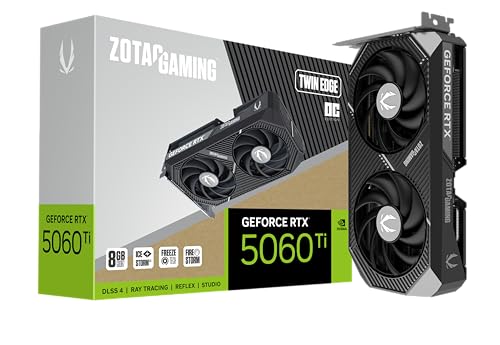
ZOTAC Gaming GeForce RTX 5060 Ti 8GB Twin Edge OC DLSS 4 8GB GDDR7 128-bit 28 Gbps PCIE 5.0 Gaming Graphics Card, IceStorm 2.0 Cooling, SFF-Ready, ZT-B50610H-10A
Chosen because it specifies IceStorm 2.0 Cooling and SFF-Ready.
View on AmazonThis card makes sense for a specific reader: someone building a small, quiet VR PC for a 1080p-per-eye-class headset — Valve Index, original Quest 2, PSVR2 via PC adapter, or a Quest 3 running at reduced render resolution — who wants NVIDIA’s driver stack and encoder without paying for 16 GB. The Twin Edge OC’s compact dual-fan body is designed for exactly those builds. It is a genuine 90 Hz card for well-optimised titles and a compromised card for everything else.
| Spec | Detail |
|---|---|
| Memory | 8 GB GDDR7, 128-bit bus, 28 Gbps modules (~448 GB/s) |
| Interface | PCIe 5.0 |
| Board power | ~180 W class |
| Outputs | DisplayPort 2.1, HDMI 2.1 |
| Features | DLSS 4 support, hardware AV1 encode/decode, NVENC |
| Design | Compact dual-fan Twin Edge body, short PCB |
Notice what is interesting here: this card has the same memory bandwidth as its 16 GB sibling (~448 GB/s from 28 Gbps GDDR7 on a 128-bit bus). Until VRAM becomes the constraint, the two perform very similarly. That makes the 8 GB version a legitimate choice for lighter VR — and a trap for heavier VR. The crossover point is roughly the moment a title’s committed VRAM exceeds about 7 GB, which happens in modded Skyrim VR, heavily populated VR Chat worlds with many avatars and custom shaders, Microsoft Flight Simulator, DCS World with high terrain textures, and any title where you push render resolution above 100%.
When the buffer fills, the failure mode is not a graceful frame-rate dip. It is texture eviction: the card streams assets from system memory over PCIe, frame times spike into the tens of milliseconds, and the headset’s reprojection kicks in. In a headset, that reads as a smeared, wobbling image during head turns — much more objectionable than the same hitch on a monitor. This is why the 8 GB 5060 Ti should be chosen deliberately, with a lighter library in mind, rather than as a default budget pick.
Where it does win: the compact cooler and modest power draw make it easy to cool in a small case, and the encoder is the same as the 16 GB model’s, so wireless PCVR streaming quality is identical. If your setup is a Quest 3 running Virtual Desktop at 72–90 Hz in titles like Into the Radius, Blade & Sorcery or Boneworks, this card is entirely adequate and leaves money for a better router — which will improve your experience more than more GPU.
Pros
- Same memory bandwidth as the 16 GB 5060 Ti for lighter VR workloads
- Compact dual-fan body suits small-form-factor VR builds
- AV1 encoder makes wireless PCVR streaming clean and low-bitrate
- PCIe 5.0 and DisplayPort 2.1 output support
- Low ~180 W class draw and a modest power supply requirement
Cons
- 8 GB of VRAM is the binding constraint in modded and sim VR
- Texture eviction produces reprojection artifacts that are very visible in a headset
- 128-bit bus limits supersampling headroom
- Priced close enough to the 16 GB version that the upgrade is often the smarter call
Against the ASUS Dual RTX 5060 Ti 16 GB, the decision is simple arithmetic: if you ever mod a VR game, run a flight or racing sim, or plan to keep the card for four years, pay the difference for 16 GB. If your VR library is a fixed set of well-optimised native titles and your case is genuinely small, the 8 GB Twin Edge is the better fit. Against the XFX RX 7600, this card wins on architecture, PCIe generation and encoder quality while both share the 8 GB ceiling.
6. ZOTAC Gaming GeForce RTX 3090 Ti AMP Extreme Holo 24GB – Best for VRAM-Hungry Modded Sims on a Used-Card Budget

ZOTAC Gaming GeForce RTX™ 3090 Ti AMP Extreme Holo 24GB GDDR6X 384-bit 21 Gbps PCIE 4.0 Gaming Graphics Card, HoloBlack, IceStorm 2.0 Advanced Cooling, Spectra 2.0 RGB Lighting, ZT-A30910B-10P
Chosen because it specifies HoloBlack and IceStorm 2.0 Advanced Cooling.
View on AmazonThis is a specialist recommendation, and it needs to be read as one. The RTX 3090 Ti’s 24 GB of GDDR6X on a 384-bit bus is still one of the largest frame buffers you can put in a consumer PC, and its ~1008 GB/s of memory bandwidth is higher than most current-generation cards. For a reader whose entire VR use case is Microsoft Flight Simulator, DCS World, Assetto Corsa Competizione or a heavily modded Skyrim VR with 4K-plus texture packs, that combination is genuinely compelling — particularly at a premium-tier listing price that reflects its age rather than its current positioning.
| Spec | Detail |
|---|---|
| Memory | 24 GB GDDR6X, 384-bit bus, 21 Gbps modules (~1008 GB/s) |
| Interface | PCIe 4.0 |
| Board power | 450 W total board power |
| Outputs | Three DisplayPort 1.4a and one HDMI 2.1 |
| Architecture | NVIDIA Ampere (RTX 30-series generation) |
| Cooling | Large triple-fan AMP Extreme Holo body with a full-length backplate |
Three caveats decide whether this card is right for you. The first is DisplayPort 1.4a. High-resolution headsets such as the Pimax Crystal family and other 3840×3840-per-eye-class panels need more link bandwidth than DP 1.4a can carry at full resolution and refresh without heavy compression. If your headset is a Quest 3, Valve Index or Bigscreen Beyond, this is a non-issue. If your headset is a Crystal Super, it is a hard limitation and you should choose a DisplayPort 2.1 card instead.
The second caveat is the encoder. Ampere includes AV1 decode but not AV1 encode, so wireless PCVR streaming over Virtual Desktop or Steam Link will use H.264 or HEVC rather than AV1. That means slightly higher bitrates for the same image quality and somewhat more visible compression in fast motion. It works, and plenty of people stream PCVR on 30-series cards, but it is a measurable step behind the current generation.
The third caveat is power. A 450 W board power rating plus a CPU, platform overhead and a headset charging over USB lands around 640 W of real system draw, and Ampere’s flagship parts are known for transient spikes well above their steady-state rating. Budget a 1000 W quality supply and expect the card to run hot under a headset for two-hour sessions. The AMP Extreme Holo cooler is a large one and handles the load, but it is loud, and it is very long — measure your case before buying.
Pros
- 24 GB of VRAM — the largest frame buffer on this list by a wide margin
- ~1008 GB/s of memory bandwidth exceeds most current-generation cards
- Ideal for VRAM-hungry modded sims and 4K texture packs
- Premium-tier listing price reflects its age rather than its capability
- Overwhelmingly capable in titles that are memory-limited rather than compute-limited
Cons
- 450 W TBP demands a 1000 W supply and produces serious heat
- DisplayPort 1.4a limits high-resolution headsets at full refresh
- No AV1 encode,
Affiliate disclosure. As an Amazon Associate we earn from qualifying purchases at no extra cost to you. Prices accurate as of the date shown.Best Graphics Cards for VRCheck price on Amazon