Our Top Picks
Most buyers are best served by a 1kWh LiFePO4 power station such as the Anker SOLIX C1000 Gen 2 or the EcoFlow DELTA 3 Plus. One of these runs a gaming laptop for roughly 5 hours, a console and TV for about 3 hours, or a CPAP for two to three nights. If you are planning for multi-day outages or want to keep a refrigerator going, step up to a 2kWh unit like the Bluetti AC200L. For a weekend of charging phones and a laptop, a 250Wh unit like the EcoFlow River 3 is enough. The formula below lets you check any of these figures against your own devices before you buy.
The runtime formula
The capacity printed on the box is not the energy you can actually use. When you run devices from the AC outlets, the inverter loses some energy as heat, and the battery management system holds a reserve at the bottom of the charge. A realistic planning figure is:

Jackery Explorer 1000 v2 Portable Power Station,1070Wh,1500W | 1 Hr Fast Charge, LiFePO4 Battery, 100W USB-C Output, Solar Generator for Camping, Emergency, RV (Solar Panel Optional)
Chosen because it specifies 1070Wh and 1500W.
View on Amazon
BLUETTI Portable Power Station AC180, 1152Wh LiFePO4 Battery Backup w/ 2 1800W (2700W peak) AC Outlets, 0-80% in 45Min, Solar Generator for Camping, Off-grid, Power Outage
Chosen because it specifies 0-80% in 45Min and Solar Generator for Camping.
View on Amazon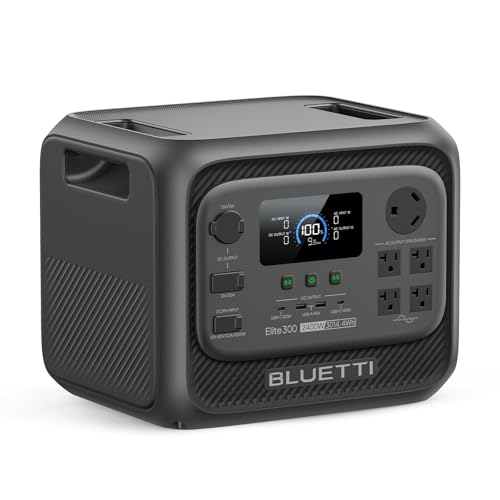
BLUETTI Elite 300 Portable Power Station for RV & Home Backup 3014.4Wh | 2400W (4800W Surge), LiFePO4 Battery, Smallest 3kWh Solar Generator for Emergency, RV Power with TT-30 RV Port & 12V/30A DC
Picked as a relevant option in this category.
View on AmazonRuntime (hours) = Battery Wh x 0.85 / Device watts
The 0.85 factor is a reasonable middle estimate for AC output. Devices powered straight from the USB-C or 12V DC ports avoid the inverter and often get closer to 0.90. Efficiency also drops when a large inverter powers a very small load, because the inverter’s own idle draw of about 10 to 20W on many 1kWh units becomes a big share of the total.
Worked runtimes for four real-world loads
The device wattages below are typical averages, not peak values. Check the label on your own gear or measure it with a plug-in watt meter for exact numbers.
- Gaming laptop under load (RTX 4060/5060 class): about 180W average at the wall
- Console plus TV: a PS5-class console at about 200W while gaming plus a 55-inch LED TV at about 80W, for 280W total
- CPAP with heated humidifier: about 40W averaged across a night, and closer to 15W with the humidifier off
- Full-size refrigerator: about 60W averaged over a day (roughly 1.4kWh/day), but 150W while the compressor runs and a startup surge of 600 to 1,200W
| Load (avg watts) | 245Wh unit (208Wh usable) | 1,024Wh unit (870Wh usable) | 2,048Wh unit (1,741Wh usable) |
|---|---|---|---|
| Gaming laptop (180W) | 1.2 hours | 4.8 hours | 9.7 hours |
| Console + TV (280W) | 0.7 hours (at the inverter limit) | 3.1 hours | 6.2 hours |
| CPAP with humidifier (40W) | 5.2 hours (under one night) | 21.8 hours (about 2.7 nights) | 43.5 hours (about 5.4 nights) |
| CPAP, humidifier off, DC (15W, 0.90) | 14.7 hours | 61 hours | 123 hours |
| Refrigerator (60W avg) | Not recommended (surge exceeds 300W inverter) | 14.5 hours | 29 hours |
Here is how one row is calculated. For the console and TV on a 1,024Wh station: 1,024 x 0.85 = 870Wh usable, and 870 / 280W = 3.1 hours. If you swap the TV for a 27-inch monitor drawing about 30W, the total falls to 230W and the runtime grows to 3.8 hours. The display is often the easiest place to win back runtime.
Two checks besides capacity
- Continuous inverter rating: This must exceed the combined running watts of everything plugged in. A 300W unit can only just carry a 280W console-and-TV combo, with no headroom for load spikes, so treat it as a short-session option at best.
- Surge rating: Compressors in fridges, freezers and window AC units can draw four to eight times their running watts for a moment at startup. Look for continuous output of 1,500W or more and a surge figure well above it before counting on a fridge.
LiFePO4 versus NMC: why chemistry decides the real cost
Almost every mainstream power station released in 2025 and 2026 uses lithium iron phosphate (LiFePO4 or LFP) cells. You will still find older nickel manganese cobalt (NMC) units at discount prices, such as the original Jackery Explorer 1000 and older Goal Zero Yeti models. The comparison looks like this:
| Factor | LiFePO4 (LFP) | NMC |
|---|---|---|
| Rated cycles to about 70 to 80% capacity | 3,000 to 4,000+ | 500 to 1,000 |
| Weight for 1kWh | Heavier, about 23 to 30 lb | Lighter, about 20 to 22 lb |
| Thermal stability | Much more resistant to thermal runaway | Less tolerant of heat and abuse |
| Cost per cycle (example: $500 LFP vs $450 NMC) | $500 / 4,000 = about $0.13 | $450 / 800 = about $0.56 |
Suppose you cycle the station once a week for camping and gaming, which is 52 cycles a year. Either chemistry will last you years. Daily use as solar storage or a desk battery is different: an NMC unit can reach its rated cycle count in two to three years, while a LiFePO4 unit should keep going for a decade. For that reason, NMC only makes sense when the discount is very large and you’ll use it rarely.
Solar recharge time
The panel wattage printed on the label assumes ideal lab conditions. In a real installation, heat, sun angle, dust and charge-controller losses cut actual harvest to about 70 to 80% of the rating. A practical way to estimate daily energy:
Daily solar Wh = Panel watts x Peak sun hours x 0.75
| Panel setup | Daily harvest at 5 peak sun hours | Days to refill 1,024Wh | Days to refill 2,048Wh |
|---|---|---|---|
| 100W folding panel | 375Wh | 2.7 days | 5.5 days |
| 200W panel | 750Wh | 1.4 days | 2.7 days |
| 400W (two panels) | 1,500Wh | 0.7 days | 1.4 days |
| 800W (four panels) | 3,000Wh | Under half a day (if the station accepts 800W) | 0.7 days |
Check how many solar watts the station can actually accept before buying more panels. Panel capacity above the station’s maximum solar input is simply wasted.
The best portable power stations by use
Best overall: Anker SOLIX C1000 Gen 2
Who it’s for: Gamers, campers and anyone who wants a good all-rounder. It has 1,024Wh of LiFePO4 cells rated for about 4,000 cycles, 2,000W continuous AC output, and a claimed wall recharge of under an hour. Solar input goes up to 600W. It usually sells for $500 to $800 depending on promotions. Trade-offs: The battery can’t be expanded, and at around 25 pounds it’s a two-hand carry.
Best for growing into home backup: EcoFlow DELTA 3 Plus
Who it’s for: Buyers who want a 1kWh unit now and the option of more capacity later. It has 1,024Wh of LiFePO4, 1,800W continuous output, up to 1,000W of solar input, and expansion batteries that bring it to about 5kWh. Its fast UPS switchover protects a gaming PC or router during short outages. It usually costs $550 to $800. Trade-offs: Adding expansion batteries quickly makes the total expensive, and some features are only available in the app.
Easiest to live with: Jackery Explorer 1000 v2
Who it’s for: First-time buyers who want simple controls. It has 1,070Wh of LiFePO4 cells, 1,500W continuous output and a compact, familiar design. It usually costs $450 to $800. Trade-offs: Its 400W solar input ceiling and lower inverter rating make it weaker for sustained high-draw loads, and it can’t be expanded.
Best value per watt-hour: Bluetti AC180
Who it’s for: Budget shoppers who want more than 1kWh. It has 1,152Wh of LiFePO4 and 1,800W of output, and on sale it often sells for $400 to $650. Trade-offs: It’s bulkier, and its solar input is modest compared with the newest 1kWh models.
Best for outages and fridges: Bluetti AC200L
Who it’s for: Households that want to keep a refrigerator, CPAP and router running for a day or more. It has 2,048Wh of LiFePO4, 2,400W continuous output and expansion to about 8kWh with Bluetti’s add-on batteries. It usually costs $800 to $1,200. Trade-offs: At more than 60 pounds it isn’t something you’ll carry to a campsite casually.
Best small unit: EcoFlow River 3
Who it’s for: Handhelds such as the Steam Deck, phones, cameras, and a laptop running from its USB-C port on day trips. It has 245Wh of LiFePO4 and a 300W inverter, weighs under 10 pounds, and usually costs $180 to $260. Trade-offs: As the table shows, it can’t run a console setup for a meaningful session or start a fridge compressor.
Picking by scenario
| Scenario | Minimum spec | Suggested pick |
|---|---|---|
| Handheld gaming and phones, day trips | 200 to 300Wh, USB-C 60W+ | EcoFlow River 3 |
| Laptop or console gaming, weekend camping | 1kWh, 1,500W+ inverter | Anker SOLIX C1000 Gen 2 |
| CPAP for multiple nights off-grid | 1kWh plus DC cable, or 200W of solar | Jackery Explorer 1000 v2 or Anker C1000 Gen 2 |
| Storm outages with a fridge | 2kWh, 2,000W+ inverter, high surge | Bluetti AC200L (or an expanded DELTA 3 Plus if 1,800W covers your loads) |
Questions buyers ask next
Can I game while the station is charging?
Most current models support pass-through charging, so they power your devices while charging from the wall or solar. The models with fast UPS-style switchover are the better choice if a power cut shouldn’t crash your PC.
Is it better to power a laptop from USB-C or from the AC outlet?
Use USB-C when the laptop accepts 100W or 140W over USB-C. It skips the inverter and adds roughly 5 to 10% more runtime. High-wattage gaming laptops usually still need their barrel charger on AC to reach full GPU performance.