
Key takeaways
- Frequent deep discounts make monitors a budget-friendly upgrade.
- High-refresh options like the Dell 144Hz IPS at low prices.
- Eye-comfort features are common even on affordable panels.
- Wide size range, from compact 19-inch to immersive 27-inch.
Hunting for a computer monitor deal is one of the smartest moves in tech shopping. Displays are discounted often and deeply, so a little patience and know-how stretch your budget remarkably far. The key is understanding which specifications genuinely improve your experience and which are marketing fluff, so you buy the right screen rather than just the cheapest one.
This review breaks down what makes a monitor deal worth grabbing, from refresh rate and panel type to connectivity and eye comfort. We highlight standout value displays across sizes and use cases so you can shop with confidence, whether you need a gaming panel, an office screen, or an everyday all-rounder.
Our top picks
 Philips 24 Inch Computer Monitor FHD 100Hz
- This 23.8″ Philips V line monitor delivers crisp…
- The VA panel produces brighter whites and deeper…
- The 178/178 degree extra wide viewing angle prevents…
 Dell 24 Monitor
- Clear visuals
- Eye comfort: TÜV Rheinland 3‑star* certification reduces harmful…
- Wide viewing angle: Get consistent views across a…
| Product | Key specs | |
|---|---|---|
| Philips 24 Inch Computer Monitor FHD 100Hz | This 23.8″ Philips V line monitor delivers crisp… The VA panel produces brighter whites and deeper… The 178/178 degree extra wide viewing angle prevents… | Check price |
| Dell 24 Monitor | Clear visuals Eye comfort: TÜV Rheinland 3‑star* certification reduces harmful… Wide viewing angle: Get consistent views across a… | Check price |
 SKitphrati 19" HD 1440x900 PC Monitor SKitphrati 19" HD 1440x900 PC Monitor | Check price | |
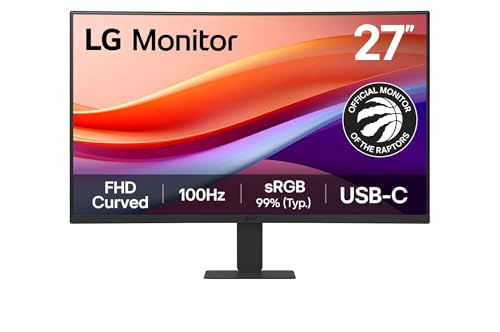 LG 27U421A-B 27-inch Full HD LG 27U421A-B 27-inch Full HD | Vivid Color with Full HD Resolution - The… 100Hz Smoother, Seamless Visuals - With a 100Hz… Multiple Devices-One Cable - Easily connect to laptops,… | Check price |
 Samsung 27" S3 Samsung 27" S3 | Experience stunning colors across the entire display with… Stay in the action when playing games, watching… Gain a competitive edge with optimizable game settings.²… | Check price |
 19-inch Full HD 75Hz Small Thin Monitor 19-inch Full HD 75Hz Small Thin Monitor | Screen performance: 1440 x 900 HD plus resolution… Dual connection options: supports HDMI and VGA ports,… Response Time - With a response time of… | Check price |
 Samsung 27" Essential S3 Samsung 27" Essential S3 | An immersive viewing experience with a curved monitor… Stay in the action when playing games, watching… Gain the edge with optimizable game settings | Check price |
 Philips 22 Inch Computer Monitor FHD 100Hz Philips 22 Inch Computer Monitor FHD 100Hz | This 22 inch class (21.5″ viewable) Philips V… 100Hz brings your favorite movies and video games… Adaptive-Sync technology ensures fluid action sequences and rapid… | Check price |
As an Amazon Associate we earn from qualifying purchases at no extra cost to you.
🎮 Get More From Your Setup — Free
Prime Gaming gives you free PC games every month, in-game loot, and a free Twitch channel sub — plus fast free shipping on all the gear above. New members get a 30-day free trial.
Watch: Computer Monitor Deal: Review & Buyer’s Guide — Video Review
Design & Build
Monitor deals span every design. The Dell 24 SE2426H keeps things clean and modern with slim bezels and a tilt stand, while the LG 27U421A curved model wraps the image slightly for a more immersive feel. Compact options like the 19-inch panels prioritize a tiny footprint for cramped desks or secondary use, and the Samsung 27-inch S3 brings a refined, flicker-free design with eye-comfort features. Budget models often use simpler stands with tilt-only adjustment, so if ergonomics matter, look for height-adjustable options or plan to use a VESA mount.
Performance
Value monitors punch above their price when chosen well. The Dell 24 SE2426H is a standout deal, pairing a 144Hz refresh and 1ms response with an IPS panel and FreeSync for smooth, colorful gaming. The Philips 24-inch 241V8LB offers a comfortable 100Hz VA panel with flicker-free, low-blue-light tech and a long warranty, ideal for office use. The Samsung 27-inch S3 delivers a 120Hz IPS experience with eye-saver mode for all-day comfort, while the compact 19-inch panels handle basic tasks and secondary duties. Match the refresh rate and panel type to your primary activity and the value becomes obvious.
Pros & Cons
- Frequent deep discounts make monitors a budget-friendly upgrade.
- High-refresh options like the Dell 144Hz IPS at low prices.
- Eye-comfort features are common even on affordable panels.
- Wide size range, from compact 19-inch to immersive 27-inch.
- Basic stands on budget models limit ergonomic adjustment.
- Built-in speakers, when present, are underwhelming.
- Renewed units may show minor cosmetic wear.
Alternatives to Consider
If gaming is your goal, the Dell 24 SE2426H is the clear value pick with its 144Hz IPS panel. For office comfort, the Philips 24-inch 241V8LB and Samsung 27-inch S3 both excel with flicker-free, low-blue-light designs. The LG 27-inch curved model suits those wanting a larger, more immersive everyday screen, while the compact 19-inch panels make sensible, inexpensive secondary displays for a dual-monitor setup.
Frequently Asked Questions
How do I spot a genuine monitor deal?
Compare the price against the refresh rate, resolution, and panel type. A 144Hz IPS panel at a budget price, like the Dell SE2426H, is a strong signal of real value.
Is 100Hz enough for everyday use?
Yes. For browsing, office work, and media, 100Hz feels smooth. Only fast-paced gaming truly benefits from 144Hz or higher refresh rates.
Should I buy a curved monitor?
Curved panels add subtle immersion and can ease eye movement on larger screens. For a 27-inch everyday display like the LG, many find the curve pleasant.
Are renewed monitors a good deal?
They can offer excellent value, but check the condition rating and warranty. Renewed panels may have minor cosmetic wear while performing like new.
Verdict
A great monitor deal comes down to matching specs to your needs. The Dell 24 SE2426H is our top pick for gaming value, the Philips 24-inch 241V8LB wins for office comfort, and the Samsung 27-inch S3 is the everyday all-rounder. Focus on refresh rate and panel type, and a sale will land you a screen you love.








