Key takeaways
- Loading screens shrink dramatically, turning a long wait into a few seconds and getting you back into play faster after every death or fast-travel.
- Open-world texture streaming keeps up with your movement, so you stop seeing blurry surfaces snap into detail after you have already run past them.
- Some 2026 titles list an SSD as a hard requirement because their asset-streaming engines were built assuming NVMe-class speeds.
- Save operations and in-game asset loads happen without the micro-stutters that a busy hard drive introduces mid-session.
For years the storage question for gamers had an easy answer: buy the biggest hard drive you could afford and don’t think too hard about it. In 2026 that logic is broken. Modern games stream enormous amounts of data from disk in real time, and a traditional spinning hard drive simply cannot keep up with what today’s engines expect. The result is longer loading screens, textures that pop in late, and in some titles outright stutter that a faster drive would eliminate.
This guide breaks down exactly how SSDs and HDDs differ for gaming, when each one still makes sense, and how to build a storage setup that loads fast without wasting money on capacity you will never fill. You will learn what the speed numbers actually mean in a game, why some new titles now require an SSD, and how to split your library across drives. To make the choices concrete, we have highlighted the NVMe SSDs below that we trust for a fast, dependable gaming rig.
Our top picks
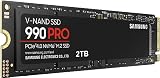
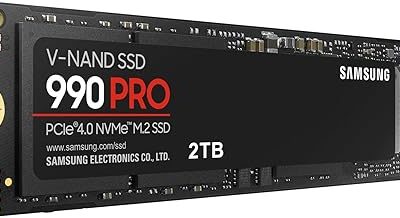
 Samsung SSD 990 PRO 2TB
- Product Group: Personal Computer
- Binding: Personal Computers

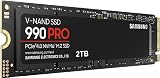
 Samsung SSD 990 PRO 1TB
- Product Group: Personal Computer
- Binding: Personal Computers


As an Amazon Associate we earn from qualifying purchases at no extra cost to you. Ratings are shown as listed on Amazon.
⚡ Save on Your Next PC — Amazon Prime
Prime members get fast free shipping on the systems above, plus early access to Prime Day & Black Friday PC deals. New members get a 30-day free trial.
Watch: SSD vs HDD for Gaming: Which Do You Need? — Video Review
How SSDs and HDDs Actually Differ
A hard drive stores data on spinning magnetic platters that a physical arm reads, which caps its speed at roughly 150 to 250 megabytes per second and forces it to seek back and forth for scattered files. A solid state drive has no moving parts, reading from flash memory instantly, and a modern NVMe SSD like the Samsung 990 PRO or WD_Black SN7100 reads at several thousand megabytes per second. That is not a small margin, it is often twenty to fifty times faster in the random-access patterns games rely on. The practical effect is that an SSD loads a level in seconds where a hard drive takes a minute, and it feeds textures to your GPU fast enough that the world renders smoothly as you move through it.
What Faster Storage Means Inside a Game
- Loading screens shrink dramatically, turning a long wait into a few seconds and getting you back into play faster after every death or fast-travel.
- Open-world texture streaming keeps up with your movement, so you stop seeing blurry surfaces snap into detail after you have already run past them.
- Some 2026 titles list an SSD as a hard requirement because their asset-streaming engines were built assuming NVMe-class speeds.
- Save operations and in-game asset loads happen without the micro-stutters that a busy hard drive introduces mid-session.
When a Hard Drive Still Makes Sense
Hard drives are not obsolete, they are just no longer the right home for the games you actively play. Where they still shine is bulk, cheap capacity: a large HDD costs far less per terabyte than any SSD, which makes it ideal for archiving media, backups, and the enormous library of games you own but rarely launch. A sensible modern setup pairs a fast NVMe SSD for your current rotation with a big hard drive as cold storage, moving titles onto the SSD only when you plan to play them. If your budget forces a single drive, though, choose the SSD every time, because the day-to-day experience gain outweighs raw capacity for almost everyone.
Reading SSD Speeds and Interfaces
Not all SSDs are equal, and the labels matter. A SATA SSD is limited to about 550 MB/s, still a huge jump over a hard drive but a fraction of what NVMe offers. NVMe drives plug into an M.2 slot and speak PCIe: a PCIe 4.0 drive like the Kingston NV3 reaches around 6,000 MB/s, while a PCIe 5.0 drive such as the Samsung 9100 PRO pushes past 14,000 MB/s. For gaming specifically, the leap from HDD to any NVMe drive is transformative, while the jump from Gen 4 to Gen 5 is far more modest in real load times. Buy a reputable PCIe 4.0 drive of the capacity you need and you will have covered the meaningful gains without paying the premium for headroom games barely use yet.
Sizing and Setting Up Your Drives
Games have ballooned in size, with many current titles occupying 100 to 200 gigabytes each, so plan capacity around how many you keep installed at once. A 1TB NVMe drive holds a healthy active rotation for most players, while 2TB gives serious libraries breathing room. Before installing, confirm your motherboard has a free M.2 slot and check which slots run at PCIe 4.0 or 5.0, since some share bandwidth with other components. Install the operating system and your most-played games on the SSD, keep the SSD below about 80 percent full to preserve performance, and use a secondary drive for everything else. A clean split like this gives you fast loads where it counts and cheap space where it does not.
Tips
- Put your operating system on the SSD too, not just games, because Windows itself feels far snappier and boots in seconds.
- Leave roughly 15 to 20 percent of your SSD free, since NVMe drives slow down noticeably when packed to the brim.
- Check that your M.2 slot runs at the drive’s rated PCIe generation, or you may quietly cap a Gen 4 drive at Gen 3 speeds.
- Use a large hard drive as an archive for finished or rarely played games, then copy them back to the SSD when you return to them.
Frequently Asked Questions
Will an SSD increase my frame rate?
Not directly, since frame rate is driven mainly by your GPU and CPU. What an SSD fixes is loading time and streaming stutter, so the game feels smoother and starts faster even though the peak FPS number stays roughly the same as on a hard drive.
Do I need a PCIe 5.0 SSD for gaming in 2026?
For almost everyone, no. A quality PCIe 4.0 NVMe drive already loads games faster than current engines can fully exploit. Gen 5 drives are excellent for content creation and future-proofing, but the real-world gaming difference over Gen 4 is small today.
Can I keep some games on a hard drive and some on an SSD?
Absolutely, and it is the smart budget approach. Install your active games and operating system on the SSD, and use a big hard drive for backups and titles you play infrequently. Most game launchers let you choose the install location per game.
Is it hard to add an NVMe SSD to my PC?
It is one of the easier upgrades. An M.2 NVMe drive slots directly into the motherboard and secures with a single screw, no cables required. After installing, you initialize it in your operating system’s disk tool and it is ready to hold games.
Conclusion
For gaming in 2026 the verdict is clear: an NVMe SSD is the drive you want for anything you actually play, delivering shorter loads, smoother streaming, and compatibility with titles that now demand it. Reserve hard drives for cheap bulk storage of backups and dormant games. Buy a reputable PCIe 4.0 drive sized to your active library, keep it comfortably below full, and pair it with a large HDD if you need archive space. That combination gives you the speed where it matters and the capacity where it does not.