
Key takeaways
- Zero screen glare thanks to forward-throwing asymmetric optics.
- Adjustable color temperature and dimming suit any time of day.
- No desk footprint—bars sit on the monitor, freeing your surface.
- USB-powered, so they run off your monitor or a spare port.
If your desk lamp throws glare across your screen or your late-night sessions leave your eyes aching, a monitor light bar is the quiet upgrade that fixes both. These slim LED strips perch on top of your display, casting even light across your keyboard and desk without a single reflection bouncing back at you. For gamers and remote workers alike, it’s a small purchase that meaningfully reduces eye strain.
The market has exploded with options ranging from simple USB bars to RGB backlight kits and clamp-mounted panels. We compared the leading models to see which deliver clean, glare-free light, useful controls, and a mount that stays put on curved and flat monitors alike.
Our top picks



As an Amazon Associate we earn from qualifying purchases at no extra cost to you. Ratings are shown as listed on Amazon.
🎮 Get More From Your Setup — Free
Prime Gaming gives you free PC games every month, in-game loot, and a free Twitch channel sub — plus fast free shipping on all the gear above. New members get a 30-day free trial.
Watch: Monitor Light Bars: Review & Buyer’s Guide — Video Review
Design & Build
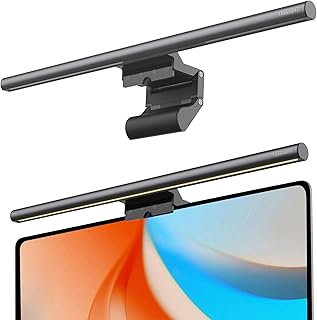
The classic form factor is a slim bar that rests on your monitor’s top bezel via a weighted, asymmetric clip—no adhesive, no wobble. Widths matter: an 11.8-inch bar suits standard monitors while a 15.7-inch or the Quntis curved light bar for 34-inch-plus ultrawides spreads light across a bigger surface. For curved screens specifically, the Quntis curved model conforms to the panel’s arc so the light stays even edge to edge. If you run dual monitors or want overhead coverage, clamp-mounted panels like the ONEMIX 42-inch 4-panel lamp and the Airlonv gooseneck LED mount to the desk and reach over the top for broader, adjustable lighting.
Performance
The whole point is zero screen glare, and the asymmetric optics on these bars deliver—light projects forward onto your desk, not backward into your eyes or onto the panel. Color temperature control is the feature to prioritize: three-temperature or stepless dimming (found on the Quntis auto-dimming bar and most 15.7-inch models) lets you warm the light for evening and cool it for focused work. Auto-dimming and touch controls add convenience, while RGB backlight versions like the Quntis curved bar throw ambient color behind the screen for a gaming-room vibe. The clamp lamps push far more total output—the ONEMIX hits 1800 lumens across four adjustable panels—for anyone lighting a whole workspace rather than just one monitor.
Pros & Cons
- Zero screen glare thanks to forward-throwing asymmetric optics.
- Adjustable color temperature and dimming suit any time of day.
- No desk footprint—bars sit on the monitor, freeing your surface.
- USB-powered, so they run off your monitor or a spare port.
- Curved-monitor fit requires a curved-specific bar for even coverage.
- Basic bars lack remotes; you reach up to touch-adjust them.
- Clamp lamps take desk-edge space and cost more than simple bars.
Alternatives to Consider
If you want ambient RGB glow for a gaming setup rather than just task light, the Quntis curved backlight bar adds color behind an ultrawide beautifully. Users lighting a two-monitor desk or a workbench should look at the ONEMIX 42-inch clamp lamp with its remote and timer, or the Airlonv gooseneck for pinpoint positioning. For a straightforward, budget-friendly single-monitor fix, a standard 11.8-inch or 15.7-inch bar with three color temperatures is all most people need.
Frequently Asked Questions
Do monitor light bars really reduce eye strain?
Yes. By evenly lighting your desk and documents without reflecting off the screen, they cut the harsh contrast between a bright monitor and a dark room—a major cause of eye fatigue.
Will a light bar fit a curved monitor?
Standard flat bars work on gently curved screens, but for aggressive 1500R ultrawide curves, choose a curved-specific model like the Quntis so the light stays even across the whole panel.
How are they powered?
Nearly all bars run on USB, drawing power from your monitor’s USB port, a hub, or a wall adapter. There’s no separate outlet or bulky power brick.
Do they block my view of the screen?
No. The bar sits above the top bezel and projects light downward and forward, so it stays entirely out of your line of sight to the display.
Verdict
For most desks, a standard 15.7-inch bar with stepless dimming and three color temperatures delivers glare-free light at a fair price. Ultrawide owners should choose the Quntis curved bar for even coverage and optional RGB, while anyone lighting a dual-monitor or workbench setup will get more from the ONEMIX 42-inch clamp lamp. Whichever you pick, your eyes will thank you after the first long evening session.



