Choosing the right motherboard for a gaming build is trickier than it looks. It’s not just about matching a socket to your CPU—you also need to think about chipset features, VRM quality, M.2 slot count, networking speed, and future upgrade headroom, all while avoiding overpriced boards packed with features you’ll never use.
This guide breaks down six of the best gaming motherboards available right now, spanning current-gen AMD AM5 platforms, Intel LGA 1700, and a couple of proven older-generation boards still worth considering for budget builds. We’ll cover what to look for, review our top picks, and answer the most common buyer questions.
Our top picks
 Asus ROG Strix B550-F Gaming WiFi II
- AM4 socket: Ready for AMD Ryzen 3000 and…
- Best gaming connectivity: PCIe 4.0-ready, dual M.2 slots,…
- Smooth networking: On-board WiFi 6E (802.11ax) and Intel…
 GIGABYTE Z390 AORUS PRO Wi-Fi
- Supports 9th and 8th Intel Core processors
- Dual channel non-ECC unbuffered DDR4, 4 DIMMs
- Intel optane memory ready
| Product | Key specs | |
|---|---|---|
| Asus ROG Strix B550-F Gaming WiFi II | AM4 socket: Ready for AMD Ryzen 3000 and… Best gaming connectivity: PCIe 4.0-ready, dual M.2 slots,… Smooth networking: On-board WiFi 6E (802.11ax) and Intel… | Check price |
 ASUS TUF Gaming Z790-Plus WiFi LGA 1700 ASUS TUF Gaming Z790-Plus WiFi LGA 1700 | Check price | |
| GIGABYTE Z390 AORUS PRO Wi-Fi | Supports 9th and 8th Intel Core processors Dual channel non-ECC unbuffered DDR4, 4 DIMMs Intel optane memory ready | Check price |
 Asus ROG Strix Z390-E Gaming Motherboard LGA1151 Asus ROG Strix Z390-E Gaming Motherboard LGA1151 | Designed for 9th 8th Generation Intel Core processors… Revamped 5-way Optimization overclocks Intelligently based on smart… Gamer's Guardian ensures component longevity with safe Slot,… | Check price |
 ASUS ROG Strix B850-A Gaming WiFi AMD ASUS ROG Strix B850-A Gaming WiFi AMD | Ready for Advanced AI PCs: Designed for the… AMD AM5 Socket: Ready for AMD Ryzen 9000,… Intelligent Control: ASUS AI Advisor, AI Networking II… | Check price |
 MSI MPG X870E Carbon WiFi Gaming Motherboard MSI MPG X870E Carbon WiFi Gaming Motherboard | Supports AMD Ryzen 9000/8000/7000 Series Desktop Processors Premium Thermal Design: Heavy plated MOSFET heatsink with… EZ PCIe Release: A simple press of a… | Check price |
 ASUS ROG Strix X870-A Gaming WiFi AMD ASUS ROG Strix X870-A Gaming WiFi AMD | Ready for Advanced AI PCs: Designed for the… AMD AM5 Socket: Ready for AMD Ryzen 7000,… Intelligent Control: ASUS-exclusive AI Overclocking, AI Cooling II,… | Check price |
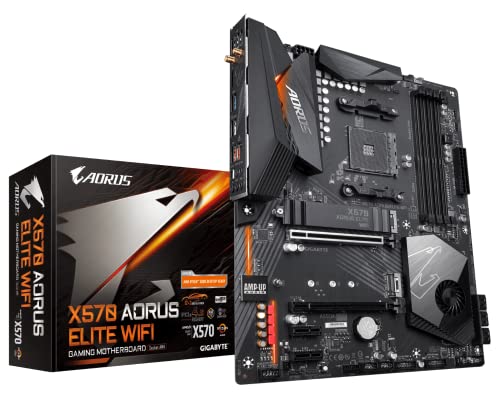 GIGABYTE X570 AORUS Elite Wi-Fi GIGABYTE X570 AORUS Elite Wi-Fi | Supports AMD 3rd Gen Ryzen/ 2nd Gen Ryzen/… Dual channel non-ECC unbuffered DDR4, 4 DIMMs 12+2 phases digital VRM solution with DrMOS | Check price |
As an Amazon Associate we earn from qualifying purchases at no extra cost to you.
🎮 Get More From Your Setup — Free
Prime Gaming gives you free PC games every month, in-game loot, and a free Twitch channel sub — plus fast free shipping on all the gear above. New members get a 30-day free trial.
Watch: Best Motherboards For Gaming PC — Video Review
How to Choose a Motherboard For Gaming PC (2026)
- Socket & CPU Compatibility: Confirm the board matches your CPU’s socket (AM5 for current Ryzen, LGA 1700 for 12th–14th Gen Intel) and check the QVL for BIOS support before buying.
- Chipset Tier: Higher-tier chipsets (X870E, Z790, B850) unlock more PCIe lanes, faster USB, and better overclocking headroom than entry-level boards.
- VRM & Power Delivery: Look for robust power stages (14+ phases or better) if you plan to run high-core-count CPUs or overclock, since weak VRMs throttle under sustained load.
- Storage & Expansion: Prioritize boards with multiple M.2 Gen4/Gen5 slots and enough SATA ports for your drives, plus at least one full-length PCIe x16 slot for your GPU.
- Networking & I/O: WiFi 6E/7 and 2.5G+ LAN matter for competitive gaming and streaming; also check for USB-C, Thunderbolt, and rear I/O layout that fits your case.
The Best Motherboards For Gaming PC (2026)s Reviewed
ASUS ROG Strix B850-A Gaming WiFi
Built for current-gen Ryzen, this AM5 board pairs a beefy 14+2+2 power stage design with WiFi 7 and quad M.2 slots, making it an excellent long-term platform for high-refresh gaming rigs. The AI Networking and AI Advisor tools are a nice touch for tuning performance without digging through BIOS menus.
MSI MPG X870E Carbon WiFi
This is a genuine flagship-tier AM5 board, with PCIe 5.0 across GPU and storage, 40Gbps USB, and WiFi 7—ideal if you’re building around a high-end Ryzen 9000/7000 chip and want zero bottlenecks. It’s pricier than most boards here, but justified for enthusiasts who want maximum headroom.
ASUS TUF Gaming Z790-Plus WiFi
A strong all-rounder for Intel 12th–14th Gen builds, offering PCIe 5.0, four M.2 slots, and Thunderbolt 4 at a more approachable price than many Z790 competitors. The 16+1 DrMOS power design comfortably handles i7/i9 chips under sustained gaming or streaming loads.
ASUS ROG Strix B550-F Gaming WiFi II
Still one of the best value picks for AM4 builds, this board brings PCIe 4.0, WiFi 6E, and 2.5G LAN to older Ryzen platforms without breaking the bank. It’s a smart choice if you already own a 3rd Gen Ryzen CPU and don’t want to jump to AM5 yet.
GIGABYTE Z390 AORUS PRO WiFi
A dependable budget-friendly option for 8th/9th Gen Intel builds, with dual M.2 slots, onboard WiFi, and RGB Fusion for basic aesthetics. It won’t compete with newer chipsets on features, but it’s a solid pick for reviving or completing an older Intel gaming rig.
Frequently Asked Questions
Do I need a high-end chipset for gaming?
Not necessarily—mid-tier chipsets like B850 or B550 offer excellent gaming performance for most builds. High-end chipsets like X870E or Z790 matter more if you’re overclocking, running multiple GPUs, or need maximum PCIe/storage bandwidth.
Does WiFi 7 make a real difference for gaming?
WiFi 7 offers lower latency and higher throughput than WiFi 6/6E, which can help in competitive online gaming, but a wired Ethernet connection will still outperform any WiFi standard for consistency.
How many M.2 slots do I actually need?
Two M.2 slots are enough for most gamers (one for OS, one for games), but four slots future-proof your build if you plan to add more high-speed storage down the line.
Is DDR5 worth the upgrade over DDR4?
For new AM5 or LGA 1700 builds, DDR5 offers meaningful bandwidth improvements for gaming and multitasking, though DDR4 boards remain a cost-effective option if you’re reusing existing memory.
Final Thoughts
For most gamers building a current-gen system, the ASUS ROG Strix B850-A Gaming WiFi offers the best balance of features and value, while the MSI MPG X870E Carbon WiFi is the pick for enthusiasts chasing maximum performance headroom. If you’re on Intel, the ASUS TUF Gaming Z790-Plus WiFi remains a dependable, well-rounded choice.