
Key takeaways
- Abundant outputs: four HDMI ports on many models support quad-monitor setups.
- Low profile and low power: designs fit small office PCs and draw minimal power.
- Affordable: a cost-effective way to add multi-display capability to any system.
- 4K support: HDMI 2.0 models like the SOYO GT 730 drive 4K monitors for sharp text.
Building a three-monitor setup for productivity, trading, or monitoring doesn’t require an expensive gaming GPU. What you actually need is a video card with enough display outputs and multi-monitor support to drive three or four screens cleanly, and there’s a whole category of affordable, low-profile cards built exactly for that job.
This review focuses on budget multi-display graphics cards, centered on GT 730, GT 740, and similar low-profile GPUs with multiple HDMI outputs. Below we cover build, real-world performance for multi-monitor work, and how to choose the right card for your needs.
Our top picks
 GT 740 4GB GDDR5 Low Profile GPU
- Robust 4GB Memory & Quad Display Ready: Equipped…
- Plug-and-Play Installation & Wide Compatibility: Utilizes a standard…
- Quiet, Cool & Compact Design: Engineered with a…
 SOYO Geforce GT 730 Graphics Card
- 【Professional Quad-HDMI Output】: Equipped with 4x HDMI 2.0…
- 【Ideal for Financial & Security Monitoring】: Perfectly designed…
- 【4GB VRAM & Smooth Performance】: Features 4GB DDR3…
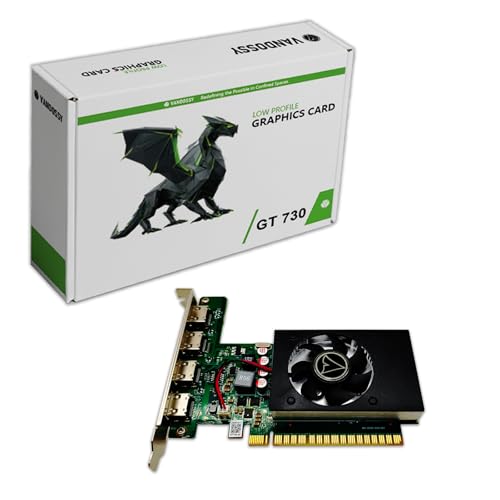 GeForce GT 730 Graphics Card
- 【Silent Operation & Broad Application】 The unique cooling…
| Product | Key specs | |
|---|---|---|
| GT 740 4GB GDDR5 Low Profile GPU | Robust 4GB Memory & Quad Display Ready: Equipped… Plug-and-Play Installation & Wide Compatibility: Utilizes a standard… Quiet, Cool & Compact Design: Engineered with a… | Check price |
| SOYO Geforce GT 730 Graphics Card | 【Professional Quad-HDMI Output】: Equipped with 4x HDMI 2.0… 【Ideal for Financial & Security Monitoring】: Perfectly designed… 【4GB VRAM & Smooth Performance】: Features 4GB DDR3… | Check price |
| GeForce GT 730 Graphics Card | 【Silent Operation & Broad Application】 The unique cooling… | Check price |
 maxsun GeForce GT 730 4GB Video Graphics maxsun GeForce GT 730 4GB Video Graphics | GeForce GT 730 GPU ITX Form Factor size perfect in most pc… Quad simultaneous display capable, 4x Monitors support: 4xHDMI… | Check price |
 GT 740 Low Profile Graphics Card GT 740 Low Profile Graphics Card | The half-height design is ideal for compatible compact… Connect up to four HDMI displays simultaneously with… Keep charts, browser windows, office applications, dashboards and… | Check price |
 QTHREE GeForce GT 210 Graphics Card QTHREE GeForce GT 210 Graphics Card | The Geforce 210 is with a 589MHz core… PCI Express 2.0 interface,offers compatibility with a range… The computer graphics cards is small in size… | Check price |
 Radeon HD 6570 Graphics Card Radeon HD 6570 Graphics Card | Check price | |
 QTHREE Radeon RX 560 XT 8GB GDDR5 QTHREE Radeon RX 560 XT 8GB GDDR5 | 【8GB GDDR5 Memory】The Radeon RX 560 XT is… 【Upgraded Performance】This gaming graphics card is equipped with… 【Faster Heat Dissipation】The computer video card is equipped… | Check price |
As an Amazon Associate we earn from qualifying purchases at no extra cost to you.
🎮 Get More From Your Setup — Free
Prime Gaming gives you free PC games every month, in-game loot, and a free Twitch channel sub — plus fast free shipping on all the gear above. New members get a 30-day free trial.
Watch: 3 Monitor Setup Video Card: Review & Buyer’s Guide — Video Review
Design & Build
These multi-display cards prioritize compatibility and quiet operation over gaming muscle. Many are low-profile designs that fit small-form-factor and slim office PCs, a key advantage for the business and trading machines where triple setups are common. The GT 730 and GT 740 models typically offer four HDMI ports for quad-monitor support, with single-fan or silent cooling and modest power draw that most systems can handle without a beefy power supply. Some, like the maxsun GT 730, use a single-slot ITX-friendly form factor, while the QTHREE GT 210 is an ultra-low-power option with HDMI and VGA. Build quality is basic but appropriate for their purpose, and the abundance of HDMI outputs is the real selling point.
Performance
For their intended use, these cards perform exactly as needed. Driving three or four displays showing spreadsheets, trading charts, dashboards, or a video wall is well within their capability, and the multiple HDMI 2.0 outputs on cards like the SOYO GT 730 support 4K monitors for crisp text. With 4GB of GDDR5 or DDR3, they handle everyday desktop workloads, browser windows, and monitoring feeds smoothly. What they are not built for is gaming or GPU-accelerated creative work, where their limited processing power quickly shows. Think of these as connectivity expanders rather than performance cards: they exist to give you the display outputs you need at low cost and power.
Pros & Cons
- Abundant outputs: four HDMI ports on many models support quad-monitor setups.
- Low profile and low power: designs fit small office PCs and draw minimal power.
- Affordable: a cost-effective way to add multi-display capability to any system.
- 4K support: HDMI 2.0 models like the SOYO GT 730 drive 4K monitors for sharp text.
- Not for gaming: these cards lack the power for modern games or 3D work.
- Basic build: simple cooling and construction reflect the budget purpose.
Alternatives to Consider
If your setup includes gaming or GPU-accelerated creative work across three screens, a mainstream gaming graphics card with multiple outputs is the better investment. Users whose motherboard already has enough video outputs may not need an add-in card at all. And if you only need to add one or two displays to an existing capable GPU, a USB-C or DisplayPort MST hub can be a simpler, cheaper solution than a dedicated card.
Frequently Asked Questions
Do I need a gaming GPU for three monitors?
No. For office, trading, and monitoring, an affordable multi-display card like a GT 730 or GT 740 with several HDMI outputs handles three or four screens perfectly.
Will these cards support 4K monitors?
Models with HDMI 2.0, such as the SOYO GT 730, support 4K displays for crisp text. Older HDMI versions may limit resolution or refresh rate, so check the specs.
Will a low-profile card fit my PC?
Low-profile cards are designed for small-form-factor and slim office PCs. Confirm your case supports the card’s height and that you have a free PCIe slot.
Can I game on these at all?
Only very light or older games. These cards are display-output expanders, not gaming GPUs, so choose a mainstream graphics card if gaming matters.
Verdict
For a three-monitor productivity, trading, or monitoring setup, an affordable multi-display card is the smart, low-cost choice, and a four-HDMI GT 730 or GT 740 covers most needs while fitting slim office PCs. Just remember these are connectivity cards, not gaming GPUs, so pair the right card to your actual workload and you’ll have a clean triple setup for very little.








