Key takeaways
- Target resolution: Match the GPU to 1080p, 1440p, or 4K; higher resolutions demand more power and VRAM.
- VRAM: 8GB suffices for 1080p, but 16GB gives headroom for 1440p, 4K, and future titles.
- Power & PSU: Check your power supply wattage and connectors before buying a high-end card.
- Case clearance: Big triple-fan cards need room; measure your case first.
- Features: Upscaling like DLSS 4, ray tracing, and modern display outputs affect longevity.
What's inside
Ask a room of gamers “what’s the best GPU?” and you will start a debate that lasts all night, because the honest answer depends on your resolution, your budget, and the games you play. The graphics card is the heart of any gaming PC, and in 2026 the choices span budget 1080p cards up to premium ray-tracing powerhouses.
To cut through the noise, this roundup gathers a range of current graphics cards across price tiers and both major architectures. We will walk through how to choose the right one, then review standout picks so you can find the card that delivers the frame rates you actually need.
As an Amazon Associate we earn from qualifying purchases at no extra cost to you. Product prices and availability are accurate as of the date shown and are subject to change.




🎮 Get More From Your Setup — Free
Prime Gaming gives you free PC games every month, in-game loot, and a free Twitch channel sub — plus fast free shipping on all the gear above. New members get a 30-day free trial.
Watch: Best What’s The Best Gpu — Video Review
How to Choose a Graphics Card
- Target resolution: Match the GPU to 1080p, 1440p, or 4K; higher resolutions demand more power and VRAM.
- VRAM: 8GB suffices for 1080p, but 16GB gives headroom for 1440p, 4K, and future titles.
- Power & PSU: Check your power supply wattage and connectors before buying a high-end card.
- Case clearance: Big triple-fan cards need room; measure your case first.
- Features: Upscaling like DLSS 4, ray tracing, and modern display outputs affect longevity.
The Best GPUs Reviewed
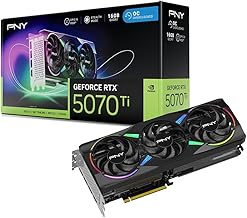
PNY GeForce RTX 5070 Ti Epic-X ARGB OC
With 16GB of GDDR7, a 256-bit bus, and a 2640 MHz boost, the RTX 5070 Ti is a superb 1440p and capable 4K card. NVIDIA’s Blackwell architecture and DLSS 4 make it a smart high-end pick for gamers who want strong ray-tracing performance without stepping up to a flagship price.
ASUS Prime Radeon RX 9070 XT OC
AMD’s RX 9070 XT brings 16GB of GDDR6 and PCIe 5.0 in a well-cooled 2.5-slot design with dual BIOS. It is a strong 1440p performer that often delivers excellent value in raster performance, making it the go-to for gamers who prioritize frames per dollar.
ASUS Dual GeForce RTX 5060 Ti 16GB OC
The RTX 5060 Ti pairs 16GB of GDDR7 with DLSS 4 support in a compact dual-fan card. That generous VRAM at a mid-range price makes it a sensible 1080p and 1440p option, especially for players who want longevity without paying flagship money.
ASUS Dual GeForce RTX 5060 8GB OC
For budget-conscious 1080p gamers, the RTX 5060 offers 8GB of GDDR7, DLSS 4, and a quiet, compact design with 0dB fan technology. It is an efficient entry point into current-generation gaming without a huge outlay.
GIGABYTE GeForce RTX 5060 WINDFORCE OC 8G
GIGABYTE’s WINDFORCE take on the RTX 5060 adds a robust cooling system to the same 8GB GDDR7 core. It is another solid 1080p choice, well suited to compact builds thanks to its dual-fan layout and PCIe 5.0 support.
Frequently Asked Questions
How much VRAM do I need?
8GB handles 1080p well today. For 1440p, 4K, or future-proofing, 16GB cards like the RTX 5070 Ti and RX 9070 XT give you comfortable breathing room.
Is NVIDIA or AMD better right now?
NVIDIA leads in ray tracing and DLSS upscaling, while AMD’s RX 9070 XT often wins on raw raster value. Both are excellent; choose based on the games and features you care about.
Will these cards fit my PC?
Most are 2 to 2.5 slots wide. Measure your case length and confirm PSU wattage and connectors, especially for the higher-tier 5070 Ti and 9070 XT.
What is DLSS 4 and does it matter?
DLSS 4 is NVIDIA’s AI upscaling that boosts frame rates with minimal quality loss. It significantly extends the life of a card, which is why it is a real advantage on the RTX models.
Final Thoughts
There is no single best GPU, only the best one for your setup. For high-end 1440p and 4K, the RTX 5070 Ti and Radeon RX 9070 XT are the cards to beat. Mid-range shoppers get great value from the RTX 5060 Ti with its 16GB of VRAM, while the RTX 5060 handles 1080p on a budget. Decide your resolution first, check your PSU and case, then pick the tier that matches your goals.