
Key takeaways
- Frame time: 144Hz refreshes every 6.94ms, 240Hz every 4.17ms. That 2.8ms saving is real but small — roughly a quarter of the jump you get moving from 60Hz to 144Hz.
- Motion clarity: Higher refresh rates reduce persistence blur, so moving targets stay legible. On a 240Hz Fast IPS panel, tracking an enemy while strafing is noticeably cleaner than on a standard 144Hz screen.
- Hardware demand: A 144Hz display is comfortably fed by a mid-range GPU. Saturating 240Hz requires both a strong graphics card and a CPU that won’t bottleneck frame delivery in CPU-heavy shooters.
- Resolution trade-off: Affordable 240Hz panels are almost universally 1080p. At 144Hz, the same budget frequently buys 1440p, which is a bigger visual upgrade for slower games.
- Diminishing returns: Most players immediately notice 60Hz to 144Hz. The step to 240Hz is subtler and takes a session or two to appreciate — but it is not placebo.
- Price in 2026: Entry-level 240Hz has collapsed into old 144Hz territory. Options like the Sceptre C255B-FWT240 and SANSUI 27″ curved panel mean the premium is now marginal at 1080p.
The refresh-rate debate used to be simple: 144Hz was the enthusiast sweet spot, and 240Hz was a luxury reserved for sponsored esports players. That framing is now out of date. Panel manufacturing has moved on, Fast IPS is cheap to produce at 1080p, and the gap between a good 144Hz display and a good 240Hz display has narrowed to the point where the decision is less about budget and more about what you actually play.
Choosing correctly in 2026 comes down to three things: whether your GPU can consistently push frames above 144fps in your main games, whether you play fast competitive titles where motion clarity translates into real information, and what you’re willing to give up elsewhere — resolution, panel size, or colour performance — to get the higher number. This guide breaks down where each refresh rate genuinely helps and where the extra hertz are wasted.
Our top picks
 Dell 24 240Hz Gaming Monitor
- Product Group: Personal Computer
- Binding: Personal Computers
 Dell 27 240Hz Gaming Monitor
- Product Group: Personal Computer
- Binding: Personal Computers
 SANSUI 32 Inch Curved 240Hz Gaming Monitor
- Product Group: Personal Computer
- Binding: Personal Computers
| Product | Key specs | Amazon rating | |
|---|---|---|---|
| Dell 24 240Hz Gaming Monitor | Product Group: Personal Computer Binding: Personal Computers | 4.8★ | Check price |
| Dell 27 240Hz Gaming Monitor | Product Group: Personal Computer Binding: Personal Computers | 4.0★ | Check price |
| SANSUI 32 Inch Curved 240Hz Gaming Monitor | Product Group: Personal Computer Binding: Personal Computers | 4.4★ | Check price |
 Sceptre Curved 24.5-inch Prime Gaming Monitor up Sceptre Curved 24.5-inch Prime Gaming Monitor up | – | Check price | |
 SANSUI 27 Inch Curved 240Hz Gaming Monitor SANSUI 27 Inch Curved 240Hz Gaming Monitor | – | Check price | |
 ASUS TUF Gaming 27”1080P Monitor ASUS TUF Gaming 27”1080P Monitor | Product Group: Personal Computer Binding: Personal Computers | 4.4★ | Check price |
 Samsung 27" Odyssey OLED G6 Samsung 27" Odyssey OLED G6 | – | Check price | |
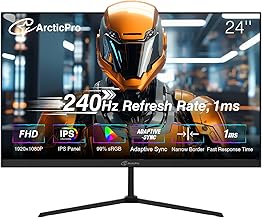 ArcticPro 24 Inch Gmaing Monitor ArcticPro 24 Inch Gmaing Monitor | – | Check price |
As an Amazon Associate we earn from qualifying purchases at no extra cost to you. Ratings are shown as listed on Amazon.
⚡ Save on Your Next PC — Amazon Prime
Prime members get fast free shipping on the systems above, plus early access to Prime Day & Black Friday PC deals. New members get a 30-day free trial.
Watch: 144Hz vs 240Hz Monitor: Worth It in 2026? — Video Review
Quick Verdict
144Hz remains the right call for mixed-use gamers who play single-player and story-driven titles, run mid-range hardware, or want to spend their budget on 1440p resolution and better colour instead of raw speed. 240Hz is the better buy for competitive FPS, arena shooters, fighting games and anyone running a GPU capable of triple-digit frame rates at 1080p — and in 2026, panels like the Dell SE2426HG and ASUS TUF VG279QM5A make that upgrade cost far less than it used to.
Key Differences
- Frame time: 144Hz refreshes every 6.94ms, 240Hz every 4.17ms. That 2.8ms saving is real but small — roughly a quarter of the jump you get moving from 60Hz to 144Hz.
- Motion clarity: Higher refresh rates reduce persistence blur, so moving targets stay legible. On a 240Hz Fast IPS panel, tracking an enemy while strafing is noticeably cleaner than on a standard 144Hz screen.
- Hardware demand: A 144Hz display is comfortably fed by a mid-range GPU. Saturating 240Hz requires both a strong graphics card and a CPU that won’t bottleneck frame delivery in CPU-heavy shooters.
- Resolution trade-off: Affordable 240Hz panels are almost universally 1080p. At 144Hz, the same budget frequently buys 1440p, which is a bigger visual upgrade for slower games.
- Diminishing returns: Most players immediately notice 60Hz to 144Hz. The step to 240Hz is subtler and takes a session or two to appreciate — but it is not placebo.
- Price in 2026: Entry-level 240Hz has collapsed into old 144Hz territory. Options like the Sceptre C255B-FWT240 and SANSUI 27″ curved panel mean the premium is now marginal at 1080p.
144Hz Monitors: The Balanced All-Rounder
144Hz is still the most sensible default for the majority of PC gamers. It clears the threshold where motion feels fluid and input feels immediate, and it does so without demanding a top-tier GPU. If your library is a mix of open-world RPGs, strategy games, sim racers and the occasional shooter, a 144Hz panel lets you spend the saved money where it shows: higher resolution, better contrast, or a larger screen.
It also ages gracefully. A 1440p 144Hz display will still look sharp in three years, whereas a 1080p panel of any refresh rate is already a compromise on desktop text and detail at 27 inches and above. The main caveat is competitive play — if you’re grinding ranked in a twitch shooter, you’re leaving a measurable amount of motion clarity on the table.
240Hz Monitors: Built for Competitive Play
240Hz earns its keep in fast, reactive games. Lower persistence blur means enemy models stay sharper during flick shots and rapid mouse movement, and the reduced frame time shaves a small but genuine slice off end-to-end latency. The ASUS TUF VG279QM5A is a strong example of what modern 240Hz looks like — Fast IPS, 0.3ms response, G-SYNC compatibility and ELMB Sync — rather than the washed-out TN panels this category once relied on.
Size and curvature choices have widened too. The Dell SE2726HG delivers 27-inch IPS at 240Hz for players who want a flat, colour-accurate esports panel, while the SANSUI 32-inch curved 1500R model targets those who prefer immersion over pixel density. Just be realistic about your hardware: a 240Hz screen running at 110fps gives you variable refresh benefits, but not the clarity you paid for.
Which Should You Buy?
- For competitive FPS players: pick 240Hz — the Dell SE2426HG at 24 inches or the ASUS TUF VG279QM5A for a more feature-complete panel.
- For mixed single-player and multiplayer libraries: pick 144Hz at 1440p; sharpness will serve you better than refresh rate.
- For mid-range GPUs: pick 144Hz, unless you play older or well-optimised esports titles that already run past 200fps.
- For immersion and desk presence: pick a curved 240Hz option like the SANSUI 27-inch 1500R or the 32-inch model.
- For the tightest budget: pick 240Hz at 1080p — the Sceptre C255B-FWT240 undercuts many older 144Hz panels outright.
Frequently Asked Questions
Can you really see the difference between 144Hz and 240Hz?
Yes, though it’s subtler than the jump from 60Hz. The difference shows up most in motion clarity during fast horizontal panning rather than in raw “smoothness.” Players who spend time in competitive shooters typically notice it within a session; casual players often don’t.
Do I need an expensive GPU for a 240Hz monitor?
To fully exploit it, yes — you want 200fps or more in your main title. However, a 240Hz panel with FreeSync or G-SYNC still behaves well at lower frame rates, so it’s not wasted money if you plan to upgrade your GPU later.
Is 1080p still acceptable in 2026?
At 24 to 25 inches, absolutely — pixel density remains fine and frame rates are easy to hit. At 27 inches and above, 1080p starts to look soft, which is the main trade-off with larger 240Hz panels.
Does a higher refresh rate actually improve my aim?
It improves the information you receive, not your mechanical skill. Clearer moving targets and slightly lower latency help you react to what’s on screen, but the effect is incremental rather than transformative.
Final Verdict
If you play competitively and your hardware can keep up, 240Hz is now an easy recommendation — the price premium that once made it hard to justify has largely disappeared, and panels like the Dell SE2426HG and ASUS TUF VG279QM5A deliver genuine esports-grade motion handling. For everyone else, a quality 144Hz display at a higher resolution remains the smarter, more balanced purchase.



