Key takeaways
- VRAM capacity: In 2026, 8GB is the bare minimum for 1080p and is already showing strain in newer titles at high texture settings. If you game at 1440p or plan to keep the card for three-plus years, prioritise a 16GB model — the difference in longevity is dramatic and often costs less than $80 extra.
- Target resolution and refresh rate: Be honest about your monitor. A 1080p 144Hz panel is well served by an entry-level RTX 5060, while a 1440p display genuinely needs the extra horsepower and memory of a 5060 Ti or RX 9060 XT. Buying more GPU than your display can show is wasted money.
- Upscaling and frame generation support: DLSS 4 on NVIDIA cards and FSR on AMD both meaningfully extend a budget GPU’s useful life. NVIDIA currently holds an edge in image quality and game support, but AMD’s implementation has closed the gap considerably and is no longer a dealbreaker.
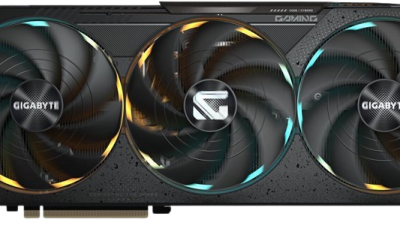
- Cooling design and case clearance: Dual-fan 2.5-slot cards fit almost anything, including compact mini-tower builds. Triple-fan designs run cooler and quieter under sustained load but demand a longer case — measure before you buy, and check clearance against your front radiator if you have one.
- Power supply headroom: These cards are efficient by historical standards, but a quality 550W–650W unit with the correct connectors is non-negotiable. A cheap PSU is the most common cause of instability in budget builds, and it’s the one component you should never cut corners on.
Shopping for a graphics card under $500 in 2026 means walking a tightrope. Spend too little and you end up with 8GB of VRAM that chokes on modern texture packs; stretch too far and you’ve blown past the budget you set in the first place. The mid-range has never been more crowded, with NVIDIA’s RTX 50-series and AMD’s RDNA 4 cards trading blows at nearly every price point, and marketing spec sheets that rarely tell you what actually matters at 1080p and 1440p.
This guide cuts through that noise. We’ve focused on cards that genuinely land under $500 at typical street pricing — no phantom MSRPs, no “under $500 if you catch a doorbuster” wishful thinking. Below you’ll find the specs that deserve your attention, honest reviews of the best options available right now, and clear guidance on which card fits which kind of gamer. Whether you’re building a first PC or upgrading an aging GTX card, there’s a strong value pick here for you.
Our top picks
 ASUS Dual NVIDIA GeForce RTX 5060 8GB
- Product Group: Personal Computer
- Binding: Personal Computers
 ASUS Dual NVIDIA GeForce RTX 5060 Ti
- Product Group: Personal Computer
- Binding: Personal Computers
| Product | Key specs | Amazon rating | |
|---|---|---|---|
| ASUS Dual NVIDIA GeForce RTX 5060 8GB | Product Group: Personal Computer Binding: Personal Computers | 4.0★ | Check price |
 GIGABYTE GeForce RTX 5060 WINDFORCE OC 8G GIGABYTE GeForce RTX 5060 WINDFORCE OC 8G | – | Check price | |
| ASUS Dual NVIDIA GeForce RTX 5060 Ti | Product Group: Personal Computer Binding: Personal Computers | 4.6★ | Check price |
 ASUS TUF Gaming GeForce RTX™ 5080 16GB ASUS TUF Gaming GeForce RTX™ 5080 16GB | Product Group: Personal Computer Binding: Personal Computers | 4.5★ | Check price |
 XFX Swift AMD Radeon RX 9060 XT XFX Swift AMD Radeon RX 9060 XT | – | Check price | |
 GIGABYTE Radeon™ RX 9060 XT Gaming OC GIGABYTE Radeon™ RX 9060 XT Gaming OC | – | Check price | |
 ASUS SFF-Ready Prime NVIDIA GeForce RTX 5070 ASUS SFF-Ready Prime NVIDIA GeForce RTX 5070 | – | Check price | |
 GIGABYTE GeForce RTX 3050 WINDFORCE OC V2 GIGABYTE GeForce RTX 3050 WINDFORCE OC V2 | Product Group: Personal Computer Binding: Personal Computers | 4.5★ | Check price |
As an Amazon Associate we earn from qualifying purchases at no extra cost to you. Ratings are shown as listed on Amazon.
⚡ Save on Your Next PC — Amazon Prime
Prime members get fast free shipping on the systems above, plus early access to Prime Day & Black Friday PC deals. New members get a 30-day free trial.
Watch: Best Graphics Card Under $500 — Video Review
How to Choose Graphics Card Under $500
- VRAM capacity: In 2026, 8GB is the bare minimum for 1080p and is already showing strain in newer titles at high texture settings. If you game at 1440p or plan to keep the card for three-plus years, prioritise a 16GB model — the difference in longevity is dramatic and often costs less than $80 extra.
- Target resolution and refresh rate: Be honest about your monitor. A 1080p 144Hz panel is well served by an entry-level RTX 5060, while a 1440p display genuinely needs the extra horsepower and memory of a 5060 Ti or RX 9060 XT. Buying more GPU than your display can show is wasted money.
- Upscaling and frame generation support: DLSS 4 on NVIDIA cards and FSR on AMD both meaningfully extend a budget GPU’s useful life. NVIDIA currently holds an edge in image quality and game support, but AMD’s implementation has closed the gap considerably and is no longer a dealbreaker.
- Cooling design and case clearance: Dual-fan 2.5-slot cards fit almost anything, including compact mini-tower builds. Triple-fan designs run cooler and quieter under sustained load but demand a longer case — measure before you buy, and check clearance against your front radiator if you have one.
- Power supply headroom: These cards are efficient by historical standards, but a quality 550W–650W unit with the correct connectors is non-negotiable. A cheap PSU is the most common cause of instability in budget builds, and it’s the one component you should never cut corners on.
The Best Picks Reviewed
ASUS Dual RTX 5060 Ti 16GB OC
This is the sweet spot of the entire sub-$500 bracket, pairing 16GB of GDDR7 with enough compute to handle 1440p at high settings in most modern titles. The Dual cooler’s 2.5-slot form factor and 0dB idle mode make it an easy fit for quieter builds, and DLSS 4 support gives it real staying power.
XFX Swift RX 9060 XT 16GB
AMD’s RDNA 4 answer to the 5060 Ti offers the same generous 16GB frame buffer, often at a slightly lower price, with a triple-fan cooler that keeps thermals and acoustics well in check. It’s the pick for raw raster performance per dollar, though NVIDIA still leads in heavy ray-tracing workloads.
GIGABYTE RX 9060 XT Gaming OC ICE 16G
Functionally similar silicon to the XFX card, but in a compact two-slot package with server-grade thermal gel and a reinforced backplate — a genuinely thoughtful design for small-form-factor builders. The white ICE colourway is a bonus if your build calls for it, and the factory overclock is meaningful rather than cosmetic.
ASUS Dual RTX 5060 8GB OC
For pure 1080p gaming on a tighter budget, this is a well-engineered card with excellent cooling and ASUS’s three-year warranty behind it. The 8GB buffer is the obvious limitation, so treat it as a 1080p card rather than a 1440p one and you’ll be very happy with it.
GIGABYTE RTX 5060 WINDFORCE OC 8G
Usually the cheapest way into the RTX 50-series and DLSS 4, with a simple, effective WINDFORCE cooler that punches above its price. It’s the budget-conscious choice for esports titles and 1080p gaming, but 16GB alternatives are worth the stretch if you can find the extra cash.
Frequently Asked Questions
Is 8GB of VRAM still enough in 2026?
For 1080p at medium-to-high settings, yes — but the margin is thin. Several 2025 and 2026 releases already require dropping texture quality on 8GB cards, so if you want a card that lasts, 16GB is the safer investment.
Should I choose NVIDIA or AMD at this price?
NVIDIA leads in ray tracing, upscaling quality and productivity apps; AMD typically offers more raw rasterisation performance and VRAM per dollar. If you play competitive or traditionally rendered games, AMD is excellent value — if you want the best path-traced visuals, go NVIDIA.
What CPU should I pair with a card in this range?
A modern six-core or eight-core chip from either vendor is plenty. Pairing any of these GPUs with an older quad-core will bottleneck performance significantly, particularly at 1080p where the CPU does more of the work.
Will these cards handle 4K gaming?
Not comfortably at high settings. The 16GB models can manage 4K in less demanding or older titles with upscaling enabled, but 4K gaming at high refresh rates realistically requires a card well above the $500 ceiling.
Final Thoughts
If you want one recommendation, make it the ASUS Dual RTX 5060 Ti 16GB — it balances VRAM, performance and features better than anything else under $500, and it’ll still be relevant in three years. Value hunters should look hard at the XFX Swift RX 9060 XT 16GB, which frequently undercuts it while matching or beating it in traditional rasterisation. And if your budget simply won’t stretch that far, the GIGABYTE RTX 5060 WINDFORCE OC 8G remains a capable, well-cooled entry point into 1080p gaming with DLSS 4 support intact.