Our Top Picks

The Samsung Galaxy S7 still makes a capable second phone, media player, and camera, but its built-in storage fills up fast once photos, video, music, and apps pile up. The real decision is not whether to add a card, but which microSD card to put in the slot. The S7 takes microSD cards, and Samsung listed official support up to 200GB, so a 128GB card sits comfortably inside that limit while leaving generous room for a large photo library and plenty of downloaded media.


This guide focuses on three 128GB microSDXC cards that suit different S7 owners. The Samsung EVO Select suits owners who want a balanced all-round card with strong app performance. The SanDisk Ultra suits owners who mainly need affordable room for photos, music, and video. The SanDisk Extreme suits owners who move large files often and want the fastest card in this group.
Quick Picks
As an Amazon Associate we earn from qualifying purchases
| Product | Best for | Key spec from title |
|---|---|---|
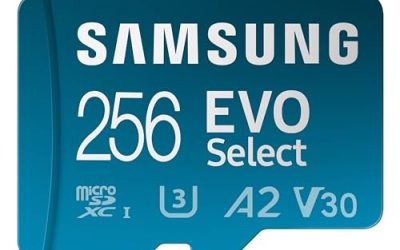
| Samsung EVO Select 128GB | Balanced everyday use and apps | 128GB microSDXC, 130MB/s, UHS-I, U3, A2, V30 |
| SanDisk Ultra 128GB | Photos, music, and video storage | 128GB microSDXC, up to 140MB/s, UHS-I, U1, A1 |
| SanDisk Extreme 128GB | Fast file transfers and 4K video | 128GB microSDXC, up to 190MB/s, UHS-I, U3, V30, A2 |
How to Choose
Match the capacity to the S7 slot
The Galaxy S7 uses a microSD slot, not a full-size SD slot, so buy a microSD card and keep the included full-size adapter for use in a laptop or camera. Samsung listed official support up to 200GB for the S7, which makes 128GB a safe and practical choice: it holds a large library of photos, many hours of video, and a good collection of music and apps without pushing against the official limit. Larger cards above 200GB generally work in many S7 handsets, but that behaviour is not part of the official specification, so staying at 128GB removes that uncertainty.
Understand UHS-I speed in an older phone
The Galaxy S7 is a UHS-I host, so it cannot use the extra bus speed of newer UHS-II cards, and the headline read speed printed on a card is a peak figure measured under ideal conditions rather than a speed the phone will reach in normal use. That does not make a faster card pointless, because read and write ratings still give a useful comparison between cards, and a faster card will still feel quicker when you copy files through a laptop or a card reader. Inside the phone, though, the gap between a good UHS-I card and a very fast UHS-I card is smaller than the numbers on the box suggest.
Check the app performance class
If you plan to move apps to the card or run apps that keep data on external storage, the app performance class matters more than the headline transfer speed. A1 cards are rated for basic app use, with enough random read and write performance for apps that load small files often. A2 cards carry a higher rating for the same kind of work, with faster random access that helps apps open and respond more smoothly when they read from the card. The two A2 cards in this guide are therefore the better fit for owners who keep apps or games on external storage.
Buy genuine cards from a trusted listing
Counterfeit microSD cards are a real problem, and a fake card can report a large capacity while holding far less, which leads to lost photos and corrupted files. Buy from a listing that names the exact brand, model number, and capacity, and check that the packaging, printing, and model number match the listing when the card arrives. A genuine Samsung or SanDisk card should carry clear branding and a model number that matches the product page, such as MB-ME128KA/AM for the EVO Select or SDSQXAA-128G-GN6MA for the SanDisk Extreme.
The 3 Best Options
Samsung EVO Select 128GB
The Samsung EVO Select 128GB is the most balanced card in this guide, pairing a useful 128GB capacity with UHS-I, U3, A2, and V30 ratings that cover photos, Full HD and 4K video, and apps stored on the card. Its headline read speed of up to 130MB/s sits in the middle of this group, yet its A2 rating gives it an edge for app use over an A1 card, and its V30 video speed class suits sustained video recording. The included full-size adapter also makes it easy to move files to a laptop, which is handy when you back up a holiday photo library or clear space before a trip.
Specs
- Capacity: 128 GB
- Type: microSDXC
- Read speed: up to 130MB/s
- Interface: UHS-I
- Speed class: U3, V30
- App performance class: A2
- Model number: MB-ME128KA/AM
- Includes full-size SD adapter
Best for: S7 owners who want one card for photos, video, and apps without choosing between them.
Watch out for: the S7 cannot reach the full headline speed, so judge this card on its capacity and A2 rating rather than its peak number alone.
SanDisk Ultra 128GB
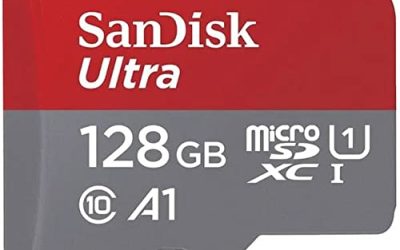
The SanDisk Ultra 128GB is the straightforward choice for S7 owners who mainly need more room for photos, music, and video. Its 128GB capacity fits comfortably inside the S7 official 200GB limit, and its UHS-I interface, Class 10 rating, and A1 app performance class cover everyday media use without fuss. The headline read speed of up to 140MB/s helps when you copy a batch of photos to a laptop, and the included adapter means you do not need a separate reader for a full-size SD slot. It is a practical card for a phone that now serves mainly as a camera, music player, or backup handset.
Specs
- Capacity: 128 GB
- Type: microSDXC
- Read speed: up to 140MB/s
- Interface: UHS-I
- Speed class: C10, U1
- App performance class: A1
- Video: Full HD
- Model number: SDSQUAB-128G-GN6MA
- Includes full-size SD adapter
Best for: S7 owners who mainly store photos, music, and video and want simple, reliable extra space.
Watch out for: its A1 rating is a step below A2, so it is less suited to heavy app use from the card than the other two picks.
SanDisk Extreme 128GB
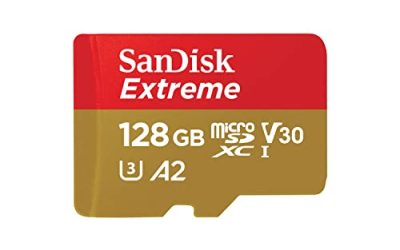
The SanDisk Extreme 128GB is the fastest card in this guide, with a headline read speed of up to 190MB/s and a write speed of up to 90MB/s, plus UHS-I, U3, V30, and A2 ratings that cover 4K video and app use. That speed shows most clearly when you transfer video files through a card reader, and the A2 rating helps apps that read small files from the card. Its 128GB capacity stays inside the S7 official limit with no capacity question, and the included adapter keeps file transfers to a laptop simple. It suits owners who shoot a lot of video and move files often.
Specs
- Capacity: 128 GB
- Type: microSDXC
- Read speed: up to 190MB/s
- Write speed: up to 90MB/s
- Interface: UHS-I
- Speed class: C10, U3, V30
- App performance class: A2
- Video: 4K, 5K
- Model number: SDSQXAA-128G-GN6MA
- Includes full-size SD adapter
Best for: S7 owners who record a lot of video and transfer large files often.
Watch out for: the S7 UHS-I host will not reach the full headline speed, so the extra speed pays off most during transfers outside the phone.
Which One Fits Your Situation
You want one card for everything
Choose the Samsung EVO Select 128GB if you want a single card that handles photos, video, and apps without a clear weakness. Its A2 rating supports app use, its V30 class suits video, and its 128GB capacity gives you room to grow. It is the safest all-round pick for an S7 that is still used every day.
You mainly need room for media
Choose the SanDisk Ultra 128GB if your S7 is mostly a camera and media player and you simply need more space for photos, music, and video. Its A1 rating and U1 class are enough for media that is read in sequence, and its 128GB capacity holds a large library. It is the simplest fit for this kind of use.
You shoot video and move big files
Choose the SanDisk Extreme 128GB if you record video often and copy large files to a laptop on a regular basis. Its faster read and write speeds shorten those transfers, and its A2 and V30 ratings cover demanding video and app use. It is the strongest choice when speed matters more than anything else.
You are setting up a spare or backup phone
Choose the SanDisk Ultra 128GB if the S7 is now a second phone and you want dependable storage without paying for speed you will rarely use. Its capacity is ample for a backup handset, and its adapter makes it easy to move files across when you need them. Keep a copy of anything important elsewhere as well.
Common Mistakes
- Buying a full-size SD card instead of a microSD card, which will not fit the S7 slot.
- Choosing a card above 200GB and assuming the official specification covers it, when Samsung listed 200GB as the supported limit.
- Picking a card on headline speed alone, when the S7 UHS-I host cannot reach the peak figure printed on the box.
- Ignoring the app performance class, then wondering why apps stored on an A1 card feel slower than apps on an A2 card.
- Buying from a vague or mismatched listing and skipping the check that the model number and capacity match the product page.
Frequently Asked Questions
Does the Galaxy S7 take a microSD card?
Yes, the Galaxy S7 takes a microSD card in its hybrid SIM tray, so you need a microSD or microSDXC card rather than a full-size SD card. The three cards in this guide are all microSDXC cards, and each one includes a full-size adapter for a laptop or camera. Format the card in the phone before you start moving files to it.
What is the largest SD card the Galaxy S7 supports?
Samsung listed official support up to 200GB for the Galaxy S7, so a 128GB card sits comfortably inside that limit. Larger cards above 200GB generally work in many S7 handsets, but that behaviour is not part of the official specification and can vary between handsets. If you want a card that is certain to sit inside the stated limit, choose 128GB or 200GB.
Can I move apps to the SD card on a Galaxy S7?
You can move some apps to the card, but not every app allows it, and apps that stay on internal storage will not move. An A2 card is the better choice for app use because its higher random read and write performance suits the small files apps load often. Keep apps you use every day on internal storage, and use the card for media and apps that allow the move.
Will a faster SD card make my Galaxy S7 faster?
A faster card will not make the phone itself faster, because the S7 is a UHS-I host and cannot reach the peak speeds printed on newer cards. A faster card can still shorten file transfers through a card reader and help with video recording and app loading from the card. For general use, capacity, reliability, and the app performance class matter more than chasing the highest headline speed.
FAQ
Does the Galaxy S7 take a microSD card?
What is the largest SD card the Galaxy S7 supports?
Can I move apps to the SD card on a Galaxy S7?
Will a faster SD card make my Galaxy S7 faster?
More from Amazon
Programs that pair well with the guide above. Offers and eligibility are set by Amazon and may change.
Free shipping on eligible items, Prime Video and more. Eligible new members can start with a free trial.
Start a Prime free trialAd-free music streaming. Eligible new subscribers can start with a free trial.
Try Music Unlimited freeA Prime membership for ages 18-24 with a trial period. Eligibility is set by Amazon.
See Prime for Young AdultsAudiobooks and podcasts to listen to on the go. Eligible new members can start with a free trial.
Try Audible freeAs an Amazon Associate we earn from qualifying purchases.