
Key takeaways
- Refresh Rate: 144Hz is the sweet spot for most gamers, but competitive FPS players benefit from 240Hz or higher if their GPU can sustain the frame rate.
- Response Time: Look for 1ms or faster (GtG) to minimize ghosting during fast camera movements and quick-scoping.
- Adaptive Sync: Confirm FreeSync Premium or G-SYNC Compatible certification to eliminate screen tearing and stuttering, especially if you’re pairing with an Nvidia or AMD card.
- Color Accuracy: A wider sRGB or DCI-P3 gamut (95%+) improves both game visuals and photo/video editing if the monitor doubles as a work display.
- Connectivity & Ergonomics: DisplayPort 1.4 is essential for high refresh rates at 1440p, and height/tilt/swivel adjustability matters more than most buyers expect once the monitor is on your desk daily.
What's inside
Shopping for a 1440p IPS gaming monitor in 2026 means wading through a flood of near-identical spec sheets—refresh rates ranging from 144Hz to 320Hz, response times measured in fractions of a millisecond, and a dozen adaptive sync acronyms that all promise smoother gameplay. Picking the wrong panel can leave you with motion blur during fast-paced shooters, washed-out colors in creative work, or a monitor that simply can’t keep up with your GPU’s output.
This guide cuts through the marketing noise to highlight six standout QHD IPS monitors for 2026, covering everything from budget-friendly 144Hz displays to blazing 320Hz competitive panels. We’ll break down what actually matters when choosing one, review our top picks in detail, and answer the questions we hear most from gamers upgrading their setup.
As an Amazon Associate we earn from qualifying purchases.





🎮 Get More From Your Setup — Free
Prime Gaming gives you free PC games every month, in-game loot, and a free Twitch channel sub — plus fast free shipping on all the gear above. New members get a 30-day free trial.
Watch: Best 1440p Ips Gaming Monitor — Video Review
How to Choose a 1440p IPS Gaming Monitor (2026)
- Refresh Rate: 144Hz is the sweet spot for most gamers, but competitive FPS players benefit from 240Hz or higher if their GPU can sustain the frame rate.
- Response Time: Look for 1ms or faster (GtG) to minimize ghosting during fast camera movements and quick-scoping.
- Adaptive Sync: Confirm FreeSync Premium or G-SYNC Compatible certification to eliminate screen tearing and stuttering, especially if you’re pairing with an Nvidia or AMD card.
- Color Accuracy: A wider sRGB or DCI-P3 gamut (95%+) improves both game visuals and photo/video editing if the monitor doubles as a work display.
- Connectivity & Ergonomics: DisplayPort 1.4 is essential for high refresh rates at 1440p, and height/tilt/swivel adjustability matters more than most buyers expect once the monitor is on your desk daily.
The Best 1440p IPS Gaming Monitor (2026)s Reviewed
ASUS TUF Gaming VG27AQ3A
A dependable all-rounder with 180Hz refresh, Extreme Low Motion Blur, and both FreeSync Premium and G-SYNC Compatible support, the VG27AQ3A delivers smooth, tear-free gameplay without a premium price tag. Built-in speakers and strong 130% sRGB coverage make it a practical choice for gamers who also want decent color for everyday use.
AOC Q27G41ZE
With a 240Hz native refresh rate overclockable to 260Hz and a blistering 0.3ms response time, this AOC panel is built for players who prioritize raw speed above all else. The 3-year zero-bright-dot warranty adds real peace of mind for a monitor pushing this hard.
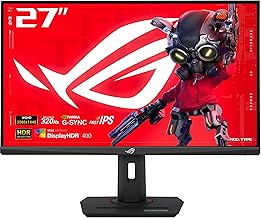
ASUS ROG XG27ACMS
This is one of the fastest 1440p IPS monitors available, hitting 320Hz with ELMB Sync and G-SYNC Compatible support for buttery-smooth competitive play. USB-C connectivity, a tripod socket, and console-friendly modes make it equally at home with a high-end PC or a PS5/Xbox setup.
ASUS ROG Strix XG27ACS
The XG27ACS balances a strong 180Hz refresh rate with HDR400 support and 133% sRGB coverage, giving it more visual punch than typical competitive monitors. USB-C input and DisplayWidget software add convenience for creators who split time between gaming and content work.
Acer Nitro KG271U N3bmiipx
A solid value pick, the Nitro KG271U offers up to 180Hz refresh, 0.5ms response, and 95% DCI-P3 coverage—an impressive color spec at this price point. HDR10 support and dual HDMI 2.0 ports round out a well-equipped budget-friendly option.
Frequently Asked Questions
Is 1440p still the best resolution for gaming in 2026?
Yes, for most gamers 1440p remains the ideal balance—it’s sharper than 1080p while requiring far less GPU horsepower than 4K, making high refresh rates like 240Hz or 320Hz actually achievable.
Do I need G-SYNC or FreeSync if my monitor is already high refresh?
Adaptive sync still matters even at high refresh rates, since it prevents tearing and stutter whenever your frame rate dips below the monitor’s maximum, which happens in nearly every game.
What GPU do I need to take advantage of a 240Hz+ 1440p monitor?
You’ll want at least an RTX 4070-class or RX 7800 XT-class GPU to reliably hit 240+ fps in competitive titles, though esports games like Valorant or CS2 can run much lighter hardware at those frame rates.
Is IPS better than VA or OLED for gaming monitors?
IPS offers the best balance of color accuracy, wide viewing angles, and fast response times without the risk of OLED burn-in, making it the most practical choice for mixed gaming and productivity use.
Final Thoughts
For most gamers, the ASUS TUF Gaming VG27AQ3A hits the ideal balance of performance and value, while competitive players chasing every frame should look to the ASUS ROG XG27ACMS with its 320Hz panel. If color quality and HDR matter alongside speed, the ASUS ROG Strix XG27ACS rounds out our top three picks for 2026.



