Shopping for a gaming PC under $1,500 in 2026 means walking a narrow line. Spend too little and you end up with a machine that stutters at 1440p within a year; spend too much and you’ve quietly crossed into a budget tier where you should have been comparing full high-end builds instead. Complicating things further, prebuilt listings routinely pair a strong GPU with a bottlenecked CPU, skimp on RAM speed, or ship with a power supply that leaves no headroom for an upgrade later.
This guide cuts through that. We’ve focused on prebuilts that deliver genuine 1440p high-refresh performance for the money, flagged the ones that only make sense at a discount, and explained exactly which specs actually move the needle on frame rates. Below you’ll find our top picks, a practical buying checklist, and answers to the questions we get asked most often about this price bracket.
Our top picks
 KOTIN Prebuilt Gaming PC RTX 5070 12GB
- POWERED BY RTX 5070 12GB + RYZEN 7…
- 32GB DDR5 6000MHz MEMORY & 1TB NVMe SSD…
- IN 11.3-INCH Smart DISPLAY - An integrated smart…
 msi Codex Z2 Gaming Desktop: AMD R7-8700F
- Driven by the AMD Ryzen 7 8700F with…
- The NVIDIA GeForce RTX 5070 is powered by…
- Simplistic Design: Enjoy the latest generation of Windows…
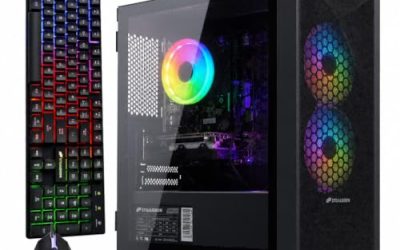
 STGAubron Gaming PC Desktop
- This Gaming PC Desktop is well-suited for a…
- This high-performance Gaming Computer Desktop is capable of…
- PC Gaming System: This gaming computer desktop is…
| Product | Key specs | |
|---|---|---|
| KOTIN Prebuilt Gaming PC RTX 5070 12GB | POWERED BY RTX 5070 12GB + RYZEN 7… 32GB DDR5 6000MHz MEMORY & 1TB NVMe SSD… IN 11.3-INCH Smart DISPLAY - An integrated smart… | Check price |
| msi Codex Z2 Gaming Desktop: AMD R7-8700F | Driven by the AMD Ryzen 7 8700F with… The NVIDIA GeForce RTX 5070 is powered by… Simplistic Design: Enjoy the latest generation of Windows… | Check price |
| STGAubron Gaming PC Desktop | This Gaming PC Desktop is well-suited for a… This high-performance Gaming Computer Desktop is capable of… PC Gaming System: This gaming computer desktop is… | Check price |
 Alienware Aurora Gaming Desktop Alienware Aurora Gaming Desktop | Legend perfected: Modern design with a matte basalt… Game changing graphics: Step into the future of… Marathon gaming unlocked: This high-performance technology ensures clean… | Check price |
 Lenovo Legion Tower 5i Lenovo Legion Tower 5i | Whether you’re dominating the leaderboard, streaming your gameplay… The Intel Core Ultra 7 265F CPU is… The NVIDIA GeForce RTX 5070 Ti GPU is… | Check price |
 CyberPowerPC Gaming PC CyberPowerPC Gaming PC | System: AMD Ryzen 5 5500 3.6GHz 6 Cores… Graphics: AMD Radeon RX 6500 XT 4GB Graphics… Connectivity: 4 x USB-A 3.2 | 4 x… | Check price |
 Dell Gaming Tower Desktop PC Dell Gaming Tower Desktop PC | Processor: Intel Core i5-7500 7th Gen Memory: 16GB DDR4 RAM Storage: 256GB SSD | Check price |
 YAWYORE Gaming PC YAWYORE Gaming PC | CPU: AMD Ryzen7 5700X (up to 4.6GHz) 8-Core… Main board: MSI B550M-A PRO motherboard provides reliable… GPU: Geforce RTX 5060 8GB GDDR7 Graphics Cards… | Check price |
As an Amazon Associate we earn from qualifying purchases at no extra cost to you.
⚡ Save on Your Next PC — Amazon Prime
Prime members get fast free shipping on the systems above, plus early access to Prime Day & Black Friday PC deals. New members get a 30-day free trial.
Watch: Best Gaming PC Under $1500 — Video Review
How to Choose Gaming PC Under $1500
- Prioritize the GPU: Your graphics card determines roughly 70–80% of gaming performance. At this budget you should be targeting an RTX 5070 or better — anything with a 4GB or 8GB last-gen card belongs in a much cheaper tier.
- Match the CPU sensibly: A Ryzen 7 9700X or Core Ultra 7 265F pairs well with a 5070-class GPU. Older Core i7 chips of unspecified generation are a red flag; vendors omit the generation for a reason.
- Insist on 32GB of DDR5: 16GB is now the bare minimum, and modern open-world titles plus a browser and Discord will use it. At $1,500, 32GB should be standard, not an upsell.
- Check storage capacity, not just type: Every machine here uses an NVMe SSD, but 512GB fills up after four or five installs. 1TB is the sensible floor; 2TB is a genuine value-add worth paying for.
- Look at the case and PSU: Airflow and wattage headroom decide whether you can drop in a better GPU in three years. Cramped proprietary cases with tightly-sized power supplies lock you into the configuration you bought.
The Best Picks Reviewed
KOTIN RTX 5070 / Ryzen 7 9700X
This is the strongest raw spec-per-dollar combination in the roundup — the Ryzen 7 9700X is a genuinely current-gen chip that won’t hold the RTX 5070 back at 1440p, and 32GB of DDR5 with a 1TB SSD covers the essentials properly. Support and build quality are less polished than the big brands, so it suits buyers comfortable troubleshooting a prebuilt themselves.
MSI Codex Z2 (A8NVP-436US)
The 2TB NVMe SSD is the standout here, doubling what most rivals offer and removing storage anxiety entirely, while the RTX 5070 and 32GB of DDR5 keep pace with anything else at this price. The R7-8700F is a slightly older architecture than the 9700X, but the gap is negligible in GPU-bound gaming, and MSI’s warranty support is a meaningful step up.
Lenovo Legion Tower 5i
The RTX 5070 Ti makes this the fastest gaming machine on the list, delivering comfortable 1440p ultra performance with real ray-tracing headroom that the standard 5070 cards can’t match. It typically sits at the very top of the $1,500 ceiling, so buy it on a sale — at full price you’re paying a premium for the Legion badge and three months of PC Game Pass.
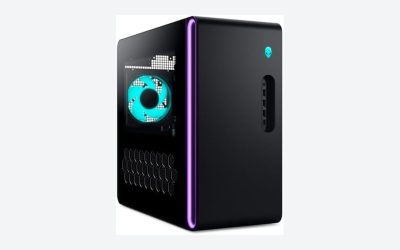
Alienware Aurora
Dell’s Aurora brings the best chassis engineering and thermal design in this group, with the Core Ultra 7 265F and RTX 5070 forming a well-balanced pairing for 1440p. The trade-off is Alienware’s traditional one: proprietary components and a case that limits future upgrades, so treat it as a machine you’ll keep as-is rather than grow into.
CyberPowerPC Ryzen 5 5500 / RX 6500 XT
This is a genuine entry-level build rather than a $1,500 contender — the RX 6500 XT’s 4GB of VRAM struggles in 2026 titles even at 1080p medium settings. Include it only if your real budget is closer to $500, and understand that the GPU will need replacing before the rest of the system does.
Frequently Asked Questions
Is $1,500 enough for 1440p gaming in 2026?
Comfortably, yes. An RTX 5070 paired with a modern eight-core CPU will hold well above 60fps at 1440p high settings in most titles, and considerably higher with DLSS enabled. It’s 4K that remains out of reach at this budget.
Should I buy a prebuilt or build my own?
Building yourself usually saves $150–250 and gets you better component choices, but prebuilts include a Windows licence, assembly, and a single point of warranty contact. If you’ve never built a PC and don’t want to, the prebuilt premium at this tier is reasonable.
Is 16GB of RAM still acceptable?
It’s workable but no longer ideal. Several 2025–2026 releases push past 16GB when combined with background applications, and DDR5 upgrades are inexpensive — but at $1,500 you shouldn’t have to buy them, so favour machines that ship with 32GB.
How long will one of these last?
Expect three to four years of high-settings 1440p gaming from an RTX 5070-class build before you’ll want to lower settings or upgrade the GPU. Machines with 8GB or less VRAM will hit that wall considerably sooner.
Final Thoughts
For most buyers, the MSI Codex Z2 is the best-balanced choice at this budget, combining a current-gen RTX 5070, 32GB of DDR5, and a generous 2TB SSD with proper manufacturer support. If you want maximum performance and can catch it on sale, the Lenovo Legion Tower 5i and its RTX 5070 Ti is the fastest option here, while the KOTIN RTX 5070 build offers the sharpest specifications-per-dollar for confident buyers who don’t need hand-holding.