Shopping for a gaming PC under $500 in 2026 means navigating a market flooded with vague listings, recycled office towers wearing RGB, and spec sheets that hide the one component that actually matters: the graphics card. Budget buyers routinely overpay for a fast CPU paired with an anemic GPU, or land a machine that benchmarks well on paper but stutters the moment a modern title loads. The gap between a genuinely capable $450 build and a repackaged dud is wide, and the listings rarely make it obvious which is which.
This guide cuts through that. We’ve focused exclusively on prebuilt desktops that realistically land at or under $500 — including refurbished and renewed units, which is where most of the real value sits at this price. Every pick below is evaluated on the metric that matters most for budget gaming: frames per dollar at 1080p, followed by upgrade headroom, storage speed, and whether the included power supply and case will survive a future GPU swap.
Our top picks
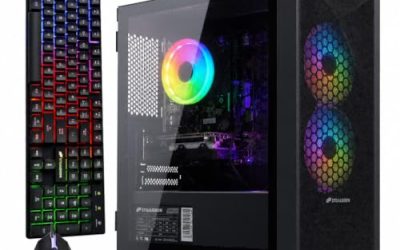
 STGAubron Gaming PC Desktop
- This Gaming PC Desktop is well-suited for a…
- This high-performance Gaming Computer Desktop is capable of…
- PC Gaming System: This gaming computer desktop is…
 Dell Gaming Tower Desktop PC
- Processor: Intel Core i5-7500 7th Gen
- Memory: 16GB DDR4 RAM
- Storage: 256GB SSD
 YAWYORE Gaming PC Desktop Computer AMD R5
- Powerful Processor: AMD Ryzen 5 5600GT 3.6GHz (4.6GHz…
- Motherboard Specification: MSI A520M-A PRO motherboard provides reliable…
- Integrated Graphics: AMD Radeon Vega Graphics (CPU Integration)…
| Product | Key specs | |
|---|---|---|
| STGAubron Gaming PC Desktop | This Gaming PC Desktop is well-suited for a… This high-performance Gaming Computer Desktop is capable of… PC Gaming System: This gaming computer desktop is… | Check price |
| Dell Gaming Tower Desktop PC | Processor: Intel Core i5-7500 7th Gen Memory: 16GB DDR4 RAM Storage: 256GB SSD | Check price |
| YAWYORE Gaming PC Desktop Computer AMD R5 | Powerful Processor: AMD Ryzen 5 5600GT 3.6GHz (4.6GHz… Motherboard Specification: MSI A520M-A PRO motherboard provides reliable… Integrated Graphics: AMD Radeon Vega Graphics (CPU Integration)… | Check price |
 suevery Prebuilt Desktop Computer Gaming PC Black suevery Prebuilt Desktop Computer Gaming PC Black | This SUEVERY pre-built gaming PC is equipped with… Memory and Storage: This pre built desktop computer… Lighting Effects and Expansion: Equipped with a customizable… | Check price |
 STGAubron Gaming PC Desktop STGAubron Gaming PC Desktop | This Gaming PC Desktop is well-suited for a… This high-performance Gaming Computer Desktop is capable of… PC Gaming System: This gaming computer desktop is… | Check price |
 YAWYORE Gaming PC YAWYORE Gaming PC | CPU: AMD Ryzen7 5700X (up to 4.6GHz) 8-Core… Main board: MSI B550M-A PRO motherboard provides reliable… GPU: Geforce RTX 5060 8GB GDDR7 Graphics Cards… | Check price |
 WIWB Prebuilt Gaming PC WIWB Prebuilt Gaming PC | Powerful Ryzen 5 4500 Processor: Equipped with a… RTX 3050 Graphics for Immersive Experiences: Featuring the… High-Speed Memory & Storage: Paired with 16GB of… | Check price |
 Thermaltake LCGS Quartz i1460 Gaming Desktop Thermaltake LCGS Quartz i1460 Gaming Desktop | Intel Core i5-14400F CPU, Intel B760 Chipset motherboard,… NVIDIA GeForce RTX 5060, Display Port/HDMI ARGB Tower Air Cooler | Check price |
As an Amazon Associate we earn from qualifying purchases at no extra cost to you.
⚡ Save on Your Next PC — Amazon Prime
Prime members get fast free shipping on the systems above, plus early access to Prime Day & Black Friday PC deals. New members get a 30-day free trial.
Watch: Best Gaming PC Under $500 — Video Review
How to Choose Gaming PC Under $500
- Prioritize the GPU above everything: At this budget, the graphics card determines roughly 80% of your gaming performance. An RX 580 8GB or RTX 2060 will outperform a newer CPU paired with a GT 1030 by a factor of three or more in real games.
- Accept older-generation silicon: A Ryzen 5 2600 or Core i7-8700 from a previous generation delivers far more value than a current-gen budget chip. These CPUs still comfortably feed a mid-tier GPU at 1080p without bottlenecking.
- Insist on 16GB of RAM and an NVMe SSD: 8GB is no longer sufficient for 2026 titles, and a SATA or mechanical drive will make load times miserable. 16GB plus a 512GB NVMe is the realistic floor.
- Check the power supply before you plan upgrades: Many sub-$500 prebuilts ship with 400W or unbranded units. If you intend to drop in a stronger card later, budget an extra $50–70 for a quality PSU alongside it.
- Read the renewed/refurbished terms carefully: Renewed units offer the best price-to-performance here, but confirm the warranty length and whether Windows is properly licensed. A 90-day seller warranty is standard; anything shorter is a red flag.
The Best Picks Reviewed
STGAubron Gaming PC — Core i7 / RX 580 8G
This is the value benchmark for the category: the RX 580 8GB still handles Valorant, Fortnite, CS2, and Apex at high settings above 100fps at 1080p, and the 8GB frame buffer keeps it viable in newer titles where 4GB cards choke. Paired with a Core i7 and a 512GB SSD, it’s the most balanced sub-$500 machine on this list.
STGAubron Gaming PC — R5 2600 / RTX 2060 6G
The RTX 2060 is the fastest GPU you’ll realistically find in this price bracket, and it unlocks DLSS support plus entry-level ray tracing that the RX 580 simply can’t touch. The Ryzen 5 2600 is the weaker half of the pairing, but for 1080p gaming it keeps up well enough that this remains the performance pick.
YAWYORE Gaming PC — Ryzen 7 5700X / RTX 5060
If your budget can stretch past the cap during a sale, this is the configuration to watch — the RTX 5060 is a genuinely current card and the 5700X is a capable eight-core chip. At full price it sits above $500, so treat it as an aspirational option rather than a core recommendation.
YAWYORE Gaming PC — R5 5600GT / 16GB / 1TB NVMe
This one leans on integrated Radeon graphics rather than a discrete card, which limits it to esports titles and older games at modest settings. The upside is genuine: a modern CPU, 16GB of RAM, and a full 1TB NVMe drive give you an excellent foundation to add a graphics card to later.
Dell Gaming Tower — i5-7500 / GT 1030 (Renewed)
The Dell chassis and build quality are a step above the generic towers here, and the bundled peripherals plus Windows 11 Pro license add real value. Be clear-eyed about the GT 1030, though — it’s an entry-level card suited to light and older titles, not a 2026 gaming GPU.
Frequently Asked Questions
Can a $500 PC really run modern games?
Yes, at 1080p with sensible settings. A machine with an RX 580 or RTX 2060 will run most 2026 releases at medium settings and 60fps, and competitive esports titles at well above 120fps.
Should I buy renewed or refurbished?
At this budget, renewed units offer substantially better components for the money. Buy from sellers offering at least a 90-day warranty and confirm the operating system is properly licensed before purchasing.
Do these come with a monitor, keyboard, and mouse?
Most do not include a monitor. Some, like the Dell tower, bundle an RGB keyboard and mouse — budget roughly $80–120 separately for a decent 1080p 75Hz or 144Hz display.
What should I upgrade first?
The graphics card, then the power supply to support it. If your system already has a capable GPU, adding a second NVMe drive or a 144Hz monitor delivers the next biggest improvement to the experience.
Final Thoughts
For most buyers, the STGAubron Core i7 / RX 580 build is the smartest use of a $500 budget — it delivers the highest frames-per-dollar of anything here and won’t leave you immediately shopping for upgrades. If DLSS and ray tracing matter to you, the STGAubron R5 2600 / RTX 2060 is worth the small premium, while the YAWYORE R5 5600GT makes sense only if you’re deliberately building a platform to add a graphics card to down the road.