
Refresh rate, measured in hertz, is how many times per second your monitor redraws the image. Higher numbers mean smoother motion and, in fast games, a real competitive advantage. But the jump from 60Hz to 144Hz is far more noticeable than the leap from 240Hz to 280Hz, so knowing where the value lies matters.
This guide explains which refresh rates suit which players and pairs each with a monitor that nails it. From smooth 144Hz all-rounders to blistering 280Hz esports panels, here are the picks that keep your gameplay fluid in 2026.
Our top picks
 Samsung 27" Odyssey G5
- QHD Resolution (2560 x 1440) has 1.7 times…
- HDR10 provides brighter highlights and nuanced shadow for…
- The 180Hz refresh rate minimizes lag for gameplay…
 Samsung 27” Odyssey G5
- Samsung’s 27” Odyssey G5 QHD Gaming Monitor delivers…
- QHD resolution (2560x1440) boasts incredibly detailed, pin-sharp images.
- With a wide 178° viewing angle, the IPS…
 AOC 27 Inch Curved Gaming Monitor FHD
- Experience gaming at a new level with a…
- The 1500R curvature provides a more engaging and…
- Enjoy vibrant visuals with HDR readiness and a…
| Product | Key specs | |
|---|---|---|
| Samsung 27" Odyssey G5 | QHD Resolution (2560 x 1440) has 1.7 times… HDR10 provides brighter highlights and nuanced shadow for… The 180Hz refresh rate minimizes lag for gameplay… | Check price |
| Samsung 27” Odyssey G5 | Samsung’s 27” Odyssey G5 QHD Gaming Monitor delivers… QHD resolution (2560x1440) boasts incredibly detailed, pin-sharp images. With a wide 178° viewing angle, the IPS… | Check price |
| AOC 27 Inch Curved Gaming Monitor FHD | Experience gaming at a new level with a… The 1500R curvature provides a more engaging and… Enjoy vibrant visuals with HDR readiness and a… | Check price |
 acer Nitro 27 Inch QHD 2560 x acer Nitro 27 Inch QHD 2560 x | Quality Visuals: The KG271U 27" IPS monitor with… AMD FreeSync Technology: Say “goodbye” to stuttering and… Up to 180Hz: The 180Hz refresh rate speeds… | Check price |
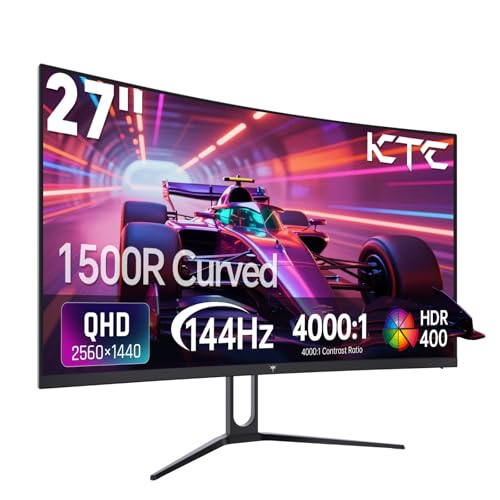 KTC 27 Inch Curved Gaming Monitor KTC 27 Inch Curved Gaming Monitor | 【1440p Monitor】KTC H27S5C 27 inch curved gaming monitor… 【Stunning Color & HDR400】This 1440p curved monitor Equipped… 【144Hz Refresh Rate】KTC 1440p 144Hz monitor is compatible… | Check price |
 KTC 24.5" Gaming Monitor KTC 24.5" Gaming Monitor | 【FHD Gaming Monitor】24.5" Full HD (1920 x 1080)… 【Enhance Your Gaming Experience】The PC monitor features a… 【Excellent Color】Enjoy lifelike images and vivid colors with… | Check price |
 SANSUI 32 Inch Curved 240Hz Gaming Monitor SANSUI 32 Inch Curved 240Hz Gaming Monitor | 32 Inch curved 1500R gaming monitor, 240Hz high… Performance: 240Hz refresh rate, Full HD 1920*1080P resolution,… Interfaces: HDMI up to 240Hz, DP 1.4 up… | Check price |
 KTC 32 Inch 280Hz 240Hz Curved Gaming KTC 32 Inch 280Hz 240Hz Curved Gaming | 【280Hz Ultra-high Refresh Rate】KTC 31.5 inch curved gaming… 【1500R Curved for Immersive Visual】1500R HVA curved monitor… 【Crystal-clear Picture Quality】FHD (1920×1080P) resolution monitor has 128%… | Check price |
As an Amazon Associate we earn from qualifying purchases at no extra cost to you.
🎮 Get More From Your Setup — Free
Prime Gaming gives you free PC games every month, in-game loot, and a free Twitch channel sub — plus fast free shipping on all the gear above. New members get a 30-day free trial.
Watch: Best Refresh Rate For Gaming Monitor — Video Review
How to Choose the Right Refresh Rate
- Know the tiers: 144Hz is the smoothness baseline, 165 to 200Hz is the enthusiast sweet spot, and 240Hz-plus is for dedicated competitors.
- Match your GPU: High refresh rates only help if your graphics card can push those frames, so balance the two.
- Pick your resolution: QHD at 144 to 200Hz is a fantastic middle ground; 1080p makes hitting 240Hz-plus far easier.
- Enable adaptive sync: FreeSync or G-Sync eliminates tearing and keeps motion clean at variable frame rates.
- Response time matters too: A low 1ms response paired with high refresh gives the sharpest motion clarity.
The Best High-Refresh Monitors Reviewed
AOC C27G4ZH 27″ 280Hz
The speed champion here, a curved FHD panel with a 280Hz refresh and 0.3ms response. For competitive shooter fans chasing every frame, this is the pick.
Samsung Odyssey G5 27″ 200Hz QHD
A superb enthusiast balance, delivering 200Hz on a sharp IPS QHD panel with HDR10 and FreeSync Premium. High refresh without sacrificing clarity.
Acer Nitro 27″ QHD 180Hz
A 1440p IPS monitor with up to 180Hz, wide color coverage, and HDR support. A well-rounded choice for gamers who want speed and image quality.
KTC H27S5C 27″ 144Hz QHD
A value QHD curved panel at the 144Hz baseline, with HDR400 and strong contrast. It proves smooth gaming doesn’t require top-tier pricing.
KTC H25T7 24.5″ 180Hz Fast IPS
A compact 1080p option that overclocks to 200Hz on a fast IPS panel, ideal for competitive players who prefer a smaller, faster screen.
Frequently Asked Questions
Is 144Hz enough for gaming?
For most players, absolutely. The jump from 60Hz to 144Hz is transformative, and panels like the KTC H27S5C deliver it affordably.
Do I need 240Hz or more?
Only dedicated competitive players in fast shooters truly benefit. For them, the AOC C27G4ZH’s 280Hz offers a razor edge.
Does my GPU need to match the refresh rate?
Yes. A high-Hz monitor only helps if your graphics card can produce enough frames, so pair them thoughtfully.
Is QHD or FHD better for high refresh?
FHD makes high frame rates easier to reach, while QHD like the Odyssey G5 offers sharper visuals at a slightly higher demand.
Final Thoughts
For the best all-around experience, the Samsung Odyssey G5 200Hz hits the enthusiast sweet spot of speed and sharpness. Competitive players should grab the AOC C27G4ZH for its 280Hz, while the KTC H27S5C is the smart value 144Hz choice. Match the refresh rate to your GPU and your games, and smoother play is guaranteed.








